


🔢 Phanton Gold Pro EA MT5 Settings: Complete Inputs Guide
Phanton Gold Pro EA is an automated trading Expert Advisor configured with breakout detection, high-and-low pivot analysis, volatility-based trade management, position sizing controls, and trading-session restrictions. Its settings include a 5-minute system timeframe, historical price analysis, configurable breakout and exit distances, optional trailing stops and risk-management features.
This guide explains all the visible parameters of Phanton Gold Pro, retaining the original input names and exact values. Some values appear unusually large for percentages, hours, or minutes; these are documented as displayed and should be verified before live trading.
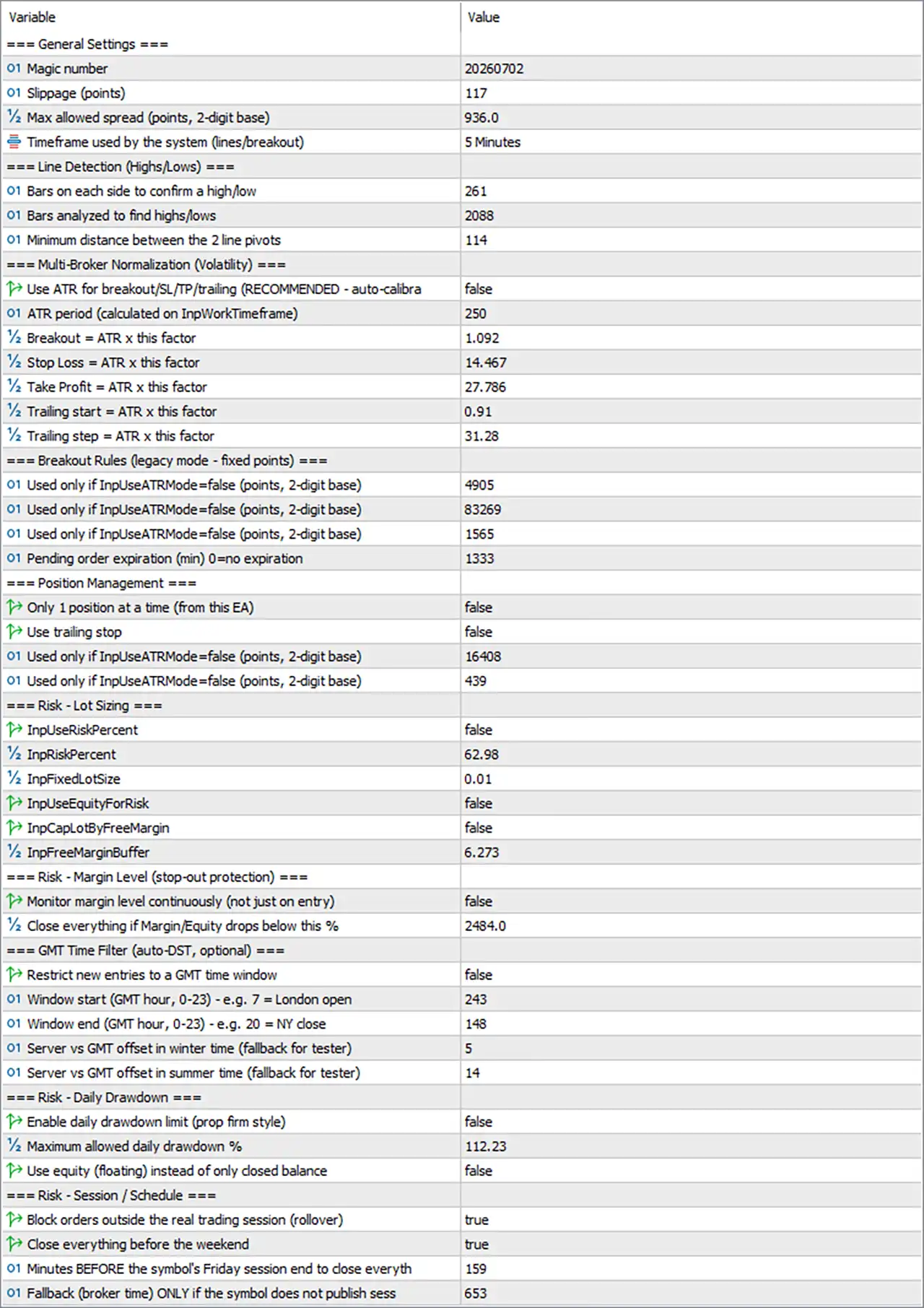
⚙️ General Settings
🔹 Magic number = 20260702: Assigns the identifier 20260702 to the EA's trades, helping distinguish its orders from manually opened positions or trades managed by other Expert Advisors.
🔹 Slippage (points) = 117: Sets the permitted slippage parameter to 117 points. Slippage is the difference between the requested and executed price; the actual price distance represented by this value depends on the broker's symbol precision and the EA's execution logic.
🔹 Max allowed spread (points, 2-digit base) = 936.0: Sets the maximum allowed spread threshold to 936.0 points using the parameter's stated 2-digit base. This filter may prevent new entries when trading costs exceed the configured limit. Verify the EA's point conversion and the broker's XAUUSD quote format, because 936.0 may represent a substantial spread allowance.
🔹 Timeframe used by the system (lines/breakout) = 5 Minutes: Sets the system timeframe to 5 minutes (M5) for line detection and breakout analysis. This determines the chart interval used by the relevant strategy components, according to the EA's implementation.
⚙️ Line Detection (Highs/Lows)
🔹 Bars on each side to confirm a high/low = 261: Sets the number of bars on each side of a candidate price point to 261 for confirming a high or low. A large confirmation window can make pivot detection more selective and may delay confirmation until sufficient historical and subsequent bars are available.
🔹 Bars analyzed to find highs/lows = 2088: Sets the historical analysis window to 2088 bars for identifying highs and lows. On an M5 timeframe, 2088 bars represent approximately 10,440 minutes, or 174 hours of market-bar time, excluding market closures and gaps.
🔹 Minimum distance between the 2 line pivots = 114: Sets the minimum permitted distance between two line pivots to 114. The input does not explicitly identify the unit, so confirm whether this means points, bars, or another internal measurement before adjusting it.
⚙️ Multi-Broker Normalization (Volatility)
🔹 Use ATR for breakout/SL/TP/trailing (RECOMMENDED - auto-calibra...) = false: Disables ATR-based automatic normalization for breakout, stop-loss, take-profit, and trailing calculations. The EA will instead use its fixed-value settings where applicable, subject to its internal rules.
🔹 ATR period (calculated on InpWorkTimeframe) = 250: Sets the ATR calculation period to 250 bars on the EA's working timeframe. Although ATR-based management is currently disabled, this value may be used if the ATR option is enabled.
🔹 Breakout = ATR x this factor = 1.092: Sets the breakout ATR multiplier to 1.092. If ATR mode is enabled, the breakout distance may be calculated as ATR multiplied by 1.092.
🔹 Stop Loss = ATR x this factor = 14.467: Sets the ATR multiplier for stop-loss distance to 14.467. This factor may produce a wide stop distance relative to ATR if the EA applies it directly.
🔹 Take Profit = ATR x this factor = 27.786: Sets the ATR multiplier for take-profit distance to 27.786. This value is relevant when ATR-based take-profit calculation is enabled; the actual target distance depends on the ATR value and the EA's formula.
🔹 Trailing start = ATR x this factor = 0.91: Sets the ATR multiplier used to calculate the trailing-stop activation threshold to 0.91, if ATR-based trailing is enabled.
🔹 Trailing step = ATR x this factor = 31.28: Sets the ATR multiplier for the trailing adjustment step to 31.28. Confirm the implementation carefully, because a large multiplier may create widely spaced trailing updates when used directly.
⚙️ Breakout Rules (Legacy Mode - Fixed Points)
The following three input labels appear identically in the supplied settings. Their individual functions cannot be identified confidently from the displayed names alone, so their original labels and values are preserved.
🔹 Used only if InpUseATRMode=false (points, 2-digit base) = 4905: Sets the first legacy fixed-point parameter to 4905. It is used only when InpUseATRMode=false, according to the input label; verify the parameter's role in the EA's code or documentation.
🔹 Used only if InpUseATRMode=false (points, 2-digit base) = 83269: Sets the second legacy fixed-point parameter to 83269. The exact function is not distinguishable from the displayed label, so confirm whether it represents a breakout distance, stop distance, target distance, or another fixed-point value.
🔹 Used only if InpUseATRMode=false (points, 2-digit base) = 1565: Sets the third legacy fixed-point parameter to 1565. This value applies only when ATR mode is disabled, but its precise purpose requires clarification from the EA's implementation.
🔹 Pending order expiration (min) 0=no expiration = 1333: Sets the pending-order expiration time to 1333 minutes. Since 0 means no expiration, the current value configures an expiration period of 1333 minutes, equivalent to 22 hours and 13 minutes, if the EA interprets the value literally.
⚙️ Position Management
🔹 Only 1 position at a time (from this EA) = false: Disables the restriction that would allow only one position at a time for this EA. Multiple positions may therefore be permitted, subject to other trade limits and the EA's entry logic.
🔹 Use trailing stop = false: Disables trailing-stop management through this setting. Even though trailing parameters are configured in the ATR section, they may not be applied while trailing is disabled here.
🔹 Used only if InpUseATRMode=false (points, 2-digit base) = 16408: Sets another legacy fixed-point parameter to 16408, applicable when ATR mode is disabled. The precise role is not identifiable from the displayed parameter name.
🔹 Used only if InpUseATRMode=false (points, 2-digit base) = 439: Sets an additional legacy fixed-point parameter to 439, applicable when ATR mode is disabled. Confirm the exact purpose before changing it.
⚙️ Risk and Lot Sizing
🔹 InpUseRiskPercent = false: Disables percentage-based risk sizing through this option. The EA may instead use the configured fixed-lot setting or another supported position-sizing method.
🔹 InpRiskPercent = 62.98: Sets the risk percentage parameter to 62.98. Because InpUseRiskPercent = false, this value may not currently control position sizing. If enabled and interpreted literally as a percentage of account capital, 62.98% would represent an extremely aggressive risk setting and should not be used without verifying the intended calculation.
🔹 InpFixedLotSize = 0.01: Sets the fixed lot size to 0.01 lots. This is the configured fixed-volume value and may be used when percentage-based risk sizing is disabled, depending on the EA's implementation.
🔹 InpUseEquityForRisk = false: Disables the use of account equity as the reference for risk calculations. If risk-based sizing is enabled, the EA may use account balance or another reference instead; the exact behavior depends on its implementation.
🔹 InpCapLotByFreeMargin = false: Disables the option to cap the calculated lot size based on available free margin through this setting. Broker margin requirements can still prevent an order from being opened.
🔹 InpFreeMarginBuffer = 6.273: Sets the free-margin buffer parameter to 6.273. The exact unit and calculation are not specified in the visible label, and this value may only apply when the free-margin lot cap is enabled.
⚙️ Risk - Margin Level (Stop-Out Protection)
🔹 Monitor margin level continuously (not just on entry) = false: Disables continuous monitoring of the account's margin level through this option. The EA may therefore not use this specific setting to monitor margin after positions are opened.
🔹 Close everything if Margin/Equity drops below this % = 2484.0: Sets the configured margin/equity threshold to 2484.0. The parameter label indicates a percentage-based trigger, but this value is unusually high for a conventional risk threshold. Verify the intended scale and calculation before enabling the related protection.
⚙️ GMT Time Filter (Auto-DST, Optional)
🔹 Restrict new entries to a GMT time window = false: Disables the GMT time-window restriction, so this filter is not intended to restrict new entries under the current configuration.
🔹 Window start (GMT hour, 0–23) - e.g. 7 = London open = 243: Sets the displayed window-start value to 243. The label specifies an hour range of 0–23, so 243 is outside the documented range and should be checked before the time filter is enabled.
🔹 Window end (GMT hour, 0–23) - e.g. 20 = NY close = 148: Sets the displayed window-end value to 148. This is also outside the stated 0–23 hour range and requires verification before enabling the GMT time filter.
🔹 Server vs GMT offset in winter time (fallback for tester) = 5: Sets the winter-time server-to-GMT offset parameter to 5. Confirm whether the EA interprets this as hours and whether the sign convention matches the broker's server time.
🔹 Server vs GMT offset in summer time (fallback for tester) = 14: Sets the summer-time server-to-GMT offset parameter to 14. If this is intended as an hour offset, it differs substantially from the winter value of 5; verify the intended value and daylight-saving logic.
⚙️ Risk - Daily Drawdown
🔹 Enable daily drawdown limit (prop firm style) = false: Disables the daily drawdown limit. The EA will not use this particular daily loss-limit option to stop trading while it remains disabled.
🔹 Maximum allowed daily drawdown % = 112.23: Sets the daily drawdown threshold parameter to 112.23. The value is preserved exactly as shown, but a threshold above 100% is unusual for a percentage of account capital. Confirm the expected scale and whether this value is a placeholder or an input error before enabling the protection.
🔹 Use equity (floating) instead of only closed balance = false: Disables the use of floating equity for the daily drawdown calculation. If daily drawdown protection is enabled, the EA may instead calculate the threshold from closed balance or another non-floating reference, depending on its implementation.
⚙️ Risk - Session / Schedule
🔹 Block orders outside the real trading session (rollover) = true: Enables the restriction on placing orders outside the defined real trading session, including the rollover period where supported by the EA. The exact session boundaries depend on the symbol and the EA's session-detection logic.
🔹 Close everything before the weekend = true: Enables the option to close the EA's positions before the weekend, according to its scheduling logic. This is intended to reduce exposure to weekend market gaps, but the exact closing time should be verified.
🔹 Minutes BEFORE the symbol's Friday session end to close everything = 159: Sets the configured lead time to 159 minutes before the symbol's Friday session end. If interpreted literally, this is 2 hours and 39 minutes before the session closes.
🔹 Fallback (broker time) ONLY if the symbol does not publish sess... = 653: Sets the displayed fallback broker-time parameter to 653. The input label is truncated and the value is outside common hour or minute ranges, so its exact unit and intended function should be verified before relying on this fallback schedule.
🔢 Conclusion
The current Phanton Gold Pro EA MT5 configuration uses the 5 Minutes timeframe, analyzes 2088 bars for highs and lows, and requires 261 bars on each side to confirm a pivot. ATR-based breakout and exit calculations are disabled, as are the fixed-risk percentage option, trailing stop, single-position restriction, GMT time-window restriction, continuous margin monitoring, and daily drawdown limit. The configured fixed lot is 0.01, and pending orders are set to expire after 1333 minutes.
Several values require particular attention before deployment: the legacy fixed-point inputs 4905, 83269, 1565, 16408, and 439; the risk percentage 62.98; the margin/equity threshold 2484.0; the GMT hour values 243 and 148; the summer-time offset 14; the daily drawdown value 112.23; and the fallback broker-time value 653. These values have been preserved exactly, but some do not fit the units suggested by their labels.
Before using this EA on a live account, verify all unusual values against the original configuration or EA source, confirm the broker's Gold point conversion, and test the trading schedule and position-sizing behavior on a demo account. Neither the parameter values nor the EA configuration guarantees profitability or prevents trading losses.


