
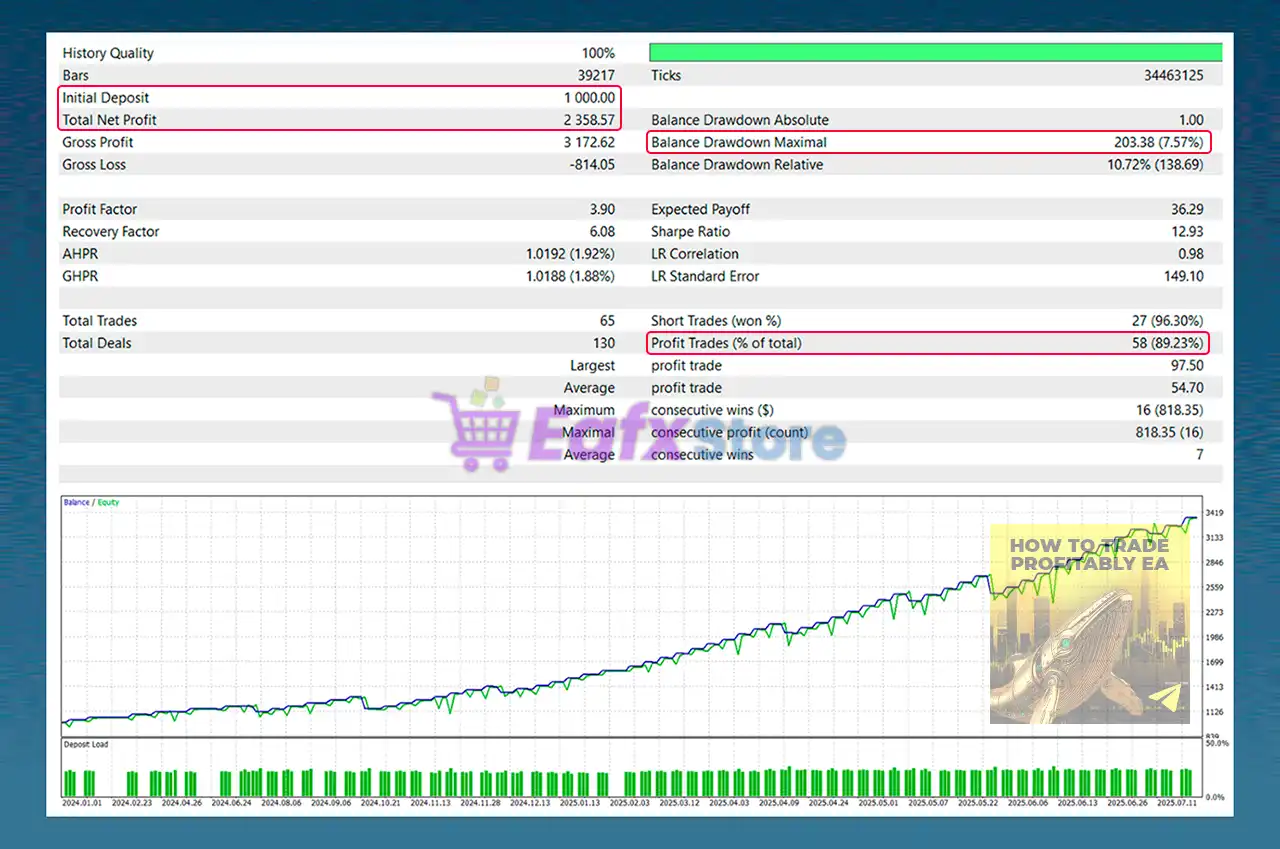
🔢 HTTP EA MT5 Settings Guide – Complete Parameter Explanation
HTTP EA is a professional automated trading Expert Advisor designed with a simple yet powerful configuration structure. It focuses on intelligent risk management, controlled trade execution, spread protection and flexible trading schedules.
With support for percentage-based risk, fixed-lot trading, daily profit and loss limits, and customizable trading windows, HTTP EA MT5 provides traders with a disciplined framework for automated trading across various market conditions.
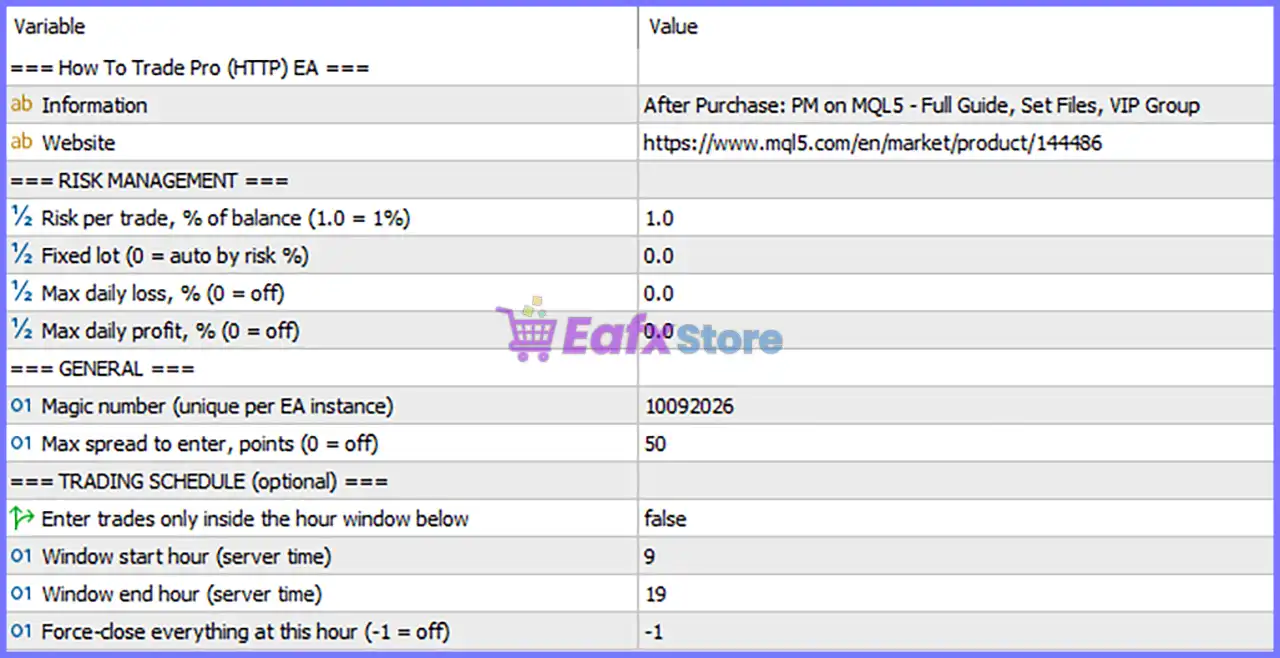
🔢 Information
🔹 Information = After Purchase: PM on MQL5 - Full Guide, Set Files, VIP Group – Indicates that after purchasing the EA, users receive access to the complete setup guide, optimized set files, and the VIP support group via MQL5 private message.
🔹 Website = https://www.mql5.com/en/market/product/144486 – Official MQL5 product page for HTTP EA MT5.
🔢 Risk Management
🔹 Risk per Trade, % of Balance (1.0 = 1%) = 1.0 – Risks 1.0% of the current account balance on each trade when percentage-based money management is used.
🔹 Fixed Lot (0 = Auto by Risk %) = 0.0 – Fixed lot trading is disabled because the value is 0.0; the EA automatically calculates lot size using the configured risk percentage.
🔹 Max Daily Loss, % (0 = Off) = 0.0 – Daily loss protection is disabled because the limit is set to 0.0.
🔹 Max Daily Profit, % (0 = Off) = 0.0 – Daily profit target protection is disabled because the value is 0.0.
🔢 General Settings
🔹 Magic Number (Unique per EA Instance) = 10092026 – Assigns the unique identifier 10092026 to all trades opened by this EA instance, preventing conflicts with other Expert Advisors.
🔹 Max Spread to Enter, Points (0 = Off) = 50 – Prevents new trades from opening whenever the market spread exceeds 50 points.
🔢 Trading Schedule (Optional)
🔹 Enter Trades Only Inside the Hour Window Below = false – Trading hour restriction is disabled, allowing the EA to trade outside the specified time window.
🔹 Window Start Hour (Server Time) = 9 – Defines 09:00 server time as the beginning of the optional trading session.
🔹 Window End Hour (Server Time) = 19 – Defines 19:00 server time as the end of the optional trading session.
🔹 Force-Close Everything at This Hour (-1 = Off) = -1 – Automatic closing of all open positions is disabled because the value is -1.
🔢 Conclusion
HTTP EA MT5 offers a streamlined yet highly effective configuration focused on automated risk management, execution quality, and trading discipline. By combining percentage-based position sizing, spread protection, optional trading sessions, and unique trade identification, the EA provides traders with a flexible solution that can be adapted to different account sizes and trading styles. Understanding each parameter allows users to configure the EA safely while maintaining consistent risk control.
🔢 FAQs
❓ How does HTTP EA MT5 calculate position size?
By default, the EA uses Risk per Trade = 1.0% because Fixed Lot = 0.0, meaning the lot size is automatically calculated based on account balance.
❓ Can I use a fixed lot instead of percentage risk?
Yes. Simply enter a value greater than 0.0 in Fixed Lot, and the EA will use that fixed trading volume instead of automatic risk-based sizing.
❓ What happens when Max Daily Loss and Max Daily Profit are set to 0.0?
Both protection features are disabled, so the EA will not stop trading based on daily profit or daily loss limits.
❓ Why is the Magic Number important?
The Magic Number = 10092026 uniquely identifies trades opened by HTTP EA MT5, ensuring it manages only its own positions even when multiple EAs are running on the same account.
❓ Can I restrict the EA to trade only during specific hours?
Yes. Enable Enter Trades Only Inside the Hour Window Below and configure the Window Start Hour and Window End Hour to limit trading to your preferred server-time session.