


🔢 Japan AI Exo Scalp EA MT5 Settings Explained – Complete Parameter Guide
Japan AI Exo Scalp EA is an AI-powered MetaTrader 5 Expert Advisor built for high-speed scalping with advanced multi-model AI decision making. It supports multiple AI engines, ATR-based Stop Loss and Take Profit calculations, intelligent spread and liquidity filtering, news protection, weekend safeguards, break-even management and trailing stops.
The EA is designed to deliver adaptive trading while maintaining strict risk management and market quality controls.

🔢 Installation Panel Parameters
Below are the details of the parameters in the advisor’s trading system settings table:
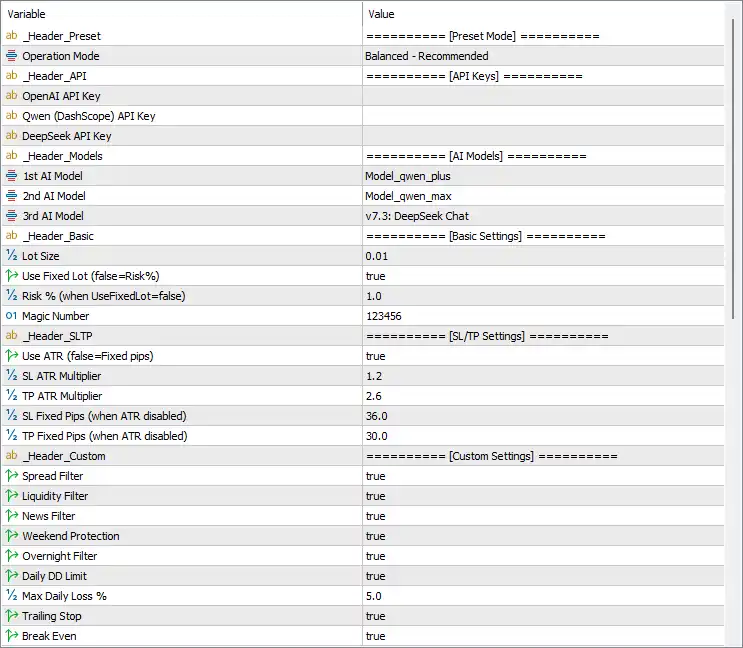
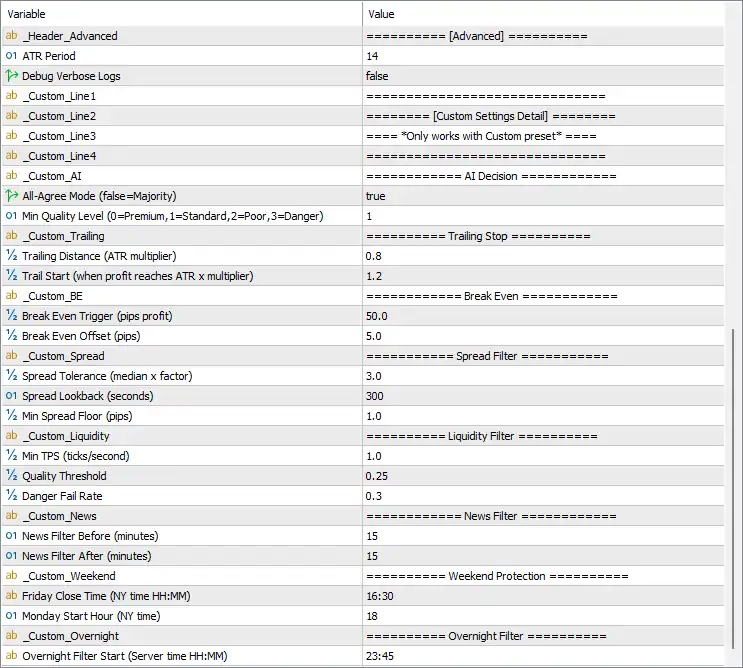
🔶 Preset Mode
🔹 Operation Mode = Balanced - Recommended – Selects the EA's operating profile. The default Balanced mode provides a balance between profitability and risk control.
🔶 API Keys
🔹 OpenAI API Key = (Blank) – Enter your OpenAI API key to enable OpenAI-powered AI analysis.
🔹 Qwen (DashScope) API Key = (Blank) – Enter your DashScope API key to use Alibaba Qwen AI models.
🔹 DeepSeek API Key = (Blank) – Enter your DeepSeek API key to enable DeepSeek AI integration.
🔶 AI Models
🔹 1st AI Model = Model_qwen_plus – Sets Qwen Plus as the primary AI model for market analysis.
🔹 2nd AI Model = Model_qwen_max – Uses Qwen Max as the secondary AI decision model.
🔹 3rd AI Model = v7.3: DeepSeek Chat – Uses DeepSeek Chat v7.3 as the third AI model for additional confirmation.
🔶 Basic Settings
🔹 Lot Size = 0.01 – Sets the default trading volume to 0.01 lots.
🔹 Use Fixed Lot (false=Risk%) = true – Enables fixed lot trading instead of percentage-based risk management.
🔹 Risk % (when UseFixedLot=false) = 1.0 – Risks 1.0% of account equity per trade when fixed lots are disabled.
🔹 Magic Number = 123456 – Assigns the unique identifier 123456 to all positions opened by the EA.
🔶 Stop Loss & Take Profit Settings
🔹 Use ATR (false=Fixed pips) = true – Calculates Stop Loss and Take Profit dynamically using the Average True Range (ATR).
🔹 SL ATR Multiplier = 1.2 – Sets the Stop Loss distance to 1.2 × ATR.
🔹 TP ATR Multiplier = 2.6 – Sets the Take Profit target to 2.6 × ATR.
🔹 SL Fixed Pips (when ATR disabled) = 36.0 – Uses a fixed 36.0 pip Stop Loss when ATR mode is disabled.
🔹 TP Fixed Pips (when ATR disabled) = 30.0 – Uses a fixed 30.0 pip Take Profit when ATR mode is disabled.
🔶 Custom Settings
🔹 Spread Filter = true – Enables spread filtering to avoid trading during high spread conditions.
🔹 Liquidity Filter = true – Enables liquidity analysis before opening new positions.
🔹 News Filter = true – Prevents trading around important economic news events.
🔹 Weekend Protection = true – Protects open positions during weekends.
🔹 Overnight Filter = true – Restricts trading during configured overnight periods.
🔹 Daily DD Limit = true – Enables daily drawdown protection.
🔹 Max Daily Loss % = 5.0 – Stops trading once the daily loss reaches 5.0%.
🔹 Trailing Stop = true – Activates automatic trailing Stop Loss management.
🔹 Break Even = true – Automatically moves Stop Loss to break-even once profit conditions are met.
🔶 Advanced Settings
🔹 ATR Period = 14 – Uses an ATR calculation period of 14.
🔹 Debug Verbose Logs = false – Disables detailed debugging logs for normal operation.
🔶 AI Decision Settings
🔹 AI-Agree Mode (false=Majority) = true – Requires all configured AI models to agree before opening a trade.
🔹 Min Quality Level (0=Premium,1=Standard,2=Poor,3=Danger) = 1 – Requires a minimum AI signal quality of Standard (Level 1).
🔶 Trailing Stop Settings
🔹 Trailing Distance (ATR multiplier) = 0.8 – Sets the trailing Stop Loss distance to 0.8 × ATR.
🔹 Trail Start (when profit reaches ATR x multiplier) = 1.2 – Activates trailing once profit reaches 1.2 × ATR.
🔶 Break-Even Settings
🔹 Break Even Trigger (pips profit) = 50.0 – Moves Stop Loss to break-even after 50.0 pips of profit.
🔹 Break Even Offset (pips) = 5.0 – Places Stop Loss 5.0 pips beyond the entry price after break-even activation.
🔶 Spread Filter Settings
🔹 Spread Tolerance (median x factor) = 3.0 – Allows spreads up to 3.0 times the median spread.
🔹 Spread Lookback (seconds) = 300 – Calculates average spread using the previous 300 seconds.
🔹 Min Spread Floor (pips) = 1.0 – Sets the minimum acceptable spread floor to 1.0 pip.
🔶 Liquidity Filter Settings
🔹 Min TPS (ticks/second) = 1.0 – Requires at least 1.0 tick per second before opening trades.
🔹 Quality Threshold = 0.25 – Minimum liquidity quality score required is 0.25.
🔹 Danger Fail Rate = 0.3 – Rejects trading if the market danger score exceeds 0.3.
🔶 News Filter Settings
🔹 News Filter Before (minutes) = 15 – Stops opening new trades 15 minutes before scheduled news.
🔹 News Filter After (minutes) = 15 – Resumes trading 15 minutes after news releases.
🔶 Weekend Protection Settings
🔹 Friday Close Time (NY time HH:MM) = 16:30 – Closes or protects trading before 16:30 New York time on Friday.
🔹 Monday Start Hour (NY time) = 18 – Resumes trading at 18:00 New York time on Monday.
🔶 Overnight Filter Settings
🔹 Overnight Filter Start (Server time HH:MM) = 23:45 – Begins overnight trading restrictions at 23:45 server time.
🔢 Conclusion
Japan AI Exo Scalp EA MT5 is an advanced AI-driven scalping solution that combines multiple AI models with intelligent market-quality filters, ATR-based trade management, liquidity analysis, news protection, spread monitoring, break-even automation, and daily drawdown controls. Its layered decision-making process and comprehensive risk management framework make it suitable for traders seeking a highly adaptive and professional automated scalping system.
🔢 FAQs
❓ Can Japan AI Exo Scalp EA MT5 use multiple AI models simultaneously?
Yes. The EA supports Qwen Plus, Qwen Max, and DeepSeek Chat v7.3, allowing multiple AI engines to participate in trade decisions.
❓ Does the EA require API keys?
Yes. To enable AI-powered analysis, you should provide valid API keys for OpenAI, Qwen (DashScope), and/or DeepSeek, depending on the models you intend to use.
❓ How are Stop Loss and Take Profit calculated?
By default, the EA uses ATR-based Stop Loss and Take Profit with multipliers of 1.2× ATR for Stop Loss and 2.6× ATR for Take Profit.
❓ How does the AI-Agree Mode work?
When enabled, all configured AI models must agree on a trading signal before the EA opens a new position, providing stronger signal confirmation.
❓ What protections are included for risk management?
The EA includes Daily Drawdown Limits (5.0%), Spread Filter, Liquidity Filter, News Filter, Weekend Protection, Overnight Filter, Trailing Stop, and Break-Even to help manage trading risk automatically.



