



🔢 Mark Robot MT4 Settings Explained – Complete Configuration Guide
Mark Robot is an automated Forex trading Expert Advisor (EA) designed for MetaTrader 4 traders who prefer a grid and martingale-style trading strategy.
The EA focuses on automated position management, dynamic lot scaling, and multi-trade recovery systems to maximize trading opportunities.
With simple yet powerful parameters such as lot sizing, trade spacing, multiplier control, and profit targets, Mark Robot MT4 is suitable for traders seeking automated trade execution with flexible risk management.
🔢 Mark Robot MT4 Full Settings Explanation
Below are the details of the parameters in the advisor’s trading system settings table:
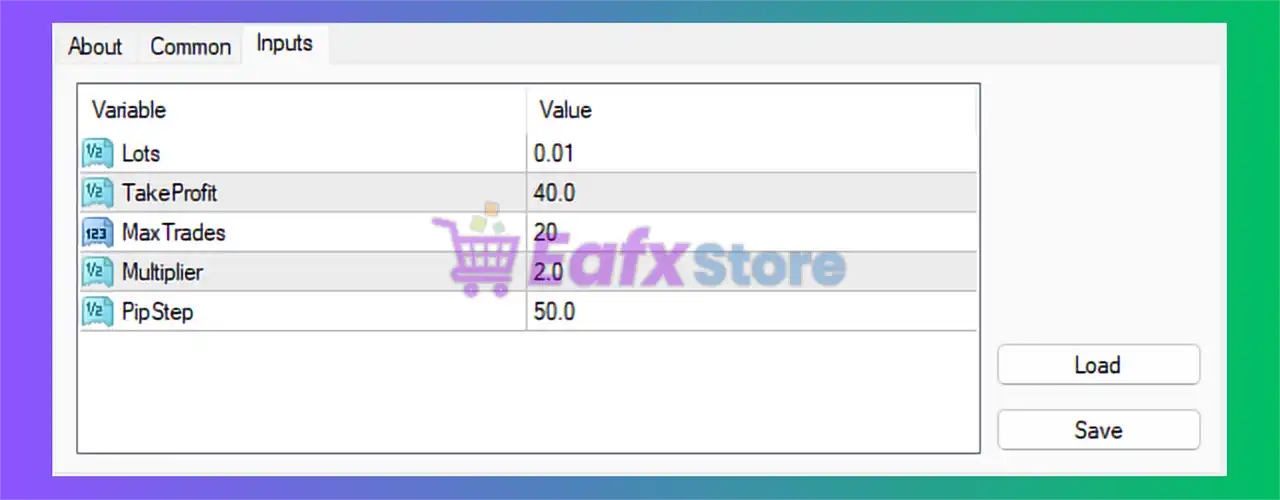
🔹 Lots = 0.01: Fixed starting lot size for the first trade is set to 0.01.
🔹 TakeProfit = 40.0: The Take Profit target for trades is configured at 40.0 pips/points.
🔹 MaxTrades = 20: Maximum number of simultaneously opened trades allowed by the EA is 20.
🔹 Multiplier = 2.0: Lot multiplier for additional recovery or grid positions is set to 2.0, meaning each next trade doubles the previous lot size.
🔹 PipStep = 50.0: Minimum distance between grid or recovery orders is configured at 50.0 pips/points.
🔢 Conclusion
Mark Robot MT4 is a lightweight yet aggressive automated trading EA built around grid and lot multiplication logic. The robot uses a structured recovery system with configurable trade spacing and dynamic position sizing to manage market fluctuations.
With settings like Multiplier = 2.0, MaxTrades = 20, and PipStep = 50.0, traders can customize the EA according to their risk tolerance and market conditions. Mark Robot MT4 is ideal for traders looking for a simple automated solution with scalable trade management features.
🔢 FAQs
❓ What is Mark Robot MT4?
Mark Robot MT4 is an automated Expert Advisor for MetaTrader 4 that uses grid and multiplier trading strategies.
❓ How does the Multiplier setting work in Mark Robot MT4?
The Multiplier = 2.0 setting doubles the lot size for each additional recovery trade.
❓ What is the purpose of PipStep in Mark Robot MT4?PipStep = 50.0 defines the distance between consecutive grid or recovery orders.
❓ How many trades can Mark Robot MT4 open at the same time?
The EA allows a maximum of 20 simultaneous trades using the MaxTrades parameter.
❓ Is Mark Robot MT4 suitable for beginners?
Yes, the EA has a simple configuration structure, but traders should understand grid and martingale risks before using it on live accounts.



