




MSX AI Multi Symbol Scalper MT5 (Latest version) - Unlimited

Subscriptions for Special Plan
- 30 EA package is more economical!
- Special package with 99%
- Download 1 EA/Day

Subscriptions for Premium Membership
- Download Unlimited in 1 Year
- Get 100% Discount
- Get free access to all

Subscriptions for Gold Membership
- 1 Year Membership
- Get 100% Discount
- Access EA+Indicator+Course
Frequently bought together 🎁
Add these products to enhance your purchase




Quick Overview
MSX AI Multi Symbol Scalper is a flexible MetaTrader 5 Expert Advisor (EA) for automated trading across Forex, Gold, indices, commodities, cryptocurrencies and other supported CFDs. It combines layered trend analysis, entry confirmation, adaptive risk, reversal exits, pullback re-entry, partial profit management and account-level capital protection.
Best For
✅ Forex, Gold, index, commodity and cryptocurrency traders.
✅ Intraday and short-term automated trading users.
✅ Portfolio operators running several MT5 EA instances.
✅ Traders who need configurable risk and capital allocation.
✅ Advanced users who want independent BUY, SELL or Two-way engines.
✅ Funded-trader users who need configurable daily and drawdown controls.
Overall Rating
⭐⭐⭐⭐⭐ 9.2/10
| Category | Score |
| Strategy Clarity | 9.3/10 |
| Risk Management | 9.5/10 |
| Features | 9.7/10 |
| Transparency | 9.1/10 |
| Performance Evidence | 8.4/10 |
| Usability | 8.5/10 |
| Value | 8.8/10 |
What Is MSX AI Multi Symbol Scalper?
MSX AI Multi Symbol Scalper is a multi-symbol, multi-timeframe MT5 Expert Advisor that can operate as a single-market system or as a broader portfolio. Each instance can have its own symbol, timeframe, direction, session, risk settings and capital allocation while sharing the same MT5 account environment.
⭐ Vendor Website: View here
⭐ Delivery time 24h-48h after payment.
⭐ Refund if not delivered.
⭐ You will receive the current version without any limitations (ID+Time).
MSX AI Multi Symbol Scalper EA MT5 Review
How Does MSX AI Multi Symbol Scalper Work?
Multi-Layer Trend Intelligence
The trend framework combines a Master Smoothed HMA, Hybrid Heiken Ashi and MSX SuperTrend Advanced engine, with trend-strength, reversal-strength and ATR volatility controls.
Five-Layer Entry Confirmation
New trades can require agreement between trend, price or Heiken Ashi state, HMA/DSHA, SuperTrend and entry-strength conditions.
One Trade Per Trend
A hard-lock option can prevent repeated entries during the same confirmed trend cycle.
Reversal and Pullback Management
Dedicated Hard Reversal Exit, Soft Reversal Exit and Pullback Re-Entry functions provide several ways to react to changing market structure.
Portfolio Capital Management
Free-margin reserves, per-EA capital allocation and adaptive lot reduction help manage shared account resources across multiple instances.
Key Features
Multi-Symbol Portfolio Architecture
Multiple independent instances can operate across different symbols and timeframes inside one MT5 account.
Adaptive Lot Reduction
Calculated volume can be reduced when margin, capital allocation or projected margin-level requirements are not satisfied.
Local and Master Protection
Daily loss, profit target, drawdown and sleep controls can operate at both local and account levels.
Session Management
Tokyo, London, New York and custom sessions can be configured with session-end and weekend protection.
Historical Trading Results Performance
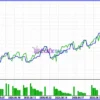
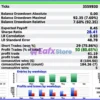
The backtest shows positive overall performance, with a net profit of $524.08 from a $1,000 initial deposit. The strategy achieved a 2.01 Profit Factor and 28.41 Sharpe Ratio, while maintaining relatively moderate drawdown levels of 7.60% balance drawdown and 9.78% equity drawdown.
MSX AI Multi Symbol Scalper EA Backtest Results
MSX AI Multi Symbol Scalper MT5 Backtest Results
MSX AI Multi Symbol Scalper Trading Strategy
Entry Logic
Entries are built around agreement between the configured trend engines, price/Heiken Ashi state, HMA/DSHA, SuperTrend and entry-strength conditions.
Confirmation Conditions
Trend strength, reversal strength and ATR volatility-spike filters can refine the trading environment.
Trade Execution
The system supports BUY+SELL, BUY-only and SELL-only operation.
Exit Logic
Positions can be managed through hard or soft reversal exits, ATR or fixed SL/TP, partial profit, session-end and weekend rules.
Position Management
Multi-stage partial profit can reduce volume progressively while preserving a remaining position.
MSX AI Multi Symbol Scalper Risk Management
Risk-Based Position Sizing
Fixed-lot and equity-based risk sizing are available.
Free Margin Reserve
A configurable reserve helps prevent excessive use of available margin.
Drawdown Controls
Local and Master account drawdown limits can restrict new trading when thresholds are reached.
Stop Loss / Take Profit
Positions can use ATR-based or fixed SL/TP settings.
Martingale / Grid
Neither Martingale nor Grid trading is presented as the core MSX architecture.
Recommended Trading Conditions
For the best performance, the developer recommends:
| Features | Type |
|---|---|
| Trading platform | MetaTrader 5 (MT5) |
| Time frames | Any |
| Currency pairs | Forex, Metals, Indices, Commodities, Cryptocurrencies |
| Minimum / Recommended deposit | $100+ |
| Minimum / Recommended leverage | Any |
| Account type | Any |
| Additional services | Unlock and Decompile |
| Recommended brokers | Exness Broker, Icmarkets Broker |
| Recommended VPS | MyfxVPS.com (Blue VPS, Golden VPS). Lowest Latency, 2 week Free Trial, 100% Free for 12-18 Months. |
Why MSX AI Multi Symbol Scalper Stands Out
Dedicated Reversal Engine
Version 2.10 separates Hard Reversal Exit settings from the entry configuration.
Capital Recycling
Partial closes can release margin back into the account’s available capital environment.
Flexible Deployment
The architecture can be used as one EA, multiple independent instances or a broader portfolio.
Strengths and Limitations
Strengths
🔹 Broad market coverage.
🔹 Deep portfolio and capital controls.
🔹 Dedicated reversal and pullback management.
🔹 Adaptive position sizing.
🔹 Multiple symbol-specific tester studies.
Limitations
🔹 Higher configuration complexity than a simple single-symbol EA.
🔹 Results depend strongly on correct symbol-specific settings.
🔹 Portfolio deployment adds margin-management complexity.
🔹 Historical tester studies are not live portfolio results.
Who Should Use MSX AI Multi Symbol Scalper?
Suitable Users
Advanced MT5 users who want a configurable automated portfolio framework and are prepared to test each market independently.
Less Suitable Users
Traders looking for a simple fixed-strategy EA with minimal settings and one universal preset.
Product Download Package?
The download package of the product suite includes:
✅ Experts: MSX AI Multi Symbol Scalper.ex5
Final Verdict
MSX AI Multi Symbol Scalper is a broad MT5 automation framework built around trend intelligence, multi-layer confirmation, adaptive risk and portfolio-aware capital management. Its strongest advantage is flexibility combined with detailed trade and capital controls. The trade-off is complexity, making careful configuration and testing essential.
🔢 MSX AI Multi Symbol Scalper EA MT5 – Complete Settings Guide
MSX AI Multi Symbol Scalper EA is a multi-symbol automated trading Expert Advisor designed to manage trend-based trades across multiple instruments from MetaTrader 5. Its configuration combines trend detection, SuperTrend and Heikin Ashi analysis, HMA and DSHA smoothing, adaptive lot sizing, margin protection, execution safeguards, reversal management, partial-profit controls, and account-level capital protection.
The supplied Inputs reveal a highly configurable portfolio framework. Traders can control whether BUY and SELL positions are allowed, define fixed or risk-based lot sizing, limit capital allocation, protect margin levels, filter excessive spreads and slippage, manage individual trading sessions, and apply local as well as account-wide drawdown protection. The public product description similarly identifies MSX AI Multi Symbol Scalper as a portfolio-focused MT5 EA supporting multiple symbols, independent BUY/SELL engines, portfolio-aware money management, and dual-layer capital protection.
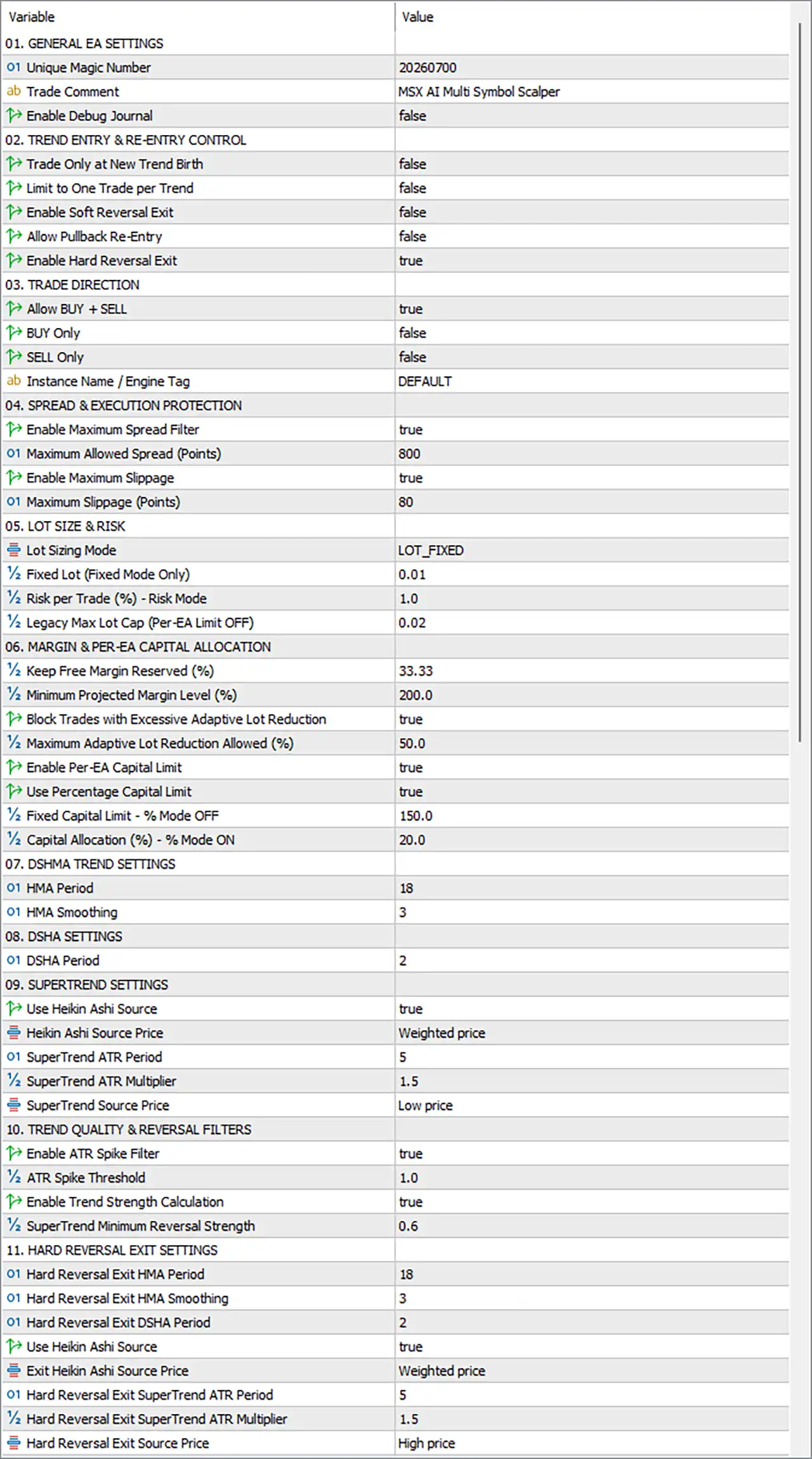
MSX AI Multi Symbol Scalper EA MT5 Settings Panel
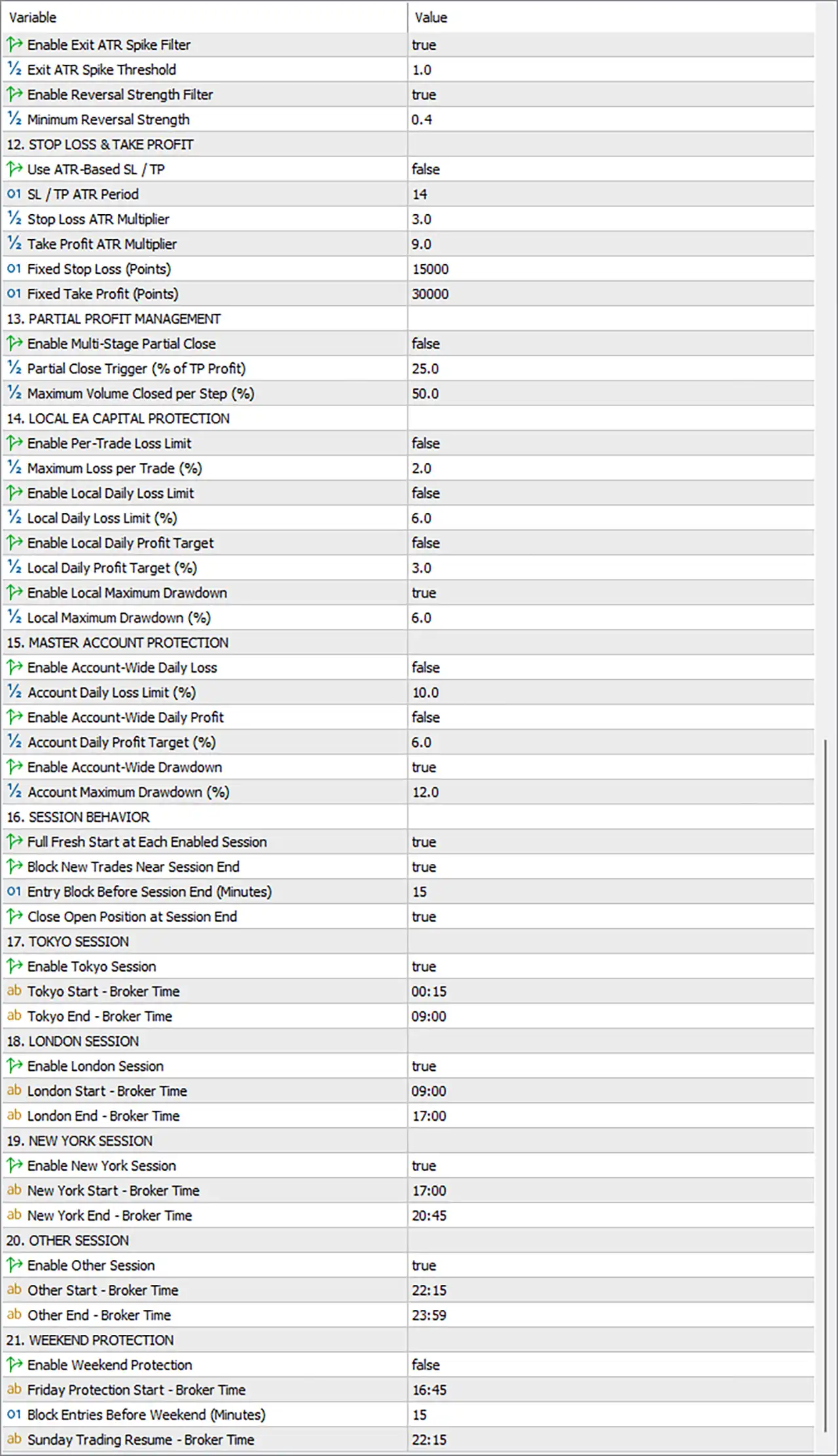
MSX AI Multi Symbol Scalper EA Settings Panel
🔢 GENERAL EA SETTINGS
🔹 Unique Magic Number = 20260700 — Assigns the unique EA identifier 20260700 to trades managed by this instance.
🔹 Trade Comment = MSX AI Multi Symbol Scalper — Sets the comment attached to trades, making EA-generated positions easier to identify in MetaTrader 5.
🔹 Enable Debug Journal = false — Disables additional debug information in the trading journal under the current configuration.
🔢 TREND ENTRY & RE-ENTRY CONTROL
🔹 Trade Only at New Trend Birth = false — Allows the EA to trade beyond only the initial formation of a new trend.
🔹 Limit to One Trade per Trend = false — Disables the restriction that would limit the EA to one trade during each identified trend.
🔹 Enable Soft Reversal Exit = false — Disables the soft reversal exit mechanism.
🔹 Allow Pullback Re-Entry = false — Disables re-entry following a pullback within the existing trading structure.
🔹 Enable Hard Reversal Exit = true — Enables the hard reversal exit mechanism, allowing the EA to respond to confirmed reversal conditions with a stronger exit action.
🔢 TRADE DIRECTION
🔹 Allow BUY + SELL = true — Enables both BUY and SELL trading directions.
🔹 BUY Only = false — Disables BUY-only mode because both trading directions are currently permitted.
🔹 SELL Only = false — Disables SELL-only mode because both trading directions are currently permitted.
🔹 Instance Name / Engine Tag = DEFAULT — Assigns DEFAULT as the instance or engine identification tag.
🔢 SPREAD & EXECUTION PROTECTION
🔹 Enable Maximum Spread Filter = true — Enables the maximum-spread protection filter before trade execution.
🔹 Maximum Allowed Spread (Points) = 800 — Sets the maximum permitted spread threshold to 800 points.
🔹 Enable Maximum Slippage = true — Enables the maximum-slippage protection mechanism.
🔹 Maximum Slippage (Points) = 80 — Limits the configured maximum slippage to 80 points.
🔢 LOT SIZE & RISK
🔹 Lot Sizing Mode = LOT_FIXED — Selects the LOT_FIXED position-sizing mode.
🔹 Fixed Lot (Fixed Mode Only) = 0.01 — Sets the fixed trading volume to 0.01 lots when the fixed-lot mode is active.
🔹 Risk per Trade (%) – Risk Mode = 1.0 — Sets the configured risk allocation to 1.0% per trade when Risk Mode is used.
🔹 Legacy Max Lot Cap (Per-EA Limit OFF) = 0.02 — Sets the legacy maximum lot cap to 0.02 under the specified per-EA limit configuration.
🔢 MARGIN & PER-EA CAPITAL ALLOCATION
🔹 Keep Free Margin Reserved (%) = 33.33 — Reserves 33.33% of the relevant capital/margin environment as free margin protection.
🔹 Minimum Projected Margin Level (%) = 200.0 — Requires the projected margin level to remain at or above 200.0% under the configured protection logic.
🔹 Block Trades with Excessive Adaptive Lot Reduction = true — Prevents trades when adaptive lot reduction becomes excessive according to the EA’s internal threshold.
🔹 Maximum Adaptive Lot Reduction Allowed (%) = 50.0 — Allows a maximum adaptive lot reduction of 50.0%.
🔹 Enable Per-EA Capital Limit = true — Enables the capital-allocation limit applied specifically to this EA.
🔹 Use Percentage Capital Limit = true — Enables percentage-based capital allocation instead of relying exclusively on the fixed capital limit.
🔹 Fixed Capital Limit – % Mode OFF = 150.0 — Sets the fixed capital allocation limit to 150.0 when percentage mode is disabled.
🔹 Capital Allocation (%) – % Mode ON = 20.0 — Allocates a maximum configured 20.0% of capital when percentage capital-limit mode is enabled.
🔢 DSHMA TREND SETTINGS
🔹 HMA Period = 18 — Sets the Hull Moving Average calculation period to 18, controlling the primary trend-smoothing lookback.
🔹 HMA Smoothing = 3 — Sets the HMA smoothing parameter to 3, adding an additional smoothing layer to the trend calculation.
🔢 DSHA SETTINGS
🔹 DSHA Period = 2 — Sets the Double Smoothed Heikin Ashi calculation period to 2.
🔢 SUPERTREND SETTINGS
🔹 Use Heikin Ashi Source = true — Enables Heikin Ashi data as the configured source for the SuperTrend calculation.
🔹 Heikin Ashi Source Price = Weighted price — Selects Weighted price as the Heikin Ashi source-price method.
🔹 SuperTrend ATR Period = 5 — Sets the SuperTrend ATR calculation period to 5.
🔹 SuperTrend ATR Multiplier = 1.5 — Sets the SuperTrend ATR multiplier to 1.5, controlling the ATR-based distance used by the SuperTrend calculation.
🔹 SuperTrend Source Price = Low price — Uses Low price as the configured source price for the SuperTrend calculation.
🔢 TREND QUALITY & REVERSAL FILTERS
🔹 Enable ATR Spike Filter = true — Enables ATR-spike filtering to help identify unusually strong volatility conditions.
🔹 ATR Spike Threshold = 1.0 — Sets the ATR spike threshold to 1.0.
🔹 Enable Trend Strength Calculation = true — Enables the EA’s trend-strength calculation.
🔹 SuperTrend Minimum Reversal Strength = 0.6 — Requires a minimum SuperTrend reversal-strength value of 0.6 according to the EA’s internal reversal logic.
🔢 HARD REVERSAL EXIT SETTINGS
🔹 Hard Reversal Exit HMA Period = 18 — Sets the HMA period used by the hard reversal exit system to 18.
🔹 Hard Reversal Exit HMA Smoothing = 3 — Sets HMA smoothing for the hard reversal exit calculation to 3.
🔹 Hard Reversal Exit DSHA Period = 2 — Sets the DSHA period used for hard reversal exits to 2.
🔹 Use Heikin Ashi Source = true — Enables the Heikin Ashi source for the hard reversal exit calculation.
🔹 Exit Heikin Ashi Source Price = Weighted price — Uses Weighted price as the source-price method for the exit Heikin Ashi calculation.
🔹 Hard Reversal Exit SuperTrend ATR Period = 5 — Sets the SuperTrend ATR period for hard reversal exits to 5.
🔹 Hard Reversal Exit SuperTrend ATR Multiplier = 1.5 — Sets the hard reversal exit SuperTrend ATR multiplier to 1.5.
🔹 Hard Reversal Exit Source Price = High price — Uses High price as the source for the hard reversal exit SuperTrend calculation.
🔢 Trend Exit & Volatility Confirmation
🔹 Enable Exit ATR Spike Filter = true — Enables ATR-spike filtering specifically for exit conditions.
🔹 Exit ATR Spike Threshold = 1.0 — Sets the exit ATR spike threshold to 1.0.
🔹 Enable Reversal Strength Filter = true — Enables the reversal-strength filter before the EA applies the corresponding reversal exit logic.
🔹 Minimum Reversal Strength = 0.4 — Sets the minimum reversal-strength threshold to 0.4.
🔢 STOP LOSS & TAKE PROFIT
🔹 Use ATR-Based SL / TP = false — Disables ATR-based Stop Loss and Take Profit calculations in the current configuration.
🔹 SL / TP ATR Period = 14 — Sets the ATR period to 14 for ATR-based SL/TP calculations if that mode is enabled.
🔹 Stop Loss ATR Multiplier = 3.0 — Sets the ATR Stop Loss multiplier to 3.0 when ATR-based SL is active.
🔹 Take Profit ATR Multiplier = 9.0 — Sets the ATR Take Profit multiplier to 9.0 when ATR-based TP is active.
🔹 Fixed Stop Loss (Points) = 15000 — Sets the fixed Stop Loss distance to 15000 points when fixed SL mode is used.
🔹 Fixed Take Profit (Points) = 30000 — Sets the fixed Take Profit distance to 30000 points when fixed TP mode is used.
🔢 PARTIAL PROFIT MANAGEMENT
🔹 Enable Multi-Stage Partial Close = false — Disables the multi-stage partial-position closing mechanism.
🔹 Partial Close Trigger (% of TP Profit) = 25.0 — Sets the partial-close trigger at 25.0% of the configured TP profit distance.
🔹 Maximum Volume Closed per Step (%) = 50.0 — Limits the maximum volume that can be closed at each partial-profit step to 50.0%.
🔢 LOCAL EA CAPITAL PROTECTION
🔹 Enable Per-Trade Loss Limit = false — Disables the individual trade-loss protection limit.
🔹 Maximum Loss per Trade (%) = 2.0 — Defines the maximum configured loss per trade as 2.0% when the protection is enabled.
🔹 Enable Local Daily Loss Limit = false — Disables the local daily-loss limit for this EA instance.
🔹 Local Daily Loss Limit (%) = 6.0 — Sets the local daily-loss threshold to 6.0%.
🔹 Enable Local Daily Profit Target = false — Disables the local daily-profit target.
🔹 Local Daily Profit Target (%) = 3.0 — Sets the local daily-profit target to 3.0%.
🔹 Enable Local Maximum Drawdown = true — Enables local maximum-drawdown protection for the EA.
🔹 Local Maximum Drawdown (%) = 6.0 — Sets the local maximum drawdown threshold to 6.0%.
🔢 MASTER ACCOUNT PROTECTION
🔹 Enable Account-Wide Daily Loss = false — Disables the account-wide daily-loss protection.
🔹 Account Daily Loss Limit (%) = 10.0 — Sets the account-wide daily-loss threshold to 10.0% when enabled.
🔹 Enable Account-Wide Daily Profit = false — Disables the account-wide daily-profit target.
🔹 Account Daily Profit Target (%) = 6.0 — Sets the account-wide daily-profit target to 6.0%.
🔹 Enable Account-Wide Drawdown = true — Enables account-wide maximum-drawdown protection.
🔹 Account Maximum Drawdown (%) = 12.0 — Sets the account-wide maximum drawdown threshold to 12.0%.
🔢 SESSION BEHAVIOR
🔹 Full Fresh Start at Each Enabled Session = true — Enables a fresh session-start behavior at each enabled trading session.
🔹 Block New Trades Near Session End = true — Prevents new trades from being opened close to the end of an active trading session.
🔹 Entry Block Before Session End (Minutes) = 15 — Blocks new entries during the final 15 minutes before the configured session ends.
🔹 Close Open Position at Session End = true — Enables automatic closure of open positions at the end of the active session.
🔢 TOKYO SESSION
🔹 Enable Tokyo Session = true — Enables the Tokyo trading session.
🔹 Tokyo Start – Broker Time = 00:15 — Sets the Tokyo session start at 00:15 broker time.
🔹 Tokyo End – Broker Time = 09:00 — Sets the Tokyo session end at 09:00 broker time.
🔢 LONDON SESSION
🔹 Enable London Session = true — Enables the London trading session.
🔹 London Start – Broker Time = 09:00 — Sets the London session start at 09:00 broker time.
🔹 London End – Broker Time = 17:00 — Sets the London session end at 17:00 broker time.
🔢 NEW YORK SESSION
🔹 Enable New York Session = true — Enables the New York trading session.
🔹 New York Start – Broker Time = 17:00 — Sets the New York session start at 17:00 broker time.
🔹 New York End – Broker Time = 20:45 — Sets the New York session end at 20:45 broker time.
🔢 OTHER SESSION
🔹 Enable Other Session = true — Enables the additional custom trading session.
🔹 Other Start – Broker Time = 22:15 — Sets the Other Session start at 22:15 broker time.
🔹 Other End – Broker Time = 23:59 — Sets the Other Session end at 23:59 broker time.
🔢 WEEKEND PROTECTION
🔹 Enable Weekend Protection = false — Disables the weekend-protection mechanism in the current configuration.
🔹 Friday Protection Start – Broker Time = 16:45 — Defines 16:45 broker time on Friday as the configured start of weekend protection when enabled.
🔹 Block Entries Before Weekend (Minutes) = 15 — Sets the pre-weekend entry-block period to 15 minutes.
🔹 Sunday Trading Resume – Broker Time = 22:15 — Defines 22:15 broker time on Sunday as the scheduled time for trading to resume.
🔢 Current Configuration Overview
🔹 Magic Number = 20260700 — EA identification is set to 20260700.
🔹 Trade Comment = MSX AI Multi Symbol Scalper — Trade identification comment is MSX AI Multi Symbol Scalper.
🔹 BUY + SELL = true — Both market directions are enabled.
🔹 Hard Reversal Exit = true — Hard reversal exits are enabled, while soft reversal exits are disabled.
🔹 Maximum Spread = 800 points — Spread protection is enabled with a maximum threshold of 800 points.
🔹 Maximum Slippage = 80 points — Slippage protection is enabled with a maximum of 80 points.
🔹 Lot Sizing Mode = LOT_FIXED — The current position-sizing mode uses fixed lots.
🔹 Fixed Lot = 0.01 — The configured fixed volume is 0.01 lots.
🔹 Risk per Trade = 1.0% — The alternative Risk Mode parameter is configured at 1.0%.
🔹 Reserved Free Margin = 33.33% — The EA is configured to preserve 33.33% free margin.
🔹 Minimum Projected Margin Level = 200.0% — Projected margin must remain at or above 200.0% according to the configured protection logic.
🔹 Maximum Adaptive Lot Reduction = 50.0% — Adaptive lot reduction is capped at 50.0%.
🔹 Per-EA Capital Limit = true — EA-level capital allocation protection is enabled.
🔹 Percentage Capital Limit = true — Percentage-based allocation is enabled.
🔹 Capital Allocation = 20.0% — The configured percentage allocation is 20.0%.
🔹 HMA Period = 18 — Primary HMA trend period is 18.
🔹 HMA Smoothing = 3 — HMA smoothing is 3.
🔹 DSHA Period = 2 — DSHA period is 2.
🔹 SuperTrend ATR Period = 5 — SuperTrend ATR period is 5.
🔹 SuperTrend ATR Multiplier = 1.5 — SuperTrend multiplier is 1.5.
🔹 ATR Spike Filter = true — Trend-quality ATR spike filtering is enabled.
🔹 ATR Spike Threshold = 1.0 — The trend ATR spike threshold is 1.0.
🔹 Trend Strength Calculation = true — Trend-strength calculation is enabled.
🔹 SuperTrend Minimum Reversal Strength = 0.6 — The trend reversal threshold is 0.6.
🔹 Exit ATR Spike Filter = true — Exit volatility filtering is enabled.
🔹 Exit ATR Spike Threshold = 1.0 — Exit ATR spike threshold is 1.0.
🔹 Reversal Strength Filter = true — Exit reversal-strength filtering is enabled.
🔹 Minimum Reversal Strength = 0.4 — Exit reversal strength threshold is 0.4.
🔹 ATR-Based SL/TP = false — ATR-based exits are currently disabled.
🔹 Fixed SL = 15000 points — Fixed Stop Loss is 15000 points.
🔹 Fixed TP = 30000 points — Fixed Take Profit is 30000 points.
🔹 Partial Close = false — Multi-stage partial closing is disabled.
🔹 Local Maximum Drawdown = true — Local EA drawdown protection is enabled at 6.0%.
🔹 Account-Wide Drawdown = true — Account-level drawdown protection is enabled at 12.0%.
🔹 All Four Sessions = true — Tokyo, London, New York, and Other sessions are enabled.
🔹 Weekend Protection = false — Weekend protection is currently disabled.
🔢 How the MSX AI Multi Symbol Scalper EA MT5 Settings Work Together
🔹 Trend Detection Layer — The EA combines HMA 18, HMA Smoothing 3, DSHA Period 2, and SuperTrend parameters of ATR Period 5 and ATR Multiplier 1.5 to define its trend framework.
🔹 Heikin Ashi Confirmation — Use Heikin Ashi Source = true with Weighted price provides the configured Heikin Ashi source for the SuperTrend and reversal calculations.
🔹 Trend Quality Control — The ATR Spike Filter = true and ATR Spike Threshold = 1.0 add volatility-based filtering, while Trend Strength Calculation = true enables the trend-strength layer.
🔹 Reversal Management — Hard reversal exits are enabled, with HMA 18, smoothing 3, DSHA 2, SuperTrend ATR period 5, multiplier 1.5, and High price as the hard-exit source.
🔹 Position Sizing — The current mode is LOT_FIXED, using 0.01 lots. A separate Risk Mode parameter of 1.0% is available if the sizing mode is changed.
🔹 Capital Allocation — The EA reserves 33.33% free margin, requires a projected margin level of 200.0%, and limits percentage-based EA capital allocation to 20.0%.
🔹 Execution Protection — Maximum spread protection is enabled at 800 points, while maximum slippage is enabled at 80 points.
🔹 Trade Exit Structure — ATR-based SL/TP is disabled, so the current configuration uses 15000 points fixed Stop Loss and 30000 points fixed Take Profit.
🔹 Profit Management — Multi-stage partial closing is disabled, although the trigger is configured at 25.0% of TP profit and the maximum volume closed per step is 50.0%.
🔹 Local Capital Protection — Local maximum drawdown protection is enabled at 6.0%, while local daily loss and daily profit controls remain disabled.
🔹 Master Account Protection — Account-wide drawdown protection is enabled at 12.0%, while account-wide daily loss and daily profit controls remain disabled.
🔹 Session-Based Trading — Tokyo, London, New York, and Other sessions are all enabled, creating multiple defined trading windows based on broker time.
🔹 Session-End Protection — New entries are blocked 15 minutes before session end, and open positions are configured to close at session end.
🔹 Weekend Management — Weekend protection is currently disabled, although Friday protection starts at 16:45, the pre-weekend block is 15 minutes, and Sunday trading resumes at 22:15 when the feature is enabled.
🔢 Conclusion
MSX AI Multi Symbol Scalper EA MT5 provides a broad portfolio-trading configuration covering trend analysis, execution quality, position sizing, margin preservation, capital allocation, reversal management, session control, partial-profit management, and both local and account-wide drawdown protection.
The current configuration is particularly conservative in its capital-protection architecture: 33.33% free margin is reserved, the projected margin level must remain at 200.0%, adaptive lot reduction can reach 50.0%, local maximum drawdown is limited to 6.0%, and account-wide maximum drawdown is set to 12.0%.
For trade management, the current setup uses LOT_FIXED with 0.01 lots, 15000 points fixed Stop Loss, and 30000 points fixed Take Profit, while ATR-based SL/TP and multi-stage partial closing are disabled. The EA also has all four configured sessions enabled and uses hard reversal exits for stronger trend-change response.
The overall architecture is consistent with the publicly described MSX AI Multi Symbol Scalper framework, which emphasizes multi-symbol trading, adaptive money management, margin protection, execution safeguards, session management, and multi-layer capital protection.
User Reviews
Only logged in customers who have purchased this product may leave a review.
What markets does MSX AI Multi Symbol Scalper support?
Forex, Gold, indices, commodities, cryptocurrencies and other broker-supported CFDs.
What timeframes are supported?
The architecture supports the MT5 timeframe range from M1 through MN, depending on configuration.
Can it run BUY-only or SELL-only?
Yes. It supports both-direction, BUY-only and SELL-only modes.
Does it support partial profit?
Yes. Multi-stage partial profit can reduce an open position progressively.
Can several instances run on one account?
Yes, subject to account capital, margin, broker and MT5/VPS resources.
Does it guarantee profits?
No. Automated trading remains exposed to market and execution risk.
-
 Original price was: $2,000.00.$199.00Current price is: $199.00.
 -
 Original price was: $30,000.00.$599.00Current price is: $599.00.
 -
 Original price was: $3,750.00.$599.00Current price is: $599.00.
 -
 Original price was: $30,000.00.$599.00Current price is: $599.00.
-
 3Original price was: $199.00.$159.00Current price is: $159.00.
 -
 1Original price was: $699.00.$249.00Current price is: $249.00.
 -
 0Original price was: $430.00.$249.00Current price is: $249.00.
 -
 6Original price was: $2,580.00.$249.00Current price is: $249.00.
There are no reviews yet.