





HARC Edge One EA MT5 (Latest version) - Unlimited

Subscriptions for Special Plan
- 30 EA package is more economical!
- Special package with 99%
- Download 1 EA/Day

Subscriptions for Premium Membership
- Download Unlimited in 1 Year
- Get 100% Discount
- Get free access to all

Subscriptions for Gold Membership
- 1 Year Membership
- Get 100% Discount
- Access EA+Indicator+Course
Frequently bought together 🎁
Add these products to enhance your purchase



Quick Overview
HARC Edge One is a MetaTrader 5 Expert Advisor built around a two-timeframe Supertrend framework. It establishes the broader market direction on H1, then monitors M15 for a pullback or price-touch setup that agrees with the higher-timeframe bias. The EA supports automated position sizing, configurable risk percentage, Stop Loss and Take Profit controls, London and New York session filters, maximum holding time, and one active position at a time.
Best For
✅ XAUUSD traders seeking structured trend and pullback entries.
✅ Users preferring one active position with risk-based sizing.
✅ Traders combining H1 direction with M15 Supertrend entries.
Overall Rating
⭐⭐⭐⭐⭐ 8.5/10
| Attribute | Details |
| Strategy Clarity | 8.8/10 |
| Risk Management | 8.4/10 |
| Features | 8.5/10 |
| Transparency | 7.4/10 |
| Performance Evidence | 7.0/10 |
| Usability | 8.2/10 |
| Value | 7.5/10 |
What is HARC Edge One EA?
HARC Edge One is a MetaTrader 5 Expert Advisor built around a two-timeframe Supertrend framework. It establishes the broader market direction on H1, then monitors M15 for a pullback or price-touch setup that agrees with the higher-timeframe bias. The EA supports automated position sizing, configurable risk percentage, Stop Loss and Take Profit controls, London and New York session filters, maximum holding time, and one active position at a time. Its published test configuration uses XAUUSD on M15 with real-tick modelling, while live use should be evaluated under the actual broker’s spread, execution, liquidity and account conditions.
 Vendor Website: View here
Delivery time 24h-48h after payment.
Refund if not delivered.
You will receive the current version without any limitations (ID+Time).
HARC Edge One EA MT5 Review
How Does HARC Edge One EA Work?
H1 Market Direction
HARC Edge One uses the H1 Supertrend to establish the broader directional bias, giving the lower-timeframe entry process a defined market context.
M15 Pullback Entry
The EA monitors the M15 Supertrend and evaluates price touches in the direction of the H1 trend before considering an automated trading opportunity.
Trend Confirmation
A setup is considered only when the M15 touch condition agrees with the higher-timeframe H1 direction, helping filter entries that conflict with the broader trend.
One-Position Execution
The system is designed to maintain one active EA position at a time, keeping exposure structurally limited rather than continuously stacking multiple positions.
Session-Based Trading
London and New York session filters restrict when the EA can operate, allowing trading activity to remain aligned with configured market-session windows.
Historical Trading Results Performance
The backtest demonstrates positive overall performance, generating $63,898.80 in net profit from a $50,000 initial deposit across 1,115 trades.
The strategy recorded a 1.16 Profit Factor and 4.51 Sharpe Ratio, while maintaining equity drawdown at 15.14%. The results indicate profitability alongside a relatively significant risk profile.
HARC Edge One EA Backtest Results
HARC Edge One EA MT5 Backtest Results
HARC Edge One Trading Strategy
H1 Market Direction
HARC Edge One uses the H1 Supertrend to establish the broader directional bias, giving the lower-timeframe entry process a defined market context.
M15 Pullback Entry
The EA monitors the M15 Supertrend and evaluates price touches in the direction of the H1 trend before considering an automated trading opportunity.
Trend Confirmation
A setup is considered only when the M15 touch condition agrees with the higher-timeframe H1 direction, helping filter entries that conflict with the broader trend.
One-Position Execution
The system is designed to maintain one active EA position at a time, keeping exposure structurally limited rather than continuously stacking multiple positions.
Session-Based Trading
London and New York session filters restrict when the EA can operate, allowing trading activity to remain aligned with configured market-session windows.
Key Features
Supertrend Framework
The strategy uses Supertrend calculations on H1 and M15 to combine directional context with a lower-timeframe pullback trigger in a clearly defined execution process.
Automated Position Sizing
Trade volume is calculated from the configured risk percentage and the distance between entry price and Stop Loss, providing a direct link between risk and position size.
Explicit SL and TP
Separate BUY and SELL Stop Loss (SL) and Take Profit (TP) parameters provide defined exit levels instead of leaving the trade outcome entirely dependent on discretionary management.
Session Filters
Dedicated London and New York session controls allow the EA to limit trading to selected market periods and avoid operating outside the preferred execution windows.
Holding-Time Control
A maximum holding-time parameter can restrict how long an active position remains open, adding another layer of time-based trade management.
HARC Edge One Risk Management
Risk Percentage
The default configuration uses a 1% risk setting, with position volume calculated according to account risk and the distance from entry to the configured Stop Loss.
Defined Stop Loss
Every trade can be protected by a configured Stop Loss, giving the strategy a predefined loss boundary that is integrated into its position-sizing calculation.
Single Active Position
Limiting the EA to one active position at a time reduces simultaneous exposure and keeps the trade-management structure easier to monitor and evaluate.
Broker Condition Awareness
Published testing notes emphasize that spreads, execution, liquidity and symbol specifications can materially change live results, so broker-specific validation remains important.
Recommended Trading Conditions
For the best performance, the developer recommends:
| Features | Type |
|---|---|
| Trading platform | MetaTrader 5 (MT5) |
| Time frames | M15, H1 |
| Currency pairs | XAUUSD (Gold) |
| Minimum / Recommended deposit | $1,000+ |
| Minimum / Recommended leverage | Any |
| Account type | Any |
| Additional services | Unlock and Decompile |
| Recommended brokers | Exness Broker, Icmarkets Broker |
| Recommended VPS | MyfxVPS.com (Blue VPS, Golden VPS). Lowest Latency, 2 week Free Trial, 100% Free for 12-18 Months. |
Why HARC Edge One Stands Out
Focused Strategy Architecture
The two-timeframe architecture is straightforward to understand because H1 establishes direction while M15 supplies the actual pullback entry condition.
Integrated Trading Logic
The one-position structure, explicit risk percentage and session filters create a relatively clear framework for evaluating exposure and operational behavior.
Practical Execution Structure
The strategy is narrowly defined rather than overloaded with many unrelated entry mechanisms, which makes its logic easier to explain and test.
Strengths and Limitations
Clear Trend and Pullback Structure
Clear H1-to-M15 trend and pullback structure. This keeps the point clear and relevant when evaluating the EA’s practical trading workflow and operating conditions.
Controlled Position Exposure
One active position at a time limits simultaneous exposure. This keeps the point clear and relevant when evaluating the EA’s practical trading workflow and operating conditions.
Risk-Based Position Sizing
Risk-based position sizing is linked to Stop Loss distance. This keeps the point clear and relevant when evaluating the EA’s practical trading workflow and operating conditions.
Session-Based Execution
London and New York session controls provide operational flexibility. This keeps the point clear and relevant when evaluating the EA’s practical trading workflow and operating conditions.
XAUUSD Market Specialization
The strategy is specialized around XAUUSD and depends on the quality of Supertrend signals in the selected market conditions.
Dependence on Supertrend Conditions
Published historical testing does not by itself establish future performance, and live results can vary with broker execution and spreads.
Broker Execution Sensitivity
The strategy may remain inactive when the required higher-timeframe and lower-timeframe conditions do not align.
Who Should Use HARC Edge One?
Target Trader Profile
XAUUSD traders seeking a rules-based trend and pullback EA. This keeps the point clear and relevant when evaluating the EA’s practical trading workflow and operating conditions.
Suitable Trading Preference
Users comfortable with MT5 and configurable percentage-based risk. This keeps the point clear and relevant when evaluating the EA’s practical trading workflow and operating conditions.
Recommended User Profile
Traders who prefer limited simultaneous exposure and session-controlled execution. This keeps the point clear and relevant when evaluating the EA’s practical trading workflow and operating conditions.
Product Download Package?
The download package of the product suite includes:
✅ Experts: HARC Edge One.ex5
Final Verdict
HARC Edge One EA presents a defined automated trading framework for MetaTrader 5 with a clear focus on its stated market and strategy. Its strongest qualities come from the specific entry architecture, integrated trade management and the degree of control described above. Historical or short-term evidence should be evaluated independently, because broker execution, market conditions and risk settings can materially change real trading outcomes.
🔢 HARC Edge One EA MT5 – Complete Settings Guide
HARC Edge One EA MT5 is an automated Expert Advisor designed around a Supertrend-based trend-following and pullback-entry methodology. The EA uses a higher-timeframe market-direction filter and a lower-timeframe entry mechanism, with the published strategy using H1 to determine the broader trend and M15 to identify Supertrend pullback or touch opportunities.
The supplied Inputs provide detailed control over ATR calculations, risk management, BUY/SELL Stop Loss and Take Profit distances, slippage, session filtering, trade direction, maximum holding time, and London/New York trading sessions. The configuration also includes Magic Number identification and a dedicated parameter labeled 0 = disabled for an additional internal control.
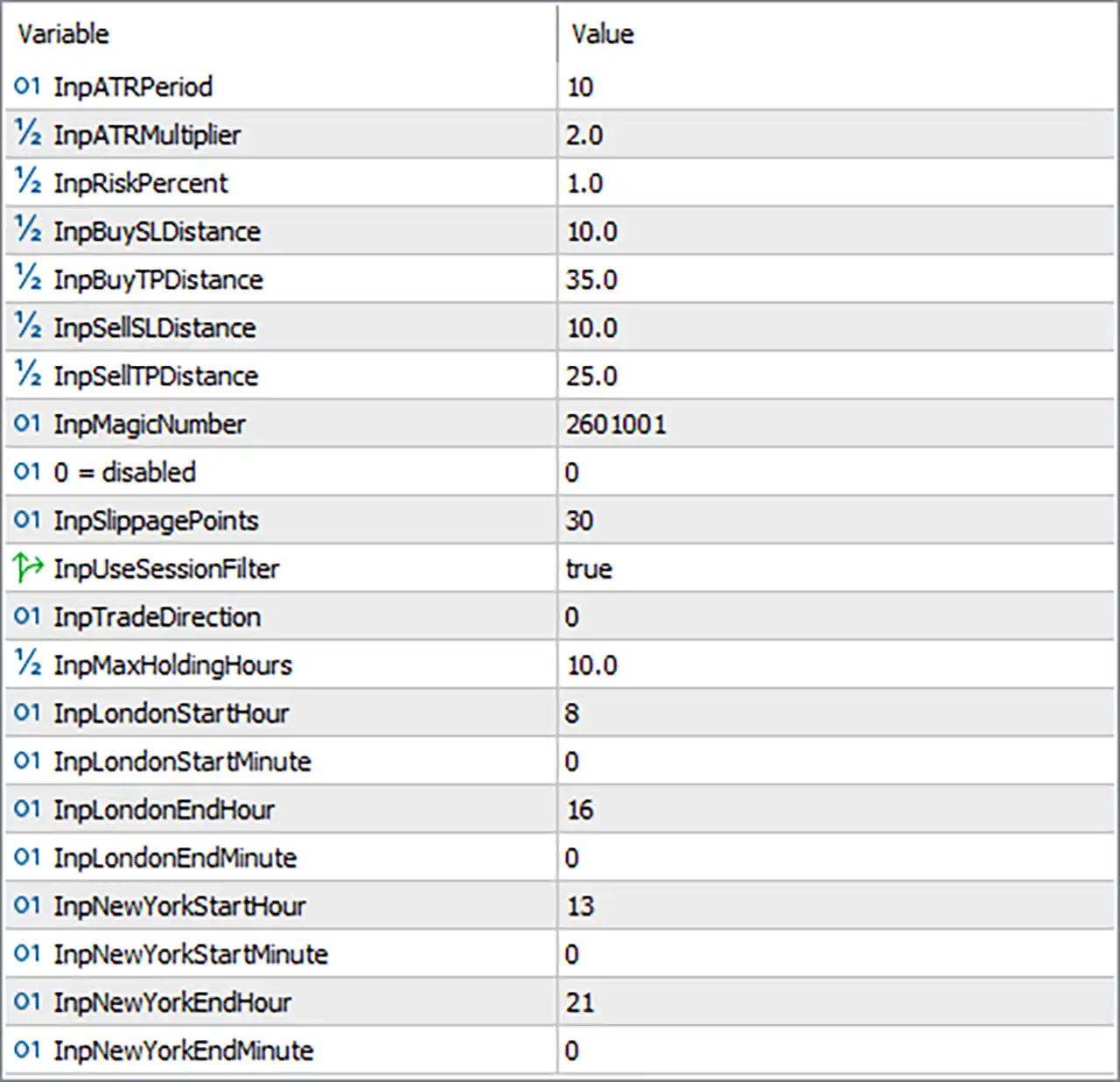
HARC Edge One EA MT5 Settings Panel
🔢 Money Management & Trade Protection
🔹 InpATRPeriod = 10 — Sets the ATR calculation period to 10, determining the number of price bars used to measure recent market volatility.
🔹 InpATRMultiplier = 2.0 — Sets the ATR multiplier to 2.0, controlling the ATR-based distance used by the EA’s Supertrend or volatility calculations.
🔹 InpRiskPercent = 1.0 — Sets the configured trading risk to 1.0%. The EA’s published description states that position volume is calculated from the selected risk percentage and the distance to Stop Loss.
🔹 InpBuySLDistance = 10.0 — Sets the BUY Stop Loss distance to 10.0 according to the EA’s configured distance unit.
🔹 InpBuyTPDistance = 35.0 — Sets the BUY Take Profit distance to 35.0 according to the EA’s configured distance unit.
🔹 InpSellSLDistance = 10.0 — Sets the SELL Stop Loss distance to 10.0 according to the EA’s configured distance unit.
🔹 InpSellTPDistance = 25.0 — Sets the SELL Take Profit distance to 25.0 according to the EA’s configured distance unit.
🔢 Trade Identification & Execution
🔹 InpMagicNumber = 2601001 — Assigns the unique Magic Number 2601001 to trades managed by HARC Edge One, allowing its positions to be identified separately from other EAs or manual trades.
🔹 0 = disabled = 0 — This parameter is displayed as 0 = disabled with a current value of 0, indicating that the associated internal option is set to its disabled state; the screenshot does not expose the parameter’s original descriptive name.
🔹 InpSlippagePoints = 30 — Sets the permitted slippage parameter to 30 points for trade execution.
🔢 Session & Trading Direction
🔹 InpUseSessionFilter = true — Enables the session filter, restricting trading according to the configured London and New York session times.
🔹 InpTradeDirection = 0 — Sets the trade-direction mode to numeric value 0. The screenshot does not show the enum mapping for this value; the published default configuration identifies the EA’s trade direction as Both, so the exact numeric mapping should be confirmed from the EA’s source/enum definition.
🔹 InpMaxHoldingHours = 10.0 — Sets the maximum position holding time to 10.0 hours, allowing the EA to limit how long an active trade remains open.
London Trading Session
🔹 InpLondonStartHour = 8 — Sets the London session start hour to 8.
🔹 InpLondonStartMinute = 0 — Sets the London session start minute to 0, producing a configured start time of 08:00.
🔹 InpLondonEndHour = 16 — Sets the London session end hour to 16.
🔹 InpLondonEndMinute = 0 — Sets the London session end minute to 0, producing a configured end time of 16:00.
The resulting London session is 08:00–16:00, matching the published default session configuration for HARC Edge One.
🔢 New York Trading Session
🔹 InpNewYorkStartHour = 13 — Sets the New York session start hour to 13.
🔹 InpNewYorkStartMinute = 0 — Sets the New York session start minute to 0, producing a configured start time of 13:00.
🔹 InpNewYorkEndHour = 21 — Sets the New York session end hour to 21.
🔹 InpNewYorkEndMinute = 0 — Sets the New York session end minute to 0, producing a configured end time of 21:00.
The resulting New York session is 13:00–21:00, which also matches the published default session configuration.
🔢 Current HARC Edge One EA MT5 Configuration
🔹 ATR Period = 10 — Volatility calculation uses a 10-period ATR.
🔹 ATR Multiplier = 2.0 — The configured ATR multiplier is 2.0.
🔹 Risk Percentage = 1.0% — The configured trade-risk percentage is 1.0%.
🔹 BUY Stop Loss = 10.0 — BUY trades use a configured SL distance of 10.0.
🔹 BUY Take Profit = 35.0 — BUY trades use a configured TP distance of 35.0.
🔹 SELL Stop Loss = 10.0 — SELL trades use a configured SL distance of 10.0.
🔹 SELL Take Profit = 25.0 — SELL trades use a configured TP distance of 25.0.
🔹 Magic Number = 2601001 — The EA identifies its trades using 2601001.
🔹 Slippage = 30 points — Maximum configured slippage is 30 points.
🔹 Session Filter = true — Session filtering is enabled.
🔹 Trade Direction = 0 — The direction mode is set to numeric value 0; its exact enum meaning is not visible in the Inputs screenshot.
🔹 Maximum Holding Time = 10.0 hours — The maximum configured holding period is 10.0 hours.
🔹 London Session = 08:00–16:00 — London trading is configured from 08:00 to 16:00.
🔹 New York Session = 13:00–21:00 — New York trading is configured from 13:00 to 21:00.
🔢 How the HARC Edge One EA MT5 Settings Work Together
🔹 Volatility Framework — The ATR Period = 10 and ATR Multiplier = 2.0 establish the core ATR configuration used by the EA’s Supertrend-based methodology.
🔹 Risk-Based Position Sizing — InpRiskPercent = 1.0 defines the configured risk percentage, while the EA calculates trading volume according to risk and the Stop Loss distance.
🔹 BUY Trade Management — BUY positions use InpBuySLDistance = 10.0 and InpBuyTPDistance = 35.0, giving a configured TP-to-SL distance ratio of 35.0:10.0, or 3.5:1.
🔹 SELL Trade Management — SELL positions use InpSellSLDistance = 10.0 and InpSellTPDistance = 25.0, giving a configured TP-to-SL distance ratio of 25.0:10.0, or 2.5:1.
🔹 Maximum Holding Control — InpMaxHoldingHours = 10.0 prevents positions from remaining open beyond the configured maximum holding period when this internal control is enforced.
🔹 Session Filtering — InpUseSessionFilter = true activates the defined London and New York trading windows.
🔹 London Window — Trading is configured for 08:00–16:00 during the London session.
🔹 New York Window — Trading is configured for 13:00–21:00 during the New York session.
🔹 Execution Control — InpSlippagePoints = 30 defines the configured slippage tolerance for order execution.
🔹 Trade Identification — InpMagicNumber = 2601001 allows the EA to identify and manage its own positions.
🔹 Trade Direction — InpTradeDirection = 0 selects a numeric direction mode. The screenshot does not display the enum definition, although the published default configuration describes the EA as supporting Both BUY and SELL logic.
🔢 Conclusion
HARC Edge One EA MT5 provides a compact but highly structured configuration centered on Supertrend-based trend following, pullback entries, ATR volatility analysis, risk-based position sizing, directional SL/TP management, session filtering, and maximum holding-time control. The official product description confirms that the strategy uses H1 for broader market direction and M15 for entry opportunities around the Supertrend level.
The supplied settings use ATR Period 10, ATR Multiplier 2.0, and Risk Percentage 1.0%. BUY trades are configured with 10.0 SL / 35.0 TP, while SELL trades use 10.0 SL / 25.0 TP. This creates different configured reward-to-risk distance relationships for BUY and SELL positions.
Session management is enabled, with London operating from 08:00–16:00 and New York from 13:00–21:00. The EA also uses 30 points slippage, a 10.0-hour maximum holding time, and Magic Number 2601001 for trade identification.
Overall, the Inputs reveal a focused configuration designed to combine trend confirmation, controlled entry timing, risk-based volume calculation, and predefined trade-management rules.
User Reviews
Only logged in customers who have purchased this product may leave a review.
What timeframe does HARC Edge One use?
HARC Edge One uses H1 to determine the broader market direction and M15 to identify pullback or Supertrend-touch entries that agree with the higher-timeframe bias.
How does HARC Edge One identify the market trend?
HARC Edge One uses the H1 Supertrend as its directional reference, establishing whether the lower-timeframe entry process should focus on bullish or bearish conditions.
How does HARC Edge One generate entries?
HARC Edge One monitors the M15 Supertrend and considers a trade when price touches the Supertrend level in a direction that agrees with the H1 market bias.
Does HARC Edge One allow multiple active positions?
HARC Edge One is designed to maintain one active EA position at a time, which keeps simultaneous exposure limited and makes the position-management structure easier to monitor.
Does HARC Edge One use risk-based position sizing?
Yes, HARC Edge One calculates trading volume from the configured risk percentage and the distance between the entry price and the Stop Loss used for the position.
What Stop Loss and Take Profit controls does HARC Edge One provide?
HARC Edge One provides separate configurable Stop Loss and Take Profit controls for BUY and SELL trades, allowing the exit structure to be defined before execution.
Does HARC Edge One use trading session filters?
Yes, HARC Edge One includes London and New York session filters, allowing automated trading to be restricted to the configured market-session windows.
What is the default risk percentage for HARC Edge One?
The published default configuration uses a 1% risk percentage, although the available risk and trade-management parameters can be adjusted for different account conditions.
Has HARC Edge One been backtested?
Yes, HARC Edge One has been tested in the MetaTrader 5 Strategy Tester on XAUUSD using M15, real-tick modelling, a $50,000 initial deposit and 1:100 leverage.
-
 Original price was: $2,000.00.$199.00Current price is: $199.00.
 -
 Original price was: $30,000.00.$599.00Current price is: $599.00.
 -
 Original price was: $3,750.00.$599.00Current price is: $599.00.
 -
 Original price was: $30,000.00.$599.00Current price is: $599.00.
-
 0Original price was: $1,299.00.$249.00Current price is: $249.00.
 -
 0Original price was: $2,288.00.$249.00Current price is: $249.00.
 -
 1Original price was: $500.00.$249.00Current price is: $249.00.
 -
 0Original price was: $199.00.$179.00Current price is: $179.00.
There are no reviews yet.