


🔢 EA Gold Liquidity MT5 – Complete Settings Guide
EA Gold Liquidity MT5 is an automated trading Expert Advisor built around a combination of ZigZag market-structure analysis, liquidity filtering, ATR-based dynamic zone management, risk-based position sizing, and structured trade management.
The supplied Inputs show a layered configuration designed to identify fresh market zones, validate them using higher-timeframe swing information and volume conditions, and manage pending orders around dynamically calculated price areas. The EA also includes defined Stop Loss and Take Profit parameters, break-even and trailing controls, session restrictions, Friday protection, and a unique Magic Number for trade identification.
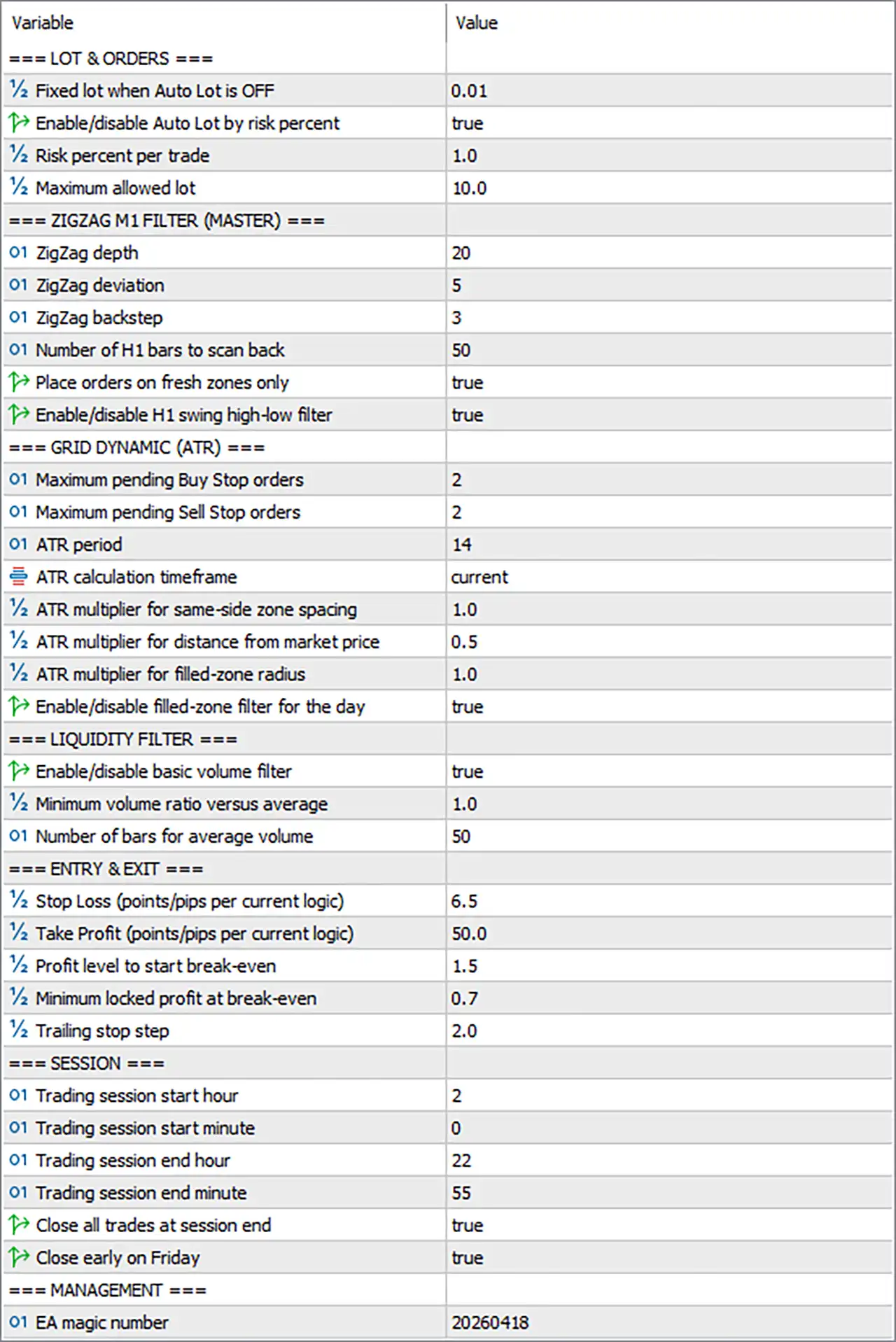
🔢 LOT & ORDERS
🔹 Fixed lot when Auto Lot is OFF = 0.01 — Sets the fixed trading volume to 0.01 lots when automatic lot sizing is disabled.
🔹 Enable/disable Auto Lot by risk percent = true — Enables automatic position sizing based on the configured risk percentage.
🔹 Risk percent per trade = 1.0 — Sets the risk allocation to 1.0% per trade when Auto Lot is enabled.
🔹 Maximum allowed lot = 10.0 — Limits automatically calculated position volume to a maximum of 10.0 lots.
🔢 ZIGZAG M1 FILTER (MASTER)
🔹 ZigZag depth = 20 — Sets the ZigZag depth to 20, controlling the number of bars considered when identifying significant swing points.
🔹 ZigZag deviation = 5 — Sets the ZigZag deviation to 5, defining the minimum price movement required for a swing to qualify.
🔹 ZigZag backstep = 3 — Sets the ZigZag backstep to 3, controlling the minimum separation between recognized swing points.
🔹 Number of H1 bars to scan back = 50 — Instructs the EA to examine the previous 50 H1 bars when evaluating higher-timeframe swing structure.
🔹 Place orders on fresh zones only = true — Restricts order placement to newly identified or fresh liquidity zones.
🔹 Enable/disable H1 swing high-low filter = true — Enables the H1 swing high/low filter to provide an additional higher-timeframe structural condition.
🔢 GRID DYNAMIC (ATR) ===
🔹 Maximum pending Buy Stop orders = 2 — Limits the number of simultaneous pending Buy Stop orders to 2.
🔹 Maximum pending Sell Stop orders = 2 — Limits the number of simultaneous pending Sell Stop orders to 2.
🔹 ATR period = 14 — Sets the ATR calculation period to 14, measuring recent market volatility.
🔹 ATR calculation timeframe = current — Uses the current chart timeframe for ATR calculations.
🔹 ATR multiplier for same-zone side spacing = 1.0 — Sets the ATR multiplier for spacing between orders on the same zone side to 1.0.
🔹 ATR multiplier for distance from market price = 0.5 — Sets the ATR multiplier used to calculate the distance between pending orders and the current market price to 0.5.
🔹 ATR multiplier for filled-zone radius = 1.0 — Sets the ATR-based radius around a filled zone to 1.0.
🔹 Enable/disable filled-zone filter for the day = true — Enables the daily filled-zone filter, allowing the EA to restrict additional trading around zones that have already been filled during the day.
🔢 LIQUIDITY FILTER
🔹 Enable/disable basic volume filter = true — Enables the basic volume filter as an additional liquidity confirmation condition.
🔹 Minimum volume ratio versus average = 1.0 — Requires the current volume ratio to reach at least 1.0 relative to the calculated average.
🔹 Number of bars for average volume = 50 — Uses 50 bars to calculate the reference average volume.
🔢 ENTRY & EXIT
🔹 Stop Loss (points/pips per current logic) = 6.5 — Sets the Stop Loss distance to 6.5 according to the EA's configured points/pips logic.
🔹 Take Profit (points/pips per current logic) = 50.0 — Sets the Take Profit distance to 50.0 according to the EA's configured points/pips logic.
🔹 Profit level to start break-even = 1.5 — Sets the profit threshold at 1.5 for activating the break-even mechanism.
🔹 Minimum locked profit at break-even = 0.7 — Sets the minimum profit to lock at break-even to 0.7.
🔹 Trailing stop step = 2.0 — Sets the trailing-stop adjustment step to 2.0.
🔢 SESSION
🔹 Trading session start hour = 2 — Sets the daily trading-session start hour to 2.
🔹 Trading session start minute = 0 — Sets the session start minute to 0, producing a configured start time of 02:00.
🔹 Trading session end hour = 22 — Sets the daily trading-session end hour to 22.
🔹 Trading session end minute = 55 — Sets the session end minute to 55, producing a configured end time of 22:55.
🔹 Close all trades at session end = true — Enables automatic closure of all EA-managed trades at the configured session end.
🔹 Close early on Friday = true — Enables early trade closure on Friday as part of the EA's end-of-week protection logic.
🔢 MANAGEMENT
🔹 EA magic number = 20260418 — Assigns the unique Magic Number 20260418 to trades managed by the EA.
🔢 Current EA Gold Liquidity MT5 Configuration
🔹 Auto Lot = true — Automatic risk-based lot sizing is currently enabled.
🔹 Risk Per Trade = 1.0% — The configured risk allocation is 1.0% per trade.
🔹 Maximum Lot = 10.0 — Automatically calculated lot size cannot exceed 10.0 lots.
🔹 ZigZag Depth = 20 — The primary ZigZag depth is 20.
🔹 ZigZag Deviation = 5 — The configured ZigZag deviation is 5.
🔹 ZigZag Backstep = 3 — The configured ZigZag backstep is 3.
🔹 H1 Structure Scan = 50 bars — The EA scans 50 H1 bars for higher-timeframe swing structure.
🔹 Fresh Zones Only = true — Orders are restricted to fresh zones.
🔹 H1 Swing Filter = true — Higher-timeframe swing high/low filtering is enabled.
🔹 Maximum Buy Stop Orders = 2 — Up to 2 Buy Stop pending orders are permitted.
🔹 Maximum Sell Stop Orders = 2 — Up to 2 Sell Stop pending orders are permitted.
🔹 ATR Period = 14 — ATR uses 14 periods.
🔹 ATR Timeframe = current — ATR is calculated using the current timeframe.
🔹 Same-Zone ATR Spacing = 1.0 — Same-zone order spacing uses an ATR multiplier of 1.0.
🔹 Market-Price Distance ATR Multiplier = 0.5 — Distance from market price uses an ATR multiplier of 0.5.
🔹 Filled-Zone Radius ATR Multiplier = 1.0 — Filled-zone radius uses an ATR multiplier of 1.0.
🔹 Filled-Zone Daily Filter = true — The filled-zone filter is enabled for the day.
🔹 Volume Filter = true — Basic volume filtering is enabled.
🔹 Minimum Volume Ratio = 1.0 — Required volume ratio versus average is 1.0.
🔹 Average Volume Period = 50 bars — Average volume is calculated over 50 bars.
🔹 Stop Loss = 6.5 — The configured SL distance is 6.5 according to the EA's current points/pips logic.
🔹 Take Profit = 50.0 — The configured TP distance is 50.0.
🔹 Break-Even Activation = 1.5 — Break-even starts at a profit level of 1.5.
🔹 Minimum Locked Profit = 0.7 — Break-even is configured to lock at least 0.7 profit.
🔹 Trailing Step = 2.0 — The trailing-stop step is 2.0.
🔹 Trading Session = 02:00–22:55 — The active trading window is configured from 02:00 to 22:55.
🔹 Close All at Session End = true — All EA-managed trades are configured to close at session end.
🔹 Close Early on Friday = true — Friday early-closing protection is enabled.
🔹 Magic Number = 20260418 — EA trades are identified by Magic Number 20260418.
🔢 How the EA Gold Liquidity MT5 Settings Work Together
🔹 Liquidity-Zone Identification — The EA uses ZigZag Depth 20, Deviation 5, and Backstep 3 to identify swing structures, while scanning 50 H1 bars for higher-timeframe context.
🔹 Fresh-Zone Filtering — With Place orders on fresh zones only = true, the configuration is designed to prioritize newly identified zones rather than repeatedly using previously tested areas.
🔹 Higher-Timeframe Confirmation — The H1 swing high-low filter = true adds a higher-timeframe structural condition before qualifying trading zones.
🔹 Dynamic Pending-Order Management — The EA permits up to 2 Buy Stop and 2 Sell Stop orders and uses ATR-based multipliers to dynamically control spacing and distance.
🔹 Volatility Adaptation — ATR Period = 14 with multipliers of 1.0, 0.5, and 1.0 provides different volatility-based measurements for same-zone spacing, market-price distance, and filled-zone radius.
🔹 Volume Confirmation — The volume filter requires a minimum ratio of 1.0 versus the average calculated over 50 bars, adding a liquidity confirmation layer.
🔹 Risk-Based Position Sizing — Auto Lot is enabled with 1.0% risk per trade, while the maximum calculated position size is capped at 10.0 lots.
🔹 Trade Management — The configuration uses 6.5 SL, 50.0 TP, 1.5 break-even activation, 0.7 minimum locked profit, and a 2.0 trailing step.
🔹 Session Control — Trading is restricted to 02:00–22:55, preventing new activity outside the configured daily window.
🔹 End-of-Day Protection — Close all trades at session end = true ensures EA-managed positions are closed at the end of the trading session.
🔹 Friday Protection — Close early on Friday = true adds an additional end-of-week position-management rule.
🔹 Trade Identification — EA magic number = 20260418 allows the EA to distinguish its positions from trades belonging to other systems.
🔢 Conclusion
EA Gold Liquidity MT5 uses a multi-layer trading architecture centered on ZigZag market structure, fresh liquidity zones, H1 swing confirmation, ATR-based dynamic order placement, volume filtering, and structured trade management.
The current configuration enables Auto Lot with 1.0% risk per trade and a 10.0-lot maximum. The master ZigZag filter uses Depth 20, Deviation 5, and Backstep 3, while the EA scans 50 H1 bars and requires fresh zones with H1 swing filtering enabled.
The dynamic grid component permits 2 Buy Stop and 2 Sell Stop orders and uses ATR Period 14 with multipliers of 1.0, 0.5, and 1.0 for different zone and price-distance calculations. The liquidity layer uses a 1.0 minimum volume ratio based on 50 bars of average volume.
Trade management is configured with 6.5 SL, 50.0 TP, break-even activation at 1.5, minimum locked profit of 0.7, and a 2.0 trailing step. The trading session runs from 02:00 to 22:55, with automatic closing at session end and early Friday closure enabled.
Overall, the supplied Inputs present a systematic Gold trading configuration that emphasizes liquidity-zone freshness, structural confirmation, adaptive volatility spacing, volume validation, and controlled risk management.


