











Neon Trade EA MT5 (Latest version) - Unlimited

Subscriptions for Special Plan
- 30 EA package is more economical!
- Special package with 99%
- Download 1 EA/Day

Subscriptions for Premium Membership
- Download Unlimited in 1 Year
- Get 100% Discount
- Get free access to all

Subscriptions for Gold Membership
- 1 Year Membership
- Get 100% Discount
- Access EA+Indicator+Course
Frequently bought together 🎁
Add these products to enhance your purchase



What is Neon Trade EA MT5?
Neon Trade EA MT5 is an advanced Expert Advisor (EA) designed for automated multi-currency trading with machine learning optimization, adaptive indicators, and intelligent risk management. The EA combines portfolio diversification, dynamic market adaptation, and automated risk allocation to deliver stability, adaptability and consistency in long-term trading across global markets.
⭐ Vendor Website: View here
About the Author
This product is compiled by Evgeniy Ilin. This author has more than +11 years of experience working on MQL5 with many famous products such as Neon Trade EA MT5, Neon Trade EA MT4, Neon Shadow EA MT5, Currency Trade MT5, Stocks Trade MT4 and other advisors. Among them, Neon Trade EA MT5 is his best performing products.
⭐ Delivery time 24h-48h after payment.
⭐ Refund if not delivered.
⭐ You will receive the current version without any limitations (ID+Time).
Neon Trade EA MT5 Trading Strategy
Key Features of Neon Trade EA MT5
🔹 Machine Learning Optimization: Uses continuously updated models to improve trading efficiency.
🔹 Advanced Risk Management: Distributes risk automatically across multiple currency pairs.
🔹 Multi-Currency Trading: Trades diversified instruments simultaneously for enhanced stability.
🔹 Dynamic Market Adaptation: Updates trading parameters automatically as conditions evolve.
🔹 Portfolio-Based Execution: Combines multiple strategies and timeframes within one system.
Why Choose & Use Neon Trade EA MT5?
🔹Stable Automated Trading: Designed for consistent performance through diversified execution.
🔹Controlled Risk Exposure: Prioritizes capital preservation with intelligent allocation systems.
🔹Adaptive Market Intelligence: Continuously evolves through machine learning enhancements.
🔹Flexible Trading Framework: Suitable for both growth-focused and long-term trading goals.
🔹Marketplace-Ready Solution: Ideal for traders seeking scalable and professional automation.
Neon Trade EA MT5 Review
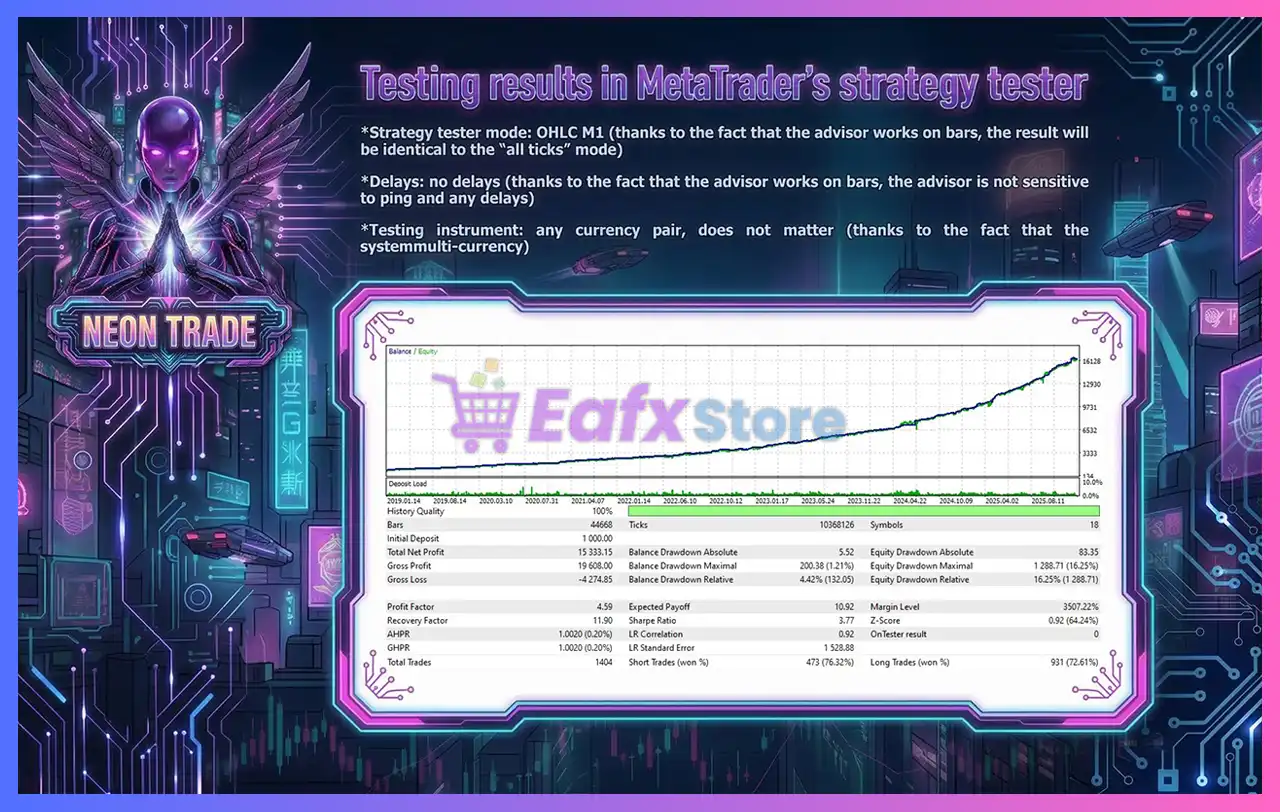
Neon Trade EA MT5 has achieved impressive profit performance over many years of trading reversion tests. This EA demonstrates excellent ability to master the market and increase profits.
✅ Initial Deposit: $1,000
✅ Total Net Profit: $15,333.15
✅ Win Rate (% of total): 76.32%
✅ Maximum Drawdown: 1.21%
Neon Trade EA MT5 Backtest
What is the Neon Trade EA MT5 Trading Strategy?
🔹Machine Learning Analysis: Evaluates market data to identify high-probability trading setups.
🔹Portfolio Diversification Logic: Spreads exposure across multiple currencies and timeframes.
🔹Adaptive Risk Allocation: Adjusts position sizes dynamically to balance portfolio performance.
🔹Market Condition Optimization: Synchronizes updated settings based on changing environments.
🔹Hedging-Oriented Structure: Uses diversification principles to improve resilience and stability.
Recommended settings
Recommended settings and parameters to pay attention to from developers and experts:
| Features | Type |
|---|---|
| Trading platform | MetaTrader 5 (MT5) |
| Time frames | M1 (1 minute chart) |
| Currency pairs | Forex, Cryptocurrencies, Stocks, Indices and Commodities |
| Minimum / Recommended deposit | $300+ |
| Minimum / Recommended leverage | Any |
| Account type | Any |
| Product type | Original version |
| Additional services | Unlock and Decompile |
| Recommended brokers | Exness Broker, Icmarkets Broker |
| Recommended VPS | MyfxVPS.com (Blue VPS, Golden VPS). Lowest Latency, 2 week Free Trial, 100% Free for 12-18 Months. |
Product Download Package?
The download package of the product suite includes:
Experts
 Neon Trade EA.ex5
SetFiles
Neon Trade_Martingale.set
Neon Trade_Simple_Lot.set
➡️ Reviewed by David Easton
Conclusion
In short, Neon Trade EA MT5 is an advanced machine-learning trading solution designed for traders seeking flexibility, diversification and adaptive portfolio management. By combining multicurrency trading, automated risk distribution, dynamic optimization updates, and intelligent market analysis, the EA provides a scalable framework for both aggressive account growth and long-term investing. Neon Trade EA MT5 delivers a modern approach to automated trading across changing market conditions.
🔢 Neon Trade EA MT5 – Complete Settings Guide & Parameter Explanation
Neon Trade EA MT5 is a multi-asset automated trading system developed for MetaTrader 5.
The EA supports Forex, Cryptocurrencies, Stocks, Indices, and Commodities while incorporating automatic lot sizing, martingale controls, symbol filtering, timeframe selection and adaptive risk management. It is designed to operate across multiple markets using dynamic calculations based on M1 volatility and account equity.
Neon Trade EA MT5 Settings
🔢 Neon Trade EA MT5 Settings Explained
Below are the details of the parameters in the advisor’s trading system settings table:
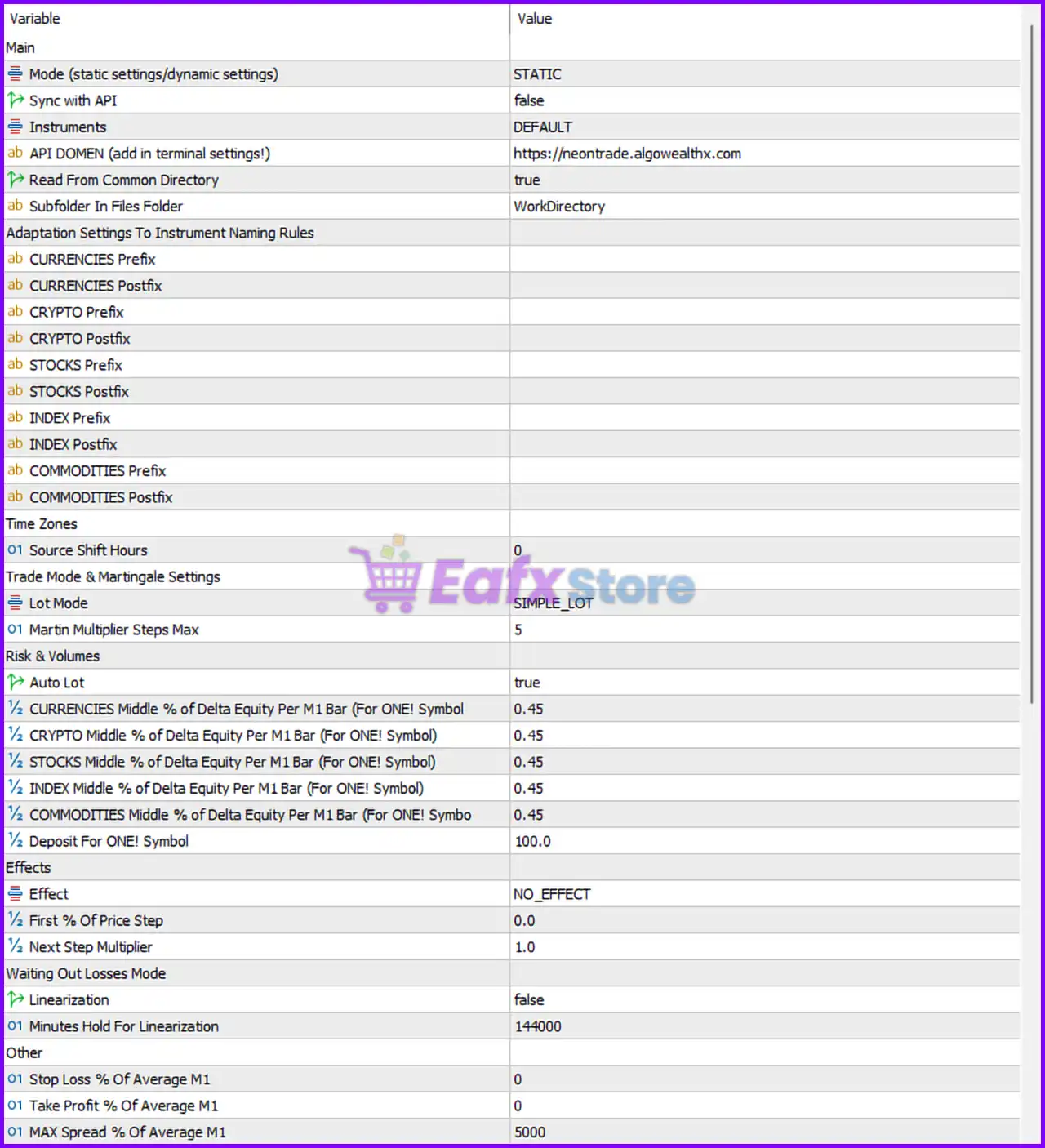
Neon Trade EA MT5 Settings Panel
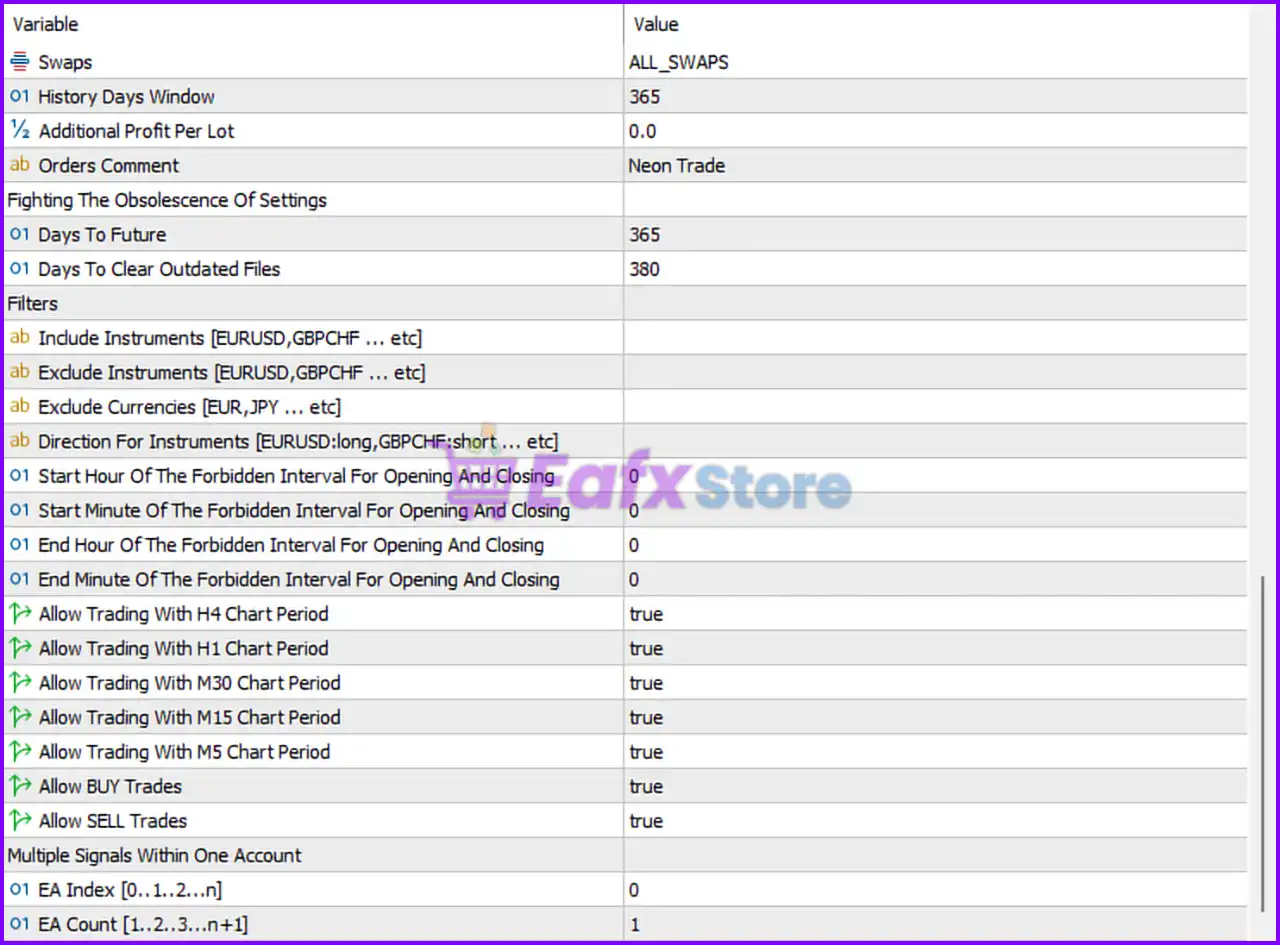
Neon Trade EA MT5 Setting Panel
🔶 Main Settings
🔹 Mode (static settings/dynamic settings) = STATIC — Uses fixed predefined settings instead of dynamically downloading or updating parameters.
🔹 Sync with API = false — Disables synchronization with the external Neon Trade API server.
🔹 Instruments = DEFAULT — Uses the default instrument set configured by the EA.
🔹 API DOMAIN (add in terminal settings!) = https://neontrade.algowealthx.com — API server address used for synchronization and data exchange when API mode is enabled.
🔹 Read From Common Directory = true — Allows the EA to read configuration files from the MT5 Common Files directory.
🔹 Subfolder In Files Folder = WorkDirectory — Defines the working subfolder used for storing and reading EA-related files.
🔶 Adaptation Settings To Instrument Naming Rules
🔹 CURRENCIES Prefix = blank — No custom prefix is applied to currency symbols.
🔹 CURRENCIES Postfix = blank — No custom postfix is applied to currency symbols.
🔹 CRYPTO Prefix = blank — No custom cryptocurrency symbol prefix is specified.
🔹 CRYPTO Postfix = blank — No custom cryptocurrency symbol postfix is specified.
🔹 STOCKS Prefix = blank — No stock symbol prefix is configured.
🔹 STOCKS Postfix = blank — No stock symbol postfix is configured.
🔹 INDEX Prefix = blank — No index symbol prefix is specified.
🔹 INDEX Postfix = blank — No index symbol postfix is specified.
🔹 COMMODITIES Prefix = blank — No commodities symbol prefix is configured.
🔹 COMMODITIES Postfix = blank — No commodities symbol postfix is configured.
🔶 Time Zone Settings
🔹 Source Shift Hours = 0 — No time offset is applied to the source market data.
🔶 Trade Mode & Martingale Settings
🔹 Lot Mode = SIMPLE_LOT — Uses a simple lot-sizing method rather than advanced position scaling.
🔹 Martin Multiplier Steps Max = 5 — Limits martingale progression to a maximum of 5 multiplication steps.
🔶 Risk & Volume Settings
🔹 Auto Lot = true — Automatically calculates lot sizes according to account balance and risk settings.
🔹 CURRENCIES Middle % of Delta Equity Per M1 Bar (For ONE! Symbol) = 0.45 — Uses 0.45% equity adjustment factor for currency instruments.
🔹 CRYPTO Middle % of Delta Equity Per M1 Bar (For ONE! Symbol) = 0.45 — Uses 0.45% equity adjustment factor for cryptocurrency instruments.
🔹 STOCKS Middle % of Delta Equity Per M1 Bar (For ONE! Symbol) = 0.45 — Uses 0.45% equity adjustment factor for stock instruments.
🔹 INDEX Middle % of Delta Equity Per M1 Bar (For ONE! Symbol) = 0.45 — Uses 0.45% equity adjustment factor for index instruments.
🔹 COMMODITIES Middle % of Delta Equity Per M1 Bar (For ONE! Symbol) = 0.45 — Uses 0.45% equity adjustment factor for commodity instruments.
🔹 Deposit For ONE! Symbol = 100.0 — Allocates a reference deposit value of 100.0 for each traded symbol.
🔶 Effects Settings
🔹 Effect = NO_EFFECT — No additional position scaling or profit-enhancement effect is applied.
🔹 First % Of Price Step = 0.0 — Initial price-step percentage is disabled.
🔹 Next Step Multiplier = 1.0 — Additional steps use a neutral multiplier of 1.0.
🔶 Waiting Out Losses Mode
🔹 Linearization = false — Linearization mode for recovering losing trades is disabled.
🔹 Minutes Hold For Linearization = 144000 — Recovery hold period configured at 144000 minutes if linearization is enabled.
🔶 Other Settings
🔹 Stop Loss % Of Average M1 = 0 — No stop-loss percentage is applied based on average M1 volatility.
🔹 Take Profit % Of Average M1 = 0 — No take-profit percentage is applied based on average M1 volatility.
🔹 MAX Spread % Of Average M1 = 5000 — Maximum spread tolerance expressed as 5000% of average M1 movement.
🔶 Swap & Historical Data Settings
🔹 Swaps = ALL_SWAPS — Considers all available swap values during calculations.
🔹 History Days Window = 365 — Uses 365 days of historical market data.
🔹 Additional Profit Per Lot = 0.0 — No extra profit target is added per lot traded.
🔹 Orders Comment = Neon Trade — Custom comment attached to all orders opened by the EA.
🔶 Fighting The Obsolescence Of Settings
🔹 Days To Future = 365 — Forecast horizon used for future settings adaptation equals 365 days.
🔹 Days To Clear Outdated Files = 380 — Automatically removes outdated files after 380 days.
🔶 Filters
🔹 Include Instruments [EURUSD,GBPCHF … etc] = blank — No specific instrument inclusion list is defined.
🔹 Exclude Instruments [EURUSD,GBPCHF … etc] = blank — No instruments are excluded.
🔹 Exclude Currencies [EUR,JPY … etc] = blank — No currencies are excluded.
🔹 Direction For Instruments [EURUSD:long,GBPCHF:short … etc] = blank — No symbol-specific directional bias is configured.
🔹 Start Hour Of The Forbidden Interval For Opening And Closing = 0 — No restricted trading interval start hour is defined.
🔹 Start Minute Of The Forbidden Interval For Opening And Closing = 0 — No restricted trading interval start minute is defined.
🔹 End Hour Of The Forbidden Interval For Opening And Closing = 0 — No restricted trading interval end hour is defined.
🔹 End Minute Of The Forbidden Interval For Opening And Closing = 0 — No restricted trading interval end minute is defined.
🔶 Allowed Timeframes
🔹 Allow Trading With H4 Chart Period = true — Trading is allowed on the H4 timeframe.
🔹 Allow Trading With H1 Chart Period = true — Trading is allowed on the H1 timeframe.
🔹 Allow Trading With M30 Chart Period = true — Trading is allowed on the M30 timeframe.
🔹 Allow Trading With M15 Chart Period = true — Trading is allowed on the M15 timeframe.
🔹 Allow Trading With M5 Chart Period = true — Trading is allowed on the M5 timeframe.
🔶 Trade Direction Controls
🔹 Allow BUY Trades = true — The EA can open Buy positions.
🔹 Allow SELL Trades = true — The EA can open Sell positions.
🔶 Multiple Signals Within One Account
🔹 EA Index [0..1..2…n] = 0 — Unique instance identifier for this EA installation.
🔹 EA Count [1..2..3…n+1] = 1 — Total number of Neon Trade EA instances operating on the account.
🔢 Conclusion
Neon Trade EA MT5 is a highly flexible multi-market trading solution that supports Forex, Crypto, Stocks, Indices, and Commodities. With automatic lot sizing, configurable martingale controls, extensive filtering options, and broad timeframe compatibility, the EA provides traders with a scalable framework for automated portfolio trading. Its ability to adapt across different asset classes makes it suitable for diversified trading strategies on MetaTrader 5.
🔢 FAQs
❓ What markets can Neon Trade EA MT5 trade?
Neon Trade EA MT5 supports currencies, cryptocurrencies, stocks, indices, and commodities.
❓ Does Neon Trade EA MT5 use automatic lot sizing?
Yes, the current configuration has Auto Lot = true, enabling automatic position-size calculations.
❓ What is the purpose of the SIMPLE_LOT mode?
SIMPLE_LOT uses straightforward position sizing without advanced scaling or complex money-management formulas.
❓ Can Neon Trade EA MT5 trade both Buy and Sell positions?
Yes, both Allow BUY Trades = true and Allow SELL Trades = true are enabled.
❓ What does Martin Multiplier Steps Max = 5 mean?
It limits the martingale progression to a maximum of 5 consecutive multiplier steps, helping control risk exposure during losing sequences.
User Reviews
Only logged in customers who have purchased this product may leave a review.
❓ What is Neon Trade EA MT5 designed for?
Neon Trade EA MT5 is a machine-learning-powered trading system built for multicurrency trading, portfolio diversification, and adaptive risk management.
❓ Can Neon Trade EA MT5 trade multiple currency pairs at the same time?
Yes, Neon Trade EA MT5 is designed for multicurrency trading and automatically distributes risk across multiple instruments simultaneously.
❓ How does machine learning improve Neon Trade EA MT5?
Neon Trade EA MT5 uses external machine learning analysis and regularly updates optimized settings to adapt to changing market conditions.
❓ Is Neon Trade EA MT5 suitable for small trading accounts?
Yes, Neon Trade EA MT5 can be used from a $300 deposit, making it suitable for traders seeking flexible account growth options.
❓ Does Neon Trade EA MT5 support prop firm challenges?
Neon Trade EA MT5 can be configured for prop firm evaluations, helping traders manage risk while meeting funding program requirements.
❓ How does Neon Trade EA MT5 manage trading risks?
Neon Trade EA MT5 automatically adjusts trade volumes, spreads exposure across assets, and recalculates risk dynamically as markets change.
❓ Does Neon Trade EA MT5 support hedging strategies?
Yes, Neon Trade EA MT5 uses portfolio diversification and hedging techniques across currencies and timeframes to reduce drawdowns.
❓ Can Neon Trade EA MT5 continue working after a platform restart?
Neon Trade EA MT5 is designed to recover open positions and resume normal operation after terminal restarts or unexpected interruptions.
❓ What additional trading modes are available in Neon Trade EA MT5?
Neon Trade EA MT5 supports optional features such as martingale, averaging, positive swap trading, advanced filters, and portfolio management.
❓ Why is diversification important in Neon Trade EA MT5?
Neon Trade EA MT5 uses broad diversification across many pairs to smooth equity growth, reduce drawdowns, and improve stability.
-
 Original price was: $2,000.00.$199.00Current price is: $199.00.
 -
 Original price was: $30,000.00.$599.00Current price is: $599.00.
 -
 Original price was: $3,750.00.$599.00Current price is: $599.00.
 -
 Original price was: $30,000.00.$599.00Current price is: $599.00.
-
 4Original price was: $499.00.$249.00Current price is: $249.00.
 -
 0Original price was: $290.00.$179.00Current price is: $179.00.
 -
 3Original price was: $199.00.$159.00Current price is: $159.00.
 -
 0Original price was: $199.00.$179.00Current price is: $179.00.
There are no reviews yet.