


🔢 Lizard EA MT5 – Complete Settings & Parameters Guide
Lizard EA is a breakout-based Expert Advisor (EA) developed for MetaTrader 5, featuring automated zone trading, dynamic trailing stop management, NFP news protection, risk-based lot sizing and customizable market filters.
The EA is designed to adapt position sizing according to account balance while providing traders with advanced control over trade entries, risk exposure and market session behavior.

🔢 Lizard EA MT5 Settings Explained
Below are the details of the parameters in the advisor’s trading system settings table:
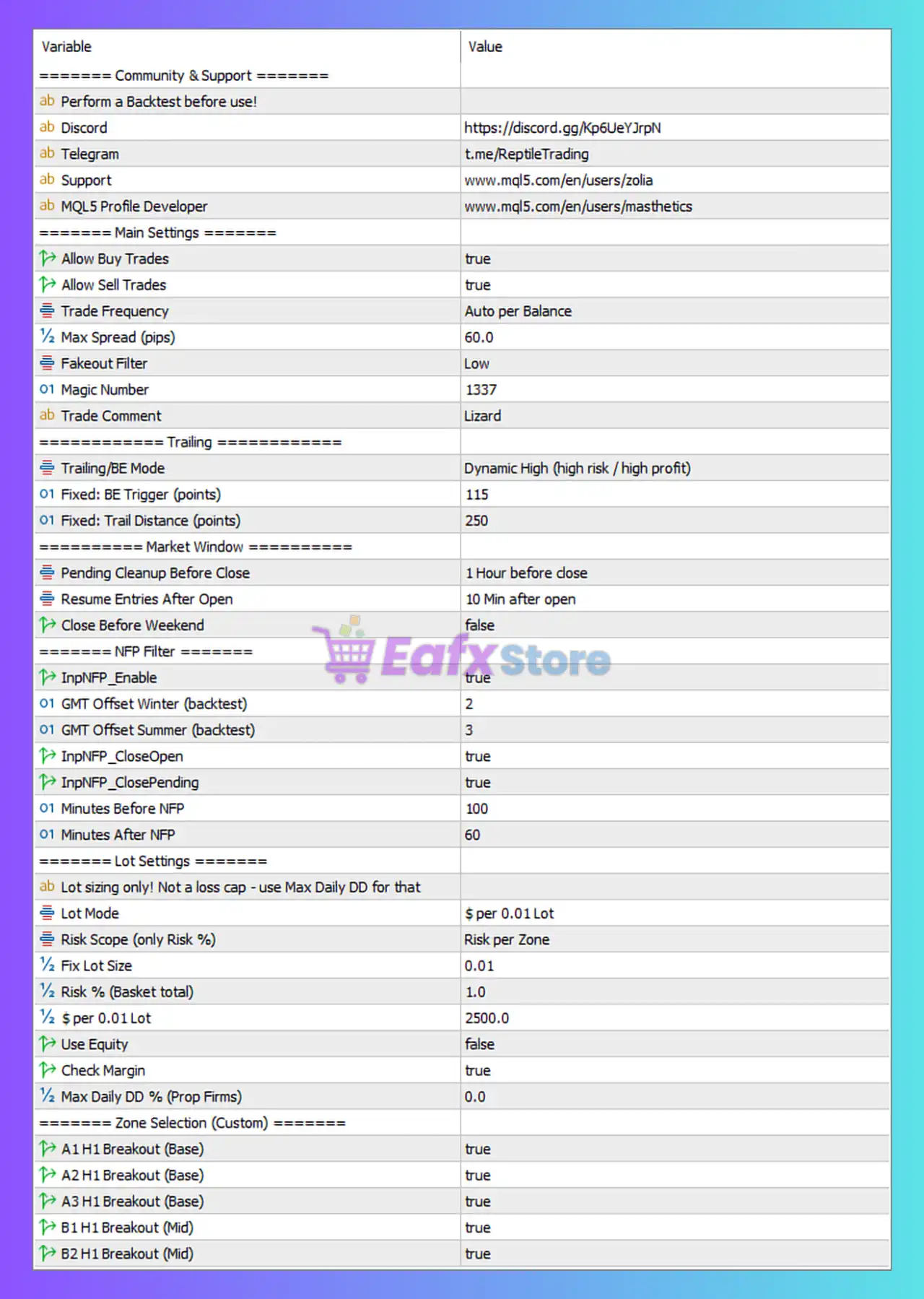
🔶 Main Settings
🔹 Allow Buy Trades = true — Enables the EA to open Buy positions.
🔹 Allow Sell Trades = true — Enables the EA to open Sell positions.
🔹 Trade Frequency = Auto per Balance — Trade frequency is automatically adjusted according to account balance.
🔹 Max Spread (pips) = 60.0 — Maximum allowed spread for opening new trades is 60.0 pips.
🔹 Fakeout Filter = Low — Uses a low-level fakeout filter to reduce false breakout entries.
🔹 Magic Number = 1337 — Unique identifier used by the EA to manage its own trades.
🔹 Trade Comment = Lizard — Custom comment attached to all trades opened by the EA.
🔶 Trailing & Break-Even Settings
🔹 Trailing/BE Mode = Dynamic High (high risk / high profit) — Uses an aggressive dynamic trailing stop and break-even mode focused on maximizing profits.
🔹 Fixed: BE Trigger (points) = 115 — Break-even activates after a profit of 115 points.
🔹 Fixed: Trail Distance (points) = 250 — Trailing stop follows price at a distance of 250 points.
🔶 Market Window Settings
🔹 Pending Cleanup Before Close = 1 Hour before close — Removes pending orders one hour before market close.
🔹 Resume Entries After Open = 10 Min after open — Trading resumes 10 minutes after market reopening.
🔹 Close Before Weekend = false — Open positions are not automatically closed before the weekend.
🔶 NFP Filter Settings
🔹 InpNFP_Enable = true — Enables the Non-Farm Payroll (NFP) news filter.
🔹 GMT Offset Winter (backtest) = 2 — Uses GMT+2 during winter backtesting.
🔹 GMT Offset Summer (backtest) = 3 — Uses GMT+3 during summer backtesting.
🔹 InpNFP_CloseOpen = true — Closes open positions during NFP protection periods.
🔹 InpNFP_ClosePending = true — Deletes pending orders during NFP protection periods.
🔹 Minutes Before NFP = 100 — Trading restrictions begin 100 minutes before NFP release.
🔹 Minutes After NFP = 60 — Trading resumes 60 minutes after the NFP event.
🔶 Lot Settings
🔹 Lot sizing only! Not a loss cap - use Max Daily DD for that — Informational note explaining that lot sizing controls position size, not drawdown protection.
🔹 Lot Mode = $ per 0.01 Lot — Lot size is calculated based on a dollar-per-0.01-lot model.
🔹 Risk Scope (only Risk %) = Risk per Zone — Risk percentage is applied individually to each trading zone.
🔹 Fix Lot Size = 0.01 — Fixed lot size used when fixed-lot mode is selected.
🔹 Risk % (Basket total) = 1.0 — Total basket risk is limited to 1.0%.
🔹 $ per 0.01 Lot = 2500.0 — Every $2,500.0 of account balance corresponds to 0.01 lot sizing.
🔹 Use Equity = false — Uses account balance instead of equity for lot calculations.
🔹 Check Margin = true — Verifies available margin before opening positions.
🔹 Max Daily DD % (Prop Firms) = 0.0 — Daily drawdown protection is disabled; 0.0 means no limit.
🔶 Zone Selection (Custom)
Base Zones
🔹 A1 H1 Breakout (Base) = true — Enables the A1 H1 breakout trading zone.
🔹 A2 H1 Breakout (Base) = true — Enables the A2 H1 breakout trading zone.
🔹 A3 H1 Breakout (Base) = true — Enables the A3 H1 breakout trading zone.
Mid Zones
🔹 B1 H1 Breakout (Mid) = true — Enables the B1 H1 breakout trading zone.
🔹 B2 H1 Breakout (Mid) = true — Enables the B2 H1 breakout trading zone.
🔢 Conclusion
Lizard EA is a sophisticated breakout trading robot that combines dynamic risk management, customizable breakout zones, NFP protection, adaptive lot sizing and advanced trailing-stop logic.
The EA is particularly suitable for traders who want systematic breakout trading while maintaining strict control over risk exposure and market-event filtering.
With support for both Buy and Sell trading, dynamic balance-based trade frequency, and multiple breakout zones, Lizard EA MT5 offers a flexible framework for automated trading on MT5.
🔢 FAQs
❓ What trading strategy does Lizard EA MT5 use?
Lizard EA MT5 primarily uses breakout-based trading zones combined with fakeout filtering and dynamic trade management.
❓ Does Lizard EA MT5 include news protection?
Yes. The EA includes a dedicated NFP filter that can close open positions and remove pending orders around major NFP announcements.
❓ How is lot size calculated in Lizard EA MT5?
The default configuration uses $2,500.0 per 0.01 lot, allowing position sizes to scale with account balance.
❓ Can I trade both Buy and Sell positions?
Yes. Both Allow Buy Trades and Allow Sell Trades are enabled by default.
❓ What is the purpose of the breakout zones (A1, A2, A3, B1, B2)?
These zones represent separate breakout entry models that the EA can use to identify and execute trading opportunities based on market structure and price movement.



