


🔢 Zerqon EA MT5 – Complete Settings Guide & Parameter Explanation
Zerqon EA is an automated trading Expert Advisor developed for MetaTrader 5, featuring adaptive money management, broker compatibility controls, prop-firm protection tools, trading schedule management and risk-based position sizing.
The EA supports both Buy and Sell operations while providing safeguards such as drawdown protection, news filtering, spread control, and trading-day restrictions to help traders manage risk efficiently.

🔢 Zerqon EA MT5 Settings Explained
Below are the details of the parameters in the advisor’s trading system settings table:
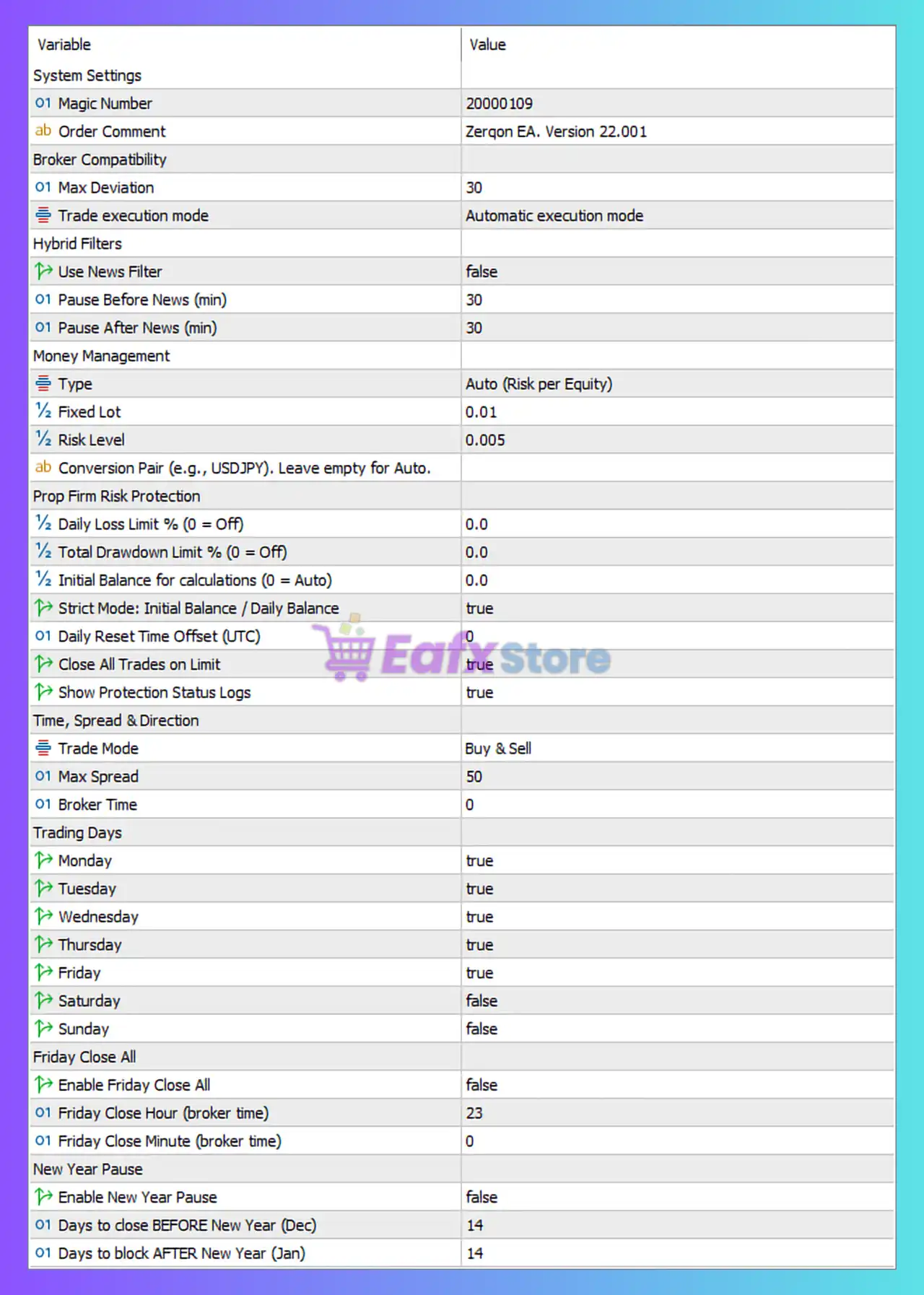
🔶 System Settings
🔹 Magic Number = 20000109 — Unique identifier used by Zerqon EA MT5 to recognize and manage its own trades without interfering with other EAs.
🔹 Order Comment = Zerqon EA. Version 22.001 — Custom comment attached to every order opened by the EA for tracking and identification purposes.
🔶 Broker Compatibility Settings
🔹 Max Deviation = 30 — Maximum allowed slippage of 30 points during order execution.
🔹 Trade Execution Mode = Automatic execution mode — The EA automatically selects the most suitable execution method supported by the broker.
🔶 Hybrid Filters
🔹 Use News Filter = false — Disables the built-in economic news filter.
🔹 Pause Before News (min) = 30 — When the news filter is enabled, trading stops 30 minutes before a scheduled news event.
🔹 Pause After News (min) = 30 — When the news filter is enabled, trading resumes 30 minutes after a news event.
🔶 Money Management
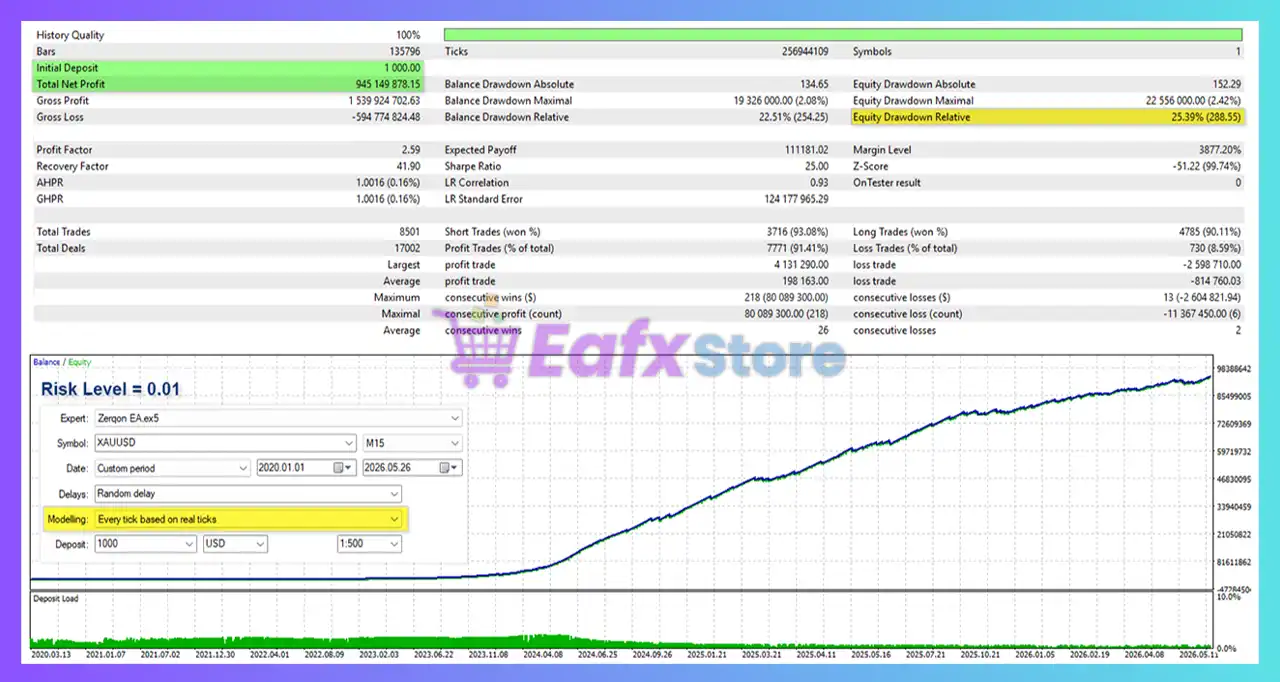
🔹 Type = Auto (Risk per Equity) — The EA automatically calculates lot size based on account equity and risk settings.
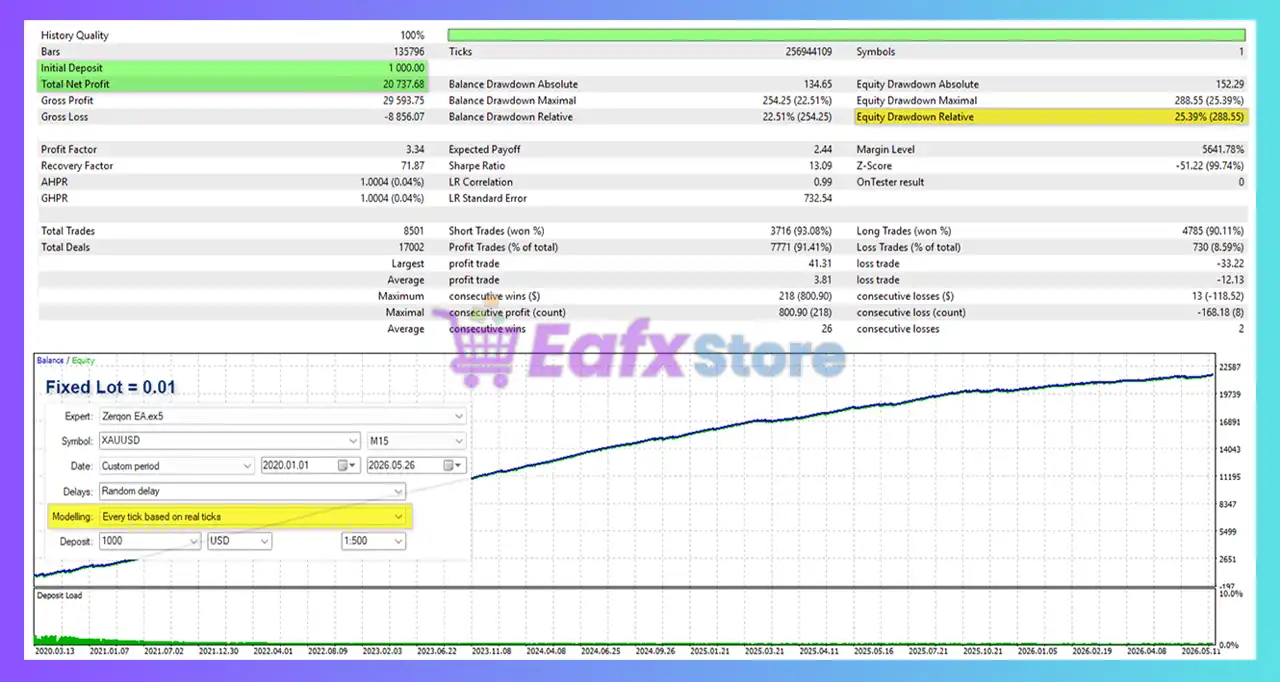
🔹 Fixed Lot = 0.01 — Uses a fixed lot size of 0.01 lots if fixed-lot mode is selected.
🔹 Risk Level = 0.005 — Risk coefficient used by the automatic lot-sizing algorithm.
🔹 Conversion Pair (e.g., USDJPY), Leave empty for Auto. = blank — No manual conversion pair specified; the EA automatically detects the required conversion pair.
🔶 Prop Firm Risk Protection
🔹 Daily Loss Limit % (0 = Off) = 0.0 — Daily loss protection is disabled because the value is set to 0.0%.
🔹 Total Drawdown Limit % (0 = Off) = 0.0 — Maximum account drawdown protection is disabled because the value is 0.0%.
🔹 Initial Balance for calculations (0 = Auto) = 0.0 — The EA automatically determines the initial balance for risk calculations.
🔹 Strict Mode: Initial Balance / Daily Balance = true — Enables strict prop-firm style risk calculations based on initial balance and daily balance limits.
🔹 Daily Reset Time Offset (UTC) = 0 — Daily risk calculations reset at UTC+0.
🔹 Close All Trades On Limit = true — Automatically closes all open positions when a configured risk limit is reached.
🔹 Show Protection Status Logs = true — Displays protection and risk-management status messages in the platform logs.
🔶 Time, Spread & Direction Settings
🔹 Trade Mode = Buy & Sell — Allows the EA to open both Buy and Sell positions.
🔹 Max Spread = 50 — Prevents new trades from opening if the spread exceeds 50 points.
🔹 Broker Time = 0 — Uses the broker’s default server time without additional offset.
🔶 Trading Days
🔹 Monday = true — Trading is allowed on Monday.
🔹 Tuesday = true — Trading is allowed on Tuesday.
🔹 Wednesday = true — Trading is allowed on Wednesday.
🔹 Thursday = true — Trading is allowed on Thursday.
🔹 Friday = true — Trading is allowed on Friday.
🔹 Saturday = false — Trading is disabled on Saturday.
🔹 Sunday = false — Trading is disabled on Sunday.
🔶 Friday Close All Settings
🔹 Enable Friday Close All = false — Automatic closure of all positions before the weekend is disabled.
🔹 Friday Close Hour (broker time) = 23 — If enabled, positions would be closed at 23:00 broker time on Friday.
🔹 Friday Close Minute (broker time) = 0 — Friday close time minute setting is 00.
🔶 New Year Pause Settings
🔹 Enable New Year Pause = false — Seasonal trading pause around New Year is disabled.
🔹 Days to close BEFORE New Year (Dec) = 14 — If enabled, the EA would stop trading 14 days before New Year.
🔹 Days to block AFTER New Year (Jan) = 14 — If enabled, trading would remain blocked for 14 days after New Year.
🔢 Conclusion
Zerqon EA combines automated execution, equity-based risk management, broker compatibility tools, and prop-firm protection features into a flexible trading system.
With support for automatic lot sizing, drawdown monitoring, spread filtering, trading-day controls, and optional seasonal trading restrictions, Zerqon EA MT5 provides traders with a structured framework for disciplined automated trading on MetaTrader 5.
🔢 FAQs
❓ What money management method does Zerqon EA MT5 use?
Zerqon EA MT5 is configured to use Auto (Risk per Equity), which automatically adjusts position size according to account equity and risk settings.
❓ Can Zerqon EA MT5 trade both Buy and Sell positions?
Yes, the current setting uses Trade Mode = Buy & Sell, allowing both long and short trades.
❓ Does Zerqon EA MT5 include prop-firm protection features?
Yes, it includes daily loss limits, drawdown controls, strict balance monitoring, and automatic trade closure options.
❓ What is the purpose of Magic Number 20000109?
The Magic Number 20000109 uniquely identifies trades opened by Zerqon EA MT5, ensuring proper trade management.
❓ Can the EA automatically stop trading around major holidays?
Yes, Zerqon EA MT5 includes a New Year Pause feature with settings for blocking trading before and after the New Year period, although it is currently disabled in the provided configuration.



