




Neurotron EA MT4 v1.30 with SetFiles (Platform build 1471+)

Subscriptions for Special Plan
- 30 EA package is more economical!
- Special package with 99%
- Download 1 EA/Day

Subscriptions for Premium Membership
- Download Unlimited in 1 Year
- Get 100% Discount
- Get free access to all

Subscriptions for Gold Membership
- 1 Year Membership
- Get 100% Discount
- Access EA+Indicator+Course
Frequently bought together 🎁
Add these products to enhance your purchase




What is Neurotron EA MT4?
Neurotron EA is an intelligent, next-generation Expert Advisor (EA) built on the powerful “London Coup” trading system, merging traditional technical indicators with the cutting-edge capabilities of neural networks. Designed for the MetaTrader 4 (MT4) platform, this advanced trading robot specializes in precision pattern recognition, low-spread scalping, and real-time market adaptation, making it a powerful tool for both novice and professional traders.
Neurotron EA Overview
Key Features of Neurotron EA MT4
🔹 Advanced Volatility Filtering: Uses Bollinger Bands and CCI for adaptive market analysis precision.
🔹 Automated Hedging Protection: Supports simultaneous BUY and SELL positions for flexible recovery logic.
🔹 Smart Risk Management System: Combines Stop Loss (SL) controls with customizable money management tools.
🔹 London Session Optimization: Designed to perform efficiently during active Forex market sessions.
🔹 Rollover Protection Mechanism: Prevents trailing activity during rollover spread expansion periods.
🔹 Flexible Trade Scheduling: Allows weekday-based automated trading with GMT synchronization support.
What is the Neurotron EA MT4 Trading Strategy?
🔹 Bollinger Bands Breakout Logic: Detects volatility expansions for precise automated trade entries.
🔹 CCI Momentum Confirmation: Uses Commodity Channel Index filters to validate market direction.
🔹 Adaptive Recovery Trading System: Increases recovery efficiency after losing market conditions occur.
🔹 Volatility-Based Entry Filtering: Avoids unstable trades using minimum and maximum volatility rules.
🔹 Hedging and Trend Balance Logic: Combines dual-direction trading with controlled exposure systems.
🔹 Session-Based Automated Trading: Focuses on optimized timing during active London market hours.
Neurotron EA MT4 Review
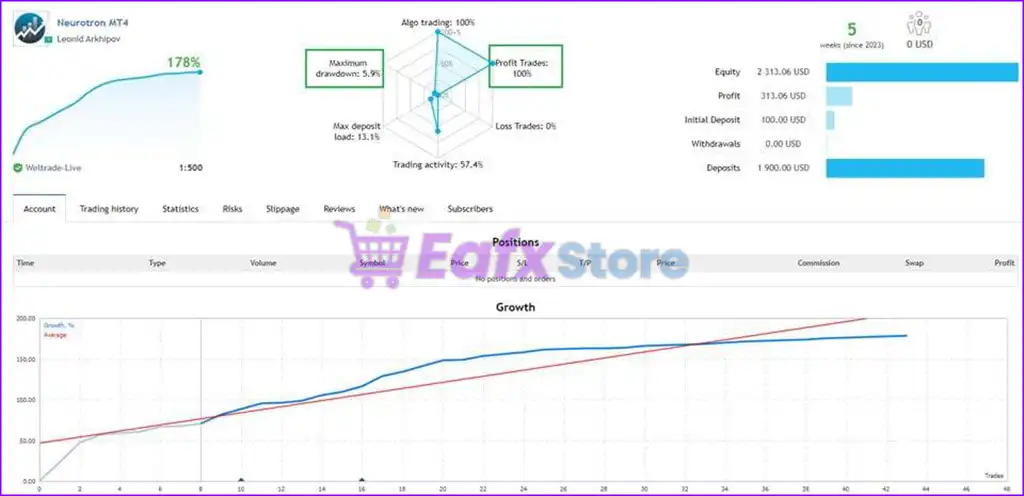
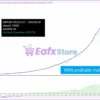
🔶 Neurotron EA, which leverages AI-based logic to execute accurate, low-risk trades, has achieved impressive profit performance in live trading for 5 weeks. Detailed profit performance parameters include:
✅ Initial Deposit: $100
✅ Total Profit: +178%
✅ Win Rate: 100%
✅ Maximum Drawdown: 5.9%
Neurotron EA Live Trading Results
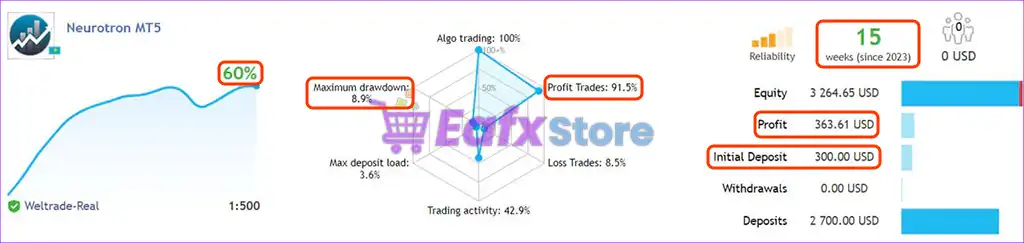
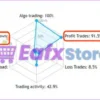
🔶 Expert Advisor (EA) trades on a real account with an initial deposit of $300, achieving a total profit in 15 weeks of trading:
✅ Initial Deposit: $300
✅ Total Profit: +60%
✅ Win Rate: 91.5%
✅ Maximum Drawdown: 8.9%
Neurotron EA Live Results
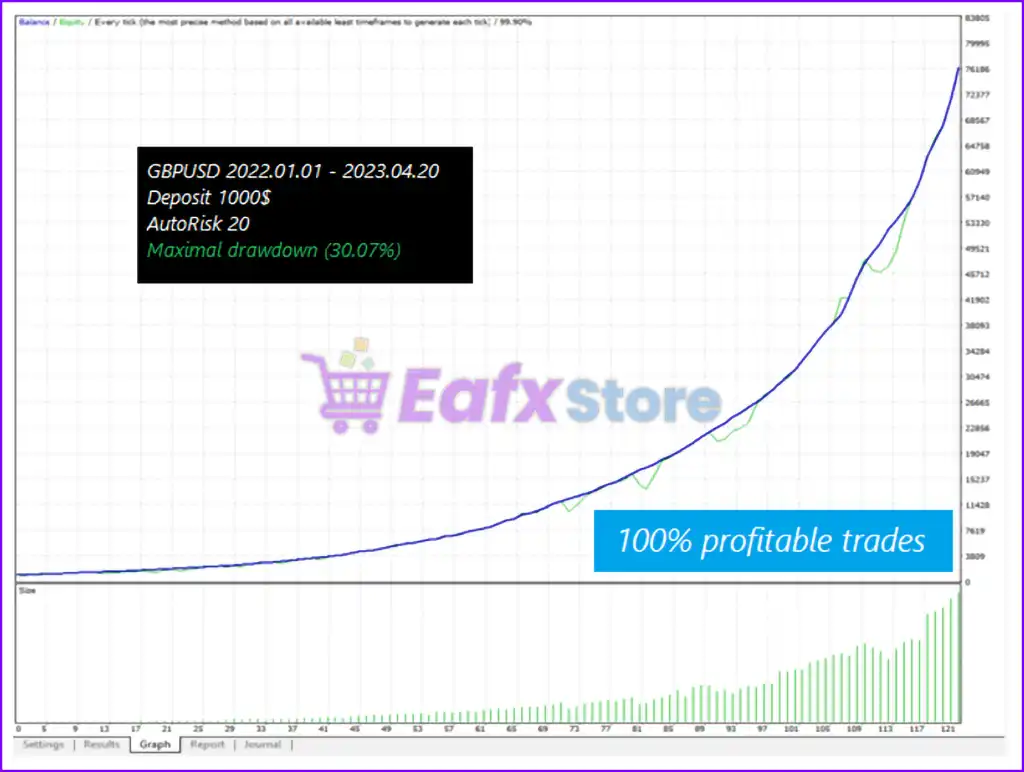
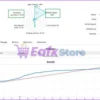
🔶 Backtest trading results with GBPUSD pair for more than 1 year (01/2022 – 04/2023), maintaining impressive profits and optimized risk level at a safe level.
Neurotron EA Review
Why choose Neurotron EA?
🔹 Professional Automated Trading Solution: Designed for disciplined Forex execution and trade control.
🔹 Built-In Stability Mechanisms: Uses volatility filters and rollover protection for safer operation.
🔹 Flexible Risk Configuration: Supports fixed lots, recovery mode and customizable protection levels.
🔹 Indicator-Driven Market Analysis: Combines technical filters for stronger trade confirmation logic.
🔹 Optimized for Dynamic Markets: Adapts efficiently to changing volatility and trend conditions.
🔹 Marketplace-Ready Expert Advisor: Suitable for traders seeking resilient and automated strategies.
Recommended settings
Recommended settings and parameters to pay attention to from developers and experts:
| Features | Type |
|---|---|
| Trading platform | MetaTrader 4 (MT4) |
| Time frames | M15 (15 minute chart) |
| Currency pairs | GBPUSD, EURCHF |
| Minimum / Recommended deposit | $100 |
| Minimum / Recommended leverage | Any |
| Product type | NoDLL / Fix |
| Additional services | Unlock and Decompile |
| Recommended brokers | Exness Broker, Icmarkets Broker |
| Recommended VPS | MyfxVPS.com ( Blue VPS, Golden VPS). Lowest Latency, 2 week Free Trial, 100% Free for 12-18 Months. |
 Reviewed by David Easton
Product Download Package?
The download package of the product suite includes:
1. Experts:
✅ Neurotron EA v1.30_fix.ex4
2. SetFiles:
✅ GBPUSD gmt+3.set
✅ GBPUSD gmt+2.set
✅ GBPUSD gmt+1.set
✅ GBPUSD gmt+0.set
✅ EURCHF gmt+3.set
✅ EURCHF gmt+2.set
✅ EURCHF gmt+1.set
✅ EURCHF gmt+0.set
Conclusion
In short, Neurotron EA stands out as a cutting-edge trading solution that merges the proven effectiveness of the London Coup strategy with the power of neural networks for real-time precision and adaptability. Its hybrid approach—combining AI with Bollinger Bands, CCI, and volatility filters—enables highly accurate trade execution during optimal market conditions, especially in the London session.
🔢 Neurotron EA MT4 – Complete EA Settings Explanation
Neurotron EA MT4 is an advanced automated Forex trading Expert Advisor (EA developed for the MetaTrader 4 platform. The EA combines technical indicators, volatility filters, hedging systems, trailing stop management, and recovery-based money management to automate trading decisions efficiently.
Designed for London session trading strategies, Neurotron EA MT4 provides flexible customization for risk control, trade filtering and market timing optimization.

Neurotron EA MT4 Settings
🔢 Neurotron EA MT4 Input Parameters Explained
Below are the details of the parameters in the advisor’s trading system settings table:
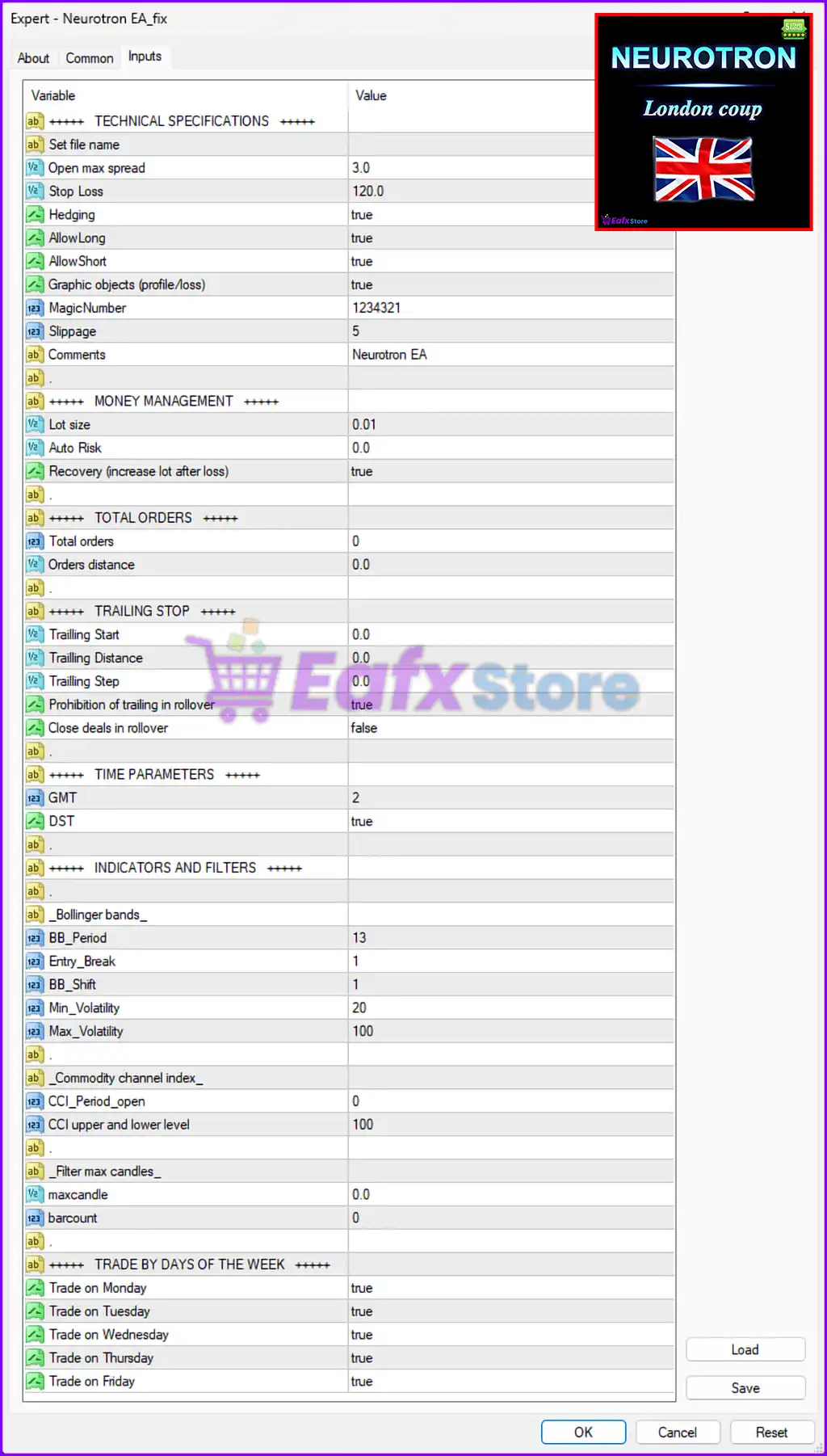
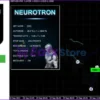
Neurotron EA MT4 Settings Panel
🔹 TECHNICAL SPECIFICATIONS = +++++ TECHNICAL SPECIFICATIONS +++++ — Section header grouping the main technical configuration settings of the EA.
🔹 Set file name — Reserved field used for preset file identification and configuration management.
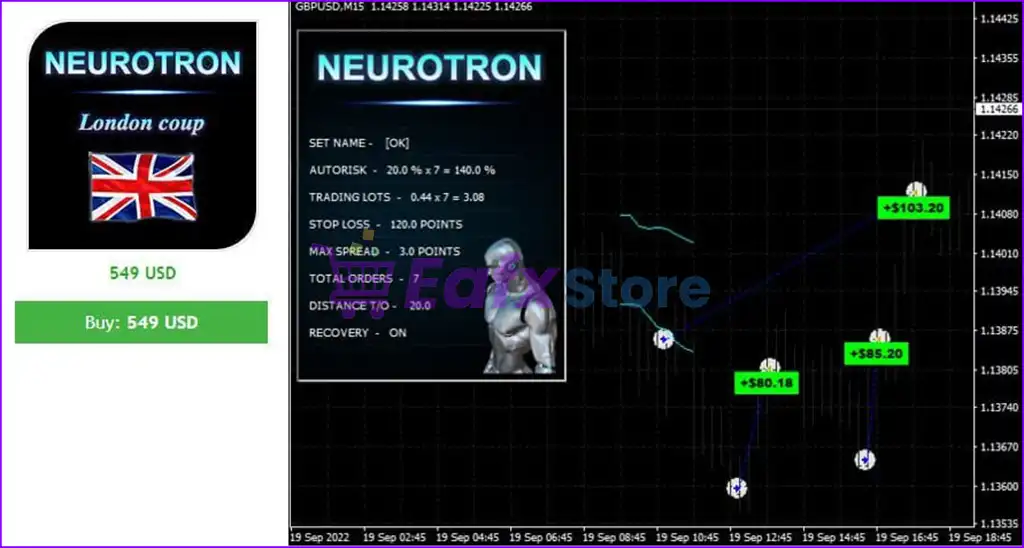
🔹 Open max spread = 3.0 — Defines the maximum spread allowed for opening new trades. The EA avoids trading when the spread exceeds 3.0.
🔹 Stop Loss = 120.0 — Specifies the Stop Loss distance used to protect trades from excessive losses.
🔹 Hedging = true — Enables hedging functionality, allowing simultaneous BUY and SELL positions when strategy conditions require it.
🔹 AllowLong = true — Allows the EA to open BUY trades automatically.
🔹 AllowShort = true — Allows the EA to open SELL trades automatically.
🔹 Graphic objects (profile/loss) = true — Enables graphical objects and account profit/loss information display on the chart.
🔹 MagicNumber = 1234321 — A unique identifier assigned to all trades opened by Neurotron EA MT4 for trade management and tracking.
🔹 Slippage = 5 — Defines the maximum acceptable slippage during order execution.
🔹 Comments = Neurotron EA — Specifies the trade comment text attached to orders opened by the EA.
🔢 Money Management Settings
🔹 MONEY MANAGEMENT = +++++ MONEY MANAGEMENT +++++ — Section header grouping all account risk and lot management parameters.
🔹 Lot size = 0.01 — Defines the fixed starting lot size used when opening trades.
🔹 Auto Risk = 0.0 — Specifies the automatic risk percentage used for dynamic lot sizing. A value of 0.0 means automatic risk calculation is disabled.
🔹 Recovery (increase lot after loss) = true — Enables recovery mode that increases lot sizes after losing trades to recover previous losses.
🔢 Total Orders Settings
🔹 TOTAL ORDERS = +++++ TOTAL ORDERS +++++ — Section header related to trade quantity and order spacing management.
🔹 Total orders = 0 — Defines the maximum number of allowed simultaneous orders. A value of 0 may indicate unlimited or strategy-controlled orders.
🔹 Orders distance = 0.0 — Specifies the minimum distance between trade entries or grid positions.
🔢 Trailing Stop Settings
🔹 TRAILING STOP = +++++ TRAILING STOP +++++ — Section header for trailing stop and rollover management settings.
🔹 Trailing Start = 0.0 — Defines the profit level at which trailing stop functionality becomes active.
🔹 Trailing Distance = 0.0 — Specifies the trailing stop distance used for locking profits.
🔹 Trailing Step = 0.0 — Determines the incremental movement step for trailing stop adjustment.
🔹 Prohibition of trailing in rollover = true — Prevents trailing stop operations during rollover periods to avoid spread expansion issues.
🔹 Close deals in rollover = false — Disables automatic trade closure during rollover periods.
🔢 Time Parameters Settings
🔹 TIME PARAMETERS = +++++ TIME PARAMETERS +++++ — Section header grouping time-related trading configurations.
🔹 GMT = 2 — Defines the GMT timezone offset used by the EA for trading schedule synchronization.
🔹 DST = true — Enables Daylight Saving Time adjustment for broker server time calculations.
🔢 Indicators and Filters Settings
🔹 INDICATORS AND FILTERS = +++++ INDICATORS AND FILTERS +++++ — Section header for technical indicators and trade filtering logic.
Bollinger Bands Settings
🔹 Bollinger bands — Configuration category for Bollinger Bands indicator settings.
🔹 BB_Period = 13 — Defines the Bollinger Bands calculation period used for market analysis.
🔹 Entry_Break = 1 — Specifies the breakout condition level used for triggering entries.
🔹 BB_Shift = 1 — Determines the Bollinger Bands indicator shift value.
🔹 Min_Volatility = 20 — Sets the minimum market volatility level required for trade execution.
🔹 Max_Volatility = 100 — Defines the maximum allowable market volatility level for opening trades.
Commodity Channel Index Settings
🔹 Commodity channel index — Configuration category for CCI indicator settings.
🔹 CCI_Period_open = 0 — Defines the CCI calculation period used for trade entry signals.
🔹 CCI upper and lower level = 100 — Specifies the CCI threshold levels used for overbought and oversold filtering.
Candle Filter Settings
🔹 Filter max candles — Section header for candle-based filtering parameters.
🔹 maxcandle = 0.0 — Defines the maximum candle size filter used within the EA strategy.
🔹 barcount = 0 — Specifies the number of candles used for filtering or trade validation logic.
🔢 Trade By Days of the Week Settings
🔹 TRADE BY DAYS OF THE WEEK = +++++ TRADE BY DAYS OF THE WEEK +++++ — Section header controlling weekday trading permissions.
🔹 Trade on Monday = true — Enables automated trading on Monday.
🔹 Trade on Tuesday = true — Enables automated trading on Tuesday.
🔹 Trade on Wednesday = true — Enables automated trading on Wednesday.
🔹 Trade on Thursday = true — Enables automated trading on Thursday.
🔹 Trade on Friday = true — Enables automated trading on Friday.
🔢 Conclusion
Neurotron EA MT4 is a comprehensive automated Forex trading Expert Advisor that combines technical indicators, volatility filtering, hedging systems, and advanced money management into a structured trading solution.
With customizable settings such as Stop Loss, Recovery mode, Bollinger Bands filters, and weekday trading permissions, traders can optimize the EA according to different market conditions and risk preferences. Understanding every parameter is essential for improving trading consistency and maintaining disciplined automated trading operations.
🔢 FAQs
❓ What is Neurotron EA MT4 used for?
Neurotron EA MT4 is an automated Forex trading Expert Advisor designed for MetaTrader 4 using Bollinger Bands, CCI indicators, and hedging strategies.
❓ What does Open max spread = 3.0 mean?
It means the EA will only open trades when the market spread is 3.0 or lower.
❓ Why is Hedging set to true?
The hedging feature allows the EA to open BUY and SELL trades simultaneously under specific market conditions.
❓ What is the purpose of MagicNumber = 1234321?
MagicNumber 1234321 uniquely identifies trades opened by Neurotron EA MT4 for tracking and management.
❓ What does Recovery (increase lot after loss) = true represent?
It means the EA automatically increases lot sizes after losing trades to attempt recovery of previous losses.
User Reviews
Only logged in customers who have purchased this product may leave a review.
1. What is Neurotron EA MT4 and how does it work?
Neurotron EA is a fully automated trading robot for MetaTrader 4 that combines the London Coup strategy, neural networks, and technical indicators to identify profitable trading opportunities during the London session.
2. What trading pairs and timeframes are supported?
It is optimized for the GBPUSD and EURCHF pairs and works best on the M15 timeframe.
3. What is the minimum deposit required to start trading with Neurotron EA?
The EA can run on accounts starting from $100, making it accessible for both small and large account holders.
4. How does the neural network enhance trading performance?
Neural networks in Neurotron EA analyze historical and real-time price behavior to improve signal accuracy, adapt to market changes, and reduce false entries.
5. What is the London Coup strategy used by the EA?
The London Coup is a reversal-based strategy that exploits price movements during the London session opening, targeting sharp, short-term reversals with high precision.
6. Does Neurotron EA use Martingale?
Yes, it includes a dynamic risk recovery system that can use martingale-style position sizing to recover losses more effectively, though it also supports fixed risk setups.
7. Is this EA suitable for beginners?
Yes. Neurotron EA is easy to set up, offers AutoRisk mode, and includes full support, making it beginner-friendly while still offering advanced features for experienced traders.
8. How does the EA manage risk during volatile or illiquid conditions?
It includes volatility filters, spread control, and rollover management to avoid trading during market instability or unfavorable conditions.
9. What kind of trading results has Neurotron EA achieved?
Live trading shows returns of up to +178% on a $100 account with a 100% win rate and a maximum drawdown of just 5.9%, proving both profitability and safety.
🔥 Get This EA for FREE with Our Membership! 🚀🚀
Unlock access to this EA, premium Indicators, and exclusive trading tools completely FREE with any of our Membership Plans! Thousands of traders already benefit from our VIP library—join them and level up your trading instantly. Choose Your Membership:
- SPECIAL – 1 Month Membership
- GOLD – 1 Year Membership
- PREMIUM – 1 Year Membership
-
 Original price was: $3,175.00.$249.00Current price is: $249.00.
 -
 Original price was: $2,000.00.$599.00Current price is: $599.00.
 -
 Original price was: $999.00.$599.00Current price is: $599.00.
 -
 Original price was: $2,000.00.$199.00Current price is: $199.00.
-
 10Original price was: $499.00.$69.00Current price is: $69.00.
 -
 1Original price was: $1,599.00.$59.00Current price is: $59.00.
 -
 1Original price was: $599.00.$59.00Current price is: $59.00.
 -
 1Original price was: $950.00.$59.00Current price is: $59.00.
There are no reviews yet.