


🔢 EA TREND MT4 – Complete Settings Guide for Forex Automation
EA TREND MT4 is an automated Forex trading Expert Advisor (EA) designed to detect market trends and execute trades automatically based on predefined trading logic.
It includes advanced risk management, trade filtering, money management, trailing systems, drawdown protection and news filters.
This EA is suitable for traders who want to automate buy/sell operations while maintaining flexible control over Lot size, Stop Loss (SL), Take Profit (TP) and market conditions.

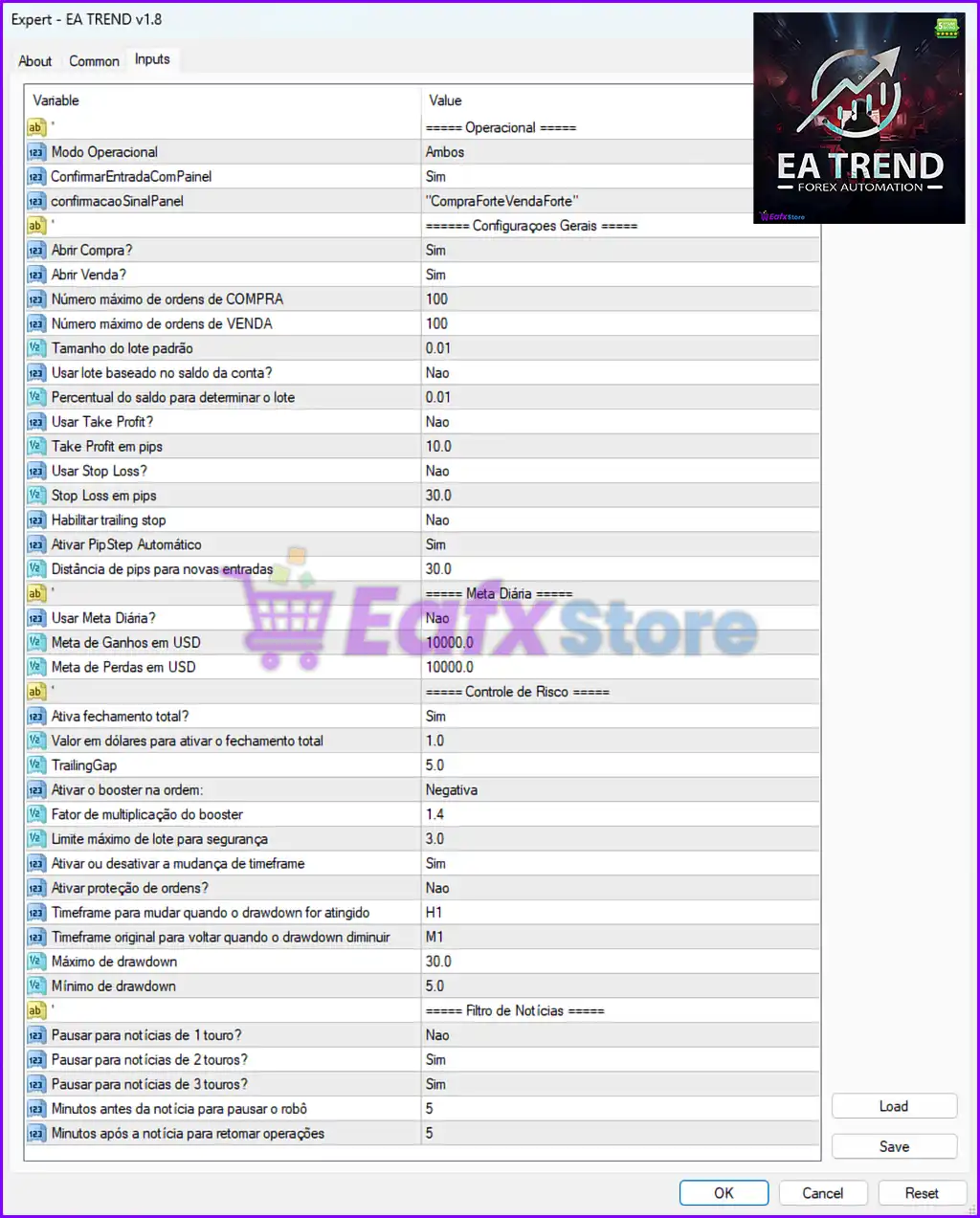
🔹 Operational Mode (Modo Operacional) = Ambos — Defines the trading direction mode; “Ambos” means the EA can open both BUY and SELL trades simultaneously.
🔹 ConfirmarEntradaComPainel = Sim — Enables confirmation of trade entries through the trading panel before executing positions.
🔹 confirmacaoSinalPainel = "CompraForteVendaForte" — Uses strong BUY and strong SELL signals from the panel as confirmation criteria for trade execution.
🔹 Abrir Compra? = Sim — Allows the EA to open BUY orders automatically.
🔹 Abrir Venda? = Sim — Allows the EA to open SELL orders automatically.
🔹 Número máximo de ordens de COMPRA = 100 — Sets the maximum number of BUY orders the EA can open at the same time.
🔹 Número máximo de ordens de VENDA = 100 — Sets the maximum number of SELL orders the EA can maintain simultaneously.
🔹 Tamanho do lote padrão = 0.01 — Defines the default trading lot size used by the EA.
🔹 Usar lote baseado no saldo da conta? = Nao — Disables automatic lot size calculation based on account balance.
🔹 Percentual do saldo para determinar o lote = 0.01 — Specifies the percentage of account balance used for dynamic lot calculation when enabled.
🔹 Usar Take Profit? = Nao — Disables automatic Take Profit functionality.
🔹 Take Profit em pips = 10.0 — Sets the Take Profit target distance to 10.0 pips.
🔹 Usar Stop Loss? = Nao — Disables Stop Loss protection for trades.
🔹 Stop Loss em pips = 30.0 — Defines the Stop Loss distance at 30.0 pips.
🔹 Habilitar trailing stop = Nao — Disables the trailing stop feature.
🔹 Ativar PipStep Automático = Sim — Enables automatic PipStep calculation for spacing between new orders.
🔹 Distância de pips para novas entradas = 30.0 — Sets a 30.0 pip distance before opening additional positions.
🔢 Daily Target Settings
🔹 Usar Meta Diária? = Nao — Disables the daily profit/loss target system.
🔹 Meta de Ganhos em USD = 10000.0 — Sets the daily profit target to 10000.0 USD.
🔹 Meta de Perdas em USD = 10000.0 — Sets the maximum daily loss limit to 10000.0 USD.
🔢 Risk Management Settings
🔹 Ativa fechamento total? = Sim — Enables total position closure when risk conditions are met.
🔹 Valor em dólares para ativar o fechamento total = 1.0 — Triggers total closure when reaching 1.0 USD defined condition.
🔹 TrailingGap = 5.0 — Defines the trailing gap distance as 5.0 points/pips.
🔹 Ativar o booster na ordem = Negativa — Activates booster logic only when trades are in negative conditions.
🔹 Fator de multiplicação do booster = 1.4 — Multiplies lot size by 1.4 for booster/recovery trades.
🔹 Limite máximo de lote para segurança = 3.0 — Limits the maximum lot size to 3.0 for account protection.
🔹 Ativar ou desativar a mudança de timeframe = Sim — Enables automatic timeframe switching during drawdown situations.
🔹 Ativar proteção de ordens? = Nao — Disables additional order protection mechanisms.
🔹 Timeframe para mudar quando o drawdown for atingido = H1 — Changes trading timeframe to H1 when drawdown threshold is reached.
🔹 Timeframe original para voltar quando o drawdown diminuir = M1 — Returns to the original M1 timeframe after drawdown decreases.
🔹 Máximo de drawdown = 30.0 — Sets the maximum allowed drawdown level to 30.0%.
🔹 Mínimo de drawdown = 5.0 — Defines the minimum drawdown recovery threshold as 5.0%.
🔢 News Filter Settings
🔹 Pausar para notícias de 1 touro? = Nao — Does not pause trading for low-impact news events.
🔹 Pausar para notícias de 2 touros? = Sim — Pauses trading during medium-impact news events.
🔹 Pausar para notícias de 3 touros? = Sim — Pauses trading during high-impact news events.
🔹 Minutos antes da notícia para pausar o robô = 5 — Stops EA trading 5 minutes before important news releases.
🔹 Minutos após a notícia para retomar operações = 5 — Resumes EA trading 5 minutes after the news event ends.
🔢 Conclusion
EA TREND MT4 is a powerful automated Forex trading robot equipped with advanced trend-following capabilities, dynamic risk management tools, drawdown protection, news filters and flexible order management settings.
With features such as automatic PipStep, booster multiplication, timeframe switching, and customizable trading limits, the EA provides traders with strong automation and control for various market conditions. Proper configuration of these settings is essential to optimize performance and reduce trading risks.
🔢 FAQs
❓ What is EA TREND MT4 used for?
EA TREND MT4 is an automated Forex trading Expert Advisor designed to identify market trends and execute trades automatically.
❓ Can EA TREND MT4 trade both BUY and SELL positions?
Yes, the Operational Mode is set to “Ambos,” which allows both BUY and SELL trading operations.
❓ Does EA TREND MT4 include risk management features?
Yes, it includes Stop Loss, Take Profit, drawdown control, lot limitation, booster management, and total closure protection.
❓ How does the news filter work in EA TREND MT4?
The EA pauses trading before medium and high-impact news events and resumes trading after the specified waiting period.
❓ Can the lot size be adjusted automatically in EA TREND MT4?
Yes, the EA supports automatic lot calculation based on account balance when enabled.


