






AutoX Pro EA MT4 v4.1 with SetFiles (Platform build 1471+)

Subscriptions for Special Plan
- 30 EA package is more economical!
- Special package with 99%
- Download 1 EA/Day

Subscriptions for Premium Membership
- Download Unlimited in 1 Year
- Get 100% Discount
- Get free access to all

Subscriptions for Gold Membership
- 1 Year Membership
- Get 100% Discount
- Access EA+Indicator+Course
Frequently bought together 🎁
Add these products to enhance your purchase




What is AutoX Pro EA MT4?
AutoX Pro EA is a powerful, fully automated Expert Advisor (EA) developed for MetaTrader 4 (MT4), built on a unique combination of Fibonacci strategy, price action, time filters and optional news avoidance. Tailored for traders who value precision, safety, and adaptive strategies, AutoX Pro EA brings intelligent automation to the forex markets.
🔶 Vender Website: Click here
About the Author
This product is compiled by ThucQuyen. This author has more than +5 years of experience working on MyFxBook with many famous products such as AutoX Pro EA MT4, Kick3TOP MT4, NFP Magic EA, AutoX Pro EA MT5 and other advisors. Among them, AutoX Pro EA is his best performing products.
AutoX Pro EA Review
Key Features of AutoX Pro EA
🔹 Fibonacci Channel Analysis: Uses adaptive Fibonacci levels for precise trade entry confirmation.
🔹 Advanced Price Action Filters: Combines candle validation with market range analysis logic.
🔹 Integrated News Protection: Supports configurable news filters for safer automated execution.
🔹 Flexible Risk Management System: Includes Fixed lots, Auto lots, Stop Loss (SL) and Take Profit (TP) protection.
🔹 Spread and Order Control: Prevents trading during unstable spread and overtrading conditions.
🔹 Grabber Indicator Integration: Enhances signal filtering with additional momentum confirmation.
What is the AutoX Pro EA Trading Strategy?
🔹 Fibonacci Retracement Trading: Executes trades based on predefined Fibonacci touch levels.
🔹 Price Action Confirmation Logic: Uses candle behavior and bar analysis for entry precision.
🔹 Volatility and Spread Filtering: Avoids unstable market conditions through spread controls.
🔹 Time-Based Trading Sessions: Focuses trading during optimized market activity periods only.
🔹 Dynamic Trade Management: Controls simultaneous positions with advanced order limitation rules.
🔹 Indicator-Based Momentum Filtering: Uses Grabber thresholds to validate stronger market setups.
AutoX Pro EA MT4 Review
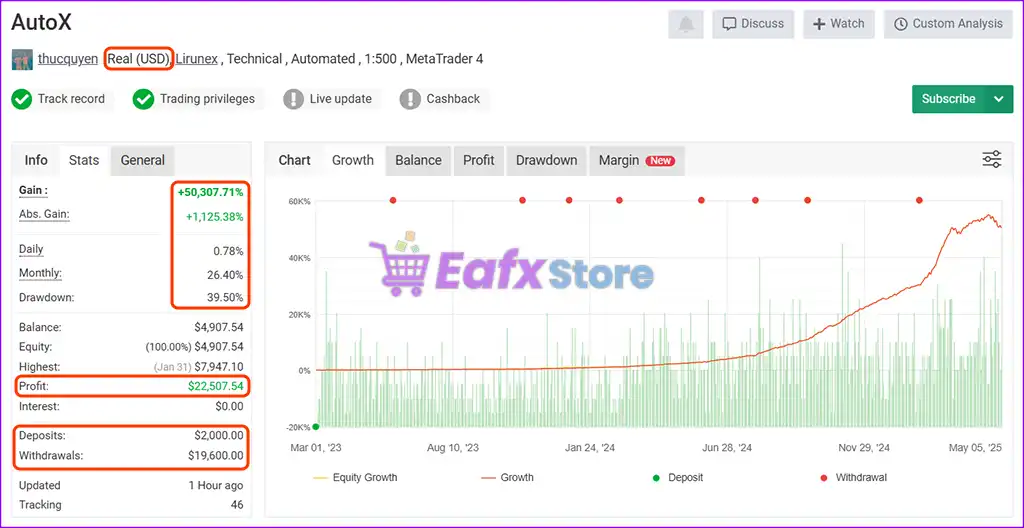
🔶 AutoX Pro EA real profit performance is meticulously verified by Myfxbook. The advisor focuses on consistent and scalable growth using technical trading logic. Here is a comprehensive analysis of its real account performance on Lirunex exchange with 1:500 leverage setting.
✅ Total Gain: +50,307.71%
✅ Deposits: $2,000
✅ Monthly Growth Rate: 26.40%
✅ Maximum Drawdown: 39.50%
✅ Live Signal Myfxbook: View here
AutoX Pro EA Live Signal Myfxbook
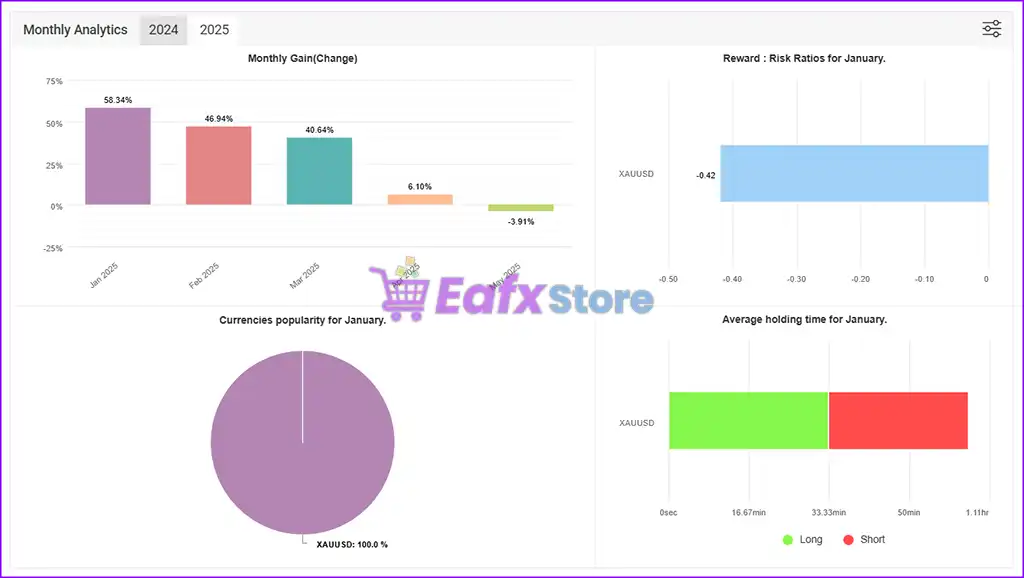
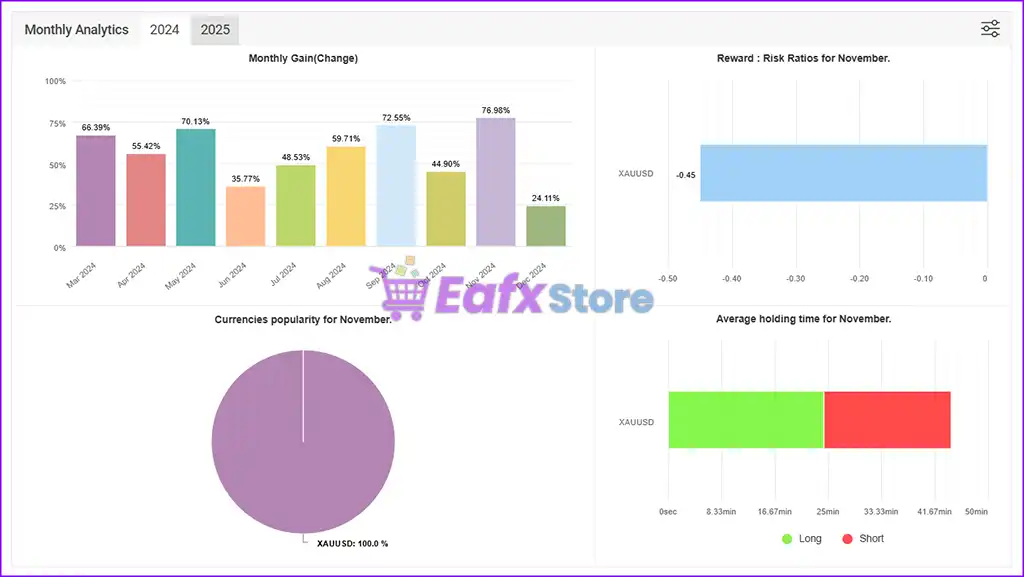
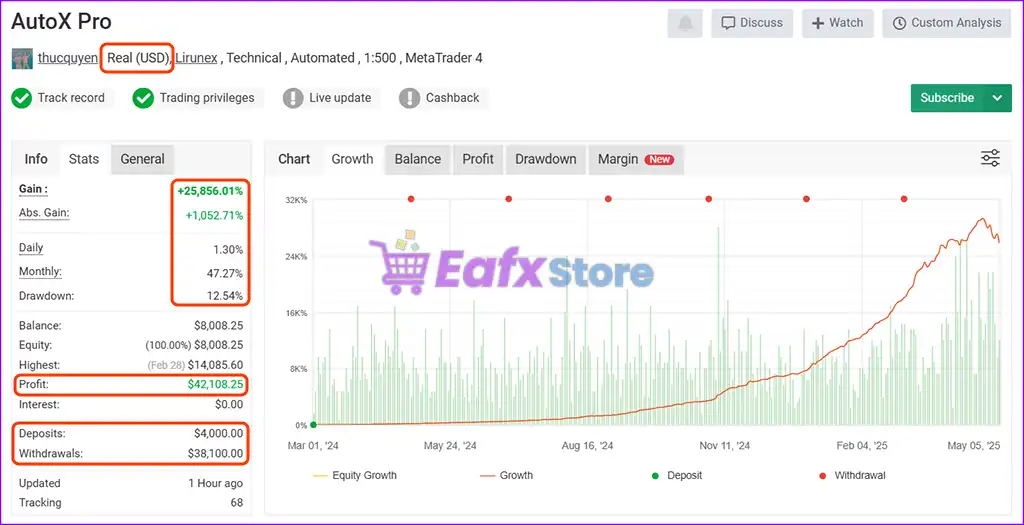
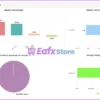
🔶 AutoX Pro EA’s real-world performance on a $4,000 account is meticulously verified by Myfxbook. Detailed performance metrics over 15 months of trading include:
✅ Total Gain: +25,856%
✅ Deposits: $4,000
✅ Monthly Growth Rate: 47.27%
✅ Maximum Drawdown: 12.54%
✅ Live Signal Myfxbook: View here
AutoX Pro EA MT4 Live Signal Myfxbook
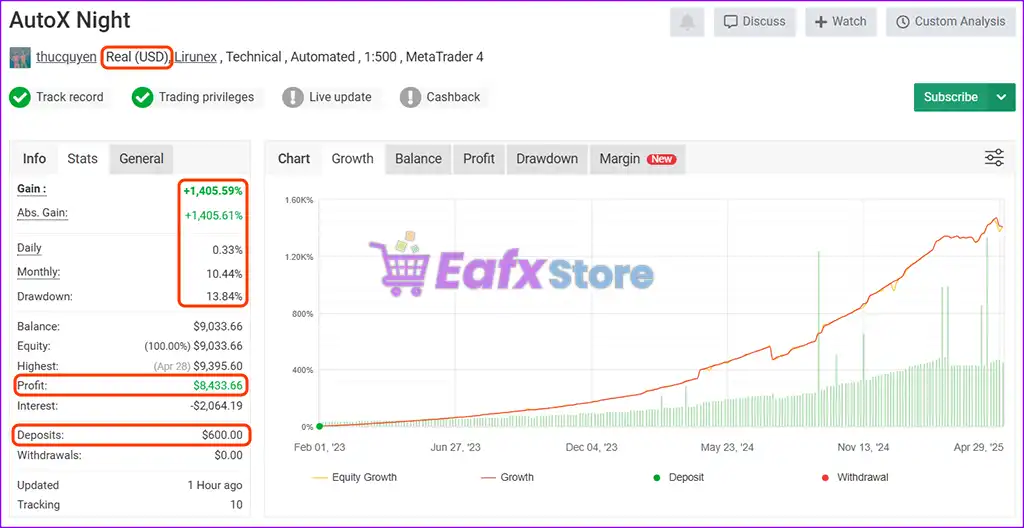
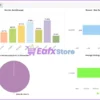
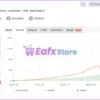
🔶 AutoX Pro’s real-world profit performance on a $600 account is meticulously verified by Myfxbook. Detailed profit performance metrics over 27 months of trading include:
✅ Total Gain: +1,405.59%
✅ Deposits: $600
✅ Monthly Growth Rate: 10.44%
✅ Maximum Drawdown: 13.84%
✅ Live Signal Myfxbook: View here
AutoX Pro EA MT4 Signal Myfxbook
Why choose AutoX Pro EA?
🔹 Structured Automated Trading: Combines technical analysis with disciplined execution systems.
🔹 Stable Risk-Control Framework: Supports controlled exposure and adaptive trading protection.
🔹 Optimized for Market Adaptability: Adjusts efficiently to volatility and trend conditions.
🔹 Professional Forex Automation Tool: Designed for traders seeking consistent trade management.
🔹 Customizable Trading Parameters: Allows flexible optimization for different market strategies.
🔹 Marketplace-Ready Trading Solution: Suitable for automated Forex trading environments worldwide.
Recommended settings
Recommended settings and parameters to pay attention to from developers and experts:
| Features | Type |
|---|---|
| Trading platform | MetaTrader 4 (MT4) |
| Time frames | M15 (15 minute chart) |
| Currency pairs | Any Pairs |
| Minimum / Recommended deposit | $100 |
| Minimum / Recommended leverage | Any |
| Product type | NoDLL / Fix |
| Additional services | Unlock and Decompile |
| Recommended brokers | Exness Broker, Icmarkets Broker |
| Recommended VPS | MyfxVPS.com ( Blue VPS, Golden VPS). Lowest Latency, 2 week Free Trial, 100% Free for 12-18 Months. |
 Reviewed by David Easton
Product Download Package?
The download package of the product suite includes:
1. Experts:
✅ AutoX Pro EA v4.1.ex4
2. SetFiles:
✅ EURCAD.set
✅ EURGBP.set
✅ EURNZD.set
✅ GBPAUD.set
✅ GBPCAD.set
✅ GBPCHF.set
✅ NZDCAD.set
✅ AUDCAD.set
✅ AUDNZD.set
✅ EURAUD.set
Conclusion
In short, AutoX Pro EA stands out as one of the most advanced and reliable Expert Advisors for traders seeking a smart, rule-based approach grounded in Fibonacci levels, price action and time-sensitive filters. Designed for both novice and experienced traders, this EA combines powerful entry logic with advanced risk management, delivering consistent, verifiable results across multiple live trading accounts.
🔢 AutoX Pro EA MT4 – Complete EA Settings Explanation
AutoX Pro EA MT4 is an advanced automated Forex trading Expert Advisor (EA) designed for the MetaTrader 4 platform.
The EA combines Fibonacci channel analysis, price action trading, news filtering, spread control, and automated order management to optimize trade execution.
With flexible risk management and customizable trading filters, AutoX Pro EA MT4 helps traders automate Forex strategies while maintaining disciplined market control.
AutoX Pro EA MT4 Settings
🔢 Installation Panel Parameters
Below are the details of the parameters in the advisor’s trading system settings table:
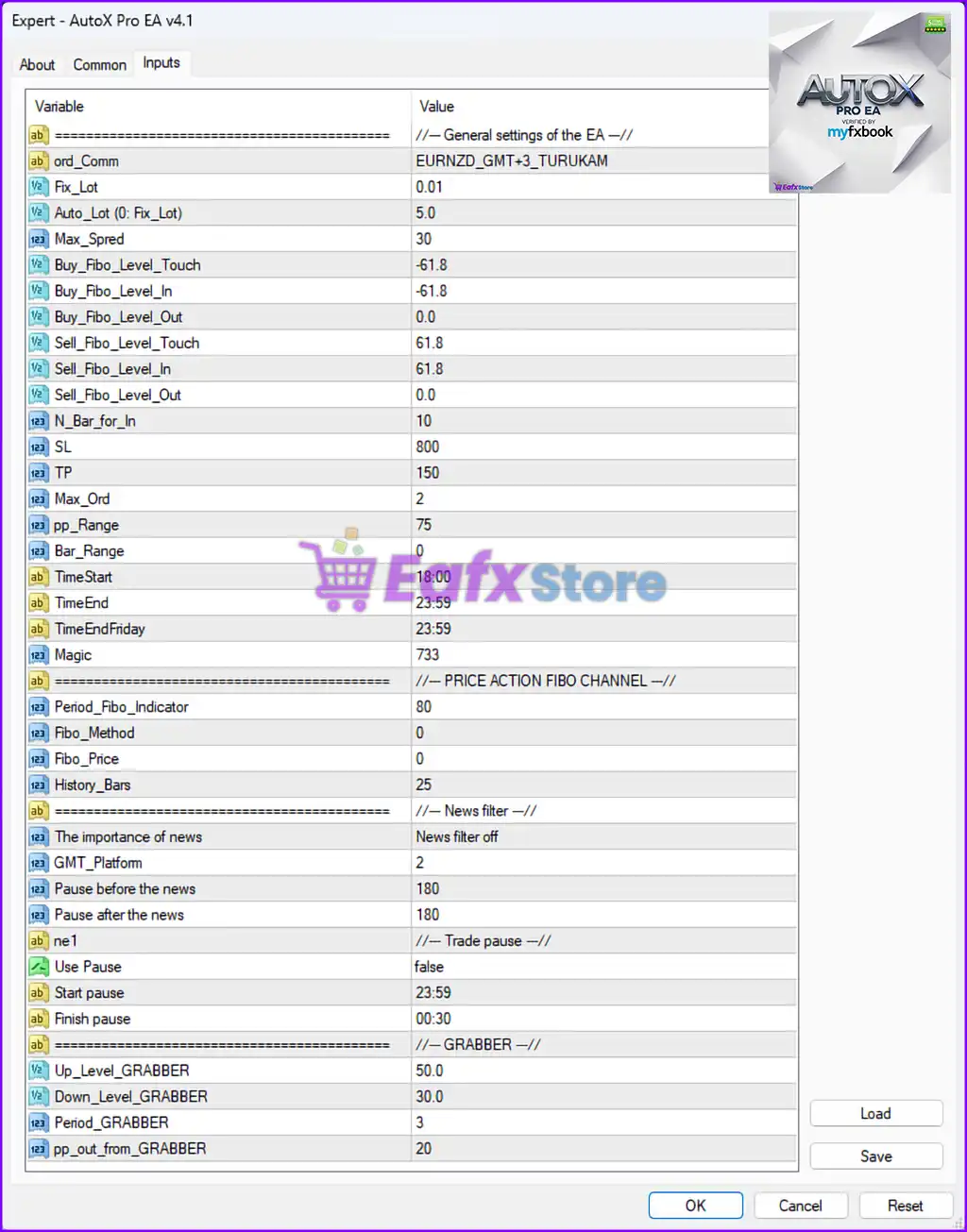
AutoX Pro EA MT4 Settings Panel
🔶 Parameters Explained
🔹 General settings of the EA = //— General settings of the EA —// — Section header grouping the primary operational settings of the Expert Advisor.
🔹 ord_Comm = EURNZD_GMT+3_TURUKAM — Defines the internal order comment or trade identification label attached to positions opened by the EA.
🔹 Fix_Lot = 0.01 — Specifies the fixed trading lot size used when opening positions. A value of 0.01 represents micro lot trading.
🔹 Auto_Lot (0: Fix_Lot) = 5.0 — Defines the automatic lot calculation parameter. The value 5.0 controls dynamic lot sizing when Auto Lot mode is enabled.
🔹 Max_Spred = 30 — Sets the maximum spread allowed for opening new trades. The EA avoids trading when spreads exceed 30.
🔹 Buy_Fibo_Level_Touch = -61.8 — Specifies the Fibonacci retracement level required for BUY trade touch conditions.
🔹 Buy_Fibo_Level_In = -61.8 — Defines the Fibonacci level used for confirming BUY trade entries.
🔹 Buy_Fibo_Level_Out = 0.0 — Determines the Fibonacci level used for closing BUY positions.
🔹 Sell_Fibo_Level_Touch = 61.8 — Specifies the Fibonacci retracement level required for SELL trade touch conditions.
🔹 Sell_Fibo_Level_In = 61.8 — Defines the Fibonacci level used for confirming SELL trade entries.
🔹 Sell_Fibo_Level_Out = 0.0 — Determines the Fibonacci level used for closing SELL positions.
🔹 N_Bar_for_In = 10 — Specifies the number of candles used for trade entry confirmation.
🔹 SL = 800 — Defines the Stop Loss value used for limiting trading losses.
🔹 TP = 150 — Specifies the Take Profit target used for automatic profit closure.
🔹 Max_Ord = 2 — Limits the maximum number of simultaneous open orders to 2 trades.
🔹 pp_Range = 75 — Defines the pip range filter used within the EA trading strategy.
🔹 Bar_Range = 0 — Specifies the candle range filter parameter used for entry validation.
🔹 TimeStart = 18:00 — Determines the starting trading time for automated operations.
🔹 TimeEnd = 23:59 — Defines the ending time for daily trading activity.
🔹 TimeEndFriday = 23:59 — Specifies the Friday trading session end time.
🔹 Magic = 733 — A unique Magic Number assigned to trades opened by the EA for trade identification and management.
🔶 Price Action Fibo Channel Settings
🔹 PRICE ACTION FIBO CHANNEL = //— PRICE ACTION FIBO CHANNEL —// — Section header grouping Fibonacci channel indicator configurations.
🔹 Period_Fibo_Indicator = 80 — Defines the calculation period used by the Fibonacci indicator.
🔹 Fibo_Method = 0 — Specifies the Fibonacci calculation method used by the EA strategy.
🔹 Fibo_Price = 0 — Determines the applied price type used for Fibonacci calculations.
🔹 History_Bars = 25 — Defines the number of historical candles analyzed by the Fibonacci channel system.
🔶 News Filter Settings
🔹 News filter = //— News filter —// — Section header grouping economic news filtering settings.
🔹 The importance of news = News filter off — Indicates that the economic news filter feature is currently disabled.
🔹 GMT_Platform = 2 — Specifies the GMT timezone offset used for synchronizing news event timing.
🔹 Pause before the news = 180 — Defines the number of minutes the EA pauses trading before major news releases.
🔹 Pause after the news = 180 — Specifies the number of minutes the EA waits after news releases before resuming trading.
🔶 Trade Pause Settings
🔹 Trade pause = //— Trade pause —// — Section header grouping trading pause schedule configurations.
🔹 Use Pause = false — Disables the automatic trade pause feature.
🔹 Start pause = 23:59 — Defines the start time for temporary trade suspension.
🔹 Finish pause = 00:30 — Specifies the end time for the trading pause period.
Grabber Indicator Settings
🔹 GRABBER = //— GRABBER —// — Section header for the Grabber indicator trading system.
🔹 Up_Level_GRABBER = 50.0 — Defines the upper threshold level used by the Grabber indicator.
🔹 Down_Level_GRABBER = 30.0 — Specifies the lower threshold level used by the Grabber indicator.
🔹 Period_GRABBER = 3 — Determines the calculation period used by the Grabber indicator.
🔹 pp_out_from_GRABBER = 20 — Defines the pip exit distance used by the Grabber strategy component.
🔢 Conclusion
AutoX Pro EA MT4 is a feature-rich automated Forex trading Expert Advisor that combines Fibonacci retracement analysis, price action trading, news filtering and advanced trade management into a structured trading solution.
With configurable settings such as SL, TP, Max_Ord, Fibonacci levels, and Grabber indicator thresholds, traders can customize the EA according to different market conditions and risk management preferences. Understanding every parameter is essential for maximizing EA performance and maintaining disciplined automated trading operations.
🔢 FAQs
❓ What is AutoX Pro EA MT4 used for?
AutoX Pro EA MT4 is an automated Forex trading Expert Advisor designed for MetaTrader 4 using Fibonacci channels, price action analysis, and advanced trade management.
❓ What does Fix_Lot = 0.01 mean?
It means the EA opens trades using a fixed micro lot size of 0.01.
❓ Why is Max_Spred = 30 important?
The EA avoids opening trades when the market spread exceeds 30, helping reduce trading costs during volatile conditions.
❓ What is the purpose of Magic = 733?
Magic Number 733 uniquely identifies trades opened by AutoX Pro EA MT4 for tracking and management purposes.
❓ What does The importance of news = News filter off represent?
It means the economic news filter feature is currently disabled, so the EA does not pause trading automatically during news events.
User Reviews
Only logged in customers who have purchased this product may leave a review.
1. What is AutoX Pro EA and how does it work?
AutoX Pro EA is a fully automated trading robot for MetaTrader 4 that uses Fibonacci levels, price action, and time filters to execute high-precision trades while minimizing risk through built-in protections.
2. Which trading pairs and timeframes does AutoX Pro EA support?
AutoX Pro EA works on any currency pair and is optimized for the M15 timeframe, making it versatile across a range of market conditions.
3. What is the minimum deposit required to start using AutoX Pro EA?
You can begin using AutoX Pro EA with as little as $100, though higher capital may allow more flexible position sizing and smoother performance.
4. Does AutoX Pro EA work during news events?
Yes, but it includes an optional news filter that can pause trading before and after high-impact events like NFP, CPI, and FOMC, reducing risk during volatile periods.
5. Is AutoX Pro EA suitable for beginners?
Yes. While it's designed with powerful customization features for experienced users, it also offers default settings that allow beginners to start quickly with minimal adjustments.
6. How does the EA manage risk and prevent overtrading?
AutoX Pro EA uses features like maximum order caps, fixed or auto lot sizes, SL/TP targets, spread control, and time-based session filters to manage risk effectively.
7. What kind of strategy is the “Grabber” module?
The Grabber module is an optional strategy that detects reversal signals or overbought/oversold conditions, helping to catch market turns based on price behavior and thresholds.
8. Can AutoX Pro EA be used on multiple accounts or brokers?
Yes, it is broker-independent and supports multi-EA setups via custom Magic Numbers. It works on any MT4 broker with reliable execution.
9. What kind of results has AutoX Pro EA achieved on live accounts?
Verified Myfxbook data shows gains of over 25,000% on a $4,000 account with monthly growth up to 47.27%, and drawdowns as low as 12.54%, reflecting strong and consistent performance.
🔥 Get This EA for FREE with Our Membership! 🚀🚀
Unlock access to this EA, premium Indicators, and exclusive trading tools completely FREE with any of our Membership Plans! Thousands of traders already benefit from our VIP library—join them and level up your trading instantly. Choose Your Membership:
- SPECIAL – 1 Month Membership
- GOLD – 1 Year Membership
- PREMIUM – 1 Year Membership
-
 Original price was: $30,000.00.$249.00Current price is: $249.00.
 -
 Original price was: $30,000.00.$249.00Current price is: $249.00.
 -
 Price range: $89.00 through $599.00
 -
 Price range: $80.00 through $599.00
-
 10Original price was: $499.00.$69.00Current price is: $69.00.
 -
 1Original price was: $599.00.$59.00Current price is: $59.00.
 -
 3Original price was: $999.00.$69.00Current price is: $69.00.
 -
 10Original price was: $2,100.00.$59.00Current price is: $59.00.
There are no reviews yet.