Quantturbo EA MT5 Settings Explained – Complete Configuration Guide
Quantturbo EA is an automated trading Expert Advisor designed for MetaTrader 5 that simplifies trading through an intelligent automatic configuration system. Instead of requiring dozens of manual parameters, the EA focuses on a few essential settings that control its operating mode, protection status, money management profile and trading lot size.
This streamlined approach makes Quantturbo suitable for both beginners and experienced traders who want a quick and efficient setup while maintaining flexibility in risk management.
Quantturbo EA MT5 Settings
Quantturbo EA MT5 Settings
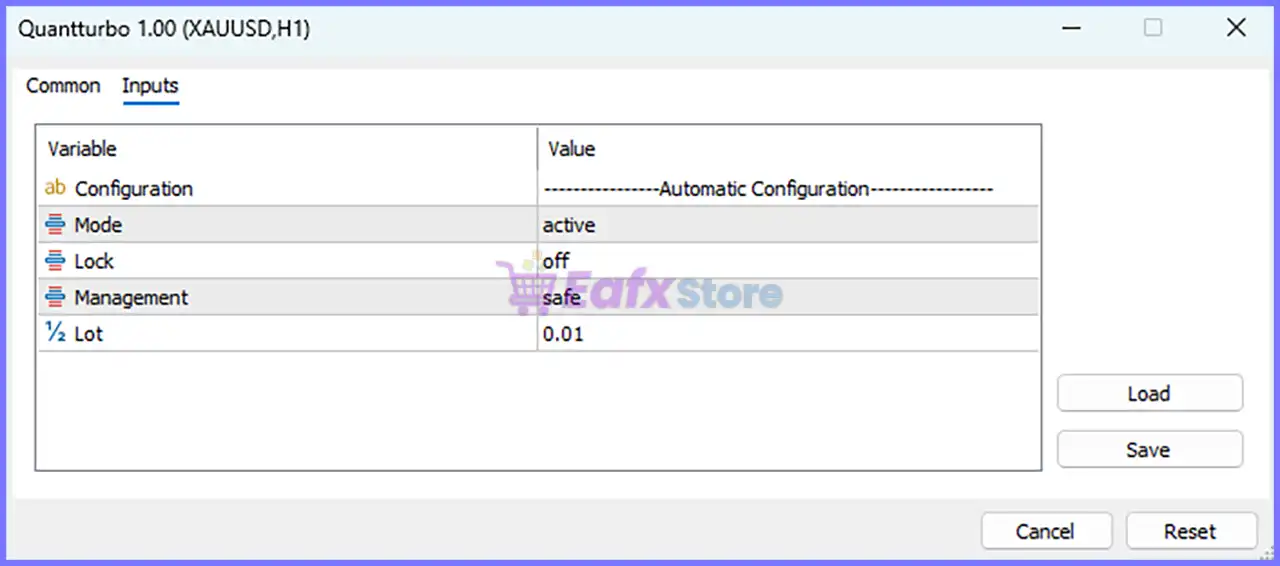
Below are the details of the parameters in the advisor’s trading system settings table:
Quantturbo EA MT5 Settings Panel
Automatic Configuration
🔹 Configuration = Automatic Configuration – Indicates that the EA uses an Automatic Configuration profile to simplify setup and optimize its internal trading parameters.
🔹 Mode = active – Enables the EA and allows it to execute its automated trading strategy in real market conditions.
🔹 Lock = off – Disables the configuration lock, allowing users to modify the EA settings whenever necessary.
🔹 Management = safe – Selects the Safe money management profile, prioritizing conservative risk control and stable position sizing.
🔹 Lot = 0.01 – Sets the initial trading volume to 0.01 lots, making it suitable for small accounts or conservative trading.
Conclusion
Quantturbo EA offers a minimalist yet practical configuration interface that emphasizes ease of use and efficient risk management. With only a handful of essential settings—including Mode, Lock, Management, and Lot Size—the EA can be configured quickly while still allowing traders to control its operational status and trading risk.
The Safe management mode combined with a 0.01 lot size provides a conservative starting point, making the EA suitable for traders who prefer automated trading with controlled exposure.
FAQs
❓ What does the Mode parameter do in Quantturbo EA MT5? It controls whether the Expert Advisor is active and allowed to execute automated trades.
❓ What is the purpose of the Lock option? The Lock parameter protects the current configuration. When set to off, users can freely modify the EA settings.
❓ What does the Safe Management mode mean? Safe Management applies a conservative money management profile designed to reduce trading risk and improve capital preservation.
❓ Can I change the default lot size? Yes. The Lot parameter can be adjusted according to your account balance, leverage, and personal risk tolerance.
❓ Is Quantturbo EA MT5 suitable for beginners? Yes. Its automatic configuration system and simplified settings make it easy to install, configure, and operate without extensive manual adjustments.
Full review
Quick Verdict
Quantturbo EA is an advanced automated trading Expert Advisor (EA) that combines trend-following analysis, multi-moving average confirmation, and intelligent money management into a simple, user-friendly package. Supporting five major currency pairs with automatic configuration modes, it offers an excellent balance between ease of use, portfolio diversification, and disciplined risk management.
Best For
✅ Multi-currency Forex traders
✅ Beginner and intermediate MT5 users
✅ Traders seeking fully automated trading
✅ Investors preferring simple EA configuration
✅ Traders focused on conservative money management
Overall Rating
9.1/10 ⭐⭐⭐⭐⭐
Category
Rating
Strategy Quality
9.2/10
Automation
9.4/10
Ease of Use
9.6/10
Risk Management
8.9/10
Flexibility
9.0/10
Performance
9.1/10
Overall Rating
9.1/10
What is Quantturbo EA MT5?
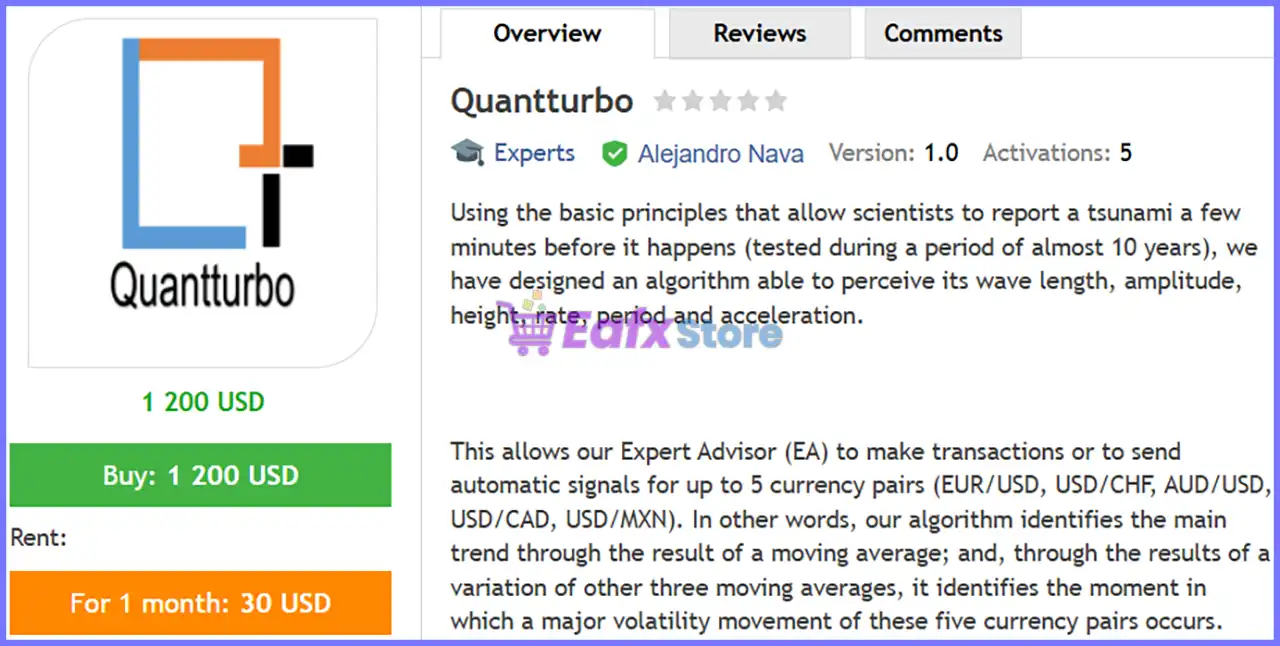
Quantturbo EA is a fully automated Forex Expert Advisor developed for MetaTrader 5 that applies mathematical market analysis inspired by wave behavior. Similar to the scientific principles used to detect tsunami patterns, the EA analyzes market characteristics such as wave length, amplitude, acceleration, and volatility to identify potential trading opportunities before significant market movements occur.
Unlike many complex trading robots that require dozens of settings, Quantturbo uses an intelligent automatic configuration system. Traders only need to configure a few essential parameters, while the EA manages the majority of trading decisions internally.
⭐ You will receive the current version without any limitations (ID+Time).
Quantturbo EA MT5 Review
How Does Quantturbo EA MT5 Work?
Trend Identification
The EA first determines the primary market direction using a moving average trend model.
Multi-Moving Average Confirmation
Three additional Moving Averages (MA) work together to identify periods of increasing market volatility before trade execution.
Volatility Detection
Instead of entering random positions, Quantturbo attempts to detect significant volatility expansions where stronger price movements are expected.
Multi-Currency Operation
One EA instance can automatically manage trades across five supported Forex pairs simultaneously.
Automatic Execution
When operating in Active Mode, the EA opens, manages, and closes trades without requiring manual intervention.
Signal Generation
Users who prefer manual trading can switch to Signal Mode or Single Signal Mode to receive trading opportunities instead of automatic execution.
Key Features of Quantturbo EA
Automatic Configuration
Minimal setup makes installation fast and user-friendly.
Multi-Currency Trading
Trades five major Forex pairs from a single EA.
Three Money Management Profiles
Choose between Safe, Smart, or Shark depending on your preferred level of risk.
Trend and Volatility Analysis
Combines multiple moving averages to identify high-probability market conditions.
Multiple Operating Modes
Supports fully automated trading or signal-only operation.
Beginner-Friendly Interface
Only a handful of parameters require user configuration.
Flexible Position Sizing
Users can customize the starting lot size according to account balance.
Long-Term Tested Algorithm
The trading concept has reportedly been tested over nearly ten years of historical market data.
Backtest Trading Results Performance
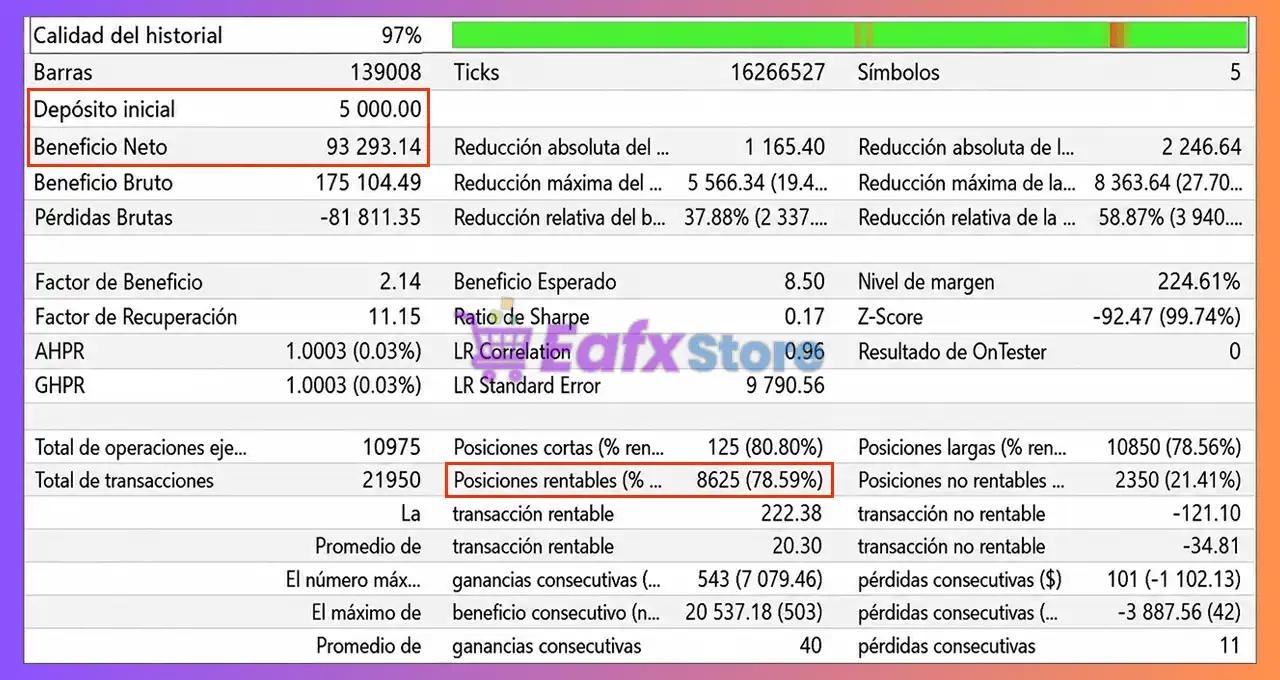
According to the published backtest report using Every Tick Based on Real Ticks, Quantturbo EA MT5 produced the following historical performance.
Quantturbo EA Backtest Results
Metric
Result
Initial Deposit
$5,000
Total Net Profit
$93,293.14
Profit Factor
2.14
Recovery Factor
11.15
Total Trades
10,975
Winning Trades
78.59%
History Quality
97%
Performance Analysis
The historical report demonstrates strong long-term profitability with more than 10,000 completed trades and a winning rate approaching 79%. A Profit Factor above 2.0 indicates that gross profits significantly exceeded gross losses during the tested period. While the strategy experienced periods of drawdown, the Recovery Factor suggests an effective ability to recover over time.
As with any historical simulation, backtest results should be viewed as reference data rather than a guarantee of future returns.
Why Quantturbo EA MT5 Stands Out
Simple Yet Powerful
Most advanced trading systems require dozens of parameters, while Quantturbo keeps configuration extremely straightforward.
Multi-Currency Capability
One installation can monitor and trade five currency pairs simultaneously.
Flexible Trading Modes
Suitable for both automated traders and signal-based users.
Adaptive Money Management
Different management profiles allow traders to choose conservative or more aggressive growth strategies.
Long Development History
The underlying trading concept has reportedly been refined over many years of algorithm development.
Real Tick Backtesting
Historical testing was performed using MetaTrader 5's Every Tick Based on Real Ticks methodology.
Risk Management Features
Quantturbo EA MT5 incorporates several layers of capital protection.
Safe Management Mode
Keeps position sizes fixed for maximum stability.
Smart Management
Gradually increases lot size after approximately 50 trading cycles.
Shark Management
Accelerates position growth by increasing lots after approximately 25trading cycles.
Equity Protection Lock
The Lock feature can prevent account equity from falling below approximately 35% of the account balance when enabled.
Configurable Initial Lot
Users maintain full control over starting position size.
Multi-Currency Diversification
Trading across multiple currency pairs helps distribute market exposure rather than relying on a single instrument.
Recommended Trading Conditions
For optimal performance, consider the following setup:
Product Download Package?
The download package of the product suite includes:
🔹 Users who want automated trading with optional signal modes.
🔹 Traders looking for a long-term algorithmic strategy.
Final Verdict
Quantturbo EA delivers a refreshing combination of simplicity, automation and intelligent market analysis. Its streamlined configuration system removes much of the complexity often associated with advanced Expert Advisors while still offering flexible trading modes, adaptive money management and support for multiple currency pairs.
The algorithm blends trend identification with volatility analysis using multiple moving averages, allowing it to react to changing market conditions with minimal user intervention. Combined with Safe, Smart, and Shark money management profiles, traders can tailor the EA to different risk preferences without navigating an overwhelming number of settings.
Questions about Quantturbo EA MT5 (Latest version) - Unlimited
❓ What markets can Quantturbo EA MT5 trade?
Quantturbo EA MT5 can automatically trade or generate signals for EUR/USD, USD/CHF, AUD/USD, USD/CAD, and USD/MXN using one installation.
❓ How does Quantturbo EA MT5 identify trading opportunities?
Quantturbo EA MT5 combines moving averages with volatility analysis to detect major market trends and identify high-probability trading opportunities.
❓ What trading modes are available in Quantturbo EA MT5?
Quantturbo EA MT5 offers Active, Signals, and Single Signal modes, allowing traders to automate trading or receive alerts for selected currency pairs.
❓ What is the Safe management mode in Quantturbo EA MT5?
Quantturbo EA MT5 Safe mode keeps the lot size fixed, helping traders maintain conservative risk management and consistent capital protection.
❓ How does Smart management work in Quantturbo EA MT5?
Quantturbo EA MT5 Smart mode gradually increases the lot size after every 50 completed trading cycles to balance growth with controlled risk.
❓ What is the purpose of Shark mode in Quantturbo EA MT5?
Quantturbo EA MT5 Shark mode increases lot size every 25 trading cycles, offering a more aggressive money management approach for experienced traders.
❓ What does the Lock feature do in Quantturbo EA MT5?
Quantturbo EA MT5 Lock can protect account equity by limiting drawdown, helping prevent equity from falling below predefined protection levels.
❓ Can I change the starting lot size in Quantturbo EA MT5?
Yes. Quantturbo EA MT5 lets you customize the initial lot size based on your account balance, leverage, and preferred level of trading risk.
❓ Is Quantturbo EA MT5 suitable for beginners?
Yes. Quantturbo EA MT5 uses automatic configuration with simple settings, making installation and daily operation easy for traders of all experience levels.
❓ Has Quantturbo EA MT5 been tested with real tick data?
Yes. Quantturbo EA MT5 has been tested using MetaTrader 5 real tick data, providing more realistic backtesting conditions for strategy evaluation.