
PythonX Manual Sync Manager MT5 (Latest version) – GroupBuy
Select a variant to see availability.
 Vendor Website:
  Setting (If Any).docx
 Reviewed by
 PythonX Manual Sync Manager EA MT5 Settings Explained – Complete Configuration Guide
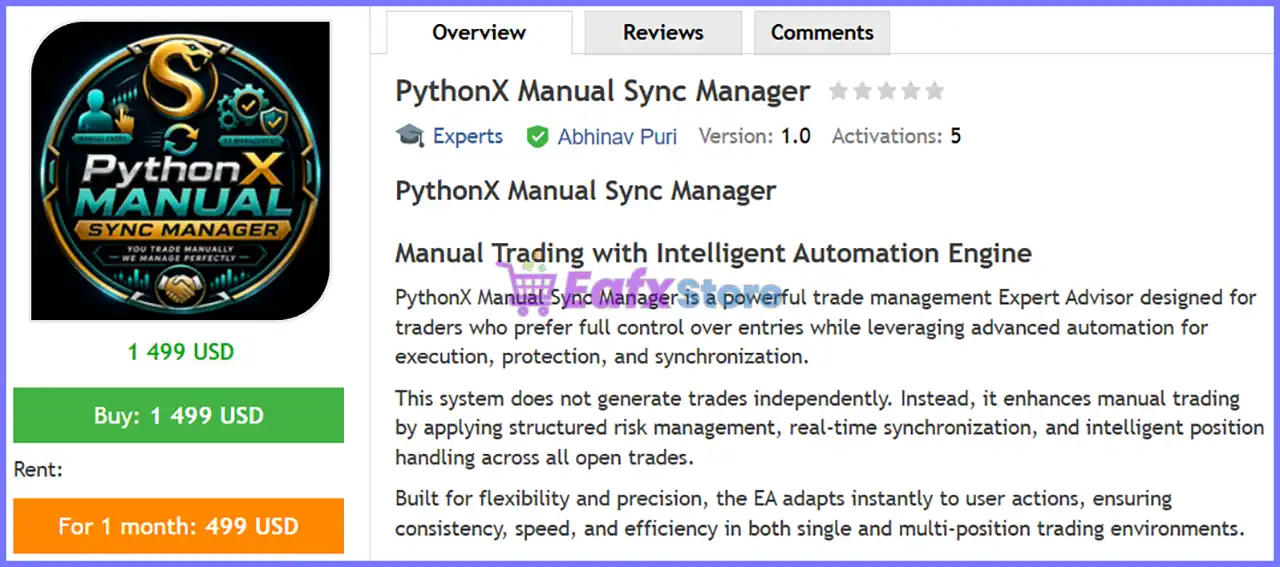
PythonX Manual Sync Manager EA is a trade management Expert Advisor for MetaTrader 5 designed to synchronize and manage manual trades efficiently. Instead of generating trading signals, the EA focuses on advanced position management by automatically applying Stop Loss, Take Profit, Trailing Stop, Break-Even and global profit/loss targets.
With support for symbol management and account-wide protection, PythonX Manual Sync Manager helps traders maintain consistent risk management across manual trading activities.
PythonX Manual Sync Manager EA MT5 Settings
PythonX Manual Sync Manager EA MT5 Settings
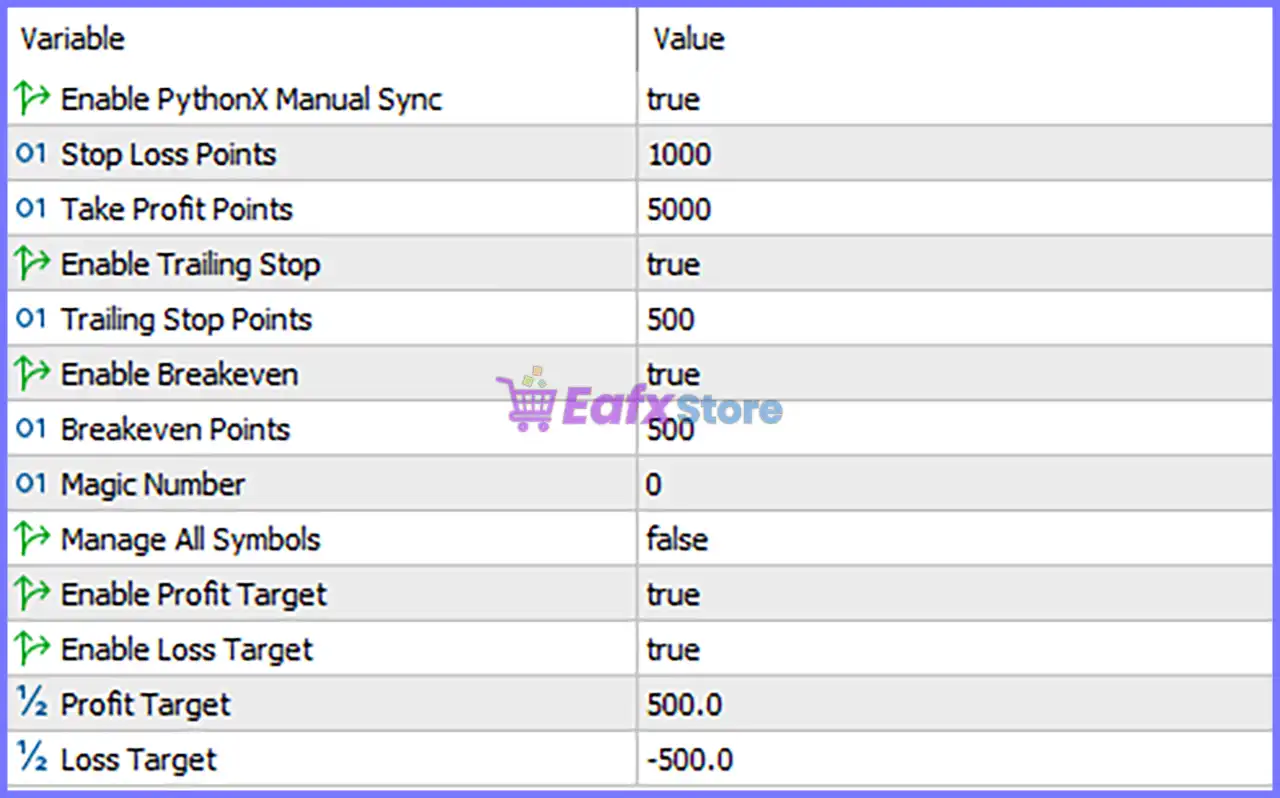
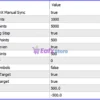
Below are the details of the parameters in the advisor’s trading system settings table:
PythonX Manual Sync Manager EA MT5 Settings Panel
🔹 Enable PythonX Manual Sync = true – Activates the PythonX Manual Sync Manager, allowing the EA to monitor and manage manual trades automatically.
🔹 Stop Loss Points = 1000 – Sets the Stop Loss distance to 1000 points for managed positions.
🔹 Take Profit Points = 5000 – Sets the Take Profit distance to 5000 points, defining the default profit objective.
🔹 Enable Trailing Stop = true – Enables the automatic Trailing Stop feature to protect profits as the market moves in favor of the trade.
🔹 Trailing Stop Points = 500 – Sets the Trailing Stop distance to 500 points behind the current market price.
🔹 Enable Breakeven = true – Automatically moves the Stop Loss to the entry price once the Break-Even condition has been reached.
🔹 Breakeven Points = 500 – Moves the Stop Loss to Break-Even after the trade gains 500 points.
🔹 Magic Number = 0 – Uses Magic Number 0, allowing the EA to manage manual trades that do not have a unique Magic Number assigned.
🔹 Manage All Symbols = false – Restricts management to the current chart symbol instead of managing every symbol in the trading account.
🔹 Enable Profit Target = true – Enables the account-level profit target feature for automatic trade closure.
🔹 Enable Loss Target = true – Enables the account-level loss protection feature.
🔹 Profit Target = 500.0 – Closes managed positions once the total account profit reaches 500.0 (account currency).
🔹 Loss Target = -500.0 – Closes managed positions if the total account loss reaches -500.0 (account currency), helping limit drawdown.
Conclusion
PythonX Manual Sync Manager EA is a dedicated trade management solution rather than a signal-generating Expert Advisor. Its configuration emphasizes automated risk control through Stop Loss, Take Profit, Trailing Stop, Break-Even, and account-wide Profit/Loss Targets. By synchronizing manual trades and applying consistent exit management, the EA helps traders improve discipline, reduce emotional decision-making, and maintain structured risk management across their MT5 accounts.
FAQs
❓ What is PythonX Manual Sync Manager EA MT5 used for?
It is designed to automatically manage manual trades by applying Stop Loss, Take Profit, Trailing Stop, Break-Even, and account-level profit or loss targets.
❓ Does this EA generate trading signals?
No. PythonX Manual Sync Manager EA MT5 is a trade management tool and does not open trades based on market analysis.
❓ Why is the Magic Number set to 0?
A Magic Number of 0 allows the EA to recognize and manage manually opened positions that do not have a unique Magic Number.
❓ Can the EA manage multiple trading symbols?
Yes. By enabling Manage All Symbols, the EA can monitor and manage trades across all symbols in the account. In the current settings, this option is disabled (false).
❓ What happens when the Profit Target or Loss Target is reached?
When the total managed profit reaches 500.0 or the total managed loss reaches -500.0, the EA automatically closes the managed positions according to the configured account protection rules.
User Reviews
Only logged in customers who have purchased this product may leave a review.
❓ What does PythonX Manual Sync Manager MT5 actually do?
PythonX Manual Sync Manager MT5 automates trade management after manual entries, applying synchronized protection and consistent position handling.
❓ Does PythonX Manual Sync Manager MT5 open trades automatically?
No. PythonX Manual Sync Manager MT5 never opens trades itself. It manages only the positions that you manually execute on your account.
❓ How does PythonX Manual Sync Manager MT5 synchronize Stop Loss and Take Profit?
PythonX Manual Sync Manager MT5 instantly copies any manual SL or TP change from one position to every other active trade in the basket.
❓ Can PythonX Manual Sync Manager MT5 manage multiple positions at once?
Yes. PythonX Manual Sync Manager MT5 is designed to synchronize and manage multiple open trades efficiently while maintaining uniform settings.
❓ Does PythonX Manual Sync Manager MT5 include Break-Even automation?
Yes. PythonX Manual Sync Manager MT5 can automatically move trades to Break-Even once predefined profit conditions are satisfied.
❓ How does the trailing stop work in PythonX Manual Sync Manager MT5?
PythonX Manual Sync Manager MT5 uses a candle-based trailing stop that follows price structure to protect profits while allowing trends to continue.
❓ Can PythonX Manual Sync Manager MT5 close all trades automatically?
Yes. PythonX Manual Sync Manager MT5 supports basket profit targets and basket loss limits to close all synchronized trades automatically.
❓ Is PythonX Manual Sync Manager MT5 suitable for grid or scaling strategies?
Yes. PythonX Manual Sync Manager MT5 works well with grid, scaling, and multi-position strategies by keeping every trade synchronized in real time.
❓ Should I use a VPS with PythonX Manual Sync Manager MT5?
Yes. PythonX Manual Sync Manager MT5 performs best on a reliable VPS, ensuring uninterrupted synchronization and continuous trade management.
❓ Who is PythonX Manual Sync Manager MT5 best suited for?
PythonX Manual Sync Manager MT5 is ideal for traders who prefer manual trade entries while automating risk management and position synchronization.
-
 Price range: $89.00 through $599.00
 -
 Price range: $80.00 through $599.00
 -
 Price range: $80.00 through $599.00
 -
 Price range: $75.00 through $599.00
-
 4
4 -
 3
3 -
 0
0 -
 0Price range: $89.00 through $1,200.00
There are no reviews yet.