






Sentinel KMZ EA MT5 v2.5 with SetFiles (Unlimited)

Subscriptions for Special Plan
- 30 EA package is more economical!
- Special package with 99%
- Download 1 EA/Day

Subscriptions for Premium Membership
- Download Unlimited in 1 Year
- Get 100% Discount
- Get free access to all

Subscriptions for Gold Membership
- 1 Year Membership
- Get 100% Discount
- Access EA+Indicator+Course
Frequently bought together 🎁
Add these products to enhance your purchase




What is Sentinel KMZ EA MT5?
Sentinel KMZ EA is an advanced Expert Advisor (EA) designed for automated Gold trading with adaptive execution, intelligent indicators and dynamic risk management. Built for aggressive growth strategies, it combines basket management, market analysis, and flexible position control to adapt to changing conditions while maintaining structured trade execution.
About the Author
This product is compiled by Luca Barone. This author has more than +1 years of experience working on MQL5 with many famous products such as Sentinel KMZ EA MT5, Sentinel MT5, Sentinel XAU EA MT5, Sentinel MT4, Sentinel SSL EA MT5 and other advisors. Among them, Sentinel KMZ EA is his best performing products.

Sentinel KMZ EA MT5 Review
Key Features of Sentinel KMZ EA MT5
🔹 Gold Trading Specialist: Optimized for XAUUSD with adaptive execution and market-responsive logic.
🔹 Dynamic Risk Management: Adjusts position sizing automatically according to account balance changes.
🔹 Basket Recovery System: Uses coordinated trade management to optimize position recovery efficiency.
🔹 Single-Chart Operation: Runs through one chart with automated symbol detection and setup.
🔹 Flexible Market Adaptation: Responds dynamically to changing volatility and price movement patterns.
Why Choose Sentinel KMZ EA?
🔹 Aggressive Growth Potential: Designed for traders seeking high-return opportunities in Gold markets.
🔹 Automated Trade Management: Reduces manual intervention through structured execution processes.
🔹 Adaptive Market Response: Adjusts efficiently to changing volatility and directional movement.
🔹 Flexible Capital Approach: Supports dynamic position sizing and evolving account conditions.
🔹 Professional Trading Solution: Combines automation, adaptability and advanced recovery techniques.
Sentinel KMZ EA MT5 Review
Sentinel KMZ EA Signal Results
The Sentinel KMZ EA trading platform has achieved impressive profit performance when trading XAUUSD (Gold) for several weeks and has shown high profit potential.
🔶 The trading results on a live account for 35 consecutive weeks.
✅ Initial Deposit: €500
✅ Growth Rate: +487%
✅ Win Rate (% of total): 79.6%
✅ Maximum Drawdown: 18.7%
Sentinel KMZ EA MT5 Signal Results
🔶 The trading results on a live account for 39 consecutive weeks.
✅ Initial Deposit: €607.49
✅ Growth Rate: +428%
✅ Win Rate (% of total): 80.1%
✅ Maximum Drawdown: 30.6%
Sentinel KMZ MT5 Signal Results
Sentinel KMZ MT5 Backtest Results
Sentinel KMZ EA has achieved impressive profit performance over many years of trading reversion tests with Gold (XAUUSD). This EA demonstrates excellent ability to master the market and increase profits.
✅ Initial Deposit: $200
✅ Total Net Profit: $9.11 million
✅ Win Rate (% of total): 77.73%
✅ Maximum Drawdown: 21.20%
Sentinel KMZ EA MT5 backtest
What is the Sentinel KMZ EA MT5 Trading Strategy?
🔹 Grid Recovery Logic: Uses structured grid management to handle adverse market movements.
🔹 Martingale Position Scaling: Increases exposure strategically to improve basket recovery potential.
🔹 Basket Profit Management: Closes grouped positions when predefined recovery objectives are achieved.
🔹 Volatility-Based Execution: Focuses on capturing opportunities within active Gold market conditions.
🔹 Adaptive Trade Control: Continuously manages entries and exits according to market behavior.
Recommended settings
Recommended settings and parameters to pay attention to from developers and experts:
| Features | Type |
|---|---|
| Trading platform | MetaTrader 5 (MT5) |
| Time frames | M15 (15 minute chart) |
| Currency pairs | XAUUSD (Gold) |
| Minimum / Recommended deposit | $100 |
| Minimum / Recommended leverage | 1:100+ |
| Account type | ECN / Raw Spread |
| Product type | Original version |
| Additional services | Unlock and Decompile |
| Recommended brokers | Exness Broker, Icmarkets Broker |
| Recommended VPS | MyfxVPS.com (Blue VPS, Golden VPS). Lowest Latency, 2 week Free Trial, 100% Free for 12-18 Months. |
Product Download Package?
The download package of the product suite includes:
Experts
 Sentinel KMZ EA_2.5_fix.ex5
SetFiles
KMZ_Signal_2.set
KMZ_Live_Signal.set
KMZ_2_5_CRAZY.set
 Reviewed by David Easton
Conclusion
In short, Designed specifically for XAUUSD, Sentinel KMZ EA offers an aggressive trading approach aimed at generating strong percentage returns within a short period. By combining grid recovery logic, martingale position management, and dynamic risk allocation, the EA seeks to accelerate account growth. Sentinel KMZ is intended for traders willing to accept substantial risk in exchange for the potential of rapid profit generation and regular withdrawals.
🔢 Sentinel KMZ EA MT5 – Complete Settings Guide & Parameter Explanation
Sentinel KMZ EA is a grid-based automated trading Expert Advisor (EA) for MetaTrader 5 that focuses on basket trading, dynamic take-profit management, anti-duplication protection, spread filtering and configurable trading schedules.
The EA supports fixed-lot trading, multiple grid levels, equity target control, and detailed trading-hour customization, making it suitable for traders who want precise control over automated trading operations.
Sentinel KMZ MT5 Settings
🔢 Installation Panel Parameters
Below are the details of the parameters in the advisor’s trading system settings table:
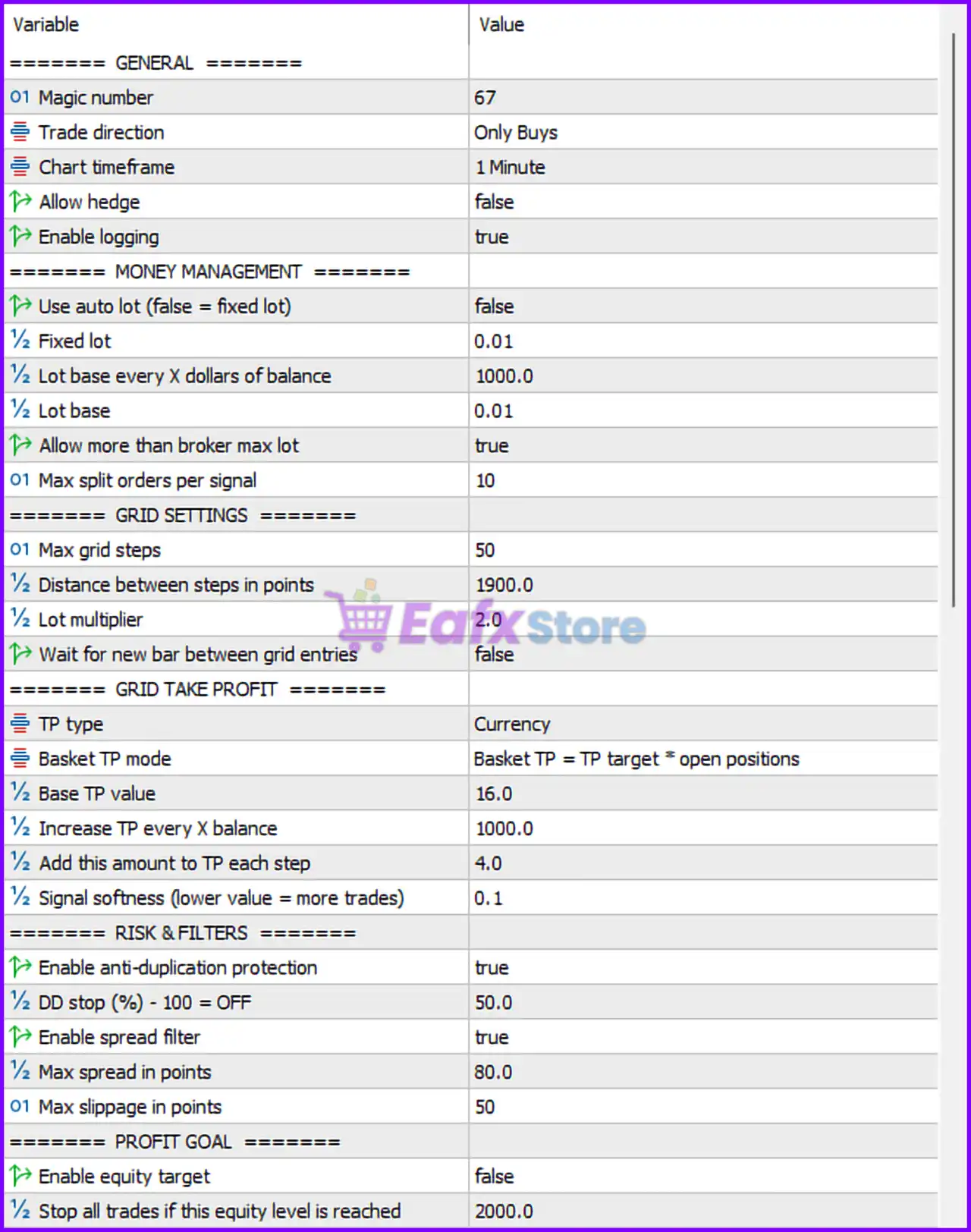
Sentinel KMZ EA MT5 Settings Panel
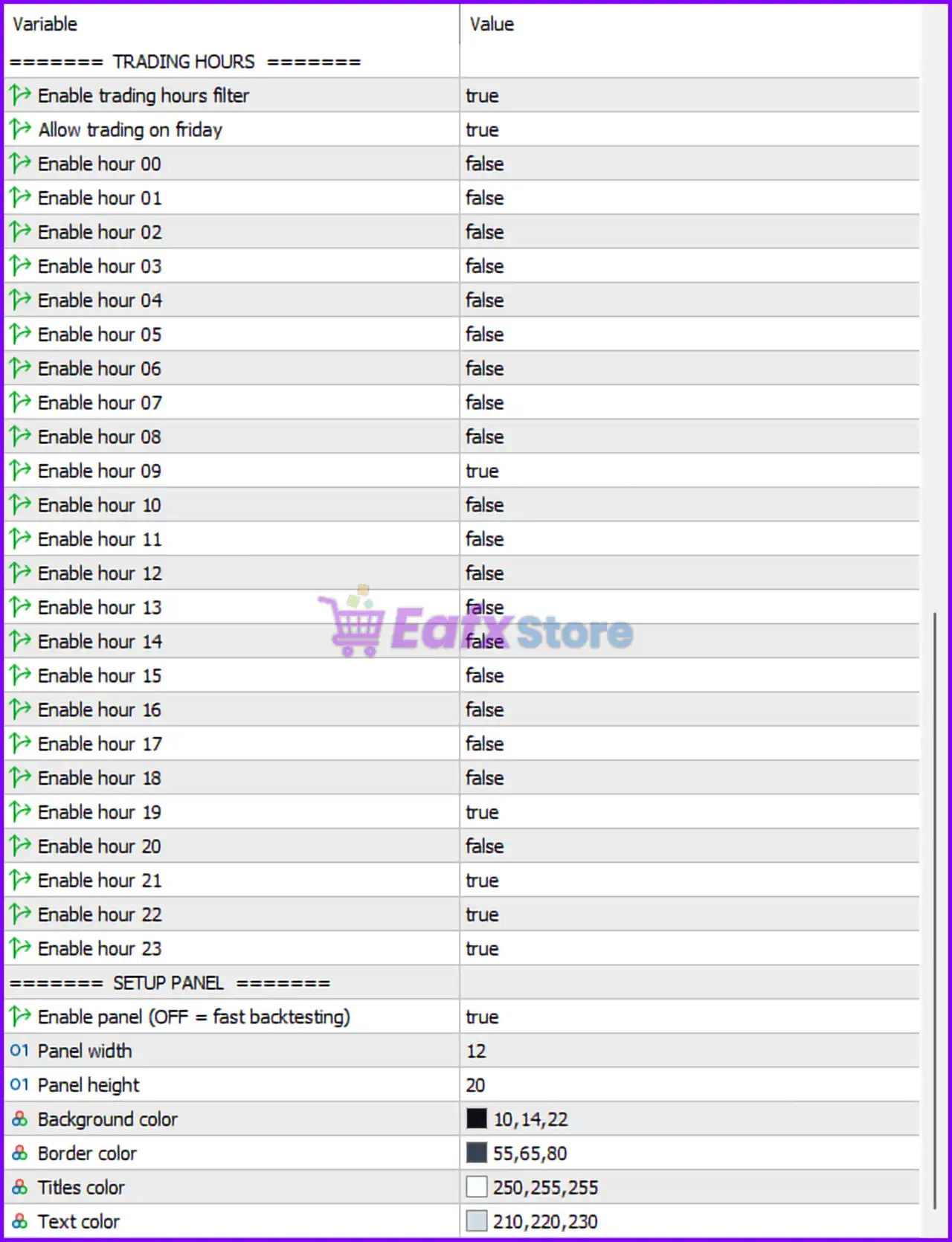
Sentinel KMZ MT5 Settings Panel
🔶 General Settings
🔹 Magic number = 67 — Unique identifier used by the EA to manage and track its own positions.
🔹 Trade direction = Only Buys — The EA is configured to open Buy trades only.
🔹 Chart timeframe = 1 Minute — The trading strategy operates on the M1 timeframe.
🔹 Allow hedge = false — Hedging is disabled; opposite-direction trades cannot be opened simultaneously.
🔹 Enable logging = true — Trading activities and events are recorded in the log files.
🔶 Money Management Settings
🔹 Use auto lot (false = fixed lot) = false — Automatic lot sizing is disabled.
🔹 Fixed lot = 0.01 — Every trade opens with a fixed volume of 0.01 lots.
🔹 Lot base every X dollars of balance = 1000.0 — Reference balance value used for lot calculations when Auto Lot is enabled.
🔹 Lot base = 0.01 — Base lot size used by the money management algorithm.
🔹 Allow more than broker max lot = true — Allows calculations beyond broker maximum lot limits (subject to broker restrictions).
🔹 Max split orders per signal = 10 — A single signal can be divided into a maximum of 10 separate orders.
🔶 Grid Settings
🔹 Max grid steps = 50 — The EA can create up to 50 grid levels.
🔹 Distance between steps in points = 1900.0 — Grid orders are spaced 1900.0 points apart.
🔹 Lot multiplier = 2.0 — Each new grid order doubles the lot size of the previous order.
🔹 Wait for new bar between grid entries = false — New grid orders can be opened without waiting for a new candle.
🔶 Grid Take Profit Settings
🔹 TP type = Currency — Take Profit is calculated in account currency rather than points.
🔹 Basket TP mode = Basket TP = TP target * open positions — Basket target increases proportionally to the number of open positions.
🔹 Base TP value = 16.0 — Base basket profit target is 16.0 currency units.
🔹 Increase TP every X balance = 1000.0 — Basket TP increases for every additional 1000.0 account balance units.
🔹 Add this amount to TP each step = 4.0 — Profit target increases by 4.0 units at each step.
🔹 Signal softness (lower value = more trades) = 0.1 — Signal sensitivity is very aggressive, generating more trades.
🔶 Risk & Filter Settings
🔹 Enable anti-duplication protection = true — Prevents duplicate or overlapping trade signals.
🔹 DD stop (%) – 100 = OFF = 50.0 — Trading stops when drawdown reaches 50.0%.
🔹 Enable spread filter = true — Spread control filter is enabled.
🔹 Max spread in points = 80.0 — Trades are allowed only if spread remains below 80.0 points.
🔹 Max slippage in points = 50 — Maximum permitted execution slippage is 50 points.
🔶 Profit Goal Settings
🔹 Enable equity target = false — Equity target management is disabled.
🔹 Stop all trades if this equity level is reached = 2000.0 — If enabled, all trades would close when equity reaches 2000.0.
🔶 Trading Hours Settings
🔹 Enable trading hours filter = true — Trading is restricted to selected hours.
🔹 Allow trading on friday = true — Friday trading is permitted.
🔹 Enable hour 00 = false — Trading disabled during hour 00.
🔹 Enable hour 01 = false — Trading disabled during hour 01.
🔹 Enable hour 02 = false — Trading disabled during hour 02.
🔹 Enable hour 03 = false — Trading disabled during hour 03.
🔹 Enable hour 04 = false — Trading disabled during hour 04.
🔹 Enable hour 05 = false — Trading disabled during hour 05.
🔹 Enable hour 06 = false — Trading disabled during hour 06.
🔹 Enable hour 07 = false — Trading disabled during hour 07.
🔹 Enable hour 08 = false — Trading disabled during hour 08.
🔹 Enable hour 09 = true — Trading enabled during hour 09.
🔹 Enable hour 10 = false — Trading disabled during hour 10.
🔹 Enable hour 11 = true — Trading enabled during hour 11.
🔹 Enable hour 12 = false — Trading disabled during hour 12.
🔹 Enable hour 13 = false — Trading disabled during hour 13.
🔹 Enable hour 14 = false — Trading disabled during hour 14.
🔹 Enable hour 15 = false — Trading disabled during hour 15.
🔹 Enable hour 16 = false — Trading disabled during hour 16.
🔹 Enable hour 17 = false — Trading disabled during hour 17.
🔹 Enable hour 18 = false — Trading disabled during hour 18.
🔹 Enable hour 19 = true — Trading enabled during hour 19.
🔹 Enable hour 20 = false — Trading disabled during hour 20.
🔹 Enable hour 21 = true — Trading enabled during hour 21.
🔹 Enable hour 22 = true — Trading enabled during hour 22.
🔹 Enable hour 23 = true — Trading enabled during hour 23.
🔶 Setup Panel Settings
🔹 Hide panel (OFF = fast backtesting) = true — The information panel is hidden to optimize chart performance.
🔹 Panel width = 12 — Width parameter of the chart panel is set to 12.
🔹 Panel height = 20 — Height parameter of the chart panel is set to 20.
🔹 Background color = 10,14,22 — Panel background color uses RGB values (10,14,22).
🔹 Border color = 55,65,80 — Panel border color uses RGB values (55,65,80).
🔹 Titles color = 250,255,255 — Panel title text color uses RGB values (250,255,255).
🔹 Text color = 210,220,230 — General panel text color uses RGB values (210,220,230).
🔢 Conclusion
Sentinel KMZ EA MT5 is a sophisticated grid-trading Expert Advisor built around basket profit management, dynamic lot progression, anti-duplication protection and detailed session control.
In the provided configuration, the EA trades Buy-only positions on the M1 timeframe, uses a 0.01 fixed lot, supports up to 50 grid levels, and applies a 2.0 lot multiplier between grid steps. With strict spread filtering and a 50% drawdown stop, Sentinel KMZ EA provides a structured framework for managing automated grid strategies.
User Reviews
Only logged in customers who have purchased this product may leave a review.
❓ What is Sentinel KMZ EA MT5 designed for?
Sentinel KMZ EA MT5 is built for aggressive account growth and account flipping, using a grid and martingale recovery system to target rapid profit opportunities.
❓ Which trading instrument does Sentinel KMZ EA MT5 support?
Sentinel KMZ EA MT5 is optimized exclusively for XAUUSD (Gold), focusing on high-volatility market movements and recovery-based trading logic.
❓ Does Sentinel KMZ EA MT5 use martingale or grid strategies?
Yes. Sentinel KMZ EA MT5 uses an aggressive grid and martingale recovery engine designed to recover positions and maximize growth potential.
❓ What is the recommended minimum deposit for Sentinel KMZ EA MT5?
Sentinel KMZ EA MT5 can start with as little as $100, while a deposit of $200 or more is recommended for better flexibility and margin management.
❓ What leverage is recommended for Sentinel KMZ EA MT5?
Sentinel KMZ EA MT5 requires a minimum leverage of 1:100 to support its aggressive recovery strategy and dynamic lot sizing system.
❓ Is Sentinel KMZ EA MT5 suitable for conservative traders?
No. Sentinel KMZ EA MT5 is designed for experienced traders who accept high risk in pursuit of fast account growth and larger returns.
❓ How does Sentinel KMZ EA MT5 manage losing trades?
Sentinel KMZ EA MT5 opens additional recovery positions through its grid logic and aims to close the entire basket when profit targets are reached.
❓ What withdrawal strategy is recommended with Sentinel KMZ EA MT5?
Sentinel KMZ EA MT5 encourages traders to withdraw their initial deposit after strong growth, then continue trading using secured profits only.
❓ Can Sentinel KMZ EA MT5 cause significant drawdowns?
Yes. Sentinel KMZ EA MT5 carries very high risk and may experience substantial drawdowns or even total account loss during extreme conditions.
❓ Should I test Sentinel KMZ EA MT5 before live trading?
Absolutely. Sentinel KMZ EA MT5 should always be tested on a demo account first to understand its aggressive behavior and risk profile.
🔥 Get This EA for FREE with Our Membership! 🚀🚀
Unlock access to this EA, premium Indicators, and exclusive trading tools completely FREE with any of our Membership Plans! Thousands of traders already benefit from our VIP library—join them and level up your trading instantly. Choose Your Membership:
- SPECIAL – 1 Month Membership
- GOLD – 1 Year Membership
- PREMIUM – 1 Year Membership
-
 Original price was: $999.00.$89.00Current price is: $89.00.
 -
 Original price was: $3,000.00.$89.00Current price is: $89.00.
 -
 Original price was: $1,400.00.$89.00Current price is: $89.00.
 -
 Original price was: $1,300.00.$89.00Current price is: $89.00.
-
 1Original price was: $11,000.00.$89.00Current price is: $89.00.
 -
 1Original price was: $599.00.$59.00Current price is: $59.00.
 -
 1Original price was: $950.00.$59.00Current price is: $59.00.
 -
 3Original price was: $999.00.$69.00Current price is: $69.00.
There are no reviews yet.