


🔢 Impulse MT5 – Complete Settings Guide & Parameter Explanation
Impulse MT5 is a multi-strategy Expert Advisor for MetaTrader 5 designed to automate trading using multiple trading engines while maintaining strict control over lot sizing, drawdown protection, spread filtering and trade direction management.
The EA supports fixed-lot and balance-based position sizing, allowing traders to customize risk according to their account size and trading objectives.

🔢 Installation Panel Parameters
Below are the details of the parameters in the advisor’s trading system settings table:
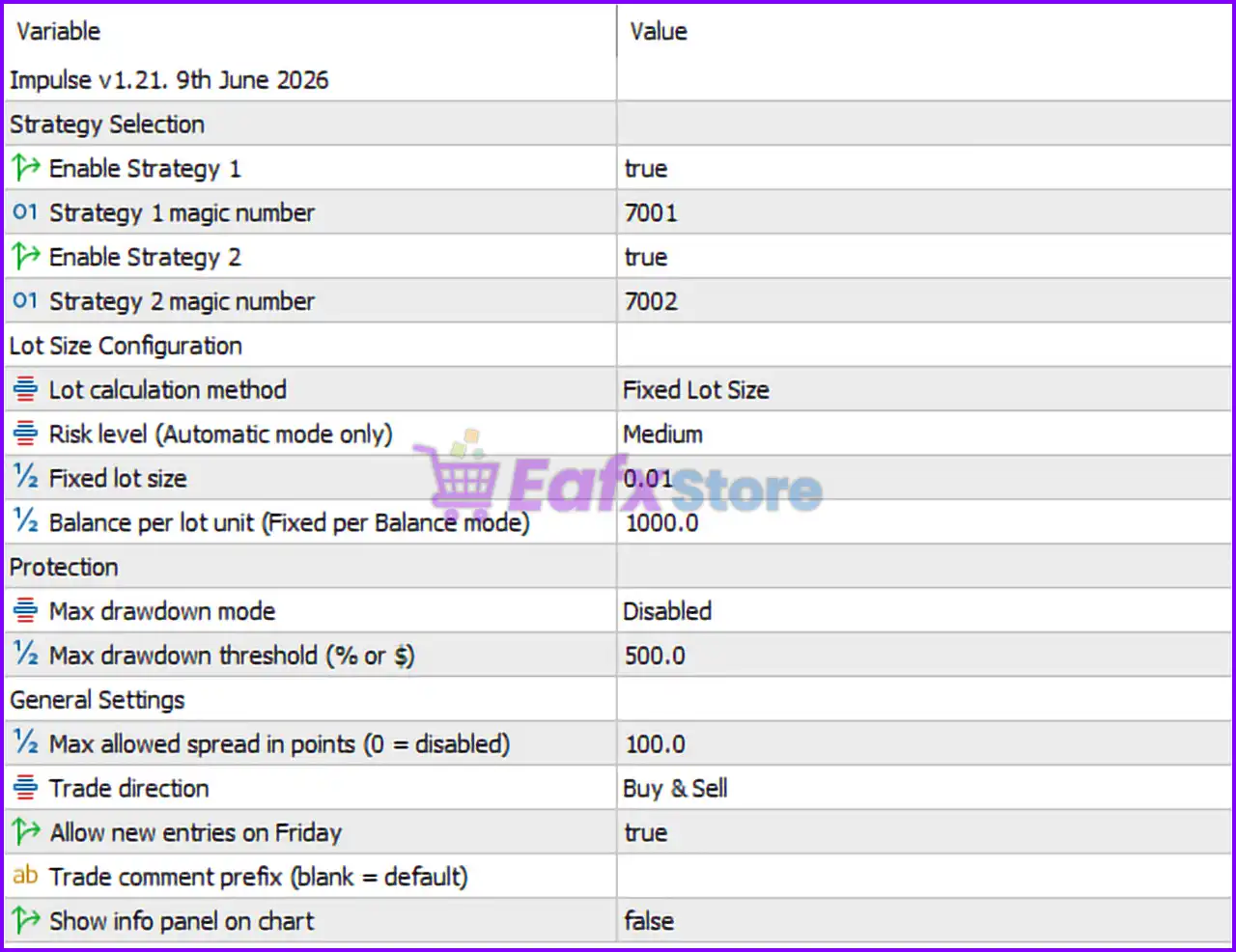
🔶 Strategy Selection
🔹 Enable Strategy 1 = true — Activates Strategy 1 for live trading.
🔹 Strategy 1 magic number = 7001 — Unique identifier assigned to all trades opened by Strategy 1.
🔹 Enable Strategy 2 = true — Activates Strategy 2 for live trading.
🔹 Strategy 2 magic number = 7002 — Unique identifier assigned to all trades opened by Strategy 2.
🔶 Lot Size Configuration
🔹 Lot calculation method = Fixed Lot Size — Position sizing is based on a fixed lot value instead of automatic balance scaling.
🔹 Risk level (Automatic mode only) = Medium — Defines the risk profile used when automatic lot calculation mode is enabled.
🔹 Fixed lot size = 0.01 — Every new trade is opened with a volume of 0.01 lots.
🔹 Balance per lot unit (Fixed per Balance mode) = 1000.0 — In balance-based mode, each 1,000.0 units of account balance correspond to one lot-sizing unit.
🔶 Protection Settings
🔹 Max drawdown mode = Disabled — Drawdown protection is currently turned off.
🔹 Max drawdown threshold (% or $) = 500.0 — Maximum drawdown limit value set to 500.0, used if drawdown protection is enabled.
🔶 General Settings
🔹 Max allowed spread in points (0 = disabled) = 100.0 — The EA will only open trades when the market spread is 100.0 points or lower.
🔹 Trade direction = Buy & Sell — The EA is allowed to open both long (Buy) and short (Sell) positions.
🔹 Allow new entries on Friday = true — New trades can be opened on Fridays.
🔹 Trade comment prefix (blank = default) = [Blank] — No custom trade comment prefix is specified; the EA uses the default comment.
🔹 Show info panel on chart = false — Information panel is hidden from the trading chart.
🔢 Conclusion
Impulse MT5 is a streamlined multi-strategy trading robot that focuses on simplicity and flexibility. In this configuration, both built-in strategies are enabled, fixed lot sizing is set to 0.01 lots, drawdown protection is disabled, and the EA can trade both Buy and Sell positions while filtering spreads above 100.0 points. These settings make the EA suitable for traders seeking a straightforward and controlled automated trading environment.
🔢 FAQs
❓ How many strategies can Impulse MT5 run simultaneously?
Impulse MT5 can run multiple strategies simultaneously, and in this setup both Strategy 1 and Strategy 2 are enabled.
❓ What is the purpose of the Magic Number settings?
Magic Numbers (7001 and 7002) help the EA identify and manage trades opened by each strategy independently.
❓ Does Impulse MT5 use automatic risk management in this configuration?
No. The EA is configured to use a fixed lot size of 0.01, so the automatic risk level setting is not currently active.
❓ Can Impulse MT5 open trades on Fridays?
Yes. The parameter Allow new entries on Friday = true permits new positions to be opened on Friday trading sessions.
❓ What happens if the spread exceeds 100.0 points?
The EA will avoid opening new trades whenever the market spread is greater than the configured limit of 100.0 points.



