


🔢 CRR Scalp EA MT5 – Complete Settings Guide & Parameter Explanation
CRR Scalp EA is an automated scalping Expert Advisor for MetaTrader 5 that combines trend-following logic, pullback detection, breakout confirmation, ATR-based volatility analysis, ADX trend filtering and advanced risk management.
The EA is designed to identify high-probability market entries while controlling risk through dynamic stop-loss calculations, break-even protection, and customizable trade management features.

🔢 Installation Panel Parameters
Below are the details of the parameters in the advisor’s trading system settings table:
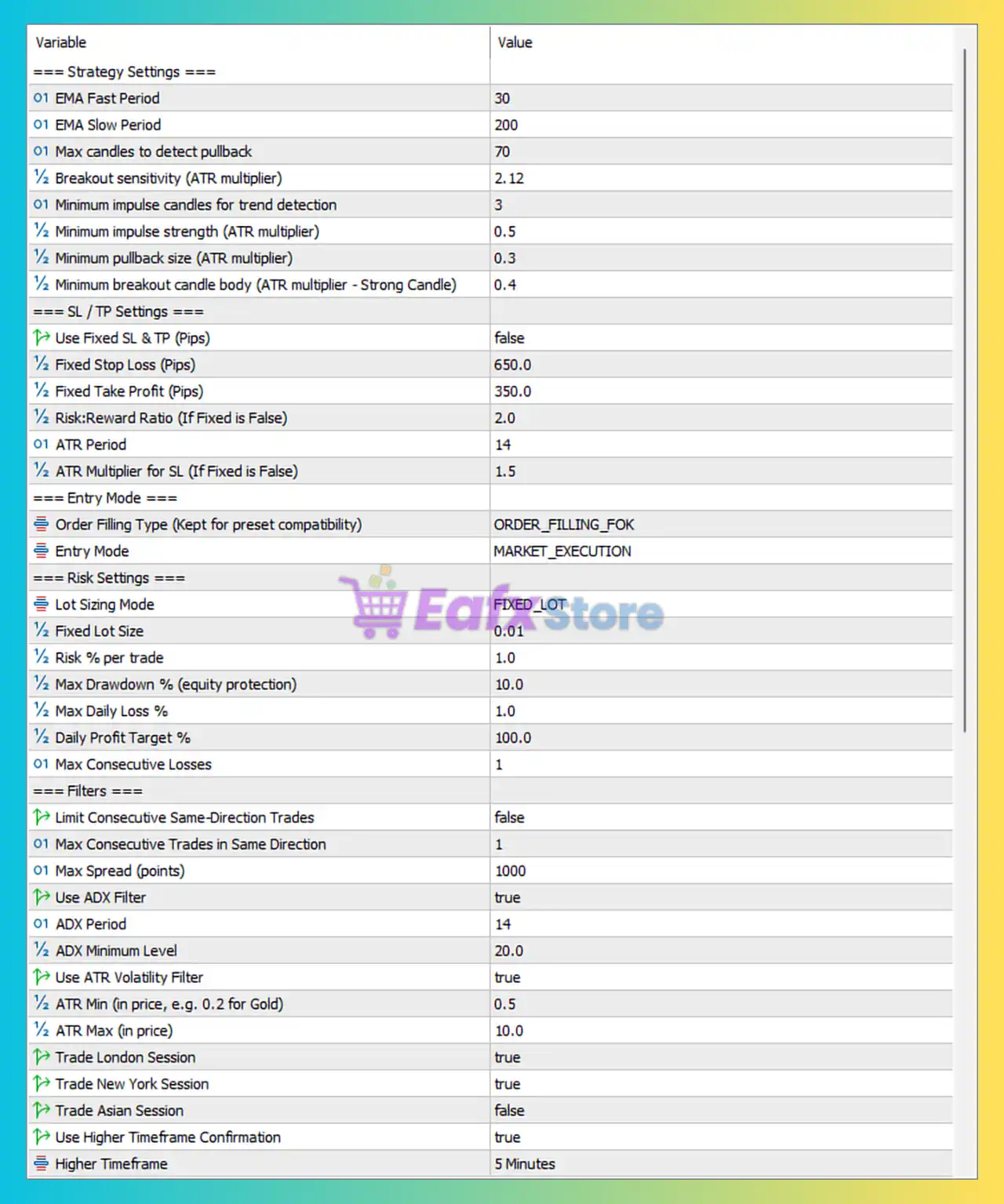
🔄 Strategy Settings
🔹 EMA Fast Period = 30 — Sets the fast Exponential Moving Average period used for trend identification and signal generation.
🔹 EMA Slow Period = 200 — Sets the slow Exponential Moving Average period used to determine the primary market trend.
🔹 Max candles to detect pullback = 70 — Maximum number of candles the EA analyzes when searching for pullback opportunities.
🔹 Breakout sensitivity (ATR multiplier) = 2.12 — Defines breakout detection sensitivity using an ATR multiplier of 2.12.
🔹 Minimum impulse candles for trend detection = 3 — Requires at least 3 consecutive impulse candles to confirm trend strength.
🔹 Minimum impulse strength (ATR multiplier) = 0.5 — Minimum impulse candle size must equal 0.5 × ATR to qualify as a valid trend impulse.
🔹 Minimum pullback size (ATR multiplier) = 0.3 — Pullback size must be at least 0.3 × ATR before a retracement is considered valid.
🔹 Minimum breakout candle body (ATR multiplier - Strong Candle) = 0.4 — Breakout candle body must be at least 0.4 × ATR to confirm a strong breakout signal.
SL / TP Settings
🔹 Use Fixed SL & TP (Pips) = false — Disables fixed Stop Loss and Take Profit values and enables dynamic ATR-based calculations.
🔹 Fixed Stop Loss (Pips) = 650.0 — Fixed Stop Loss distance of 650.0 pips if fixed mode is enabled.
🔹 Fixed Take Profit (Pips) = 350.0 — Fixed Take Profit distance of 350.0 pips if fixed mode is enabled.
🔹 Risk:Reward Ratio (If Fixed is False) = 2.0 — Uses a 1:2 risk-to-reward ratio when ATR-based targets are active.
🔹 ATR Period = 14 — ATR calculation period used for volatility measurement.
🔹 ATR Multiplier for SL (If Fixed is False) = 1.5 — Stop Loss is calculated as 1.5 × ATR when dynamic SL is enabled.
🔄 Entry Mode Settings
🔹 Order Filling Type (Kept for preset compatibility) = ORDER_FILLING_FOK — Uses the Fill-Or-Kill execution model where orders must be filled completely or canceled.
🔹 Entry Mode = MARKET_EXECUTION — Executes trades directly at market price.
🔄 Risk Settings
🔹 Lot Sizing Mode = FIXED_LOT — Uses fixed lot sizing instead of percentage-based risk management.
🔹 Fixed Lot Size = 0.01 — Opens positions with a fixed volume of 0.01 lots.
🔹 Risk % per trade = 1.0 — Risk allocation set to 1.0% per trade when risk-based sizing is used.
🔹 Max Drawdown % (equity protection) = 10.0 — Stops trading if account drawdown reaches 10.0%.
🔹 Max Daily Loss % = 1.0 — Daily loss limit is restricted to 1.0% of account equity.
🔹 Daily Profit Target % = 100.0 — Daily profit target is set to 100.0%.
🔹 Max Consecutive Losses = 1 — Trading stops after 1 consecutive losing trade.
🔄 Filter Settings
🔹 Limit Consecutive Same-Direction Trades = false — Disables restrictions on consecutive trades in the same direction.
🔹 Max Consecutive Trades in Same Direction = 1 — Maximum allowed same-direction trade count is 1 if the filter is enabled.
🔹 Max Spread (points) = 1000 — Prevents new trades when spread exceeds 1000 points.
🔹 Use ADX Filter = true — Enables ADX trend-strength filtering.
🔹 ADX Period = 14 — ADX indicator period used for trend analysis.
🔹 ADX Minimum Level = 20.0 — Requires ADX value above 20.0 to allow entries.
🔹 Use ATR Volatility Filter = true — Enables volatility filtering using ATR.
🔹 ATR Min (in price, e.g. 0.2 for Gold) = 0.5 — Minimum ATR value required to permit trading.
🔹 ATR Max (in price) = 10.0 — Maximum ATR value allowed for trading activity.
🔹 Trade London Session = true — Enables trading during the London trading session.
🔹 Trade New York Session = true — Enables trading during the New York trading session.
🔹 Trade Asian Session = false — Disables trading during the Asian session.
🔹 Use Higher Timeframe Confirmation = true — Requires confirmation from a higher timeframe before opening trades.
🔹 Higher Timeframe = 5 Minutes — Uses the M5 timeframe as higher-timeframe confirmation.
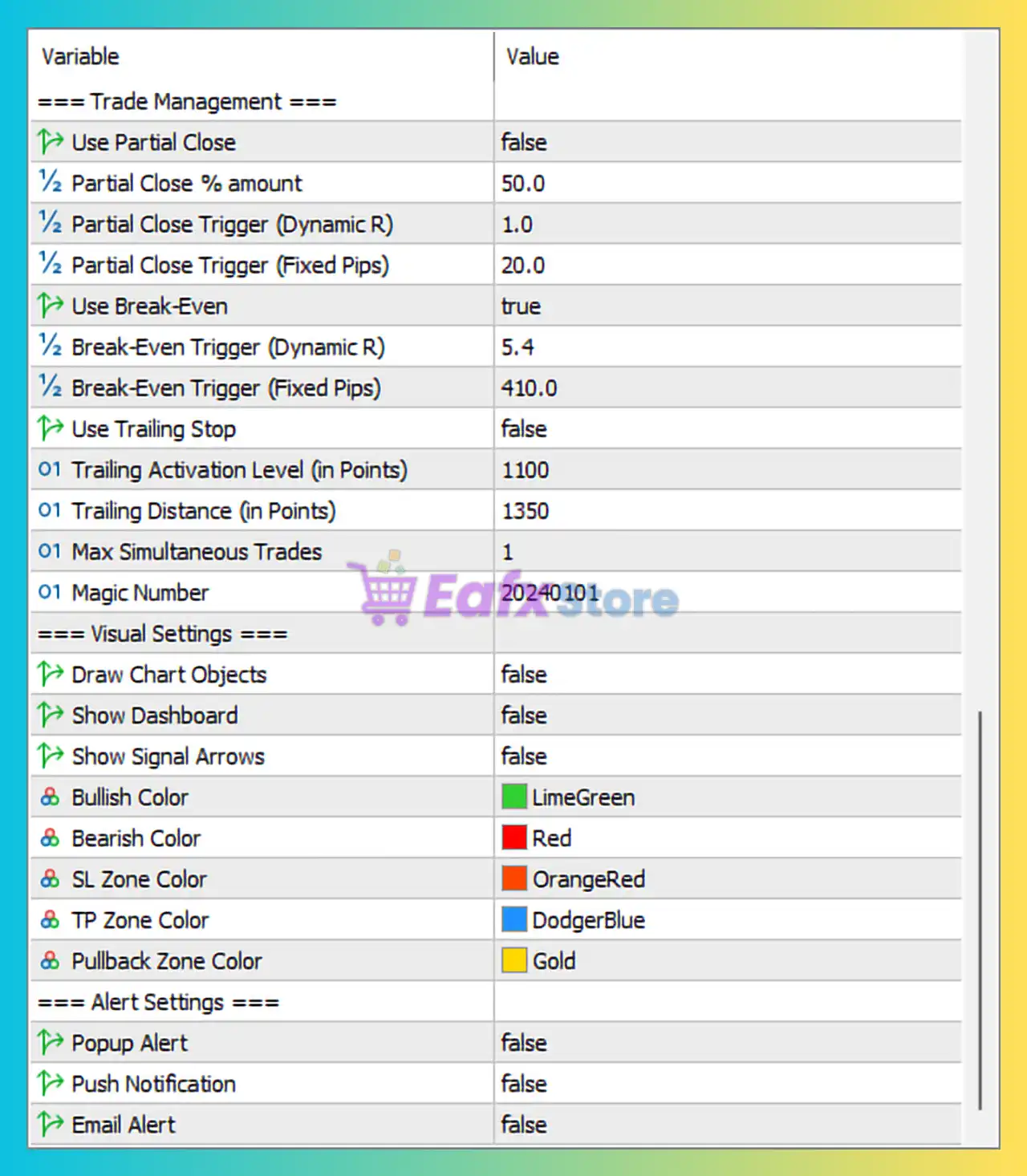
🔄 Trade Management Settings
🔹 Use Partial Close = false — Disables partial position closing.
🔹 Partial Close % amount = 50.0 — Would close 50.0% of the position if enabled.
🔹 Partial Close Trigger (Dynamic R) = 1.0 — Partial close activates at 1.0R profit when dynamic mode is used.
🔹 Partial Close Trigger (Fixed Pips) = 20.0 — Partial close activates after 20.0 pips when fixed mode is used.
🔹 Use Break-Even = true — Enables automatic Break-Even protection.
🔹 Break-Even Trigger (Dynamic R) = 5.4 — Break-Even activates after reaching 5.4R profit.
🔹 Break-Even Trigger (Fixed Pips) = 410.0 — Break-Even activates at 410.0 pips in fixed mode.
🔹 Use Trailing Stop = false — Disables trailing stop management.
🔹 Trailing Activation Level (in Points) = 1100 — Trailing Stop would activate at 1100 points if enabled.
🔹 Trailing Distance (in Points) = 1350 — Distance maintained between price and trailing stop is 1350 points.
🔹 Max Simultaneous Trades = 1 — Allows only 1 active trade at a time.
🔹 Magic Number = 20240101 — Unique identifier used by the EA to manage its own trades.
🔄 Visual Settings
🔹 Draw Chart Objects = false — Disables drawing trading objects on the chart.
🔹 Show Dashboard = false — Hides the EA information dashboard.
🔹 Show Signal Arrows = false — Hides buy/sell signal arrows.
🔹 Bullish Color = LimeGreen — Color used for bullish signals and bullish chart objects.
🔹 Bearish Color = Red — Color used for bearish signals and bearish chart objects.
🔹 SL Zone Color = OrangeRed — Color used to display Stop Loss areas.
🔹 TP Zone Color = DodgerBlue — Color used to display Take Profit areas.
🔹 Pullback Zone Color = Gold — Color used to highlight pullback areas.
🔄 Alert Settings
🔹 Popup Alert = false — Disables popup notifications.
🔹 Push Notification = false — Disables mobile push notifications.
🔹 Email Alert = false — Disables email notifications.
🔢 Conclusion
CRR Scalp EA is a trend-based scalping system that combines EMA trend analysis, ATR volatility measurement, ADX trend-strength filtering and pullback-breakout logic.
The current configuration uses a 0.01 fixed lot size, ATR-based Stop Loss calculations, Break-Even protection, London and New York session trading, and higher timeframe confirmation on M5, creating a disciplined framework focused on controlled risk and trend-following opportunities.



