🔢 StorageFX EA MT4 Settings Explained
StorageFX EA is an advanced automated Forex trading robot for MetaTrader 4 that combines trend analysis, Half Trend indicators, Laguerre filters, volatility detection and news filtering into a single trading system.
The EA includes martingale management, spread protection, multiple technical filters, and customizable risk control features designed to help traders optimize market entries and improve automated trading performance across different market conditions.
🔢 StorageFX EA MT4 Full Settings Explanation
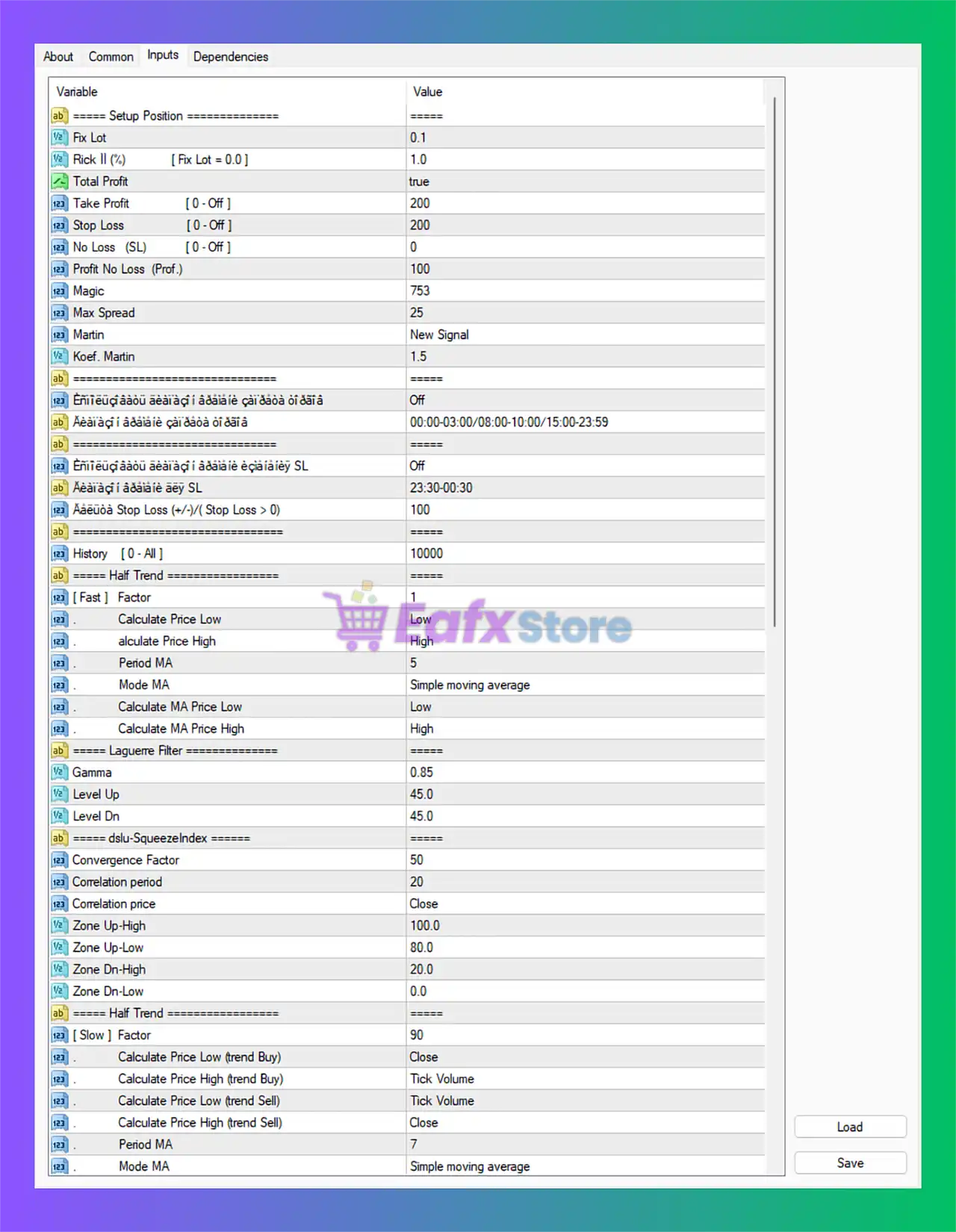
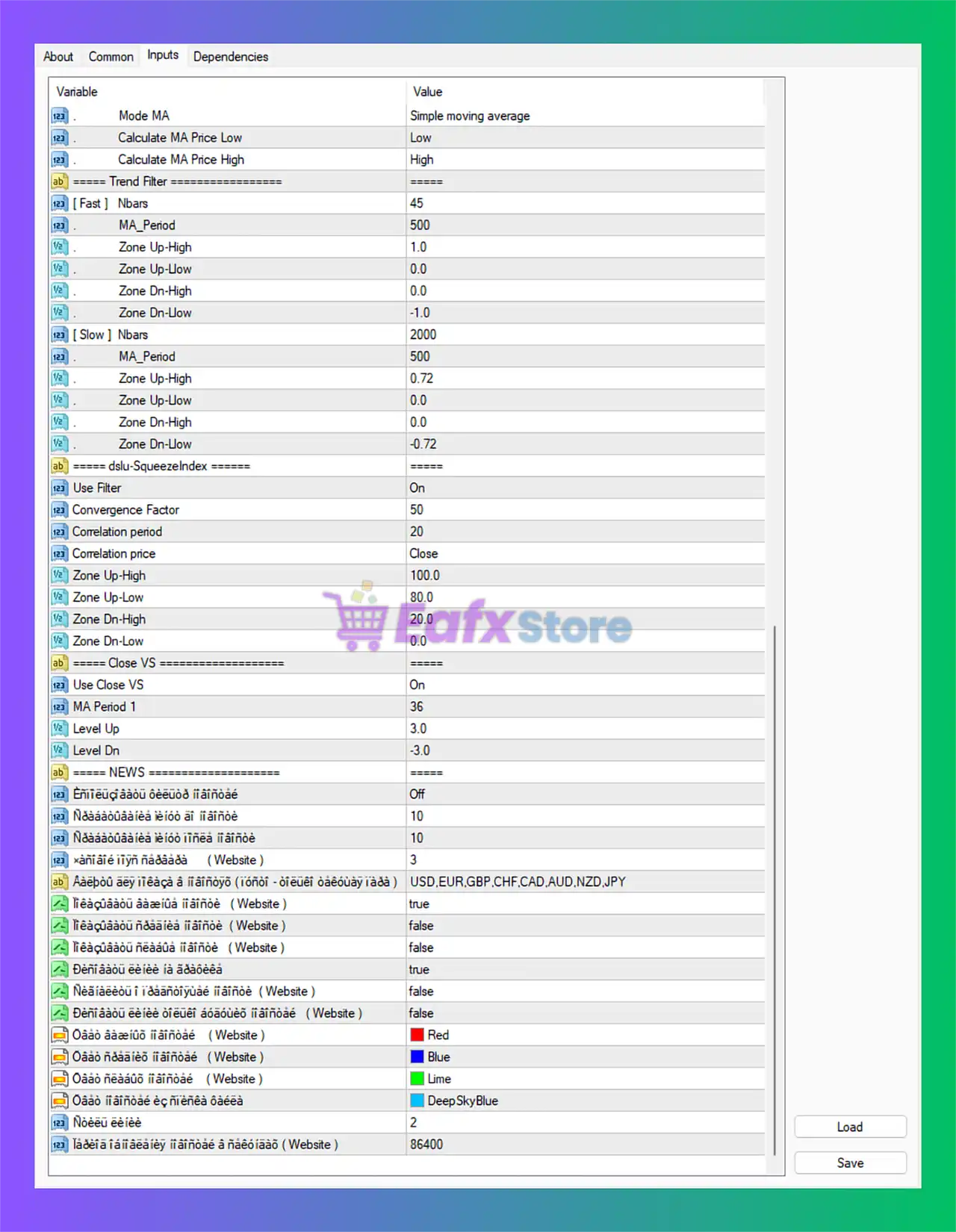
Below are the details of the parameters in the advisor’s trading system settings table:
🔶 SETUP POSITION SETTINGS
🔹 Fix Lot = 0.1: Sets the fixed trading lot size to 0.1.
🔹 Risk II (%) [ Fix Lot = 0.0 ] = 1.0: Defines the account risk percentage as 1.0% when dynamic lot sizing is enabled.
🔹 Total Profit = true: Enables total profit management for all open trades.
🔹 Take Profit [ 0 - Off ] = 200: Sets the Take Profit level to 200 points; 0 disables Take Profit.
🔹 Stop Loss [ 0 - Off ] = 200: Sets the Stop Loss level to 200 points; 0 disables Stop Loss.
🔹 No Loss (SL) [ 0 - Off ] = 0: Break-even Stop Loss feature is disabled with value 0.
🔹 Profit No Loss (Prof.) = 100: Activates break-even profit protection after 100 points profit.
🔹 Magic = 753: Unique Magic Number assigned to EA trades is 753.
🔹 Max Spread = 25: Maximum allowed spread for opening trades is 25.
🔹 Martin = New Signal: Martingale system opens new positions only on fresh trading signals.
🔹 Koef. Martin = 1.5: Martingale lot multiplier coefficient is set to 1.5.
🔶 TIME FILTER SETTINGS
🔹 Trading Time Filter = Off: Trading session filter is disabled.
🔹 Allowed Trading Sessions = 00:00-03:00 / 08:00-10:00 / 15:00-23:59: Configured trading sessions for EA operations.
🔹 Stop Loss Time Filter = Off: Time-based Stop Loss management is disabled.
🔹 Stop Loss Active Time = 23:30-00:30: Time window for Stop Loss execution if enabled.
🔹 Automatic Stop Loss (+/-) (Stop Loss > 0) = 100: Dynamic Stop Loss adjustment level is 100.
🔹 History [ 0 - All ] = 10000: Historical candle data used for calculations is 10000.
🔶 HALF TREND FAST SETTINGS
🔹 [ Fast ] Factor = 1: Fast Half Trend factor value is 1.
🔹 Calculate Price Low = Low: Uses candle Low prices for low-price calculations.
🔹 Calculate Price High = High: Uses candle High prices for high-price calculations.
🔹 Period MA = 5: Moving Average period is set to 5.
🔹 Mode MA = Simple moving average: Uses Simple Moving Average calculation mode.
🔹 Calculate MA Price Low = Low: Uses Low prices for MA low calculations.
🔹 Calculate MA Price High = High: Uses High prices for MA high calculations.
🔶 LAGUERRE FILTER SETTINGS
🔹 Gamma = 0.85: Laguerre filter gamma smoothing coefficient is 0.85.
🔹 Level Up = 45.0: Upper threshold level for Laguerre filter is 45.0.
🔹 Level Dn = 45.0: Lower threshold level for Laguerre filter is 45.0.
🔶 DSLU-SQUEEZEINDEX SETTINGS
🔹 Convergence Factor = 50: Squeeze Index convergence factor is configured at 50.
🔹 Correlation period = 20: Correlation calculation period is 20.
🔹 Correlation price = Close: Uses Close prices for correlation calculations.
🔹 Zone Up-High = 100.0: Upper bullish zone high level is 100.0.
🔹 Zone Up-Low = 80.0: Upper bullish zone low level is 80.0.
🔹 Zone Dn-High = 20.0: Lower bearish zone high level is 20.0.
🔹 Zone Dn-Low = 0.0: Lower bearish zone low level is 0.0.
🔶 HALF TREND SLOW SETTINGS
🔹 [ Slow ] Factor = 90: Slow Half Trend factor value is 90.
🔹 Calculate Price Low (trend Buy) = Close: Uses Close prices for Buy trend low calculations.
🔹 Calculate Price High (trend Buy) = Tick Volume: Uses Tick Volume for Buy trend high calculations.
🔹 Calculate Price Low (trend Sell) = Tick Volume: Uses Tick Volume for Sell trend low calculations.
🔹 Calculate Price High (trend Sell) = Close: Uses Close prices for Sell trend high calculations.
🔹 Period MA = 7: Moving Average period for slow trend is 7.
🔹 Mode MA = Simple moving average: Uses Simple Moving Average mode for slow trend calculations.
🔹 Calculate MA Price Low = Low: Uses Low prices for MA low calculations.
🔹 Calculate MA Price High = High: Uses High prices for MA high calculations.
🔶 TREND FILTER SETTINGS
🔹 [ Fast ] Nbars = 45: Fast trend filter analyzes 45 bars.
🔹 MA_Period = 500: Fast trend filter Moving Average period is 500.
🔹 Zone Up-High = 1.0: Fast bullish zone upper limit is 1.0.
🔹 Zone Up-Low = 0.0: Fast bullish zone lower limit is 0.0.
🔹 Zone Dn-High = 0.0: Fast bearish zone upper limit is 0.0.
🔹 Zone Dn-Low = -1.0: Fast bearish zone lower limit is -1.0.
🔹 [ Slow ] Nbars = 2000: Slow trend filter analyzes 2000 bars.
🔹 MA_Period = 500: Slow trend Moving Average period is 500.
🔹 Zone Up-High = 0.72: Slow bullish zone upper threshold is 0.72.
🔹 Zone Up-Low = 0.0: Slow bullish zone lower threshold is 0.0.
🔹 Zone Dn-High = 0.0: Slow bearish zone upper threshold is 0.0.
🔹 Zone Dn-Low = -0.72: Slow bearish zone lower threshold is -0.72.
🔶 DSLU-SQUEEZEINDEX FILTER SETTINGS
🔹 Use Filter = On: Enables the Squeeze Index filter.
🔹 Convergence Factor = 50: Filter convergence value is 50.
🔹 Correlation period = 20: Correlation calculation period remains 20.
🔹 Correlation price = Close: Uses Close prices for correlation analysis.
🔹 Zone Up-High = 100.0: Upper bullish squeeze zone high is 100.0.
🔹 Zone Up-Low = 80.0: Upper bullish squeeze zone low is 80.0.
🔹 Zone Dn-High = 20.0: Lower bearish squeeze zone high is 20.0.
🔹 Zone Dn-Low = 0.0: Lower bearish squeeze zone low is 0.0.
🔶 CLOSE VS SETTINGS
🔹 Use Close VS = On: Enables Close VS market filter logic.
🔹 MA Period 1 = 36: Moving Average period for Close VS is 36.
🔹 Level Up = 3.0: Upper signal threshold is 3.0.
🔹 Level Dn = -3.0: Lower signal threshold is -3.0.
🔶 NEWS FILTER SETTINGS
🔹 Enable News Filter = Off: News filter functionality is disabled.
🔹 Minutes Before News = 10: Trading pauses 10 minutes before news releases.
🔹 Minutes After News = 10: Trading resumes 10 minutes after news events.
🔹 News Importance Filter (Website) = 3: Filters news based on importance level 3.
🔹 Currencies Filter = USD,EUR,GBP,CHF,CAD,AUD,NZD,JPY: News events are filtered for these currencies.
🔹 Show News Panel (Website) = true: Displays the news information panel on chart.
🔹 Show Medium News (Website) = false: Medium impact news display is disabled.
🔹 Show Low News (Website) = false: Low impact news display is disabled.
🔹 Show High News (Website) = true: High impact news display is enabled.
🔹 Show Vertical News Lines (Website) = false: Vertical news markers on the chart are disabled.
🔹 Show News Line Background (Website) = false: Background shading for news events is disabled.
🔹 High News Color (Website) = Red: High impact news color is Red.
🔹 Medium News Color (Website) = Blue: Medium impact news color is Blue.
🔹 Low News Color (Website) = Lime: Low impact news color is Lime.
🔹 Panel Background Color = DeepSkyBlue: News panel background color is DeepSkyBlue.
🔹 News Refresh Rate = 2: News data refresh interval is 2.
🔹 News Display Duration (Website) = 86400: News event display duration is 86400 seconds.
🔢 Conclusion
StorageFX EA MT4 is a feature-rich automated Forex trading system designed with advanced trend analysis, volatility filtering, martingale control, and intelligent news management. With its extensive technical filters such as Half Trend, Laguerre Filter, Squeeze Index, and dynamic market condition analysis, the EA offers traders a powerful framework for automated trading. Its customizable money management and flexible risk controls make StorageFX EA MT4 suitable for traders seeking a robust and adaptable trading solution.
🔢 FAQs
❓ What is StorageFX EA MT4?
StorageFX EA MT4 is an automated Forex Expert Advisor that combines trend filters, martingale management, and advanced technical indicators.
❓ Does StorageFX EA MT4 include news filtering?
Yes, the EA includes a configurable news filter system with currency and impact-level controls.
❓ Can I use fixed lots with StorageFX EA MT4?
Yes, the EA supports fixed lot trading as well as percentage-based risk management.
❓ What indicators are included in StorageFX EA MT4?
The EA includes Half Trend, Laguerre Filter, DSLU-SqueezeIndex, Moving Averages, and additional trend filters.
❓ Does StorageFX EA MT4 support martingale trading?
Yes, the EA includes a configurable martingale system with adjustable multiplier settings.