
🔢 Shauns CoPilot EA MT4 Settings Explained
Shauns CoPilot EA is a professional multi-strategy Expert Advisor (EA) for MetaTrader 4 designed to combine anchor trading, scalp trading, indicator confirmations, partial close management, and advanced risk controls into one automated trading system.
The EA supports Bollinger Bands, Stochastic, Fair Value Gap (FVG), Support & Resistance, EMA trend filtering, higher timeframe analysis and dynamic lot sizing.
With flexible trade management and advanced filtering tools, Shauns CoPilot EA is suitable for traders seeking a highly customizable automated Forex trading solution.
🔢 Shauns CoPilot EA MT4 Full Settings Explanation
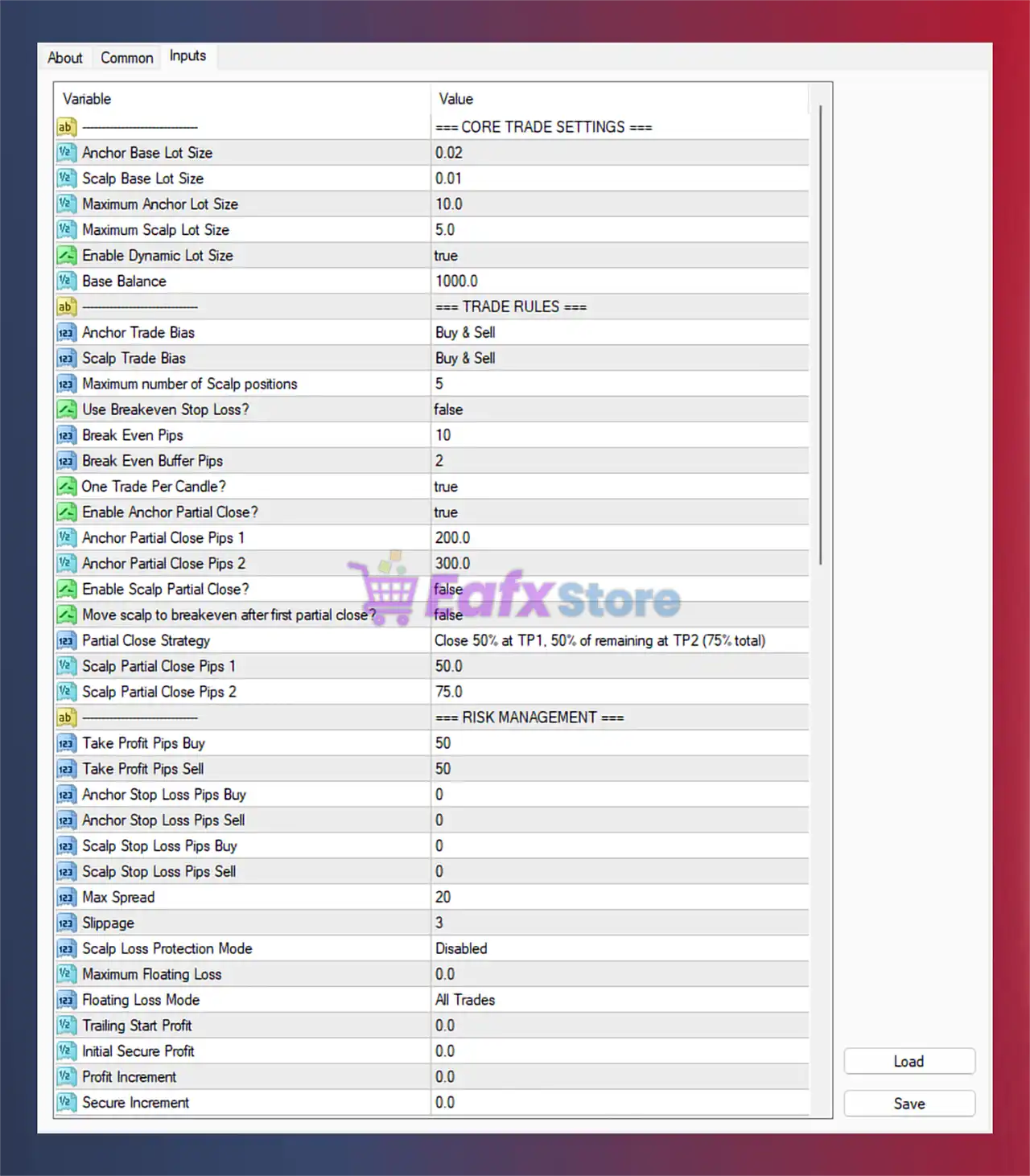
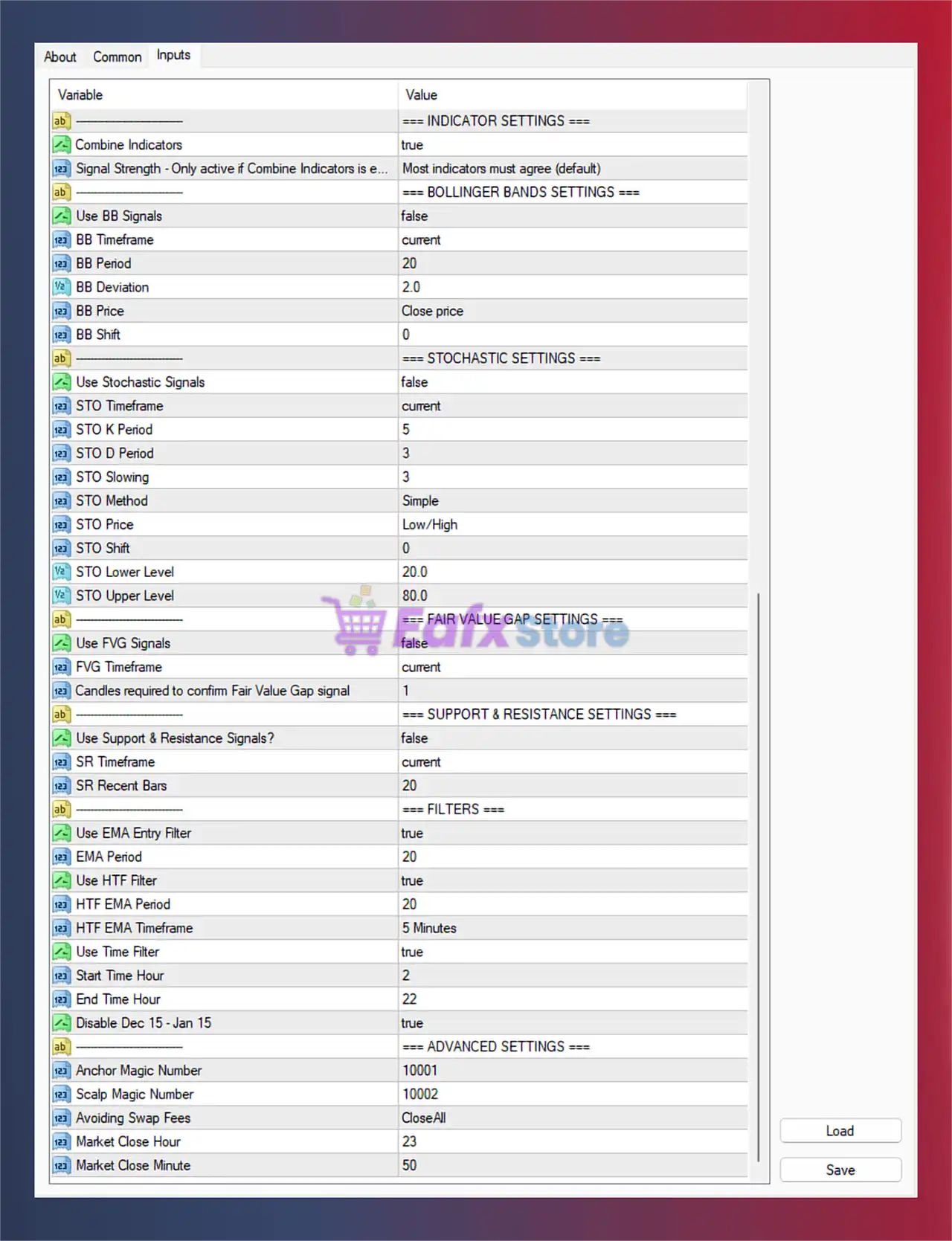
Below are the details of the parameters in the advisor’s trading system settings table:
🔶 CORE TRADE SETTINGS
🔹 Anchor Base Lot Size = 0.02: Base lot size used for anchor trades is set to 0.02.
🔹 Scalp Base Lot Size = 0.01: Base lot size used for scalp trades is configured at 0.01.
🔹 Maximum Anchor Lot Size = 10.0: Maximum allowable lot size for anchor positions is 10.0.
🔹 Maximum Scalp Lot Size = 5.0: Maximum allowable lot size for scalp positions is 5.0.
🔹 Enable Dynamic Lot Size = true: Dynamic lot scaling based on account conditions is enabled.
🔹 Base Balance = 1000.0: Dynamic lot calculations are based on an account balance of 1000.0.
🔶 TRADE RULES
🔹 Anchor Trade Bias = Buy & Sell: Anchor trades are allowed for both buy and sell directions.
🔹 Scalp Trade Bias = Buy & Sell: Scalp trades can open both buy and sell positions.
🔹 Maximum number of Scalp positions = 5: The EA can open a maximum of 5 scalp positions simultaneously.
🔹 Use Breakeven Stop Loss? = false: Automatic breakeven stop-loss feature is disabled.
🔹 Break Even Pips = 10: Breakeven activates after 10 pips profit when enabled.
🔹 Break Even Buffer Pips = 2: Additional 2 pip buffer is added after breakeven activation.
🔹 One Trade Per Candle? = true: Only one trade can be opened per candle.
🔹 Enable Anchor Partial Close? = true: Partial close functionality for anchor trades is enabled.
🔹 Anchor Partial Close Pips 1 = 200.0: First anchor partial close level is 200.0 pips.
🔹 Anchor Partial Close Pips 2 = 300.0: Second anchor partial close level is 300.0 pips.
🔹 Enable Scalp Partial Close? = false: Partial close for scalp trades is disabled.
🔹 Move scalp to breakeven after first partial close? = false: Automatic breakeven movement after partial close is disabled.
🔹 Partial Close Strategy = Close 50% at TP1, 50% of remaining at TP2 (75% total): Defines the partial close execution logic.
🔹 Scalp Partial Close Pips 1 = 50.0: First scalp partial close level is 50.0 pips.
🔹 Scalp Partial Close Pips 2 = 75.0: Second scalp partial close level is 75.0 pips.
🔶 RISK MANAGEMENT
🔹 Take Profit Pips Buy = 50: Buy trades close automatically after 50 pips profit.
🔹 Take Profit Pips Sell = 50: Sell trades close automatically after 50 pips profit.
🔹 Anchor Stop Loss Pips Buy = 0: Buy anchor trades have no fixed stop loss.
🔹 Anchor Stop Loss Pips Sell = 0: Sell anchor trades have no fixed stop loss.
🔹 Scalp Stop Loss Pips Buy = 0: Buy scalp trades have no fixed stop loss.
🔹 Scalp Stop Loss Pips Sell = 0: Sell scalp trades have no fixed stop loss.
🔹 Max Spread = 20: Maximum allowed trading spread is 20 points.
🔹 Slippage = 3: Maximum slippage allowed during execution is 3.
🔹 Scalp Loss Protection Mode = Disabled: Additional scalp loss protection is disabled.
🔹 Maximum Floating Loss = 0.0: No floating loss limit is currently configured.
🔹 Floating Loss Mode = All Trades: Floating loss calculations apply to all open trades.
🔹 Trailing Start Profit = 0.0: Trailing secure profit starts immediately when enabled.
🔹 Initial Secure Profit = 0.0: Initial secure profit lock level is 0.0.
🔹 Profit Increment = 0.0: Profit increment step is currently disabled.
🔹 Secure Increment = 0.0: Secure increment step is disabled.
🔶 INDICATOR SETTINGS
🔹 Combine Indicators = true: Multiple indicators are combined for trade confirmation.
🔹 Signal Strength = Most indicators must agree (default): Signals are validated only when most indicators align.
🔶 BOLLINGER BANDS SETTINGS
🔹 Use BB Signals = false: Bollinger Bands entry signals are disabled.
🔹 BB Timeframe = current: Bollinger Bands use the current chart timeframe.
🔹 BB Period = 20: Bollinger Bands calculation period is 20.
🔹 BB Deviation = 2.0: Bollinger Bands deviation setting is 2.0.
🔹 BB Price = Close price: Bollinger Bands are calculated using closing prices.
🔹 BB Shift = 0: No Bollinger Bands shift is applied.
🔶 STOCHASTIC SETTINGS
🔹 Use Stochastic Signals = false: Stochastic indicator signals are disabled.
🔹 STO Timeframe = current: Stochastic uses the current timeframe.
🔹 STO K Period = 5: Stochastic %K period is 5.
🔹 STO D Period = 3: Stochastic %D period is 3.
🔹 STO Slowing = 3: Stochastic slowing value is 3.
🔹 STO Method = Simple: Stochastic uses Simple moving average smoothing.
🔹 STO Price = Low/High: Stochastic is calculated from Low/High prices.
🔹 STO Shift = 0: No Stochastic shift is applied.
🔹 STO Lower Level = 20.0: Oversold level is set to 20.0.
🔹 STO Upper Level = 80.0: Overbought level is set to 80.0.
🔶 FAIR VALUE GAP SETTINGS
🔹 Use FVG Signals = false: Fair Value Gap signal detection is disabled.
🔹 FVG Timeframe = current: FVG analysis uses the current timeframe.
🔹 Candles required to confirm Fair Value Gap signal = 1: One candle confirmation is required for FVG validation.
🔶 SUPPORT & RESISTANCE SETTINGS
🔹 Use Support & Resistance Signals? = false: Support and resistance signals are disabled.
🔹 SR Timeframe = current: Support and resistance analysis uses the current timeframe.
🔹 SR Recent Bars = 20: The EA checks the most recent 20 bars for SR calculations.
🔶 FILTERS
🔹 Use EMA Entry Filter = true: EMA trend filtering for entries is enabled.
🔹 EMA Period = 20: EMA calculation period is 20.
🔹 Use HTF Filter = true: Higher timeframe trend filtering is enabled.
🔹 HTF EMA Period = 20: Higher timeframe EMA period is 20.
🔹 HTF EMA Timeframe = 5 Minutes: HTF EMA uses the 5 Minutes timeframe.
🔹 Use Time Filter = true: Time-based trading restriction is enabled.
🔹 Start Time Hour = 2: Trading starts at hour 2.
🔹 End Time Hour = 22: Trading ends at hour 22.
🔹 Disable Dec 15 - Jan 15 = true: Trading is disabled between December 15 and January 15.
🔶 ADVANCED SETTINGS
🔹 Anchor Magic Number = 10001: Magic number assigned to anchor trades.
🔹 Scalp Magic Number = 10002: Magic number assigned to scalp trades.
🔹 Avoiding Swap Fees = CloseAll: The EA closes all trades to avoid overnight swap charges.
🔹 Market Close Hour = 23: Market closing management starts at hour 23.
🔹 Market Close Minute = 50: Market close management activates at minute 50.
🔢 Conclusion
Shauns CoPilot EA is a highly advanced automated Forex trading system that combines anchor trading, scalp execution, dynamic risk management and multi-indicator confirmations into one powerful EA.
With configurable EMA filters, Bollinger Bands, Stochastic indicators, Fair Value Gap analysis, and advanced partial close strategies, the EA provides traders with extensive control over trade execution and risk exposure. Its flexible architecture makes it suitable for both conservative and aggressive trading styles on MetaTrader 4.
🔢 FAQs
❓ What is Shauns CoPilot EA MT4?
Shauns CoPilot EA MT4 is a multi-strategy automated Forex trading robot designed for MetaTrader 4.
❓ Does Shauns CoPilot EA MT4 support dynamic lot sizing?
Yes, the EA includes dynamic lot size management based on account balance.
❓ Can I use indicator filters in Shauns CoPilot EA MT4?
Yes, the EA supports EMA, Bollinger Bands, Stochastic, Fair Value Gap, and Support & Resistance filters.
❓ Does Shauns CoPilot EA MT4 include partial close functionality?
Yes, the EA supports configurable partial close strategies for anchor and scalp trades.
❓ Is Shauns CoPilot EA MT4 suitable for scalping?
Yes, the EA includes dedicated scalp trading settings and scalp risk management features.