
TrainedModelPlusAIgoldKing EA MT5
TrainedModelPlusAIgoldKing EATrainedModelPlusAIgoldKing MT5 ResultsTrainedModelPlusAIgoldKing MT5 ResultsTrainedModelPlusAIgoldKing EA Trading ResultsTrainedModelPlusAIgoldKing EA MT5 Trading ResultsTrainedModelPlusAIgoldKing EA MT5 Review
MT5XAUUSD (Gold) · AnyUpdated 20 Oct 2026

TrainedModelPlusAIgoldKing EA MT5 (Latest version)

TrainedModelPlusAIgoldKing EA trades XAUUSD with a machine learning model and OpenAI consensus, trend protection and risk based sizing.

Buy now — $599Add to cart
Download link right after paymentLifetime licenceInstall guide includedFree updates to new versions
Pay with Visa · MastercardUSDT · BTC · ETHBinance Pay
Not sure it fits your broker or account?Ask a question
Check before you buy

Will it work for me?

Trading platform
Time frames
Any
Currency pairs
XAUUSD (Gold)
Minimum / Recommended deposit
$1,000+
Minimum / Recommended leverage
Any
Account type
Netting, Hedging accounts
Additional services
Recommended brokers
What you get

In the download

FILETrainedModelPlusAIgoldKing EA
Optimize Settings

Recommended settings for TrainedModelPlusAIgoldKing EA MT5

🔢 TrainedModelPlusAIgoldKing EA MT5 Settings: Complete Inputs Guide

TrainedModelPlusAIgoldKing EA MT5 is an automated trading system for MetaTrader 5 that combines trained machine-learning (ML) signals with a second decision model to evaluate potential trading opportunities. Its configuration includes AI server communication, confidence thresholds, risk management, ATR-based stop-loss and take-profit levels, trailing stops, adaptive spread filtering, break-even protection, and partial position closing.

The EA also provides controls for managing multiple positions, limiting consecutive losses, closing trades when opposite signals appear, and exporting data for AI training. Understanding these settings helps traders configure the system according to their preferred trading conditions, risk tolerance, and testing objectives.
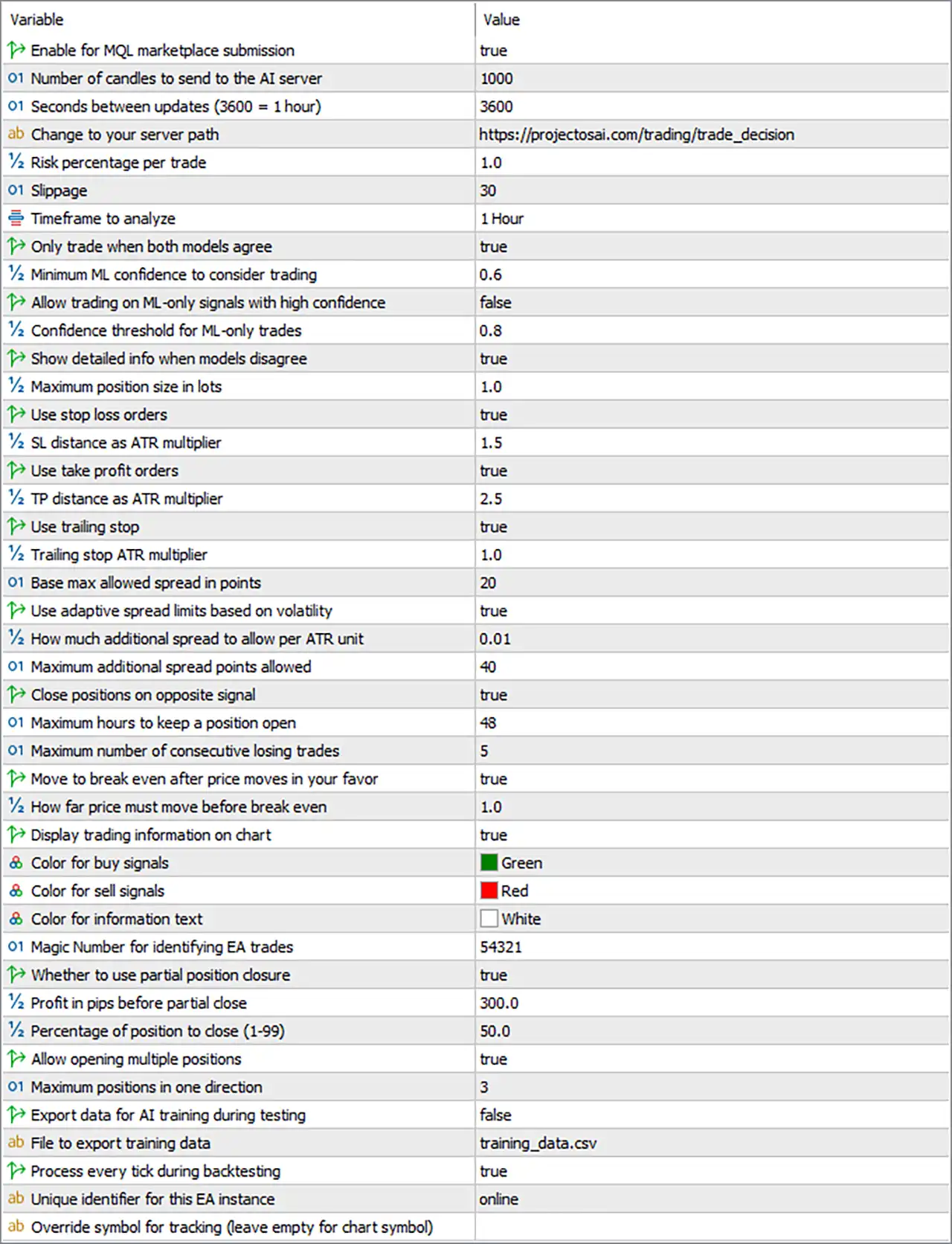
TrainedModelPlusAIgoldKing EA MT5 Settings Panel

⚙️ AI Server & Model Configuration

🔹 Enable for MQL Marketplace Submission: true — Enables the configuration intended for marketplace submission, allowing the EA to operate with the specified submission-related setting.

🔹 Number of Candles to Send to the AI Server: 1000 — Sets the number of historical candles sent to the AI server for analysis, providing up to 1,000 candles of market data for the model's decision process.

🔹 Seconds Between Updates (3600 = 1 Hour): 3600 — Sets the AI update interval to 3,600 seconds, equivalent to one hour, controlling how frequently the EA refreshes its server-based analysis.

🔹 Change to Your Server Path: https://projectosai.com/trading/trade_decision — Specifies the server endpoint used to submit trading data and receive AI-generated decisions; the endpoint must remain accessible and compatible with the EA's request format.

🔹 Risk Percentage per Trade: 1.0 — Sets the configured risk percentage to 1.0% per trade, although the actual monetary risk depends on the EA's position-sizing calculation and stop-loss implementation.

🔹 Slippage: 30 — Sets the permitted execution deviation to 30 points, defining the price tolerance used when submitting or executing trades, subject to the EA's implementation and broker rules.

🔹 Timeframe to Analyze: 1 Hour — Sets the main analysis timeframe to H1, allowing the EA to evaluate hourly market candles when preparing its trading decisions.

⚙️ AI Signal Confirmation & Confidence Filters

🔹 Only Trade When Both Models Agree: true — Requires both decision models to agree before opening a trade, providing an additional confirmation layer intended to reduce conflicting trading signals.

🔹 Minimum ML Confidence to Consider Trading: 0.6 — Sets the minimum machine-learning confidence threshold to 0.6, or 60% if the model expresses confidence on a normalized 0–1 scale.

🔹 Allow Trading on ML-Only Signals with High Confidence: false — Disables trades based solely on the machine-learning model, requiring the EA to follow its other signal-confirmation rules.

🔹 Confidence Threshold for ML-Only Trades: 0.8 — Sets the confidence threshold to 0.8, equivalent to 80% on a normalized 0–1 scale, for ML-only trades if that trading mode is enabled.

🔹 Show Detailed Info When Models Disagree: true — Enables detailed information about disagreements between the models, helping users inspect why a potential trade may not satisfy the configured confirmation rules.

⚙️ Position Sizing & Risk Management

🔹 Maximum Position Size in Lots: 1.0 — Sets the maximum configured position size to 1.0 lot, providing an upper limit for position sizing; this is substantially larger than the exposure implied by a 0.01-lot starting position, if one is used elsewhere in the setup.

🔹 Use Stop Loss Orders: true — Enables stop-loss orders for trades, allowing the EA to define an exit level intended to limit losses when the market moves against an open position.

🔹 SL Distance as ATR Multiplier: 1.5 — Sets the stop-loss distance to 1.5 times the Average True Range (ATR), allowing the stop distance to adapt to the volatility measured by the EA.

🔹 Use Take Profit Orders: true — Enables take-profit orders so positions can close automatically when the configured profit target is reached.

🔹 TP Distance as ATR Multiplier: 2.5 — Sets the take-profit distance to 2.5 times ATR, defining a volatility-adjusted profit target that is wider than the configured 1.5 ATR stop-loss distance.

🔹 Use Trailing Stop: true — Enables trailing-stop management, allowing the EA to adjust stop-loss levels as the market moves favorably, according to its trailing logic.

🔹 Trailing Stop ATR Multiplier: 1.0 — Sets the trailing-stop distance to 1.0 times ATR, allowing the distance to respond to measured market volatility.

⚙️ Spread & Execution Filters

🔹 Base Max Allowed Spread in Points: 20 — Sets the baseline maximum permitted spread to 20 points, helping the EA avoid opening trades when trading costs exceed the configured limit.

🔹 Use Adaptive Spread Limits Based on Volatility: true — Enables volatility-adjusted spread filtering, allowing the EA to modify its permitted spread according to market conditions rather than relying exclusively on a fixed threshold.

🔹 How Much Additional Spread to Allow per ATR Unit: 0.01 — Sets the additional-spread adjustment factor to 0.01 per ATR unit, controlling how the EA increases the permitted spread as volatility changes.

🔹 Maximum Additional Spread Points Allowed: 40 — Caps the extra spread allowance at 40 points, limiting how much the adaptive spread filter can expand beyond its base threshold.

⚙️ Trade Exit & Position Duration Controls

🔹 Close Positions on Opposite Signal: true — Enables closing positions when an opposite trading signal appears, allowing the EA to respond to potential changes in market direction.

🔹 Maximum Hours to Keep a Position Open: 48 — Sets the maximum position holding period to 48 hours, or two days, if the EA enforces this time-based exit as configured.

🔹 Maximum Number of Consecutive Losing Trades: 5 — Sets the consecutive losing-trade threshold to 5, providing a limit that the EA may use to restrict further trading after a sequence of losses; the exact response depends on its internal logic.

🔹 Move to Break Even After Price Moves in Your Favor: true — Enables break-even management, allowing the EA to move the stop-loss toward the entry price after a favorable price movement meets the configured condition.

🔹 How Far Price Must Move Before Break Even: 1.0 — Sets the favorable price-movement threshold to 1.0 in the EA's configured measurement units, which must be verified to determine whether it represents price units, ATR units, or another distance measure.

⚙️ Chart Display & Signal Colors

🔹 Display Trading Information on Chart: true — Enables the display of trading-related information directly on the MT5 chart, helping users monitor the EA's status and relevant signal information.

🔹 Color for Buy Signals: Green — Sets buy-signal markers or related visual elements to green, making potential buying opportunities easier to distinguish.

🔹 Color for Sell Signals: Red — Sets sell-signal markers or related visual elements to red, providing a contrasting visual indication of potential selling opportunities.

🔹 Color for Information Text: White — Sets informational text displayed by the EA to white, improving visibility depending on the chart's background color and visual theme.

⚙️ Trade Identification & Partial Position Closing

🔹 Magic Number for Identifying EA Trades: 54321 — Assigns the magic number 54321 to identify trades associated with the EA, helping distinguish its positions from those managed by other expert advisors or manual trading.

🔹 Whether to Use Partial Position Closure: true — Enables partial position closing, allowing the EA to close a portion of an open trade when the configured profit condition is reached.

🔹 Profit in Pips Before Partial Close: 300.0 — Sets the profit threshold for partial closing to 300.0 pips, subject to the EA's pip-conversion logic and the symbol's specifications.

🔹 Percentage of Position to Close (1–99): 50.0 — Sets the partial-close percentage to 50.0%, instructing the EA to close half of the eligible position when the specified conditions are satisfied.

⚙️ Multiple Position Management

🔹 Allow Opening Multiple Positions: true — Enables the EA to open multiple positions when its trading signals and other configured conditions permit additional entries.

🔹 Maximum Positions in One Direction: 3 — Limits the number of positions in a single direction to 3, helping control the accumulation of simultaneous buy or sell exposure.

⚙️ AI Training & Backtesting Configuration

🔹 Export Data for AI Training During Testing: false — Disables the export of training data during testing, preventing the EA from generating training-data exports under the displayed configuration.

🔹 File to Export Training Data: training_data.csv — Specifies training_data.csv as the filename for exported AI training data when the export feature is enabled.

🔹 Process Every Tick During Backtesting: true — Enables every-tick processing during backtesting, allowing the EA to evaluate its logic at each simulated tick rather than relying exclusively on less granular price updates.

⚙️ EA Instance & Symbol Tracking

🔹 Unique Identifier for This EA Instance: online — Sets the instance identifier to online, potentially distinguishing this running EA instance from other instances that use the same trading system.

🔹 Override Symbol for Tracking (Leave Empty for Chart Symbol): Empty — Leaves the symbol override blank, indicating that the EA should use the symbol associated with the current chart for tracking, provided this matches its implementation.

🔢 Conclusion

TrainedModelPlusAIgoldKing EA MT5 combines AI-based signal evaluation with configurable position sizing, ATR-based exits, adaptive spread limits, break-even protection, and partial position closing. Its settings provide controls for balancing model confidence, execution conditions, and trade-management rules.

Full review

Quick Overview

TrainedModelPlusAIgoldKing EA is an XAUUSD robot that joins a machine learning model with an OpenAI language model in one consensus system. Trend protection rules, risk based position sizing and ATR based stops support the decisions. It also needs a separate Python AI server, a database and an OpenAI account to run, so setup is technical.

Best For:

✅ Gold traders who want an AI assisted robot.

✅ Users who can run a Python server.

✅ Traders who accept an OpenAI usage cost.

✅ Users who like trend protection rules.

✅ Traders who want to review every AI decision.

What is TrainedModelPlusAIgoldKing EA?

TrainedModelPlusAIgoldKing EA MT5 is an Expert Advisor (EA) built for XAUUSD trading on MetaTrader 5. It combines a trained machine learning model and an OpenAI language model into one consensus decision system.

The EA connects to a separate Python AI server and a database, so the package includes both the trading robot and the supporting server software.

⭐ Vendor Website: View here

⭐ Join Our Channel Telegram

⭐ Delivery time 24h-48h after payment.

⭐ Refund if not delivered.

⭐ You will receive the current version without any limitations (ID+Time).

TrainedModelPlusAIgoldKing EA MT5 Review

How Does TrainedModelPlusAIgoldKing EA MT5 Work?

Dual AI Analysis

A RandomForest model scores technical data while an OpenAI model reviews the market context. A consensus step resolves agreement or disagreement and decides whether to trade.

Trend Protection

Sell signals are blocked in a strong uptrend and buy signals are blocked in a strong downtrend. Weak and ranging markets receive adjusted handling.

Risk and Position Sizing

Lot size follows the account balance, the chosen risk level and volatility, with a daily risk limit, a position limit, ATR based stops and a trailing stop.

Records and Dashboard

Each AI decision is stored in a database, and a web dashboard shows win rate, profit factor, drawdown and model performance over time.

Key Features of TrainedModelPlusAIgoldKing EA MT5

Dual AI Decision System

A machine learning model and an OpenAI language model both analyze the market, and the EA combines their views into one decision for every possible entry.

Selectable AI Modes

The trader can run the machine learning model only, the OpenAI model only, or the full consensus mode, which makes testing each part separately possible.

Trend Protection Rules

Counter trend signals are blocked in strong trends, and the strategy is adjusted for ranging markets, which removes many trades that fight the main move.

Market Context Analysis

Fair value gaps, volume profile, support and resistance, volatility, momentum and session information give the AI models a wider view of the market.

Market Regime Detection

The EA separates trending, ranging, breakout and consolidation conditions, and it adapts its approach when the character of the market changes.

Risk Based Position Sizing

Lot size follows the account balance, the chosen risk level and current volatility, and an optional bonus can raise size after a run of winning trades.

Layered Safety Controls

A daily risk limit, a position limit, ATR based stop losses and a trailing stop work together to reduce damage from a bad sequence of trades.

Decision Logging and Dashboard

Every AI decision is stored in a database, and a web dashboard shows win rate, profit factor, drawdown and the record of each model over time.

Complete Software Package

The package includes the EA file, a Python AI server, pre-trained models, a PostgreSQL database setup, an API guide, manuals and video tutorials.

Multiple Accounts and Instances

Several EA instances can run with separate settings, and the same setup can serve a demo account and a live account at the same time.

Historical Trading Results Performance

✅ TrainedModelPlusAIgoldKing EA traded XAUUSD (Gold vs. US Dollar) from July 6–7, 2025, as shown in the trading history. The account recorded a profit of $1,422.55 from an initial balance of $100,000.

TrainedModelPlusAIgoldKing EA MT5 Trading Results

TrainedModelPlusAIgoldKing EA MT5 Trading Results
Parameter Result
Trading Symbol XAUUSD
Initial Balance $100,000
Total Profit $1,422.55
Current Balance $101,422.55
Trading Period Shown July 6–7, 2025

✅ TrainedModelPlusAIgoldKing EA traded XAUUSD (Gold vs. US Dollar) from July 10–11, 2025, as shown in the trading history. The account achieved a profit of $26,934.64 from an initial deposit of $100,000.

TrainedModelPlusAIgoldKing EA Trading Results

TrainedModelPlusAIgoldKing EA Trading Results
Parameter Result
Trading Symbol XAUUSD
Initial Deposit $100,000
Total Profit $26,934.64
Current Balance $126,934.64
Trading Period Shown July 10–11, 2025

How to Get the Most from TrainedModelPlusAIgoldKing EA MT5

Read the Setup Guide First

The EA depends on a Python server, a database and an OpenAI connection, so every part of the installation guide should be completed before any trade.

Test Each AI Mode

Run the machine learning mode, the OpenAI mode and the consensus mode separately on a demo account to see how each one behaves.

Keep the Server Online

The EA relies on an outside server to return a decision, so the machine that hosts it should stay stable and connected without interruption.

Watch the OpenAI Usage

The language model is paid by usage, so the monthly cost should be checked and the account limits set before the system runs all day.

Check the Decision Log

The stored decisions show why a trade was taken or skipped, and reviewing them often helps to spot weak points in the AI logic.

Choose a Modest Risk Setting

The risk level should fit the account size and the loss that the trader can accept, and larger sizes should be added slowly.

Plan the Risk First

The risk management guide helps with choosing a lot size and a loss limit that suit the account.

Risk Management

Increasing Size After Wins Is Risky

The optional winning streak bonus raises the lot after profitable trades, so a single loss after a long run of wins is larger than usual and can erase earlier gains.

The AI Can Be Wrong

The author describes learning and high confidence, but a model trained on past data can fail when the market changes, and a language model can give confident but poor reasoning.

The System Depends on Outside Services

The EA needs its server and the OpenAI service to return decisions, so a failure can leave open trades without new guidance.

Several Concurrent Trades Add Exposure

The EA can hold multiple positions at once, so correlated losses on gold can build up quickly during a sharp move against the system.

Strengths and Limitations

Strengths

🔹 Broad market view: technical indicators, volume profile, fair value gaps and session data give the models many inputs to weigh before a trade.

🔹 Trend filter: blocking signals against a strong trend removes a common cause of large losses in gold trading, where trends can last a long time.

🔹 Transparent records: the decision log and dashboard show how each model performed, which supports an honest review of the system over time.

🔹 Flexible modes: machine learning only, OpenAI only and consensus modes allow gradual testing instead of one fixed behavior.

Limitations

🔹 Complex setup: a Python server, a PostgreSQL database and an OpenAI account must all work together, which is harder than installing a normal EA file.

🔹 Outside dependencies: trading decisions depend on a server and on the OpenAI service, so an outage or a slow response can stop or delay the system.

🔹 Running cost: the OpenAI service is billed by usage, so the system has an ongoing cost on top of the price of the product itself.

🔹 Unproven claims: the source gives no backtest or live report, so statements about accuracy and profitability cannot be checked from the product information.

Product Download Package?

The download package of the product suite includes:

✅ Experts: TrainedModelPlusAIgoldKing EA.ex5

➡️ Reviewed by David Easton

Final Verdict

TrainedModelPlusAIgoldKing EA MT5 is an XAUUSD robot that joins a machine learning model with an OpenAI language model and filters trades with trend protection and risk based sizing. It suits technically skilled traders who can run a Python server and accept an ongoing usage cost. The setup is complex, the system depends on outside services and no verified results are published, so a long demo test with small risk and a close look at the decision log should come before any live account is funded.

Questions about TrainedModelPlusAIgoldKing EA MT5 (Latest version)

❓ What is TrainedModelPlusAIgoldKing EA MT5?

An XAUUSD Expert Advisor that combines a machine learning model with an OpenAI language model and makes trading decisions through a consensus system.

❓ How does TrainedModelPlusAIgoldKing EA MT5 make decisions?

A RandomForest model scores technical data, an OpenAI model reviews the context, and a consensus system resolves agreement or disagreement between them.

❓ Which platform does TrainedModelPlusAIgoldKing EA MT5 use?

MetaTrader 5. It also needs a separate Python AI server and an OpenAI API account to work.

❓ Does TrainedModelPlusAIgoldKing EA MT5 need an OpenAI account?

Yes. The language model part runs through the OpenAI API, which is billed by usage and adds a running cost.

❓ Can TrainedModelPlusAIgoldKing EA MT5 run without OpenAI?

The author lists a machine learning only mode, so the language model can be turned off, although the AI server is still part of the setup.

❓ What is trend protection in TrainedModelPlusAIgoldKing EA MT5?

A rule set that blocks sell signals in a strong uptrend and buy signals in a strong downtrend, with adjusted handling for weak trends.

❓ How does TrainedModelPlusAIgoldKing EA MT5 size its trades?

By account balance, the chosen risk level and market volatility. An optional bonus can raise the size after a series of winning trades.

Other products traders compare

$599
Instant download
Buy now