


🔢 GoldFortune EA MT5: Complete Settings Guide and Configuration Explained
GoldFortune EA is an automated trading Expert Advisor with configurable execution settings, position sizing, recovery management, basket profit targets, and manual stop-order controls. Its inputs include a maximum open-entry limit, recovery step and target parameters, broker take-profit modification protection, Magic Numbers, and a Thailand time-filter section.
The configuration also contains compatibility-related settings and Cent account feed stabilization options. This guide explains every visible input and section heading, preserving all numerical values and Boolean settings. Where an input name does not fully define its behavior, the explanation describes its likely purpose without assuming undocumented functionality.
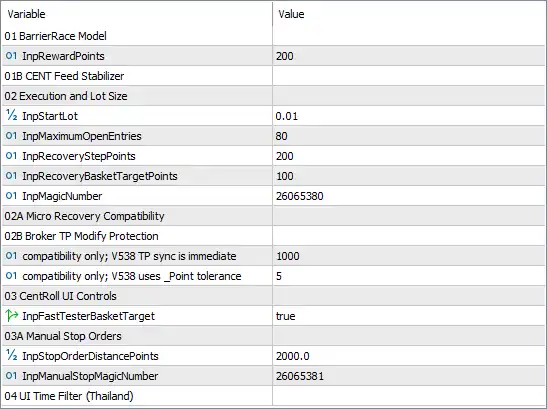
⚙️ BarrierRace Model
🔹 01 BarrierRace Model = Section heading — Identifies the BarrierRace Model configuration section. No value is displayed for this heading, so it appears to organize the related settings rather than control a specific parameter directly.
🔹 InpRewardPoints = 200 — Sets the reward-related distance or target to 200 points. This may define a target distance used by the BarrierRace strategy, but the exact meaning depends on the EA’s internal trading logic.
🔹 01B CENT Feed Stabilizer = Section heading — Identifies the Cent Feed Stabilizer section. No value is displayed, so this appears to be a category label rather than an independently configured input. The name suggests functionality related to stabilizing price-feed or execution behavior on Cent accounts, but its exact operation cannot be established from the heading alone.
⚙️ Execution and Lot Size
🔹 02 Execution and Lot Size = Section heading — Introduces the execution and position-sizing settings used by the EA.
🔹 InpStartLot = 0.01 — Sets the starting lot size to 0.01 lots. This is the configured initial trading volume, although subsequent positions may use different volumes if the EA applies recovery or other position-sizing logic.
🔹 InpMaximumOpenEntries = 80 — Sets the maximum open-entry limit to 80. This is a high configured ceiling, but the exact scope depends on whether the EA counts positions, entry orders, or another category of trades. If recovery trading is used, the actual exposure could increase substantially before the limit is reached.
🔹 InpRecoveryStepPoints = 200 — Sets the recovery-step distance to 200 points. The EA may use this distance to determine when another recovery entry can be considered after price moves against an existing position. The precise trigger and direction depend on the recovery algorithm.
🔹 InpRecoveryBasketTargetPoints = 100 — Sets the recovery basket target to 100 points. This likely defines the target used to close or manage a group of related recovery positions. The reference price, calculation method, and whether the value applies to the entire basket or another measure depend on the EA’s implementation.
🔹 InpMagicNumber = 26065380 — Assigns the Magic Number 26065380 to the EA’s trades. This identifier helps distinguish its orders from those managed by other Expert Advisors or opened manually, provided the order-management logic uses the identifier consistently.
⚙️ Micro Recovery Compatibility
🔹 02A Micro Recovery Compatibility = Section heading — Identifies the Micro Recovery Compatibility section. No direct value is displayed for this heading; it organizes the compatibility-related settings below.
⚙️ Broker Take-Profit Modification Protection
🔹 02B Broker TP Modify Protection = Section heading — Introduces settings associated with protecting broker-side take-profit modification behavior. These controls may help address compatibility issues when the EA updates take-profit levels, but their exact role depends on the implementation.
🔹 compatibility only; V538 TP sync is immediate = 1000 — Sets the compatibility parameter associated with immediate TP synchronization in version V538 to 1000. The label identifies this as a compatibility-only setting. The unit and exact effect of the numerical value are not specified, so it should not be interpreted as a guaranteed delay or distance without further verification.
🔹 compatibility only; V538 uses _Point tolerance = 5 — Sets the compatibility tolerance to 5 points for the V538 behavior described in the label. This likely defines an allowed price difference when comparing or synchronizing take-profit levels. Its precise effect depends on how the EA implements the tolerance.
⚙️ CentRoll UI Controls
🔹 03 CentRoll UI Controls = Section heading — Identifies the CentRoll user-interface control section. It organizes the related interface or target-management setting.
🔹 InpFastTesterBasketTarget = true — Enables the fast tester basket-target option. The label suggests that this setting is intended to control basket-target behavior during testing or a fast-testing workflow. Whether it changes target calculations, testing speed, or another function should be verified from the EA’s implementation.
⚙️ Manual Stop Orders
🔹 03A Manual Stop Orders = Section heading — Introduces the manual stop-order settings. These inputs appear to configure order spacing and identification for manually initiated stop orders managed by the EA.
🔹 InpStopOrderDistancePoints = 2000.0 — Sets the stop-order distance to 2000.0 points. This likely determines how far a pending stop order is placed from a reference price, although the exact reference and whether the value applies to buy-stop orders, sell-stop orders, or both depend on the EA’s logic.
🔹 InpManualStopMagicNumber = 26065381 — Assigns the Magic Number 26065381 to manual stop orders associated with this feature. It differs from the primary EA Magic Number 26065380, helping distinguish these orders from the EA’s regular trades if the implementation uses the identifiers as intended.
7. Thailand Time Filter
🔹 04 UI Time Filter (Thailand) = Section heading — Identifies the Thailand time-filter section. No value is displayed beneath this heading in the provided settings. The name suggests that the EA includes a time-based control related to Thailand local time, but the active schedule, enable/disable state, and exact filtering rules cannot be determined from the visible inputs alone.
🔢 Conclusion
The displayed GoldFortune EA MT5 configuration uses a starting lot size of 0.01, a maximum open-entry limit of 80, a recovery step of 200 points, and a recovery basket target of 100 points. Its primary Magic Number is 26065380, while the manual stop-order Magic Number is 26065381. The manual stop-order distance is configured at 2000.0 points.
The BarrierRace reward parameter is 200 points. Compatibility-related settings are configured with values of 1000 for immediate TP synchronization and 5 points for the V538 _Point tolerance. The fast tester basket-target option is enabled with InpFastTesterBasketTarget = true.
Before using this configuration on a live account, verify how the EA interprets reward and recovery points, how it calculates basket targets, and how the maximum of 80 open entries is enforced. Particular attention should be paid to recovery exposure, broker TP synchronization, and the manual stop-order distance. The visible settings do not show the active Thailand time-filter schedule, so that behavior should also be confirmed before deployment.


