


🔢 Dynamic TP XAU Scalper EA MT5 Settings: Complete Inputs Guide
Dynamic TP XAU Scalper EA MT5 is an automated trading system designed for scalping Gold (XAUUSD) on the MetaTrader 5 platform. Its configuration combines dynamic trade management, adjustable lot sizing, basket take-profit and stop-loss levels, trailing stops, break-even protection, optional grid layers, and multiple technical filters. These include EMA trend analysis, RSI confirmation, MACD momentum, ADX trend strength, and high/low breakout detection.
The EA offers configurable trading timeframes, entry lookback periods, order limits, and cooldown intervals. Understanding each input helps traders customize the strategy, manage exposure, and align the EA's behavior with their trading objectives. The settings below reproduce the displayed input values, with explanations of their intended functions.
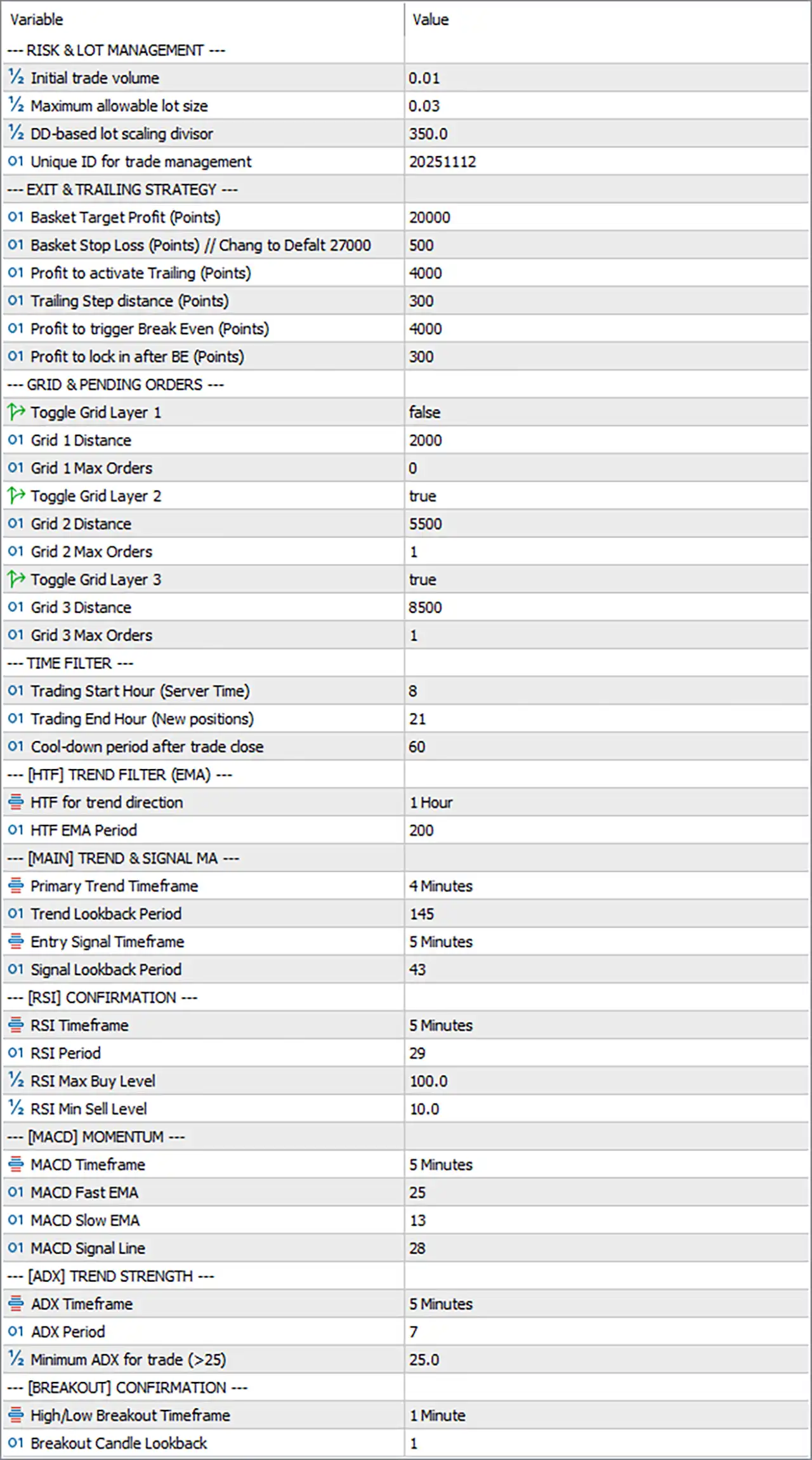
⚙️ Risk & Lot Management
🔹 Initial Trade Volume: 0.01 — Sets the starting lot size for the EA's initial trade, allowing the strategy to begin with a relatively small position volume.
🔹 Maximum Allowable Lot Size: 0.03 — Defines the maximum permitted lot size, helping limit the volume of individual positions when the EA adjusts its trade sizing.
🔹 DD-Based Lot Scaling Divisor: 350.0 — Provides the divisor used by the drawdown-based lot-scaling mechanism; the exact relationship between drawdown and volume depends on the EA's internal calculation.
🔹 Unique ID for Trade Management: 20251112 — Assigns a unique identifier, commonly associated with the EA's magic number or trade-management ID, to distinguish its orders from other trading systems.
⚙️ Exit & Trailing Strategy
🔹 Basket Target Profit (Points): 20000 — Sets the target profit threshold of 20,000 points for basket-level trade management, potentially closing a group of related positions when the target is reached.
🔹 Basket Stop Loss (Points): 500 — Sets the basket stop-loss threshold to 500 points. The input label includes the instruction “Change to Default 27000,” so the displayed value of 500 differs from the suggested value of 27000.
🔹 Profit to Activate Trailing (Points): 4000 — Activates the trailing mechanism after the relevant profit threshold reaches 4,000 points, allowing the EA to begin protecting accumulated gains.
🔹 Trailing Step Distance (Points): 300 — Sets the trailing adjustment interval to 300 points, controlling how far the relevant price or profit level must move before the trailing mechanism updates.
🔹 Profit to Trigger Break Even (Points): 4000 — Defines a 4,000-point profit threshold for activating break-even management, which is intended to move the stop-loss toward the entry price when the required condition is met.
🔹 Profit to Lock In After BE (Points): 300 — Sets the profit-locking distance to 300 points after break-even activation, potentially securing a small gain instead of merely protecting the entry price.
⚙️ Grid & Pending Orders
🔹 Toggle Grid Layer 1: false — Disables the first grid layer, preventing this layer from being activated by the EA under the displayed configuration.
🔹 Grid 1 Distance: 2000 — Defines a spacing of 2,000 points for the first grid layer if that layer is enabled in a different configuration.
🔹 Grid 1 Max Orders: 0 — Sets the maximum number of orders for Grid Layer 1 to zero, indicating that no orders are permitted through this layer under the displayed limit.
🔹 Toggle Grid Layer 2: true — Enables the second grid layer, allowing the EA to use this layer when its internal grid-entry conditions are satisfied.
🔹 Grid 2 Distance: 5500 — Sets the second grid layer's spacing to 5,500 points, defining the configured distance between relevant grid levels.
🔹 Grid 2 Max Orders: 1 — Limits Grid Layer 2 to one order, restricting the number of additional positions that can be placed through this layer.
🔹 Toggle Grid Layer 3: true — Enables the third grid layer, allowing this layer to participate in trade management when the EA's conditions are met.
🔹 Grid 3 Distance: 8500 — Defines an 8,500-point spacing for Grid Layer 3, providing a wider configured interval than the second grid layer.
🔹 Grid 3 Max Orders: 1 — Limits Grid Layer 3 to one order, restricting the number of additional positions that can be opened through this layer.
⚙️ Time Filter
🔹 Trading Start Hour (Server Time): 8 — Sets the start of the trading window at 08:00 broker-server time, determining when the EA may begin opening trades under its time filter.
🔹 Trading End Hour (New Positions): 21 — Sets the cutoff for opening new positions at 21:00 broker-server time, while the handling of existing positions remains subject to the EA's other management rules.
🔹 Cool-Down Period After Trade Close: 60 — Establishes a cooldown period of 60 units after a trade closes; this is likely measured in seconds, but the precise unit should be confirmed from the EA's implementation.
⚙️ Higher-Timeframe (HTF) Trend Filter — EMA
🔹 HTF for Trend Direction: 1 Hour — Uses the H1 timeframe to evaluate the broader market trend, helping the EA align lower-timeframe entries with a higher-timeframe directional bias.
🔹 HTF EMA Period: 200 — Sets the higher-timeframe Exponential Moving Average period to 200, providing a long-term trend reference for the EA's directional filter.
⚙️ Main Trend & Signal Moving Average
🔹 Primary Trend Timeframe: 4 Minutes — Sets the primary trend-analysis timeframe to 4 minutes, allowing the EA to evaluate shorter-term directional conditions before considering an entry.
🔹 Trend Lookback Period: 145 — Sets the trend lookback period to 145, defining the number of historical bars or observations used by the primary trend-analysis component.
🔹 Entry Signal Timeframe: 5 Minutes — Sets the entry-signal timeframe to M5, determining the chart interval used to evaluate the EA's entry conditions.
🔹 Signal Lookback Period: 43 — Uses a lookback period of 43 for the entry-signal component, controlling how much recent market history is considered by the signal calculation.
⚙️ RSI Confirmation
🔹 RSI Timeframe: 5 Minutes — Calculates the Relative Strength Index using the M5 timeframe, helping the EA evaluate short-term momentum and market conditions.
🔹 RSI Period: 29 — Sets the RSI calculation period to 29 bars, producing a relatively longer momentum measurement than the commonly used 14-period setting.
🔹 RSI Max Buy Level: 100.0 — Sets the maximum RSI threshold for buy signals to 100.0, the upper boundary of the standard RSI scale, making this particular upper limit unlikely to restrict most valid RSI readings.
🔹 RSI Min Sell Level: 10.0 — Sets the minimum RSI threshold for sell signals to 10.0, establishing a very low RSI boundary whose precise filtering behavior depends on how the EA evaluates sell conditions.
⚙️ MACD Momentum
🔹 MACD Timeframe: 5 Minutes — Calculates MACD momentum on M5, allowing the EA to assess short-term changes in momentum alongside its other entry filters.
🔹 MACD Fast EMA: 25 — Sets the fast exponential moving average parameter to 25, controlling one of the moving-average components used in the MACD calculation.
🔹 MACD Slow EMA: 13 — Sets the slow exponential moving average parameter to 13, defining the second moving-average component. The configured value is lower than the fast EMA value of 25, which is unconventional and should be verified against the EA's intended MACD implementation.
🔹 MACD Signal Line: 28 — Sets the MACD signal-line parameter to 28, determining the configured period used to smooth the MACD output or evaluate its signal component.
⚙️ ADX Trend Strength
🔹 ADX Timeframe: 5 Minutes — Uses M5 data for the Average Directional Index, helping the EA assess whether market conditions meet its trend-strength requirements.
🔹 ADX Period: 7 — Sets the ADX calculation period to 7 bars, making the indicator more responsive to recent market changes than longer-period configurations.
🔹 Minimum ADX for Trade (>25): 25.0 — Sets the minimum ADX threshold to 25.0, requiring the trend-strength reading to exceed the configured level if the EA implements the condition as stated in the input label.
⚙️ Breakout Confirmation
🔹 High/Low Breakout Timeframe: 1 Minute — Uses the M1 timeframe to identify potential breakouts beyond recent price highs or lows, supporting short-term scalping entries.
🔹 Breakout Candle Lookback: 1 — Sets the breakout lookback to one candle, making the breakout component focus on a very recent candle when determining its high/low reference levels.
🔢 Conclusion
Dynamic TP XAU Scalper EA MT5 provides a configurable framework for automated Gold scalping, combining higher-timeframe EMA direction with shorter-term trend analysis, RSI confirmation, MACD momentum, ADX strength, and M1 breakout detection. Its basket exits, trailing stop settings, break-even controls, and grid-layer limits offer additional flexibility in managing open trades.
The displayed configuration uses an initial volume of 0.01 lots, a maximum allowable lot size of 0.03, and a trading window from 08:00 to 21:00 broker-server time. However, Grid Layers 2 and 3 are enabled, and the basket stop-loss value is set to 500 points despite the accompanying note recommending a default of 27000. These settings deserve particular attention before live deployment.
Recommended practice: Verify the EA's point-to-price conversion for the specific XAUUSD symbol, confirm the unusual MACD parameter order, and test the complete configuration in MT5 Strategy Tester and on a demo account. Basket point values do not directly translate into a fixed monetary risk without considering symbol specifications, trade volume, and the EA's basket-calculation method.


