
Bfg 9K Gold Killer EA MT5 Settings Explained – Complete Configuration Guide
Bfg 9K Gold Killer EA is an advanced AI-powered Expert Advisor for MetaTrader 5 that combines automatic trade execution, intelligent position management, trailing stop technology and comprehensive risk protection.
The EA includes an Auto Pilot mode, Executor engine, Cleaner module, AI signal filters, and multiple safety features, making it suitable for traders seeking automated Gold trading with customizable money management and account protection.

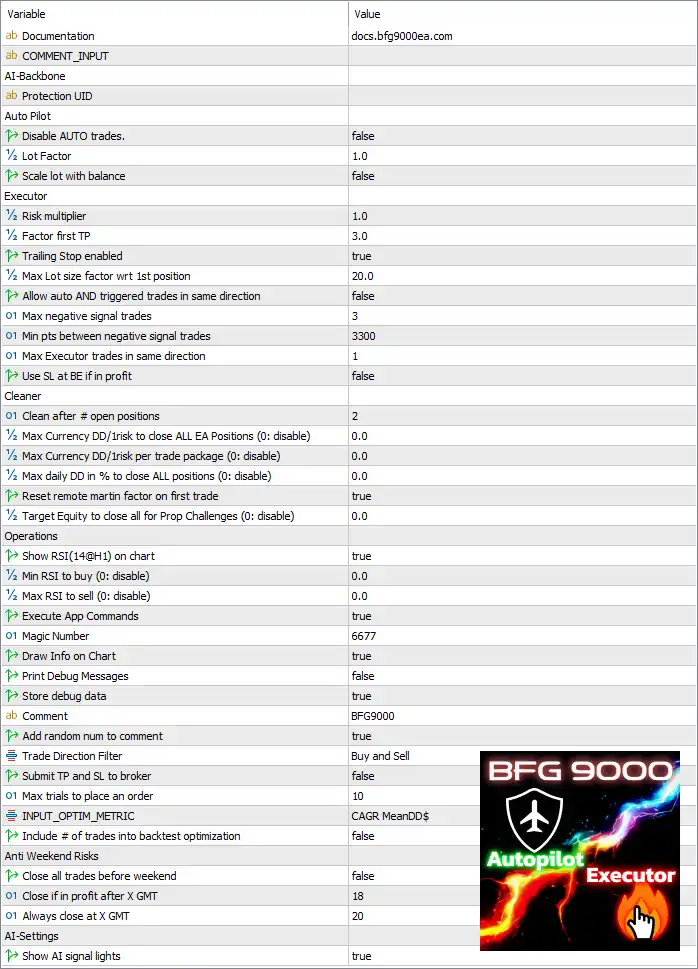
Bfg 9K Gold Killer EA MT5 Settings
Documentation
🔹 Documentation = docs.bfg9000ea.com – Provides access to the official documentation and user guide.
🔹 COMMENT_INPUT – Reserved section for user comments or internal EA configuration.
AI-Backbone
🔹 Protection UID – Unique protection identifier used by the EA licensing and security system.
Auto Pilot Settings
🔹 Disable AUTO trades = false – Automatic trading is enabled.
🔹 Lot Factor = 1.0 – Sets the base lot size multiplier to 1.0.
🔹 Scale lot with balance = false – Lot size does not automatically increase with account balance.
Executor Settings
🔹 Risk multiplier = 1.0 – Applies a 1.0x multiplier to the EA's risk calculations.
🔹 Factor first TP = 3.0 – Multiplies the first Take Profit target by 3.0.
🔹 Trailing Stop enabled = true – Enables automatic trailing stop management.
🔹 Max Lot size factor wrt 1st position = 20.0 – Limits maximum lot size to 20.0 times the initial position.
🔹 Allow auto AND triggered trades in same direction = false – Prevents automatic and manually triggered trades from opening simultaneously in the same direction.
🔹 Max negative signal trades = 3 – Allows a maximum of 3 trades against negative signals.
🔹 Min pts between negative signal trades = 3300 – Requires 3300 points between consecutive negative signal trades.
🔹 Max Executor trades in same direction = 1 – Limits Executor to 1 trade per direction.
🔹 Use SL at BE if in profit = false – Break-even Stop Loss is disabled even when trades become profitable.
Cleaner Settings
🔹 Clean after # open positions = 2 – Activates the Cleaner module after 2 open positions.
🔹 Max Currency DD/risk to close ALL EA Positions (0: disable) = 0.0 – Currency drawdown protection is disabled.
🔹 Max Currency DD/risk per trade package (0: disable) = 0.0 – Per-package currency drawdown protection is disabled.
🔹 Max daily DD in % to close ALL positions (0: disable) = 0.0 – Daily percentage drawdown protection is disabled.
🔹 Reset remote martin factor on first trade = true – Resets the Martingale factor when a new trading cycle begins.
🔹 Target Equity to close all for Prop Challenges (0: disable) = 0.0 – Prop challenge equity target is disabled.
Operations Settings
🔹 Show RSI(14@H1) on chart = true – Displays the 14-period RSI on H1 directly on the chart.
🔹 Min RSI to buy (0: disable) = 0.0 – No minimum RSI requirement for Buy entries.
🔹 Max RSI to sell (0: disable) = 0.0 – No maximum RSI requirement for Sell entries.
🔹 Execute App Commands = true – Allows commands received from the companion application.
🔹 Magic Number = 6677 – Unique identifier assigned to EA trades.
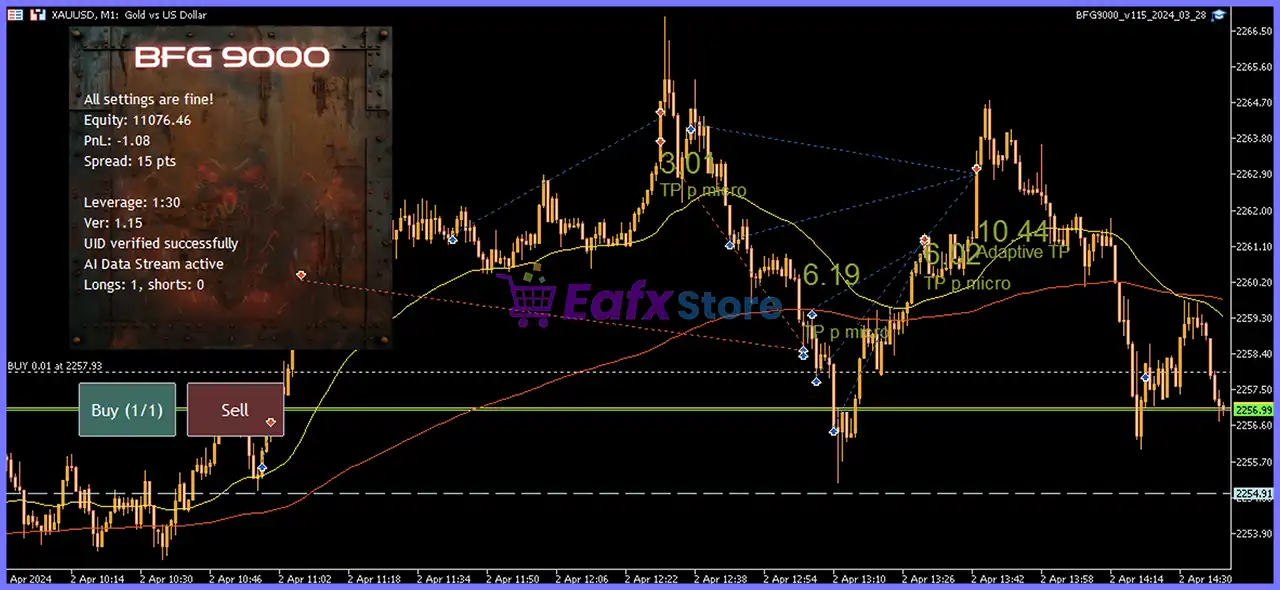
🔹 Draw Info on Chart = true – Displays trading information directly on the chart.
🔹 Print Debug Messages = false – Debug messages are disabled.
🔹 Store debug data = true – Saves diagnostic information for troubleshooting.
🔹 Comment = BFG9000 – Adds BFG9000 as the trade comment.
🔹 Add random num to comment = true – Appends a random number to each order comment.
🔹 Trade Direction Filter = Buy and Sell – Allows both Buy and Sell trades.
🔹 Submit TP and SL to broker = false – Take Profit and Stop Loss are managed internally instead of being sent to the broker.
🔹 Max trials to place an order = 10 – Retries order placement up to 10 times.
🔹 INPUT_OPTIM_METRIC = CAGR MeanDD$ – Uses CAGR MeanDD$ as the optimization metric.
🔹 Include # of trades into backtest optimization = false – Number of trades is excluded from optimization scoring.
Anti Weekend Risks
🔹 Close all trades before weekend = false – Weekend auto-closing is disabled.
🔹 Close if in profit after X GMT = 18 – Closes profitable trades after 18:00 GMT.
🔹 Always close at X GMT = 20 – Forces all positions to close at 20:00 GMT.
AI Settings
🔹 Show AI signal lights = true – Displays AI-generated trading signals on the chart.
Conclusion
Bfg 9K Gold Killer EA combines AI-assisted trading, automated execution, advanced trailing stop management, and multiple account protection tools into a single Expert Advisor. With configurable Auto Pilot settings, Executor controls, Cleaner safeguards, RSI filters, and weekend risk management, it offers traders a flexible framework for managing Gold trading strategies while maintaining control over risk and trade execution.
FAQs
❓ What does the Auto Pilot mode do in Bfg 9K Gold Killer EA MT5?
Auto Pilot automatically manages trade execution using the configured lot sizing and risk settings.
❓ Can the EA trade both Buy and Sell positions?
Yes. The default Trade Direction Filter = Buy and Sell allows trading in both market directions.
❓ Does Bfg 9K Gold Killer EA MT5 include Trailing Stop functionality?
Yes. The default configuration enables the built-in Trailing Stop feature for automatic profit protection.
❓ Is the Stop Loss sent directly to the broker?
No. By default, Submit TP and SL to broker = false, meaning the EA manages exits internally.
❓ Does the EA include AI-based chart indicators?
Yes. The EA can display AI signal lights and the RSI(14) on the H1 timeframe, helping traders monitor market conditions and trading signals visually.