







Boomerang All in one EA MT5 (Latest version) – GroupBuy
Select a variant to see availability.
Quick Verdict
Boomerang All in One EA is a professional multi-strategy Expert Advisor (EA) built for traders seeking stable long-term automated trading across Forex, Gold, Commodities, Stocks and Cryptocurrency markets. With flexible symbol management, intelligent risk control, advanced money management, news protection, and independent trading profiles, it provides a comprehensive solution for both individual traders and investment funds looking for consistent portfolio growth.
Best For
✅ Professional MT5 traders
✅ Long-term automated investors
✅ Gold (XAUUSD) traders
✅ Portfolio diversification
✅ Investment funds
✅ Prop traders with disciplined risk management
✅ Traders seeking non-Martingale and non-DCA strategies
Overall Rating
9.5/10 ⭐⭐⭐⭐⭐
| Category | Score |
|---|---|
| Profit Potential | 9.6/10 |
| Risk Management | 9.7/10 |
| Stability | 9.5/10 |
| Flexibility | 9.8/10 |
| Ease of Configuration | 9.2/10 |
| Live Performance | 9.4/10 |
| Overall Value | 9.5/10 |
What is Boomerang All in One EA?
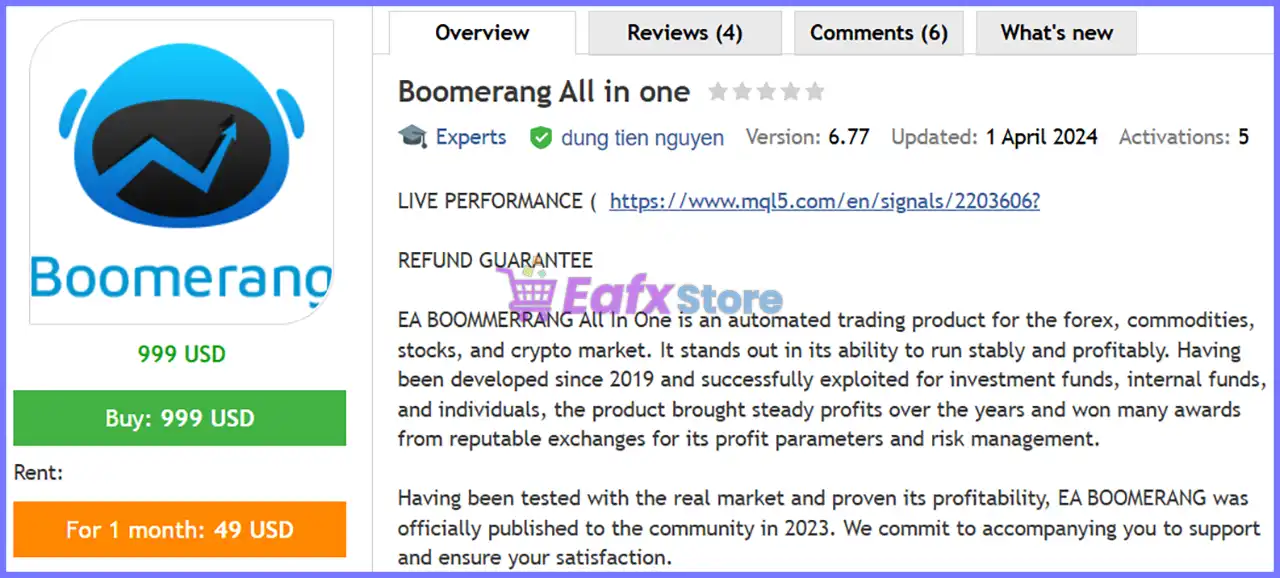
Boomerang All in One EA is a premium automated trading system for MetaTrader 5 designed to trade Forex, Commodities, Stocks, Indices, Cryptocurrency, and Precious Metals from one powerful Expert Advisor.
Unlike conventional trading robots that rely on a single strategy, Boomerang integrates multiple independent trading profiles into one EA. Each profile can trade different symbols, use unique trading sessions, individual Magic Numbers, separate lot management and customized risk parameters.
Originally developed in 2019 for private investors and investment funds, the EA was publicly released in 2023 after several years of live market validation. During its development, it earned recognition through trading competitions and performance awards while continuously evolving into a highly configurable portfolio trading solution.
One of its biggest advantages is its retracement-based trading logic instead of relying on Martingale or traditional DCA recovery systems. This allows the EA to pursue controlled growth while maintaining disciplined capital management.
 Vendor Website: View here
This is GroupBuy ==> How to Join
Boomerang All in one EA MT5 Review
How Does Boomerang All in One EA Work?
Boomerang All in One EA operates by combining multiple independent trading engines inside a single MT5 Expert Advisor.
Each symbol profile functions independently and includes:
🔹 Separate Magic Number
🔹 Individual trading schedule
🔹 Independent lot sizing
🔹 News event protection
🔹 Maximum drawdown settings
🔹 Position management
🔹 Custom Take Profit logic
🔹 Daily trading limits
🔹 Risk management rules
The EA continuously monitors market movements using its proprietary Wave Principle. Instead of increasing exposure through Martingale, it identifies retracement opportunities where price is more likely to reverse before executing trades.
Trading decisions are further filtered through:
🔹 Economic news events
🔹 Spread filters
🔹 Slippage limits
🔹 Trading sessions
🔹 Drawdown monitoring
🔹 Adaptive money management
This layered approach helps reduce unnecessary exposure while maintaining consistent trading activity.
Key Features of Boomerang All in One EA
Multi-Strategy Architecture
Run multiple independent trading strategies simultaneously within a single Expert Advisor.
Three Independent Symbol Profiles
Configure separate trading conditions, schedules, and risk parameters for each trading profile.
Advanced Wave-Based Trading
Uses retracement principles instead of Martingale or DCA recovery techniques.
Dynamic Money Management
Automatically adjusts position sizes according to account balance and accumulated profits.
Flexible Trading Sessions
Each profile supports custom trading hours for every weekday.
Economic News Protection
Avoids opening trades before and after major economic news releases.
Smart Position Management
Supports individual Take Profit placement and customizable exit logic.
Drawdown Protection
Built-in drawdown control helps reduce excessive account exposure during unfavorable market conditions.
Spread & Slippage Filters
Trades are executed only when market conditions satisfy predefined spread and execution quality requirements.
Portfolio Diversification
Supports Forex pairs, Gold, Commodities, Indices, Stocks, and Cryptocurrency markets from a single EA.
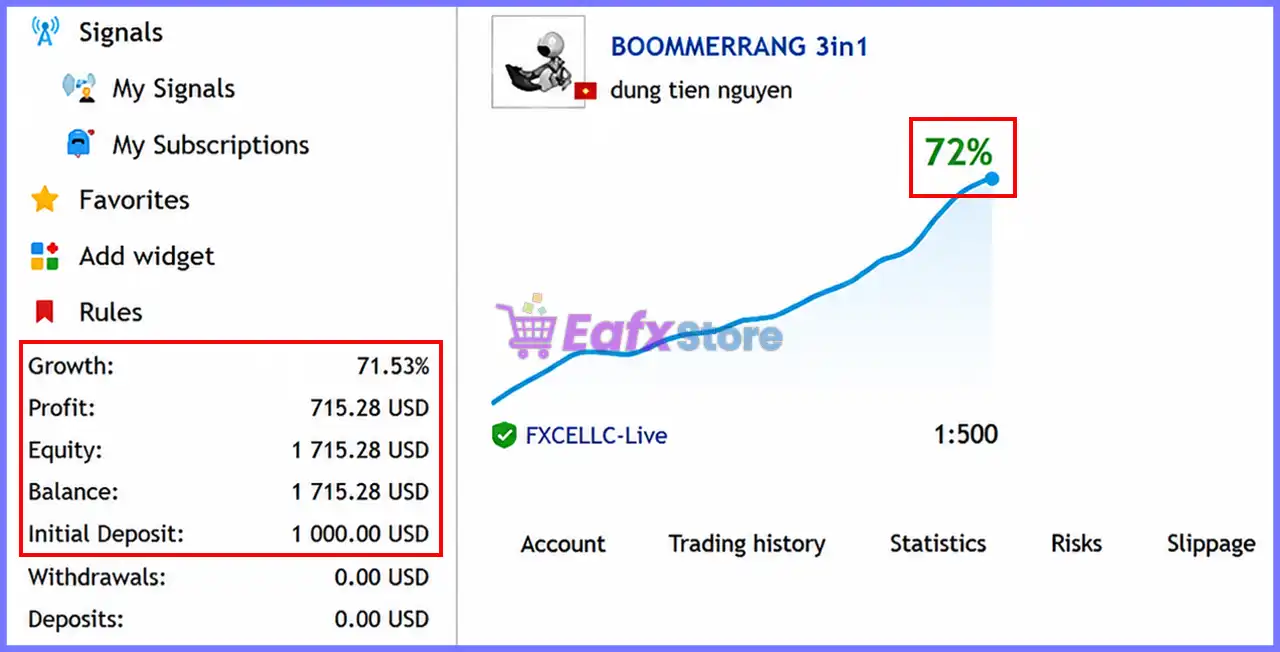
Verified Live Signal Performance
The published live signal demonstrates consistent account growth with controlled risk over real trading conditions.
Boomerang All in one EA Live Signal
Live Account Highlights
| Metric | Result |
|---|---|
| Account Growth | 71.53% |
| Net Profit | $715.28 |
| Initial Deposit | $1,000 |
| Current Balance | $1,715.28 |
| Equity | $1,715.28 |
| Withdrawals | $0 |
| Leverage | 1:500 |
Live Signal Analysis
The verified signal reflects steady equity appreciation rather than highly volatile spikes, suggesting disciplined trade execution and controlled exposure. With more than 71% account growth from an initial $1,000 deposit, the EA demonstrates its ability to compound gains while maintaining balance and equity consistency. The absence of withdrawals also provides a clear view of organic account growth without performance distortion.
Backtest Trading Results Performance
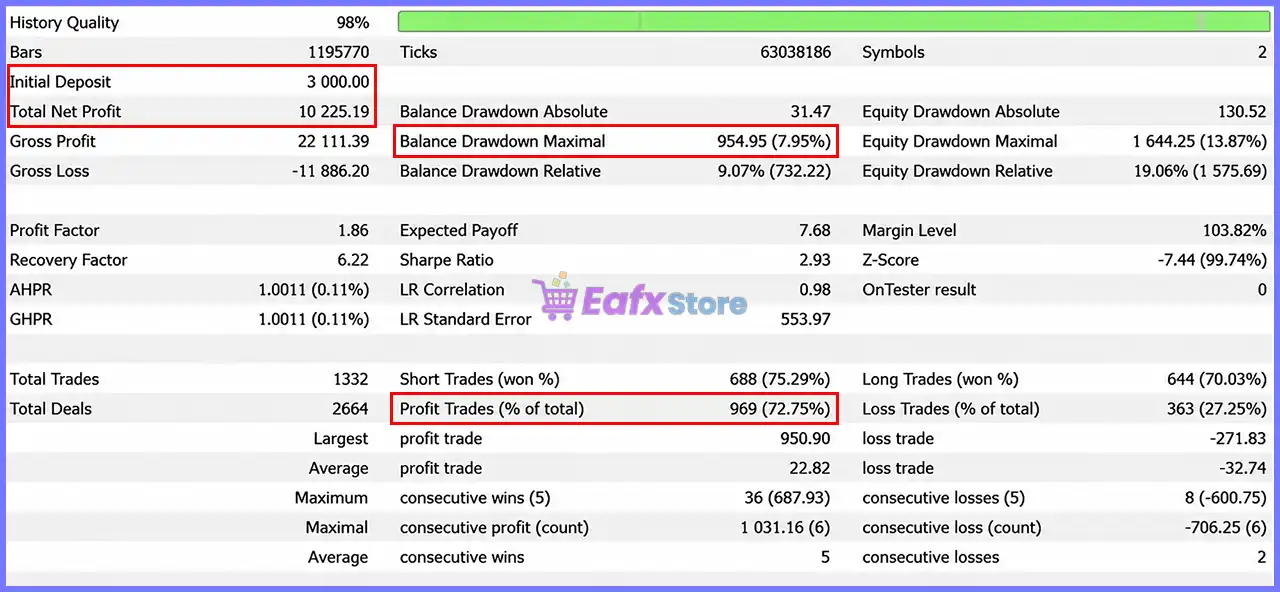
Historical testing further demonstrates the EA’s ability to sustain profitability across a large sample of trades.
Boomerang All in one EA Backtest
| Performance Metric | Value |
|---|---|
| History Quality | 98% |
| Initial Deposit | $3,000 |
| Total Net Profit | $10,225.19 |
| Gross Profit | $22,111.39 |
| Gross Loss | -$11,886.20 |
| Profit Factor | 1.86 |
| Recovery Factor | 6.22 |
| Sharpe Ratio | 2.93 |
| Total Trades | 1,332 |
| Winning Trades | 72.75% |
| Maximum Balance Drawdown | 7.95% |
| Maximum Equity Drawdown | 13.87% |
Backtest Analysis
Several performance indicators stand out:
🔹 72.75% winning trade ratio across more than 1,300 trades.
🔹 Profit Factor of 1.86 indicates profitable long-term expectancy.
🔹 Recovery Factor above 6 demonstrates efficient recovery after losing periods.
🔹 Maximum Balance Drawdown below 8% reflects disciplined capital protection.
🔹 High-quality historical data (98%) increases confidence in the reliability of the test.
Overall, the historical results align well with the EA’s focus on stable, risk-controlled portfolio growth.
Why Boomerang All in One EA Stands Out
True Multi-Profile Trading
Few MT5 Expert Advisors allow three completely independent trading profiles inside one EA.
Non-Martingale Design
Rather than relying on aggressive recovery systems, the EA focuses on retracement opportunities and intelligent market timing.
Institutional-Level Configuration
The large number of configurable parameters enables traders to customize the EA for various markets, brokers, and trading objectives.
Suitable for Multiple Asset Classes
Unlike many Gold-only robots, Boomerang can trade currencies, commodities, stocks, indices and cryptocurrencies.
Proven Development History
The strategy has been refined since 2019 before becoming publicly available, benefiting from years of private market testing.
Risk Management Features
Boomerang All in One EA places significant emphasis on protecting trading capital through multiple independent safety mechanisms.
Adaptive Lot Scaling
Position size automatically adjusts according to account balance and accumulated profits.
Drawdown Protection
Each trading profile supports its own maximum drawdown threshold to limit risk during adverse market conditions.
News Event Filter
Trading activity can pause before and after major economic announcements to avoid unnecessary volatility.
Trading Session Filters
Orders are opened only during predefined market sessions, reducing exposure during less favorable periods.
Spread and Slippage Control
The EA avoids entering trades when spreads widen or execution quality deteriorates.
Daily Trading Limits
Profiles can restrict the number of trading rounds per day to prevent overtrading.
Individual Symbol Risk Management
Each symbol maintains its own Magic Number, risk configuration, and trading schedule for improved portfolio isolation.
Recommended Trading Conditions
For optimal performance, the following setup is recommended:
| Features | Type |
|---|---|
| Trading platform | MetaTrader 5 (MT5) |
| Time frames | Any |
| Currency pairs | Forex, Gold, Commodities, Stocks, Crypto |
| Minimum / Recommended deposit | $1,000+ |
| Minimum / Recommended leverage | 1:100+ |
| Type of account | ECN or Raw Spread |
| Additional services | Unlock and Decompile |
| Recommended brokers | Exness Broker, Icmarkets Broker |
| Recommended VPS | MyfxVPS.com ( Blue VPS, Golden VPS). Lowest Latency, 2 week Free Trial, 100% Free for 12-18 Months. |
Product Download Package?
The download package of the product suite includes:
 Setting (If Any).docx
Installation Guide.docx
 Reviewed by David Easton
Weaknesses and Risk Warnings
Although Boomerang All in One EA offers a sophisticated trading framework, traders should understand several important considerations.
Large Number of Settings
The extensive configuration options may feel overwhelming for beginners.
Performance Depends on Broker Quality
Execution speed, spreads, and slippage can significantly influence live performance.
Market Conditions Can Change
No Expert Advisor can guarantee profits under every market environment.
Requires Proper Risk Configuration
Using aggressive lot sizes may increase drawdown beyond intended levels.
VPS Recommended
Continuous automated trading benefits from stable, uninterrupted VPS hosting.
Who Should Use Boomerang All in One EA?
Boomerang All in One EA is particularly suitable for:
Individual Investors
Ideal for traders seeking long-term portfolio growth through disciplined automated trading.
Investment Funds
The flexible risk management and portfolio diversification features make it suitable for professional money management.
Experienced MT5 Traders
Advanced users can fully utilize the EA’s independent trading profiles and extensive customization options.
Gold Traders
The provided configurations are optimized for XAUUSD while remaining adaptable to other markets.
Multi-Asset Traders
A strong choice for those who want to manage multiple asset classes from a single automated trading solution.
Final Verdict
Boomerang All in One EA is a highly configurable MT5 Expert Advisor that combines multi-strategy execution, advanced money management, and comprehensive risk control into a single automated trading system. Its independent trading profiles, retracement-based methodology, adaptive lot sizing, news-event protection, and flexible session management provide traders with exceptional versatility across Forex, Gold, Commodities, Stocks and Cryptocurrency markets.
Both the published live signal and historical backtest indicate a strong balance between profitability and risk management, with consistent account growth, a healthy win rate, controlled drawdown and efficient recovery characteristics. While the extensive configuration options may require some learning, they also give experienced traders the flexibility to tailor the EA to different market conditions and investment objectives.
For traders seeking a professional-grade MT5 Expert Advisor focused on long-term stability rather than aggressive recovery systems, Boomerang All in One stands out as a compelling solution capable of delivering disciplined automated trading across multiple financial markets.
🔢 Boomerang All in One EA MT5 Settings Explained – Complete Configuration Guide
Boomerang All in One EA is a multi-strategy Expert Advisor designed for MetaTrader 5 that allows traders to manage multiple trading sessions and independent symbol configurations within a single EA.
It includes flexible time filters, news protection, dynamic lot sizing, drawdown control, position management and customizable exit strategies.
Each trading profile can be configured separately, making the EA suitable for diversified automated trading while maintaining robust risk management.
Boomerang All in one EA MT5 Settings
🔢 Boomerang All in One EA MT5 Settings
Below are the details of the parameters in the advisor’s trading system settings table:
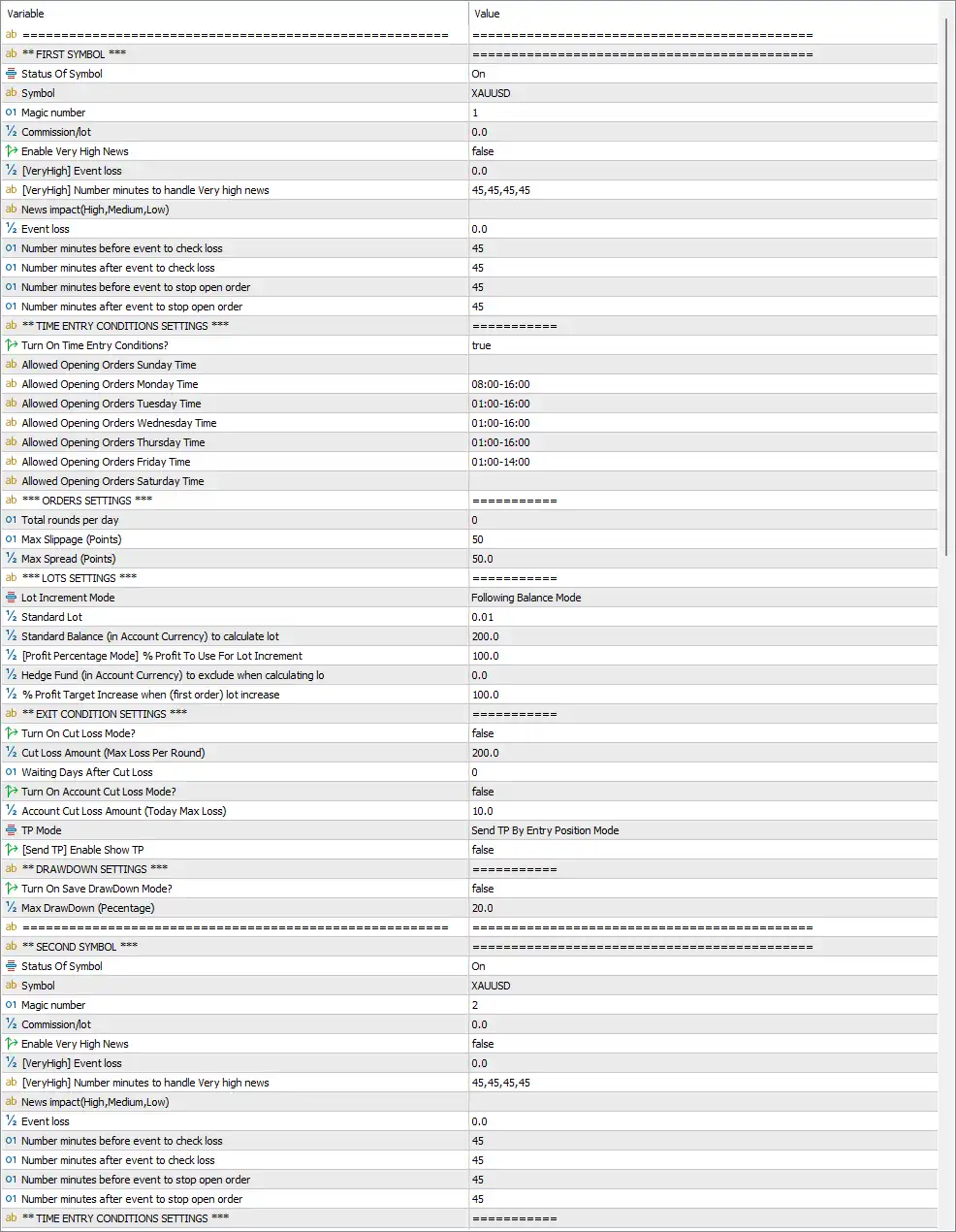
Boomerang All in one EA Settings Panel
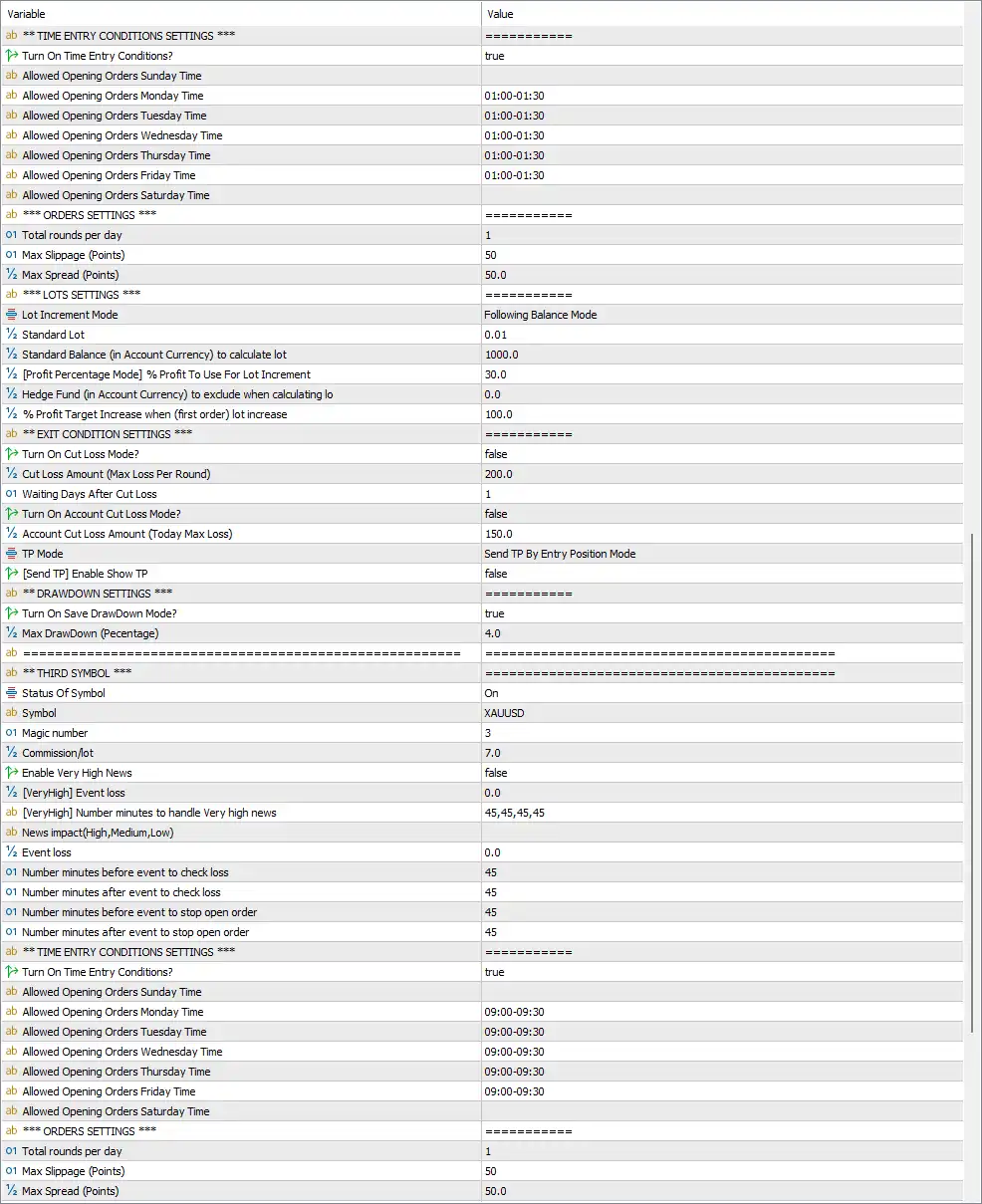
Boomerang All in one EA MT5 Settings Panel
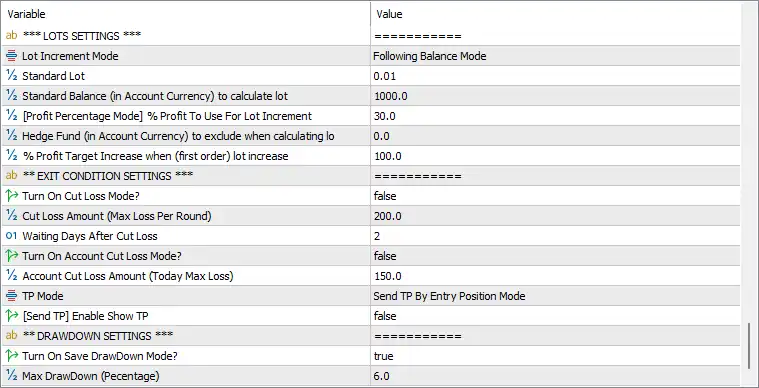
Boomerang All in one MT5 Settings Panel
🔶 First Symbol Settings
🔹 Status Of Symbol = On – Enables trading for the first configured symbol.
🔹 Symbol = XAUUSD – The trading instrument assigned to this profile is XAUUSD.
🔹 Magic number = 1 – Assigns Magic Number 1 to identify trades opened by the first symbol.
🔹 Commission/lot = 0.0 – Trading commission per lot is set to 0.0.
🔹 Enable Very High News = false – Does not apply a dedicated filter for very high-impact news.
🔹 [VeryHigh] Event loss = 0.0 – Maximum allowed event loss during very high-impact news is 0.0.
🔹 [VeryHigh] Number minutes to handle Very High news = 45,45,45,45 – Uses 45-minute protection windows around very high-impact events.
🔹 News impact (High, Medium, Low) – Defines which economic news levels the EA monitors.
🔹 Event loss = 0.0 – Maximum acceptable loss during monitored news events.
🔹 Number minutes before event to check loss = 45 – Starts monitoring losses 45 minutes before scheduled news.
🔹 Number minutes after event to check loss = 45 – Continues monitoring losses for 45 minutes after the event.
🔹 Number minutes before event to stop open order = 45 – Stops opening new orders 45 minutes before news.
🔹 Number minutes after event to stop open order = 45 – Resumes order placement 45 minutes after news.
🔶 First Symbol Time Entry Conditions
🔹 Turn On Time Entry Conditions = true – Enables trading time restrictions.
🔹 Allowed Opening Orders Sunday Time – No trading session specified.
🔹 Allowed Opening Orders Monday Time = 08:00–16:00 – Allows new trades Monday between 08:00 and 16:00.
🔹 Allowed Opening Orders Tuesday Time = 01:00–16:00 – Tuesday trading window.
🔹 Allowed Opening Orders Wednesday Time = 01:00–16:00 – Wednesday trading window.
🔹 Allowed Opening Orders Thursday Time = 01:00–16:00 – Thursday trading window.
🔹 Allowed Opening Orders Friday Time = 01:00–14:00 – Friday trading ends at 14:00.
🔹 Allowed Opening Orders Saturday Time – No trading session configured.
🔶 First Symbol Order Settings
🔹 Total rounds per day = 0 – No daily limit on trading rounds.
🔹 Max Slippage (Points) = 50 – Maximum acceptable slippage is 50 points.
🔹 Max Spread (Points) = 50.0 – New trades are blocked if spread exceeds 50.0 points.
🔶 First Symbol Lot Settings
🔹 Lot Increment Mode = Following Balance Mode – Lot size automatically scales with account balance.
🔹 Standard Lot = 0.01 – Base lot size is 0.01.
🔹 Standard Balance (Account Currency) = 200.0 – Uses 200.0 account currency units as the base balance reference.
🔹 Profit Percentage Mode = 100.0 – Uses 100% of accumulated profit when increasing lot size.
🔹 Hedge Fund (Account Currency) = 0.0 – Hedge fund amount excluded from calculations is 0.0.
🔹 Profit Target Increase when first order lot increases = 100.0 – Profit target scales proportionally with larger lot sizes.
🔶 First Symbol Exit Conditions
🔹 Turn On Cut Loss Mode = false – Automatic cut-loss protection is disabled.
🔹 Cut Loss Amount (Max Loss Per Round) = 200.0 – Maximum loss threshold per trading round is 200.0.
🔹 Waiting Days After Cut Loss = 0 – No waiting period after a cut-loss event.
🔹 Turn On Account Cut Loss Mode = false – Account-wide cut-loss protection is disabled.
🔹 Account Cut Loss Amount (Today Max Loss) = 10.0 – Daily account loss threshold is 10.0.
🔹 TP Mode = Send TP By Entry Position Mode – Sends Take Profit individually for each position.
🔹 [Send TP] Enable Show TP = false – Does not display Take Profit lines on the chart.
🔶 First Symbol Drawdown Settings
🔹 Turn On Save DrawDown Mode = false – Drawdown recovery mode is disabled.
🔹 Max DrawDown (Percentage) = 20.0 – Maximum allowed drawdown is 20.0%.
🔶 Second Symbol Settings
🔹 Status Of Symbol = On – Enables the second trading profile.
🔹 Symbol = XAUUSD – Trades XAUUSD.
🔹 Magic number = 2 – Uses Magic Number 2.
🔹 Commission/lot = 0.0 – Commission per lot is 0.0.
🔹 Enable Very High News = false – Very high-impact news filter disabled.
🔹 [VeryHigh] Event loss = 0.0 – Event loss limit is 0.0.
🔹 [VeryHigh] Number minutes to handle Very High news = 45,45,45,45 – Uses four 45-minute protection intervals.
🔹 Event loss = 0.0 – Event loss threshold remains 0.0.
🔹 Number minutes before event to check loss = 45 – Begins monitoring 45 minutes before news.
🔹 Number minutes after event to check loss = 45 – Ends monitoring 45 minutes after news.
🔹 Number minutes before event to stop open order = 45 – Stops opening orders before news.
🔹 Number minutes after event to stop open order = 45 – Resumes trading after news.
🔶 Second Symbol Time Entry Conditions
🔹 Turn On Time Entry Conditions = true – Enables time-based trading.
🔹 Allowed Opening Orders Monday–Friday = 01:00–01:30 – Trading is limited to the 01:00–01:30 window each weekday.
🔶 Second Symbol Order Settings
🔹 Total rounds per day = 1 – Allows 1 trading round per day.
🔹 Max Slippage (Points) = 50 – Maximum slippage is 50 points.
🔹 Max Spread (Points) = 50.0 – Maximum spread allowed is 50.0 points.
🔶 Second Symbol Lot Settings
🔹 Lot Increment Mode = Following Balance Mode – Uses balance-based lot sizing.
🔹 Standard Lot = 0.01 – Initial lot size is 0.01.
🔹 Standard Balance = 1000.0 – Base balance reference is 1000.0.
🔹 Profit Percentage Mode = 30.0 – Uses 30% of profit for lot increment calculations.
🔹 Hedge Fund = 0.0 – Hedge fund exclusion is 0.0.
🔹 Profit Target Increase = 100.0 – Profit target increases proportionally.
🔶 Second Symbol Exit Conditions
🔹 Turn On Cut Loss Mode = false – Cut-loss mode disabled.
🔹 Cut Loss Amount = 200.0 – Maximum loss per round is 200.0.
🔹 Waiting Days After Cut Loss = 1 – Waits 1 day before resuming trading.
🔹 Turn On Account Cut Loss Mode = false – Account-level protection disabled.
🔹 Account Cut Loss Amount = 150.0 – Daily account loss threshold is 150.0.
🔹 TP Mode = Send TP By Entry Position Mode – Uses individual Take Profit.
🔹 Enable Show TP = false – TP visualization disabled.
🔶 Second Symbol Drawdown Settings
🔹 Turn On Save DrawDown Mode = true – Enables drawdown protection.
🔹 Max DrawDown (Percentage) = 4.0 – Stops or protects trading at 4.0% drawdown.
🔶 Third Symbol Settings
🔹 Status Of Symbol = On – Enables the third trading profile.
🔹 Symbol = XAUUSD – Uses XAUUSD.
🔹 Magic number = 3 – Assigns Magic Number 3.
🔹 Commission/lot = 7.0 – Commission per lot is 7.0.
🔹 Enable Very High News = false – Very high-impact news filter disabled.
🔹 [VeryHigh] Event loss = 0.0 – Event loss threshold remains 0.0.
🔹 [VeryHigh] Number minutes to handle Very High news = 45,45,45,45 – Uses four 45-minute protection periods.
🔹 Event loss = 0.0 – No additional event loss threshold.
🔹 Number minutes before event to check loss = 45 – Begins checking 45 minutes before news.
🔹 Number minutes after event to check loss = 45 – Ends checking 45 minutes afterward.
🔹 Number minutes before event to stop open order = 45 – Stops entries before news.
🔹 Number minutes after event to stop open order = 45 – Resumes entries after news.
🔶 Third Symbol Time Entry Conditions
🔹 Turn On Time Entry Conditions = true – Enables trading schedule.
🔹 Allowed Opening Orders Monday–Friday = 09:00–09:30 – Trades only between 09:00 and 09:30.
🔶 Third Symbol Order Settings
🔹 Total rounds per day = 1 – Allows 1 trading cycle per day.
🔹 Max Slippage (Points) = 50 – Maximum slippage is 50 points.
🔹 Max Spread (Points) = 50.0 – Spread limit is 50.0 points.
🔶 Third Symbol Lot Settings
🔹 Lot Increment Mode = Following Balance Mode – Balance-based lot management.
🔹 Standard Lot = 0.01 – Initial position size is 0.01 lots.
🔹 Standard Balance = 1000.0 – Base balance reference is 1000.0.
🔹 Profit Percentage Mode = 30.0 – Uses 30% of profits for lot growth.
🔹 Hedge Fund = 0.0 – Hedge fund exclusion value.
🔹 Profit Target Increase = 100.0 – Profit target grows with lot size.
🔶 Third Symbol Exit Conditions
🔹 Turn On Cut Loss Mode = false – Cut-loss protection disabled.
🔹 Cut Loss Amount = 200.0 – Maximum loss per round is 200.0.
🔹 Waiting Days After Cut Loss = 2 – Waits 2 days after a cut-loss event.
🔹 Turn On Account Cut Loss Mode = false – Account-wide cut-loss disabled.
🔹 Account Cut Loss Amount = 150.0 – Daily loss threshold is 150.0.
🔹 TP Mode = Send TP By Entry Position Mode – Sends TP to each individual trade.
🔹 Enable Show TP = false – Chart TP display disabled.
🔶 Third Symbol Drawdown Settings
🔹 Turn On Save DrawDown Mode = true – Enables drawdown protection.
🔹 Max DrawDown (Percentage) = 6.0 – Maximum allowable drawdown is 6.0%.
🔢 Conclusion
Boomerang All in One EA is a flexible multi-profile trading Expert Advisor that allows traders to operate several independent trading strategies within one MT5 instance. With configurable trading schedules, symbol-specific Magic Numbers, adaptive lot sizing, news-event protection, spread and slippage filters, drawdown management, and customizable exit logic, it provides a comprehensive framework for disciplined automated trading. Its ability to manage multiple trading profiles independently makes it suitable for traders seeking diversified strategy execution while maintaining precise risk control.
🔢 FAQs
❓ What is the purpose of Boomerang All in One EA MT5?
It is a multi-profile MT5 Expert Advisor that allows several independent trading configurations, each with its own risk, schedule, and management settings.
❓ Can each trading profile use different trading hours?
Yes. Every symbol profile has its own customizable trading schedule, allowing completely different market sessions for each strategy.
❓ Does the EA support automatic lot scaling?
Yes. The “Following Balance Mode” automatically adjusts lot sizes based on account balance and configured growth parameters.
❓ How does the drawdown protection work?
Each profile can enable Save DrawDown Mode with its own maximum drawdown percentage, helping protect trading capital independently.
❓ Can Boomerang All in One EA MT5 trade multiple symbols simultaneously?
Yes. The EA is designed to manage multiple symbol profiles independently, each with separate Magic Numbers, trading sessions, lot settings, news filters, and risk controls.
User Reviews
Only logged in customers who have purchased this product may leave a review.
❓ What markets can Boomerang All in one MT5 trade?
Boomerang All in one MT5 supports Forex, commodities, stocks, and cryptocurrencies, providing one automated solution for multiple financial markets.
❓ Does Boomerang All in one MT5 use Martingale or DCA?
No. Boomerang All in one MT5 is built around a Wave retracement strategy instead of Martingale or DCA, aiming for controlled entries and exits.
❓ Is Boomerang All in one MT5 suitable for long-term investing?
Yes. Boomerang All in one MT5 is designed for long-term growth with compound strategies, advanced money management, and structured risk control.
❓ Can Boomerang All in one MT5 be used for scalping?
Yes. Boomerang All in one MT5 supports M1 scalping on low-spread ECN accounts while also adapting to medium- and long-term trading styles.
❓ What risk management features does Boomerang All in one MT5 include?
Boomerang All in one MT5 offers daily stop loss optimization, profit sharing, capital planning, order rotation, and flexible money management tools.
❓ Which brokers are recommended for Boomerang All in one MT5?
Boomerang All in one MT5 works with most brokers, but trusted ECN brokers with stable execution are recommended for better trading performance.
❓ Can beginners use Boomerang All in one MT5?
Yes. Boomerang All in one MT5 automates trading decisions, making it suitable for beginners while allowing experienced traders to customize settings.
❓ Does Boomerang All in one MT5 offer a refund policy?
Yes. Boomerang All in one MT5 provides a conditional refund program for eligible users who follow the official setup and registration requirements.
❓ What makes Boomerang All in one MT5 different from other EAs?
Boomerang All in one MT5 combines Wave-based trading, flexible asset support, advanced capital management, and years of verified live trading experience.
❓ Can Boomerang All in one MT5 trade multiple assets at the same time?
Yes. Boomerang All in one MT5 is designed to trade multiple asset classes, helping diversify opportunities while maintaining structured risk management.
-
 Original price was: $299.00.$89.00Current price is: $89.00.
 -
 Original price was: $1,200.00.$69.00Current price is: $69.00.
 -
 Original price was: $500.00.$89.00Current price is: $89.00.
 -
 Original price was: $1,499.00.$199.00Current price is: $199.00.
-
 2
2 -
 0
0 -
 7Original price was: $1,199.00.$229.00Current price is: $229.00.
 -
 3Price range: $89.00 through $599.00
There are no reviews yet.