


Trend DCA EA MT5 (Latest version) - Unlimited

Subscriptions for Special Plan
- 30 EA package is more economical!
- Special package with 99%
- Download 1 EA/Day

Subscriptions for Premium Membership
- Download Unlimited in 1 Year
- Get 100% Discount
- Get free access to all

Subscriptions for Gold Membership
- 1 Year Membership
- Get 100% Discount
- Access EA+Indicator+Course
Frequently bought together 🎁
Add these products to enhance your purchase


What is Trend DCA EA MT5?
Trend DCA EA is an advanced Expert Advisor (EA) built for automated trading using trend detection, probability-based market analysis and adaptive risk management. Combining intelligent market sensing, dynamic position management, and smart indicators, it delivers stability, flexibility and resilient performance across changing market environments.
 Vendor Website: Click here
About the author
This product is compiled by Pham Khanh Duy. This author has more than +8 years of experience working on MQL5 with many famous products such as Trend DCA EA MT5, Trend DCA EA MT4 and other advisors. Among them, Trend DCA EA is his best performing products.
Delivery time 24h-48h after payment.
Refund if not delivered.
You will receive the current version without any limitations (ID+Time).
Key Features of Trend DCA EA MT5
🔹 Smart Market Sensor: Analyzes market conditions dynamically to adapt trading behavior in real time.
🔹 Automatic Trend Detection: Identifies bullish and bearish trends to align positions with market direction.
🔹 Adaptive Volume Management: Calculates position sizing automatically based on predefined risk models.
🔹 Advanced Risk Management: Includes equity protection, break-even control and smart trailing features.
🔹 Hidden Profit Handling: Manages Take Profit (TP) execution intelligently to optimize trade management.
Why choose to use Trend DCA EA?
🔹 Stable Automated Trading: Designed to maintain consistency across evolving market conditions.
🔹 Enhanced Capital Protection: Focuses on drawdown control and disciplined risk management practices.
🔹 High Market Adaptability: Responds effectively to volatility changes and trend transitions.
🔹 Efficient Trade Automation: Reduces manual intervention through intelligent trade management.
🔹 Professional Trading Solution: Combines automation, resilience and structured execution logic.
Trend DCA EA MT5 Review
Trend DCA EA is an advanced Dollar-Cost Averaging (DCA) trading algorithm designed for MetaTrader 5 (MT5). This EA specializes in trend-following strategies with automated grid trading, aiming to optimize trade entries and exits based on market trends and price action. Key performance metrics:
✅ Trading Instrument: XAUUSD (Gold)
✅ Timeframe: H4 (4-Hour Chart)
✅ Initial Deposit: $5,000
✅ Current Balance: $6,092
Trend DCA MT5 Live Results
Trend DCA EA MT5 Live Results
Trend DCA EA Live Results
What is the Trend DCA EA Trading Strategy?
🔹 Trend-Focused Execution: Opens positions based on detected market direction and momentum analysis.
🔹 Probability-Based Logic: Uses statistical models to improve entry and exit decision accuracy.
🔹 Dynamic Position Management: Adjusts trade volume and exposure according to market conditions.
🔹 Automated Break-Even Control: Calculates optimal protection levels for active trading positions.
🔹 Smart Trailing Mechanism: Protects profits while allowing trades to benefit from extended trends.
Is Trend DCA EA MT5 safe?
Trend DCA EA showcases exceptional potential in generating consistent and reliable profits, positioning itself as a valuable tool in the forex market. Highly acclaimed by the MQL5 community for its performance and stability, this expert advisor has earned the trust of traders worldwide.
⭐⭐⭐⭐⭐ ANSELMO (2024.07.25): “After 2 months I have reached an unthinkable milestone now on 25/07/2024 I am in the black of € 10,163.10. I still have a lot to learn and excuse me if I call you often to better understand some points.”
⭐⭐⭐⭐⭐ 22086059 (2024.03.26): “First of all, I am impressed with this service. And for the performance of EA, I will update you soon.”
⭐⭐⭐⭐⭐ Florrie (2024.03.04): “Early days on the results side but so far all appears to be working as i hope.”
Trading Specifications
Recommended settings and parameters to pay attention to from developers and experts:
| Features | Type |
|---|---|
| Trading platform | MetaTrader 5 (MT5) |
| Time frames | Any |
| Currency pairs | XAUUSD (Gold) |
| Minimum / Recommended deposit | $1,000 |
| Minimum / Recommended leverage | 1:200+ |
| Product type | Original version |
| Additional services | Unlock and Decompile |
| Recommended brokers | Exness Broker, Icmarkets Broker |
| Recommended VPS | MyfxVPS.com ( Blue VPS, Golden VPS). Lowest Latency, 2 week Free Trial, 100% Free for 12-18 Months. |
Product Download Package?
The download package of the product suite includes:
✅ Experts: Trend DCA.ex5
➡️ Reviewed by David Easton
Conclusion
In short, Trend DCA EA MT5 stands out as a powerful, automated trading algorithm designed to enhance profitability while minimizing risk. By integrating advanced Dollar Cost Averaging (DCA) strategies with machine learning, probability-based calculations, and trend detection, this EA provides traders with an intelligent and efficient way to navigate the forex market.
Trend DCA EA Settings Guide
Trend DCA EA is an automated trading Expert Advisor built around trend-following logic and Dollar-Cost Averaging (DCA) position management. The EA provides extensive controls for market permissions, Buy and Sell modes, fixed-volume settings, DCA range spacing, smart Stop Loss and Take Profit management, account-level risk controls, and individual-position protection.
The displayed configuration uses Sensor-X (Multi-layers) – News trading, a fixed starting volume of 0.01, a volume multiplier of 3.2, and Random Dispersion for DCA range management. Smart SL-TP is enabled with TP = 550 points, SL activation = 450 points, and SL = 300 points.
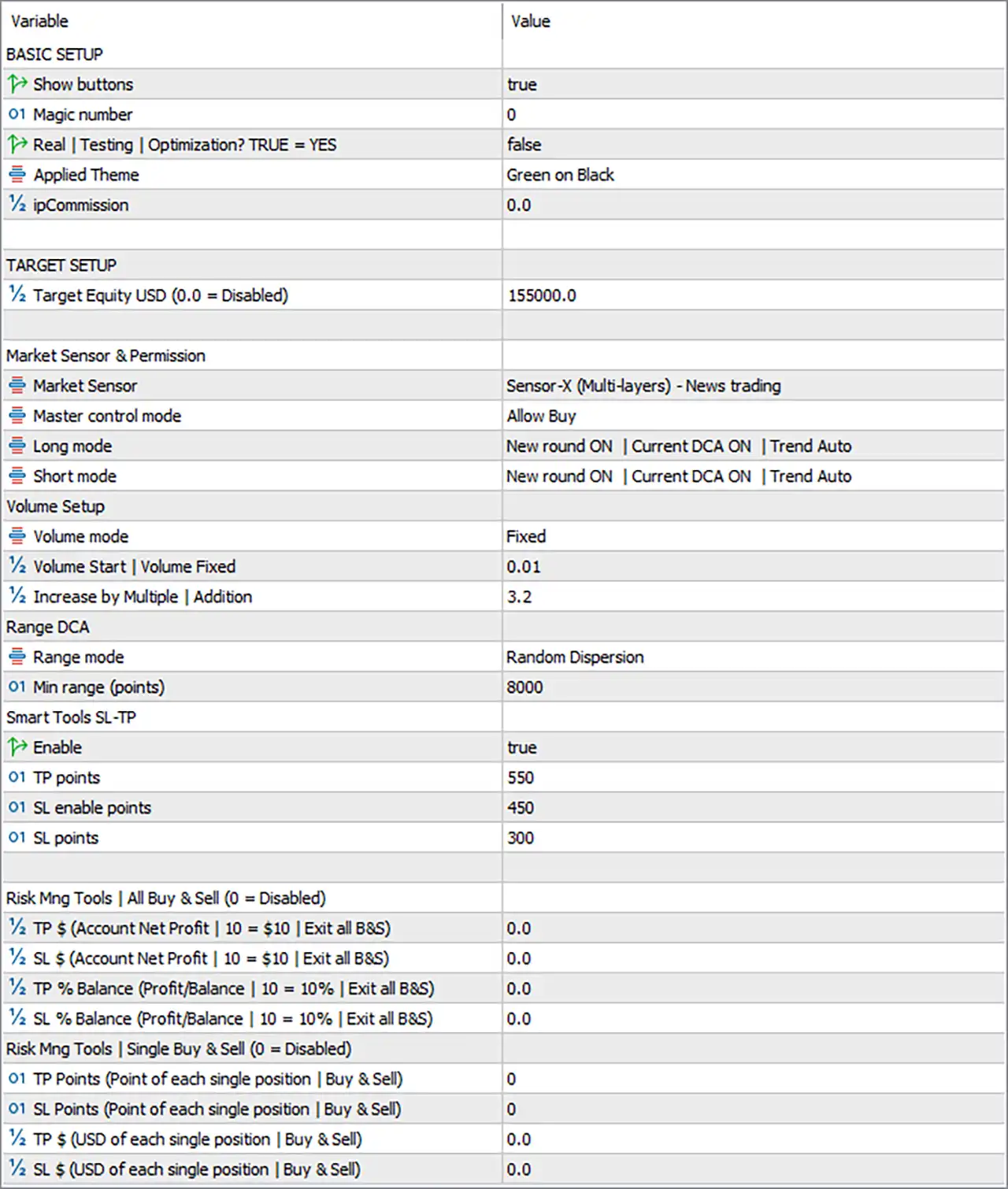
Trend DCA EA MT5 Settings Panel
Basic Setup
🔹 Show buttons = true — Displays the EA’s control buttons on the trading chart, allowing available manual controls to remain visible.
🔹 Magic number = 0 — Sets the Magic Number to 0, which identifies the EA’s trades according to the platform’s standard Magic Number convention.
🔹 Real | Testing | Optimization? TRUE = YES = false — Sets this parameter to false, indicating that the special Real/Testing/Optimization mode is not enabled.
🔹 Applied Theme = Green on Black — Selects the Green on Black interface theme for the EA’s visual controls and chart panel.
🔹 ipCommission = 0.0 — Sets the commission-related input to 0.0, meaning no additional commission value is specified in this configuration.
Target Setup
🔹 Target Equity USD (0.0 = Disabled) = 155000.0 — Sets the target account equity level to 155000.0 USD; because the value is above 0.0, the target-equity function is configured with a specific target rather than disabled.
Market Sensor & Permission
🔹 Market Sensor = Sensor-X (Multi-layers) – News trading — Selects Sensor-X (Multi-layers) – News trading as the active market-sensing system for the EA.
🔹 Master control mode = Allow Buy — Sets the master trading permission to Allow Buy, controlling the overall Buy-side trading permission.
🔹 Long mode = New round ON | Current DCA ON | Trend Auto — Enables a new Long trading round, allows current DCA activity, and sets the trend direction for Long trades to Auto.
🔹 Short mode = New round ON | Current DCA ON | Trend Auto — Enables a new Short trading round, allows current DCA activity, and sets the trend direction for Short trades to Auto.
Volume Setup
🔹 Volume mode = Fixed — Selects Fixed as the volume-management mode.
🔹 Volume Start | Volume Fixed = 0.01 — Sets the starting/fixed trading volume to 0.01 lots.
🔹 Increase by Multiple | Addition = 3.2 — Sets the DCA volume increase multiplier to 3.2, controlling how position volume increases according to the EA’s DCA logic.
Range DCA
🔹 Range mode = Random Dispersion — Selects Random Dispersion as the method for determining DCA trade spacing within the configured range.
🔹 Min range (points) = 8000 — Sets the minimum DCA range distance to 8000 points, establishing the minimum spacing used by the configured Range DCA system.
Smart Tools SL-TP
🔹 Enable = true — Activates the Smart Tools SL-TP module.
🔹 TP points = 550 — Sets the Take Profit level to 550 points for the Smart SL-TP system.
🔹 SL enable points = 450 — Sets the activation threshold for the Smart Stop Loss to 450 points.
🔹 SL points = 300 — Sets the Stop Loss distance to 300 points once the Smart SL-TP Stop Loss mechanism is activated.
Risk Management Tools – All Buy & Sell
🔹 TP $ (Account Net Profit | 10 = $10 | Exit all B&S) = 0.0 — Sets the account-level Buy & Sell Take Profit target to 0.0 USD, which disables this specific global TP function.
🔹 SL $ (Account Net Profit | 10 = $10 | Exit all B&S) = 0.0 — Sets the account-level Buy & Sell Stop Loss threshold to 0.0 USD, disabling this specific global SL function.
🔹 TP % Balance (Profit/Balance | 10 = 10% | Exit all B&S) = 0.0 — Sets the account-level Take Profit target based on Balance percentage to 0.0%, disabling this percentage-based global TP function.
🔹 SL % Balance (Profit/Balance | 10 = 10% | Exit all B&S) = 0.0 — Sets the account-level Stop Loss threshold based on Balance percentage to 0.0%, disabling this percentage-based global SL function.
Risk Management Tools – Single Buy & Sell
🔹 TP Points (Point of each single position | Buy & Sell) = 0 — Sets the individual-position Take Profit distance to 0 points, meaning this specific individual-position TP function is disabled.
🔹 SL Points (Point of each single position | Buy & Sell) = 0 — Sets the individual-position Stop Loss distance to 0 points, meaning this specific individual-position SL function is disabled.
🔹 TP $ (USD of each single position | Buy & Sell) = 0.0 — Sets the individual-position monetary Take Profit target to 0.0 USD, disabling this specific individual-position TP function.
🔹 SL $ (USD of each single position | Buy & Sell) = 0.0 — Sets the individual-position monetary Stop Loss threshold to 0.0 USD, disabling this specific individual-position SL function.
Key Features of This Trend DCA EA Configuration
🔹 Trend-Based Market Detection — The configuration uses Sensor-X (Multi-layers) – News trading for market sensing.
🔹 DCA Position Management — Both Long and Short modes have New round ON and Current DCA ON.
🔹 Automatic Trend Direction — Both Long and Short modes use Trend Auto.
🔹 Fixed Starting Volume — The EA starts with 0.01 lots under the Fixed volume mode.
🔹 DCA Volume Multiplier — Increase by Multiple = 3.2 controls the configured volume increase between DCA positions.
🔹 Large DCA Range — Min range = 8000 points establishes the configured minimum spacing for the Range DCA system.
🔹 Random DCA Dispersion — Range mode = Random Dispersion adds the selected spacing method to the DCA logic.
🔹 Smart TP/SL Protection — Smart Tools SL-TP is enabled with TP = 550, SL activation = 450, and SL = 300 points.
🔹 Global Profit/Loss Targets Disabled — All four account-level TP/SL parameters are set to 0.0, disabling those specific global controls.
🔹 Individual Monetary and Point Targets Disabled — The individual-position TP/SL values are all 0 or 0.0.
🔹 Equity Target Configured — Target Equity = 155000.0 USD provides a defined account-equity target.
Important Notes About the Current Configuration
The Trend DCA EA configuration contains several layers of trade and risk management. The active Smart Tools SL-TP system is separate from the individual-position TP/SL inputs, which are all set to 0 or 0.0.
The DCA configuration is particularly important because Volume Start = 0.01 is combined with Increase by Multiple = 3.2. This means the EA’s configured DCA volume progression uses a relatively large multiplication factor when additional DCA positions are created. The actual sequence depends on the EA’s internal DCA implementation and broker volume rules.
The Min range = 8000 points should also be interpreted according to the traded symbol’s point size. The monetary and price impact of 8000 points can differ substantially between Forex pairs, indices, metals, and cryptocurrencies.
The Target Equity = 155000.0 USD is also a significant account-level parameter. The input description explicitly states that 0.0 = Disabled, while the current value is 155000.0, so the target is configured rather than disabled.
Conclusion
The displayed Trend DCA EA setup combines trend detection, DCA position management, fixed-volume trading, random DCA dispersion, and Smart SL-TP protection.
The core configuration uses Sensor-X (Multi-layers) – News trading, Fixed volume mode, 0.01 lots as the starting/fixed volume, and an Increase by Multiple of 3.2. The DCA range is configured with Random Dispersion and a minimum range of 8000 points.
For trade protection, Smart Tools SL-TP = true, with TP = 550 points, SL activation = 450 points, and SL = 300 points. Meanwhile, the separate account-level and individual-position TP/SL controls are disabled through their 0 and 0.0 values.
The configuration also includes a 155000.0 USD Target Equity, a Green on Black interface theme, and enabled chart buttons. Both Long and Short modes show New round ON | Current DCA ON | Trend Auto, providing automated direction handling for the respective trade modes.
Because this EA uses DCA and a 3.2 volume multiplier, traders should carefully evaluate the potential position-size progression, margin requirements, maximum exposure, and drawdown characteristics through backtesting and forward testing before applying the configuration to a live account.
User Reviews
Only logged in customers who have purchased this product may leave a review.
1. What is Trend DCA EA MT5?
Trend DCA EA MT5 is an automated trading algorithm that uses the Dollar Cost Averaging (DCA) strategy combined with trend detection, probability calculations, and machine learning to maximize profitability while managing risk effectively.
2. How does the Dollar Cost Averaging (DCA) strategy work in this EA?
The DCA strategy involves placing multiple trades over time to reduce price volatility impact. This EA enhances the traditional DCA approach by automatically detecting trends, calculating entry volume, and managing risk.
3. What are the key features of Trend DCA EA MT5?
Some standout features include:
✔ Automated Trend Detection – Identifies uptrends and downtrends for better trade execution.
✔ Smart Market Sensor – Avoids trading during high-impact news events.
✔ Hidden Take Profit & Trailing Stop – Optimizes profits while keeping TP orders hidden from brokers.
✔ Equity-Based Exit – Stops trading when account equity reaches a predefined target.
✔ Quick Control Panel – Allows for manual intervention if needed.
4. Which currency pairs and timeframes does Trend DCA EA support?
✔ Trading instrument: XAUUSD (Gold)
✔ Recommended timeframe: H4 (4-Hour Chart)
✔ Supported timeframes: Any (but optimized for H4)
5. What is the minimum deposit required to use Trend DCA EA?
✔ Minimum deposit: $1,000
✔ Recommended deposit: $5,000 for optimal performance
6. How does Trend DCA EA manage risk?
The EA includes multiple risk management features:
✔ Break-even calculation to protect capital
✔ Trailing Stop to lock in profits
✔ Equity-based exit to prevent large drawdowns
✔ Smart Market Sensor to avoid volatile trading periods
7. Can I use Trend DCA EA on multiple accounts?
Trend DCA EA MT5 is usually licensed for a specific number of accounts. Check with the vendor for details on multiple account usage or additional licenses.
8. Can I track live trading results before purchasing?
Yes! The EA provides Live Signal tracking so you can monitor real-time performance before making a purchase.
9. Is Trend DCA EA a risk-free trading system?
No trading system is risk-free. While Trend DCA EA incorporates strong risk management strategies, it is essential to use proper capital allocation, backtesting, and monitoring to achieve long-term profitability.
-
 Original price was: $500.00.$249.00Current price is: $249.00.
-
 Original price was: $888.00.$249.00Current price is: $249.00.
-
 Original price was: $439.00.$249.00Current price is: $249.00.
-
 Original price was: $9,999.00.$249.00Current price is: $249.00.
-
 4Original price was: $499.00.$249.00Current price is: $249.00.
-
 0Original price was: $1,299.00.$249.00Current price is: $249.00.
-
 3Original price was: $199.00.$159.00Current price is: $159.00.
-
 0Original price was: $778.00.$249.00Current price is: $249.00.
There are no reviews yet.