







Growth Killer EA MT5 (Latest version) - Unlimited

Subscriptions for Special Plan
- 30 EA package is more economical!
- Special package with 99%
- Download 1 EA/Day

Subscriptions for Premium Membership
- Download Unlimited in 1 Year
- Get 100% Discount
- Get free access to all

Subscriptions for Gold Membership
- 1 Year Membership
- Get 100% Discount
- Access EA+Indicator+Course
Frequently bought together 🎁
Add these products to enhance your purchase




What is Growth Killer EA MT5?
Growth Killer EA is a professional Expert Advisor (EA) built for automated portfolio trading with adaptive strategies, intelligent indicators and advanced risk management. Designed for multi-symbol diversification, it combines dynamic lot sizing, smart recovery systems, and flexible trade control to deliver stable and resilient trading performance.
 Vendor Website: View here
About the Author
This product is compiled by Pablo Dominguez Sanchez. This author has more than +2 years of experience working on MQL5 with many famous products such as Growth Killer EA MT5, Karat Killer EA MT5, Stability Killer AI MT5, Pivot Killer EA MT5 and other advisors. Among them, Growth Killer MT5 is his best performing products.
Delivery time 24h-48h after payment.
Refund if not delivered.
You will receive the current version without any limitations (ID+Time).
Key Features of Growth Killer EA for MT5
🔹 Portfolio Trading Engine: Manages multiple symbols and strategies from a single automated system.
🔹 Adaptive Risk Management: Includes drawdown protection, smart recovery and dynamic lot sizing.
🔹 Custom Strategy Builder: Allows flexible configuration of entry logic, filters and trade management.
🔹 Multi-Timeframe Execution: Trades across multiple market conditions with optimized signal processing.
🔹 Partial Close System: Secures profits progressively while reducing overall portfolio drawdown risk.
🔹 Trend & Time Filters: Uses advanced indicators and session filters for precision trade execution.
What is the Growth Killer EA Trading Strategy?
🔹 Multi-Strategy Trading: Combines preset and custom strategies for diversified market exposure.
🔹 Adaptive Grid Technology: Uses flexible grid positioning with intelligent recovery management logic.
🔹 Trend-Following Filters: Applies SMA and EMA indicators to align trades with market direction.
🔹 Dynamic Risk Allocation: Automatically adjusts lot size based on balance and exposure conditions.
🔹 Smart Recovery Mechanism: Redirects trailing profits into protective buffers for future recovery.
🔹 Session-Based Execution: Restricts trading activity to selected market sessions for stability.
Growth Killer EA MT5 Review
Growth Killer EA Live Results
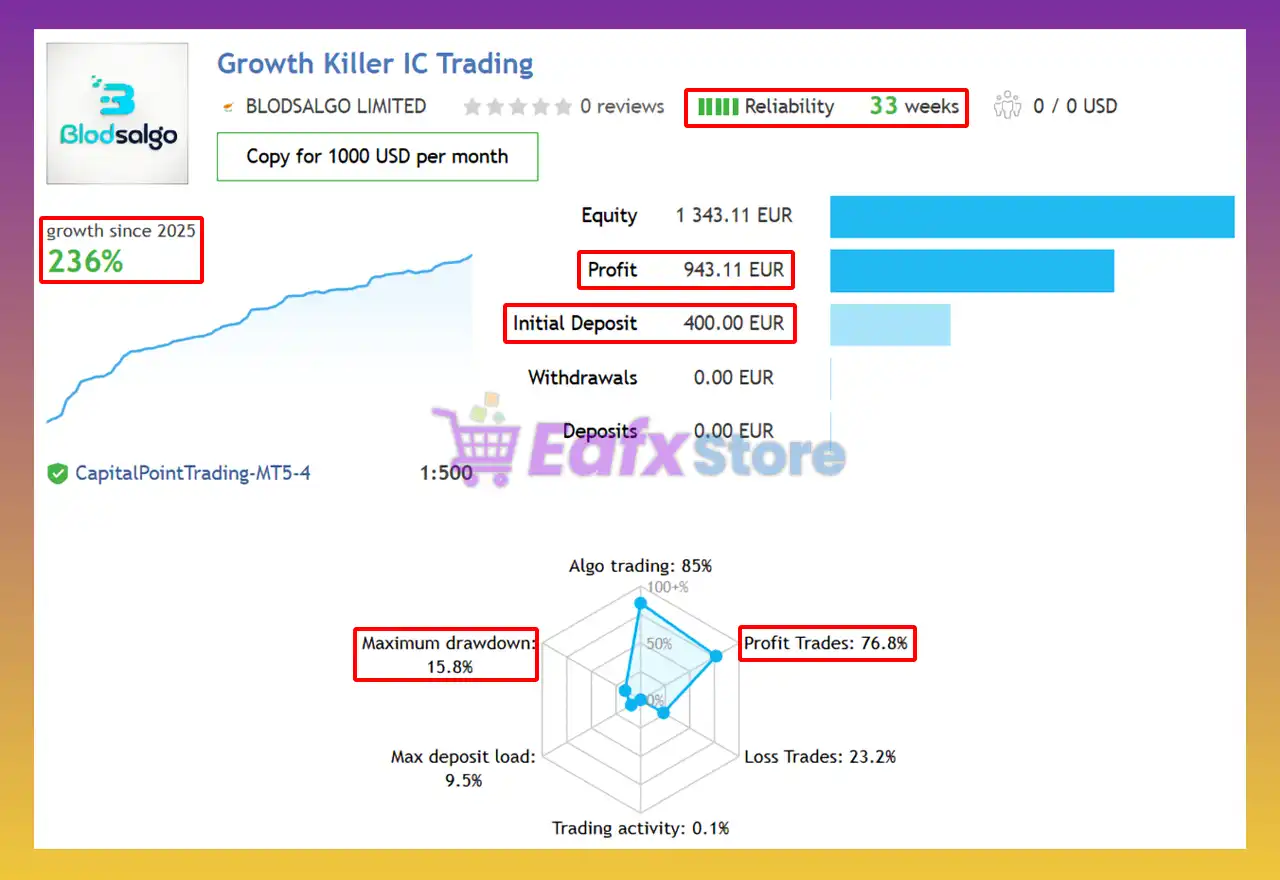
The Growth Killer EA achieved impressive profit performance when trading with XAUUSD (Gold). Trading results on real account for 33 weeks of trading.
✅ Initial Deposit: €400
✅ Growth Rate: +236%
✅ Win Rate (% of total): 76.8%
✅ Maximum Drawdown: 15.8%
Growth Killer EA Signal Results
Growth Killer EA Backtest Results
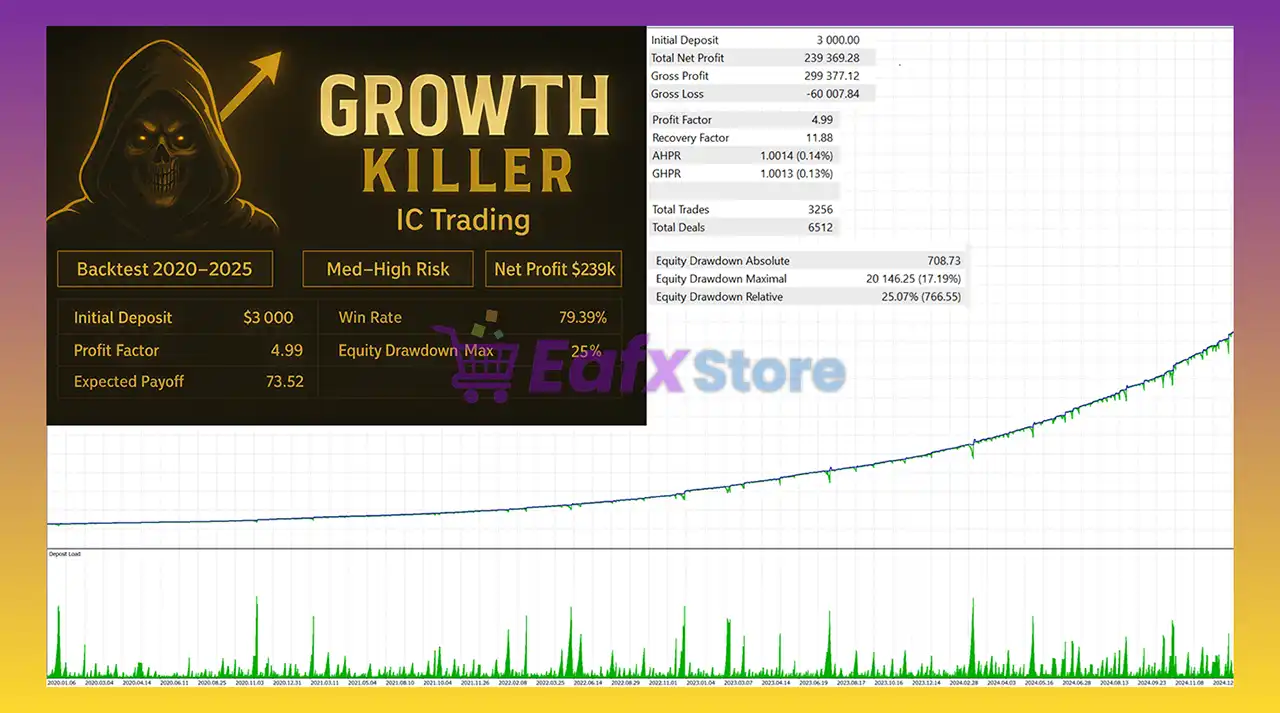
The Growth Killer EA backtest trading results achieved impressive profit performance for 5 years on the XAUUSD (Gold) pair. The advisor showed the ability to maintain safe stars on the 5-minute chart.
✅ Initial Deposit: $3,000
✅ Total Net Profit: $239,369.28
✅ Win Rate: 79.39%
✅ Maximum Drawdown: 17.19%
Growth Killer EA Backtest Results
Why choose and use Growth Killer EA?
🔹 Stable Portfolio Management: Designed for controlled growth with diversified trading execution.
🔹 Professional Risk Protection: Features drawdown shutdown and adaptive exposure limitations.
🔹 Flexible Market Compatibility: Supports Forex, Gold, Crypto, Indices and Stock trading setups.
🔹 Prop Firm Ready System: Optimized for disciplined risk management and funded account trading.
🔹 Advanced Automation Control: Offers complete flexibility for custom strategies and risk settings.
🔹 Reliable Long-Term Performance: Built for resilient trading across changing market conditions.
Is Growth Killer EA MT5 safe?
Growth Killer EA shows significant potential in providing stable and reliable profits, becoming a reliable tool in the forex market. This advisor is highly appreciated by the community in many aspects and has won the trust of users.
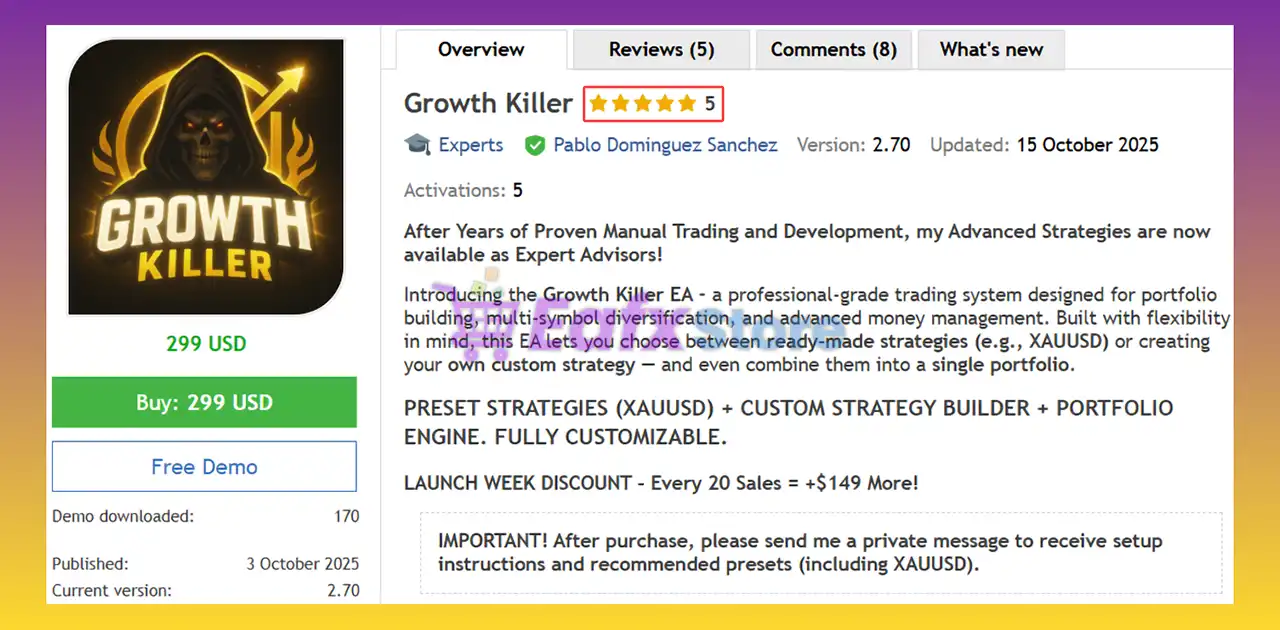
⭐⭐⭐⭐⭐ Khaled Eweidat (2025.10.13): “Nice product — the publisher is responsive and the results so far are good. The product has great potential.”
⭐⭐⭐⭐⭐ Solomon_Porch (2025.10.04): “Very nice so far!”
⭐⭐⭐⭐⭐ Krisztian Pataj (2025.10.12): “De momento quiero remarcar la gran atención por parte de Pablo, rápida respuesta y se nota un gran conocimiento del mercado. En 3 días 184€ de beneficio. Tiene muy buena pinta!”
Recommended settings
Recommended settings and parameters to pay attention to from developers and experts:
| Features | Type |
|---|---|
| Trading platform | MetaTrader 5 (MT5) |
| Time frames | Any |
| Currency pairs | GOLD (Forex, Indices, Crypto, Stocks) |
| Minimum / Recommended deposit | $300 |
| Minimum / Recommended leverage | Any |
| Account type | Any |
| Product type | Original version |
| Additional services | Unlock and Decompile |
| Recommended brokers | Exness Broker, Icmarkets Broker |
| Recommended VPS | MyfxVPS.com ( Blue VPS, Golden VPS). Lowest Latency, 2 week Free Trial, 100% Free for 12-18 Months. |
Product Download Package?
The download package of the product suite includes:
✅ Experts: Growth Killer EA.ex5
➡️ Reviewed by David Easton
Conclusion
In short, Growth Killer EA for MT5 is a professional-grade portfolio engine that combines flexibility, safety and performance. With its Smart Recovery System, customizable strategy builder, and multi-symbol adaptability, it empowers traders to build unique, risk-controlled strategies across markets. Proven by live and backtest results, Growth Killer EA delivers consistent, intelligent growth—making it a true powerhouse for modern automated trading.
Growth Killer EA MT5 – Complete Settings Guide & Explanation
Growth Killer EA MT5 is a powerful automated grid trading Expert Advisor designed for the MetaTrader 5 platform. The EA combines multi-timeframe grid strategies, automatic lot sizing, news filtering, spread protection, Friday risk controls and remote trade management tools.
With advanced TP decay systems and dynamic grid settings, Growth Killer EA MT5 is optimized for traders seeking aggressive growth strategies while maintaining customizable risk management.
Growth Killer EA MT5 Settings
Installation Panel Parameters
Below are the details of the parameters in the advisor’s trading system settings table:
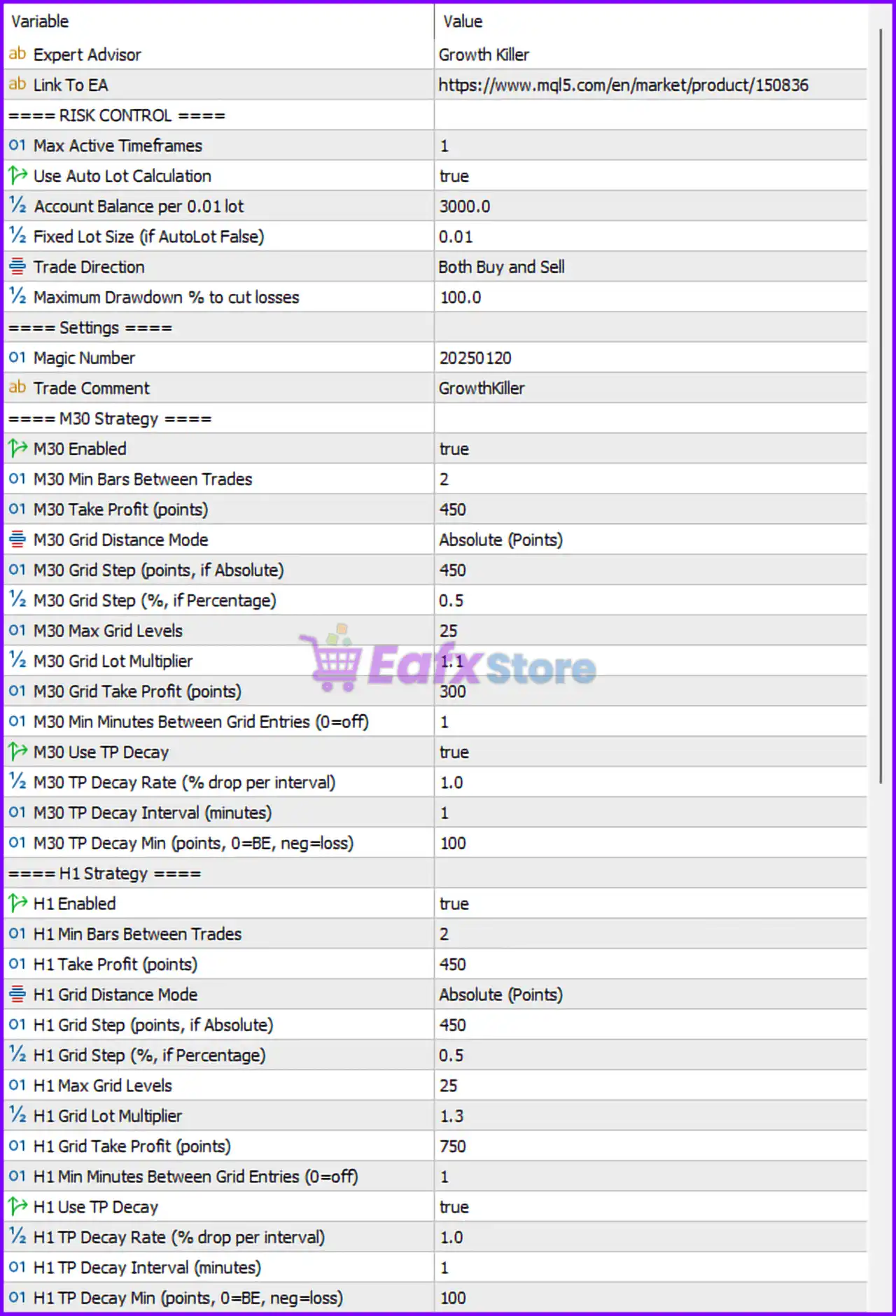
Growth Killer EA MT5 Setting Panel
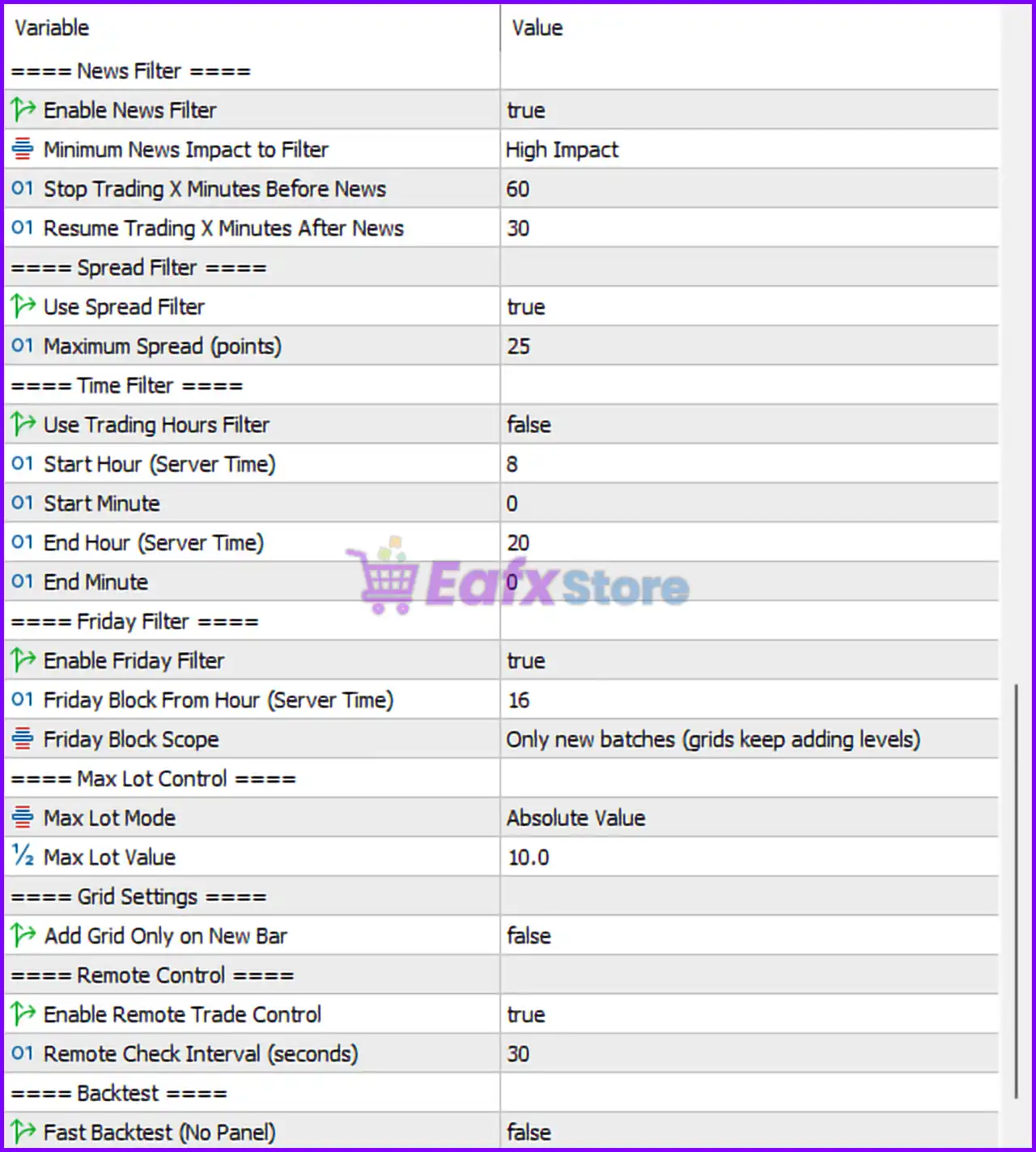
Growth Killer MT5 Setting Panel
Risk Control Settings
🔹 ==== RISK CONTROL ==== — Main section header for account risk management settings.
🔹 Max Active Timeframes = 1 — Allows the EA to trade on one active timeframe simultaneously.
🔹 Use Auto Lot Calculation = true — Enables automatic lot size calculation based on account balance.
🔹 Account Balance per 0.01 lot = 3000.0 — Uses 0.01 lot size for every 3000.0 account balance units.
🔹 Fixed Lot Size (if AutoLot False) = 0.01 — Fixed lot size used when automatic lot sizing is disabled.
🔹 Trade Direction = Both Buy and Sell — Allows the EA to open both BUY and SELL trades.
🔹 Maximum Drawdown % to cut losses = 100.0 — Maximum drawdown percentage before forced loss reduction is activated.
General Settings
🔹 ==== Settings ==== — Main section header for EA identification settings.
🔹 Magic Number = 20250120 — Unique identifier used by the EA to manage trades.
🔹 Trade Comment = GrowthKiller — Adds the “GrowthKiller” label to all trades opened by the EA.
M30 Strategy Settings
🔹 ==== M30 Strategy ==== — Section header for the 30-minute timeframe trading strategy.
🔹 M30 Enabled = true — Enables the M30 trading strategy.
🔹 M30 Min Bars Between Trades = 2 — Requires at least 2 bars between new trades.
🔹 M30 Take Profit (points) = 450 — Sets take profit target to 450 points.
🔹 M30 Grid Distance Mode = Absolute (Points) — Uses fixed point values for grid spacing.
🔹 M30 Grid Step (points, if Absolute) = 450 — Grid spacing distance set to 450 points.
🔹 M30 Grid Step (%, if Percentage) = 0.5 — Percentage-based grid spacing value is 0.5%.
🔹 M30 Max Grid Levels = 25 — Maximum number of grid orders allowed is 25.
🔹 M30 Grid Lot Multiplier = 1.1 — Multiplies lot size by 1.1 for each additional grid level.
🔹 M30 Grid Take Profit (points) = 300 — Combined grid take profit target is 300 points.
🔹 M30 Min Minutes Between Grid Entries (0=off) = 1 — Requires 1 minute between grid entries.
🔹 M30 Use TP Decay = true — Enables dynamic TP decay management.
🔹 M30 TP Decay Rate (% drop per interval) = 1.0 — Reduces TP target by 1.0% per interval.
🔹 M30 TP Decay Interval (minutes) = 1 — TP decay recalculates every 1 minute.
🔹 M30 TP Decay Min (points, 0=BE, neg=loss) = 100 — Minimum TP decay limit set to 100 points.
H1 Strategy Settings
🔹 ==== H1 Strategy ==== — Section header for the 1-hour timeframe trading strategy.
🔹 H1 Enabled = true — Enables the H1 trading strategy.
🔹 H1 Min Bars Between Trades = 2 — Requires at least 2 bars between H1 trades.
🔹 H1 Take Profit (points) = 450 — H1 strategy take profit target set to 450 points.
🔹 H1 Grid Distance Mode = Absolute (Points) — Uses fixed point values for H1 grid spacing.
🔹 H1 Grid Step (points, if Absolute) = 450 — Grid distance for H1 strategy is 450 points.
🔹 H1 Grid Step (%, if Percentage) = 0.5 — Percentage-based H1 grid spacing is 0.5%.
🔹 H1 Max Grid Levels = 25 — Maximum H1 grid levels allowed is 25.
🔹 H1 Grid Lot Multiplier = 1.3 — Increases lot size by 1.3 per H1 grid level.
🔹 H1 Grid Take Profit (points) = 750 — Combined H1 grid TP target set to 750 points.
🔹 H1 Min Minutes Between Grid Entries (0=off) = 1 — Requires 1 minute delay between H1 grid entries.
🔹 H1 Use TP Decay = true — Enables TP decay system for H1 strategy.
🔹 H1 TP Decay Rate (% drop per interval) = 1.0 — Reduces TP target by 1.0% over time.
🔹 H1 TP Decay Interval (minutes) = 1 — TP decay recalculates every 1 minute.
🔹 H1 TP Decay Min (points, 0=BE, neg=loss) = 100 — Minimum TP target during decay is 100 points.
News Filter Settings
🔹 ==== News Filter ==== — Main section header for economic news filtering.
🔹 Enable News Filter = true — Enables the built-in economic news filter.
🔹 Minimum News Impact to Filter = High Impact — Filters only high-impact economic news events.
🔹 Stop Trading X Minutes Before News = 60 — Stops trading 60 minutes before news releases.
🔹 Resume Trading X Minutes After News = 30 — Resumes trading 30 minutes after news events.
Spread Filter Settings
🔹 ==== Spread Filter ==== — Section header for spread protection controls.
🔹 Use Spread Filter = true — Enables spread filtering before opening trades.
🔹 Maximum Spread (points) = 25 — Maximum spread allowed for trading is 25 points.
Time Filter Settings
🔹 ==== Time Filter ==== — Section header for trading session scheduling.
🔹 Use Trading Hours Filter = false — Disables trading hour restrictions.
🔹 Start Hour (Server Time) = 8 — Trading start hour is 08:00 server time.
🔹 Start Minute = 0 — Trading starts at minute 00.
🔹 End Hour (Server Time) = 20 — Trading session ends at 20:00 server time.
🔹 End Minute = 0 — Trading session ends at minute 00.
Friday Filter Settings
🔹 ==== Friday Filter ==== — Section header for Friday risk management controls.
🔹 Enable Friday Filter = true — Enables Friday trading restrictions.
🔹 Friday Block From Hour (Server Time) = 16 — Restricts trading from Friday hour 16.
🔹 Friday Block Scope = Only new batches (grids keep adding levels) — Blocks only new trade batches while allowing existing grids to continue.
Max Lot Control Settings
🔹 ==== Max Lot Control ==== — Section header for maximum lot protection.
🔹 Max Lot Mode = Absolute Value — Uses fixed maximum lot size limitation mode.
🔹 Max Lot Value = 10.0 — Maximum lot size allowed is 10.0 lots.
Grid Settings
🔹 ==== Grid Settings ==== — Section header for grid execution behavior.
🔹 Add Grid Only on New Bar = false — Allows grid entries without waiting for a new candle/bar.
Remote Control Settings
🔹 ==== Remote Control ==== — Section header for external EA control features.
🔹 Enable Remote Trade Control = true — Enables remote trade management functionality.
🔹 Remote Check Interval (seconds) = 30 — EA checks remote commands every 30 seconds.
Backtest Settings
🔹 ==== Backtest ==== — Section header for strategy testing configuration.
🔹 Fast Backtest (No Panel) = false — Disables fast backtest optimization and keeps visual panels active.
Conclusion
Growth Killer EA MT5 is an advanced grid trading Expert Advisor (EA) that combines multi-timeframe strategies, automatic lot sizing, TP decay systems, news filtering, spread control and remote trade management into one professional MT5 solution.
With flexible risk settings and dynamic grid optimization, the EA is suitable for traders seeking automated growth-focused trading strategies with customizable protection systems.
FAQs
❓ What is Growth Killer EA MT5?
Growth Killer EA MT5 is an automated grid trading Expert Advisor for MetaTrader 5 that uses multi-timeframe strategies and advanced risk management systems.
❓ Does Growth Killer EA MT5 support automatic lot sizing?
Yes, the EA supports automatic lot calculation based on account balance and predefined risk settings.
❓ What is TP Decay in Growth Killer EA MT5?
TP Decay dynamically reduces take profit targets over time to help close trades faster during changing market conditions.
❓ Can Growth Killer EA MT5 filter high-impact news events?
Yes, the EA includes a built-in news filter that blocks trading during high-impact economic events.
❓ Does Growth Killer EA MT5 support remote trade control?
Yes, the EA includes remote trade management functionality with configurable remote check intervals.
User Reviews
Only logged in customers who have purchased this product may leave a review.
❓ What is Growth Killer EA and how does it work?
Growth Killer EA is a multi-strategy, multi-symbol trading system for MetaTrader 5 (MT5). It allows traders to combine multiple strategies into one portfolio using its Preset Strategies Engine or build their own with the Custom Strategy Builder. The EA manages trades across different symbols and timeframes while controlling overall risk and exposure.
❓ Does Growth Killer EA use Martingale or Grid strategies?
Yes, but only when the user enables them. The EA offers complete flexibility—traders can use simple single-shot trading or activate its Advanced Grid system with a Smart Recovery mechanism. This system reallocates a portion of profits to recover future losing trades, ensuring better long-term performance.
❓ Can I create my own trading strategies with Growth Killer EA?
Absolutely. One of its most powerful features is the Custom Strategy Builder, which lets you design personalized trading setups. You can define entry rules, filters, grid behavior, and risk parameters—essentially crafting your own EA logic within the Growth Killer framework.
❓ What makes Growth Killer EA different from other EAs?
Unlike most single-strategy robots, Growth Killer EA functions as a portfolio engine, capable of running multiple independent systems simultaneously. It offers professional-grade risk control, trend and time filtering, smart scaling, and dynamic recovery — all from a single EA instance.
❓ What are the live trading results of Growth Killer EA?
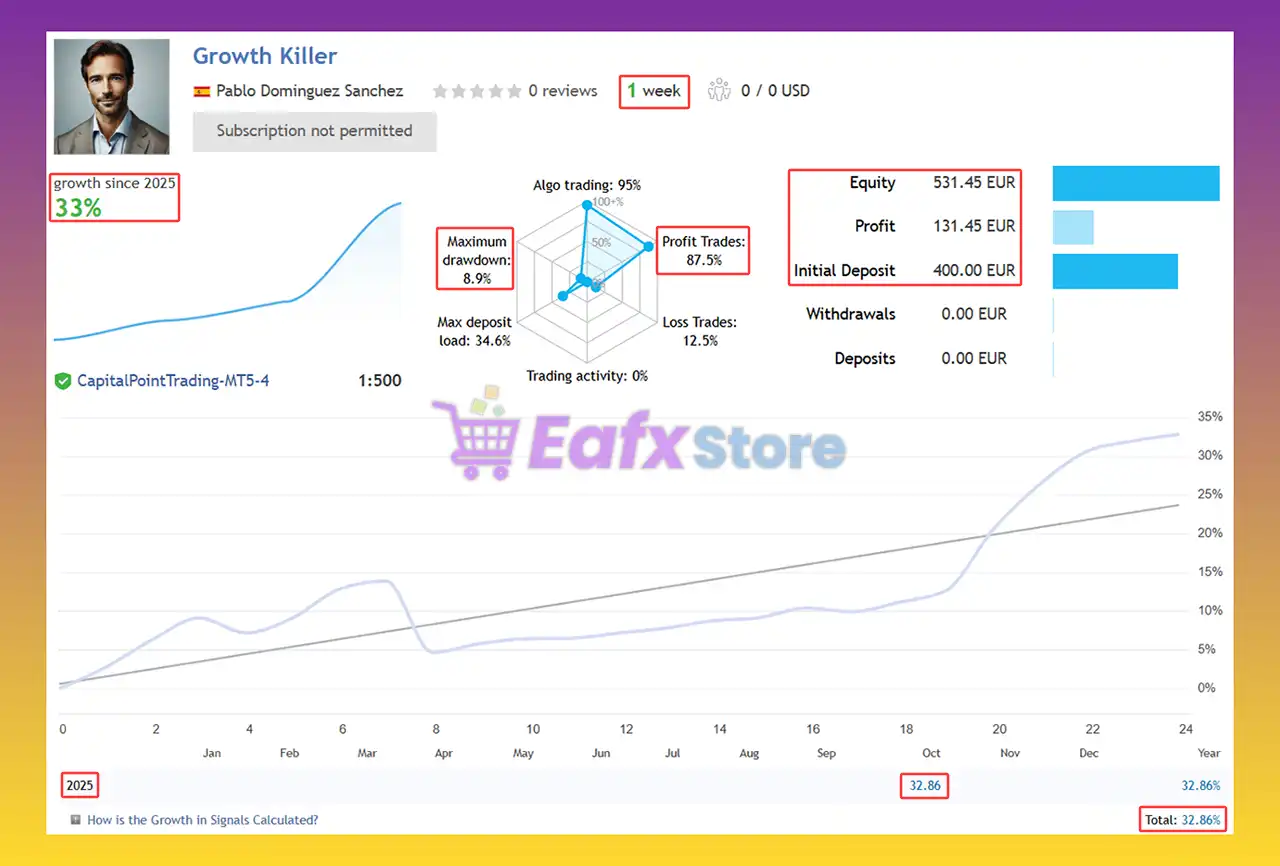
On a verified live account, Growth Killer EA showed impressive short-term results:
✅ Initial Deposit: $400
✅ Growth: +33% in one week
✅ Win Rate: 87.5%
✅ Maximum Drawdown: 8.9%
These numbers indicate strong capital protection and consistent profitability.
❓ What are the backtest results for Growth Killer EA?
A 5-year backtest on XAUUSD (Gold) demonstrated exceptional performance:
✅ Initial Deposit: $3,000
✅ Total Net Profit: $239,369.28
✅ Win Rate: 79.39%
✅ Max Drawdown: 17.19%
This long-term data highlights the EA’s ability to sustain performance under various market conditions.
❓ What financial instruments can Growth Killer EA trade?
Growth Killer EA supports any instrument available on MT5, including Forex pairs, Gold, Indices, Crypto, and Stocks. This makes it ideal for portfolio diversification and multi-asset management.
❓ What is the minimum deposit and leverage required?
The recommended minimum deposit is $300, and the EA works efficiently with any leverage. However, traders often prefer using 1:100 or higher to maximize capital efficiency when running multiple strategies simultaneously.
❓ How does the Smart Recovery System work?
The Smart Recovery System allocates a small portion of profits into a reserve buffer. If a trade loss occurs later, the EA uses this buffer to gradually recover it—helping maintain smoother equity growth and reducing the impact of drawdowns.
-
 Original price was: $500.00.$249.00Current price is: $249.00.
 -
 Original price was: $888.00.$249.00Current price is: $249.00.
 -
 Original price was: $439.00.$249.00Current price is: $249.00.
 -
 Original price was: $9,999.00.$249.00Current price is: $249.00.
-
 4Original price was: $499.00.$249.00Current price is: $249.00.
 -
 3Original price was: $199.00.$159.00Current price is: $159.00.
 -
 1Original price was: $699.00.$249.00Current price is: $249.00.
 -
 1Original price was: $1,299.00.$249.00Current price is: $249.00.
There are no reviews yet.