📌📌📌 Buy this unlimited GhostyFX EA MT4 product here 📌📌📌
🧩 License & Core Trade Parameters
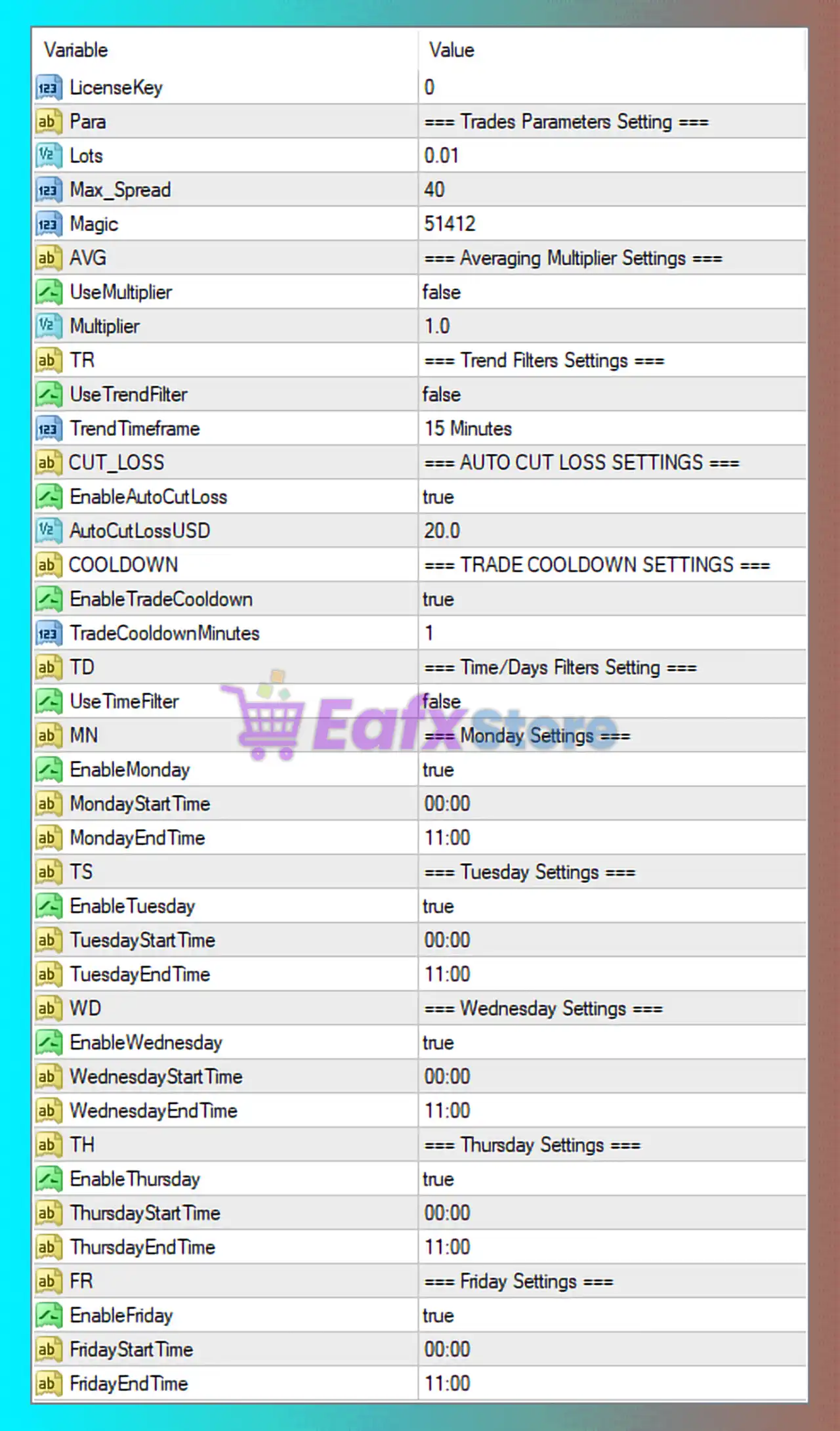
➡️ LicenseKey: 0
- Indicates either a demo version, unlimited license, or broker-bound activation.
- Does not affect trading logic directly.
➡️ Lots: 0.01
- Fixed minimum lot size.
- Very safe and suitable for small accounts, cent accounts, or forward testing.
➡️ Max_Spread: 40
- Maximum allowed spread (in points) for trade execution.
- Helps avoid entries during high spread conditions such as news or low liquidity periods.
➡️ Magic: 51412
- Unique identifier for GhostyFX EA orders.
- Prevents conflicts when running multiple EAs on the same MT4 account.
🧩 Averaging & Multiplier Settings
➡️ UseMultiplier: false
- Lot multiplication (martingale or grid scaling) is disabled.
- This significantly reduces drawdown and risk.
➡️ Multiplier: 1.0
- Neutral multiplier value.
- Confirms GhostyFX EA is operating in non-martingale, fixed-lot mode.
➡️ Risk Insight:
- This configuration favors capital preservation over aggressive growth.
🧩 Trend Filter Settings
➡️ UseTrendFilter: false
- EA does not rely on higher-timeframe or trend confirmation.
- Trades are likely based on internal logic such as price action or mean-reversion.
➡️ TrendTimeframe: 15 Minutes
- Preset timeframe for trend filtering if enabled in the future.
- M15 is commonly used for short-term bias without over-filtering signals.
🧩 Auto Cut Loss Settings (Risk Protection)
➡️ EnableAutoCutLoss: true
- Automatic equity or loss protection is enabled.
- This is a critical safety feature.
➡️ AutoCutLossUSD: 20.0
- The EA will stop trading or cut positions once a $20 loss threshold is reached.
- Very conservative and ideal for small balance accounts.
➡️ Risk Assessment:
- This setting strongly limits catastrophic drawdowns.
🧩 Trade Cooldown Settings
➡️ EnableTradeCooldown: true
- Prevents overtrading by enforcing a pause between trades.
➡️ TradeCooldownMinutes: 1
- Minimum 1-minute delay between trades.
- Helps reduce rapid re-entries during volatile price movements.
🧩 Time & Day Trading Filters
➡️ Time Filter
UseTimeFilter: false
- Time filtering logic exists but is currently disabled globally.
➡️ Day-by-Day Trading Schedule
GhostyFX EA is enabled to trade Monday through Friday, with identical trading windows:
| Day | Enabled | Trading Time |
|---|---|---|
| Monday | true | 00:00 – 11:00 |
| Tuesday | true | 00:00 – 11:00 |
| Wednesday | true | 00:00 – 11:00 |
| Thursday | true | 00:00 – 11:00 |
| Friday | true | 00:00 – 11:00 |
Session Insight:
- This window typically overlaps with the Asian session and early London open.
- Avoids late-day volatility, news spikes, and low-liquidity conditions.
🧩 Overall Strategy Interpretation
Based on the configuration:
- ❌ No martingale
- ❌ No grid scaling
- ✅ Strict spread control
- ✅ Auto cut-loss protection
- ✅ Controlled trading hours
- ✅ Cooldown between trades
This indicates that GhostyFX EA is configured as a low-risk, conservative automated trading system, prioritizing consistency and drawdown control.
🧩 Final Conclusion
The GhostyFX EA settings shown in the image represent a highly conservative and risk-controlled trading configuration, ideal for traders who prioritize account safety over aggressive profit targets. With fixed lot sizing, disabled multipliers, strict auto cut-loss protection, and limited trading hours, this setup is particularly suitable for small accounts, beginners, and long-term stability strategies.