🔶 What is HyperNDX EA?
HyperNDX EA is an automated trading Expert Advisor (EA) developed for the MetaTrader 5 platform. The EA is designed to combine algorithmic signal generation with structured money management and a customizable trading interface. HyperNDX focuses on controlled risk exposure, daily trade limits, and visual monitoring tools to help traders maintain disciplined automated trading.
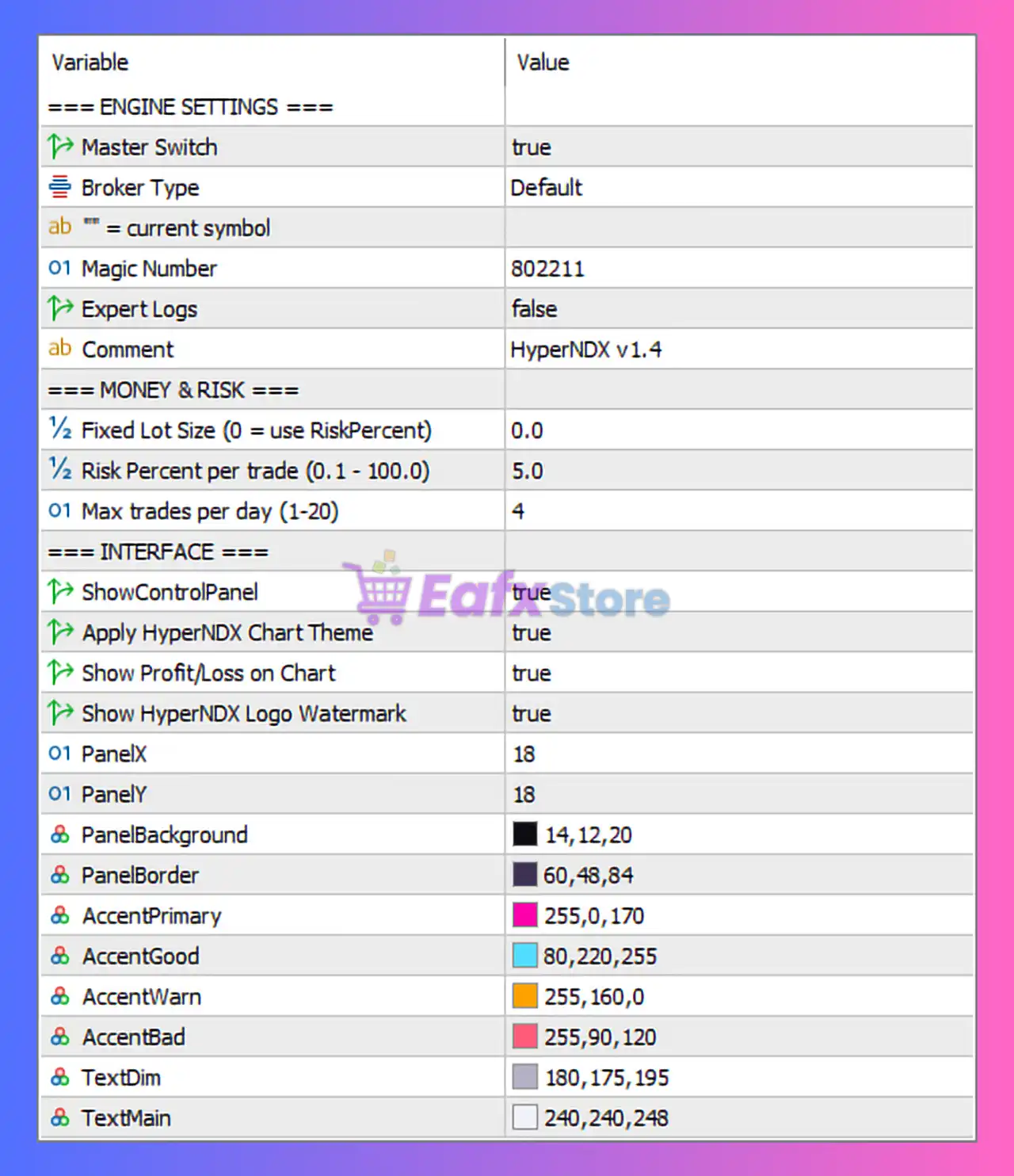
🔶 Engine Settings
| Parameter | Value | Explanation |
|---|---|---|
| Master Switch | true | Enables or disables the EA’s trading engine. When true, the EA is active and allowed to trade. |
| Broker Type | Default | Uses standard broker settings optimized for typical MT5 trading environments. |
| Current Symbol | Active chart symbol | The EA operates on the symbol attached to the chart. |
| Magic Number | 802211 | Unique identifier used by the EA to manage its own trades independently. |
| Expert Logs | false | Disables detailed logging to reduce terminal resource usage. |
| Comment | HyperNDX v1.4 | Custom identifier attached to trades opened by the EA. |
➡️ These parameters define the EA’s core operating environment.
🔶 Money & Risk Management
| Parameter | Value | Explanation |
|---|---|---|
| Fixed Lot Size | 0.0 | When set to zero, the EA uses risk percentage instead of fixed lot size. |
| Risk Percent Per Trade | 5.0% | Determines the portion of account balance risked per trade. |
| Max Trades Per Day | 4 | Limits the number of trades executed in a single day. |
➡️ This configuration emphasizes controlled risk exposure and limited trading frequency.
🔶 Interface Settings
| Parameter | Value | Explanation |
|---|---|---|
| Show Control Panel | true | Displays an interactive dashboard on the chart. |
| Apply HyperNDX Chart Theme | true | Automatically adjusts chart colors to match the EA interface style. |
| Show Profit/Loss on Chart | true | Displays real-time PnL information directly on the chart. |
| Show HyperNDX Logo Watermark | true | Displays the EA logo watermark for visual identification. |
➡️ These features improve usability and provide real-time trading information.
🔶 Control Panel Layout
| Parameter | Value | Explanation |
|---|---|---|
| Panel X Position | 18 | Horizontal position of the EA dashboard on the chart. |
| Panel Y Position | 18 | Vertical position of the EA dashboard. |
➡️ This allows traders to adjust the dashboard placement on the chart interface.
🔶 Panel Color Customization
| Parameter | Value | Explanation |
|---|---|---|
| Panel Background | RGB (14,12,20) | Defines the dark background color of the EA interface panel. |
| Panel Border | RGB (60,48,84) | Color of the panel border frame. |
| Accent Primary | RGB (255,0,170) | Primary highlight color used for key elements. |
| Accent Good | RGB (80,220,255) | Indicates positive trading conditions or profits. |
| Accent Warn | RGB (255,160,0) | Warning color used for potential risk situations. |
| Accent Bad | RGB (255,90,120) | Color used to display critical or negative conditions. |
| Text Dim | RGB (180,175,195) | Secondary text color used for less important information. |
| Text Main | RGB (240,240,248) | Primary text color for important labels. |
➡️ These settings control the visual appearance of the EA dashboard.
🔶 Strategy Overview
HyperNDX EA MT5 focuses on structured algorithmic trading combined with strict risk control. The EA automatically calculates trade sizes based on the selected risk percentage and limits the number of trades executed per day.
The built-in dashboard and chart theme provide a clear visual overview of trading performance and system status.
➡️ By combining automated execution with strong visual monitoring tools, HyperNDX aims to improve trading discipline and transparency.
🔶 Risk Management Perspective
Key safety features in HyperNDX EA include:
- Percentage-based risk management
- Maximum trade limit per day
- Automatic lot calculation based on account size
- Visual monitoring of profit and loss
- Customizable interface for real-time trade tracking
➡️ These features help traders maintain consistent trading discipline and avoid excessive market exposure.
🔶 Conclusion
HyperNDX EA MT5 is a modern automated trading system that combines algorithmic trade execution with advanced risk management and visual monitoring tools. With dynamic lot sizing, daily trade limits, and a customizable dashboard interface, the EA is designed to provide both automation and transparency.
For best performance, traders should use reliable brokers with stable execution speeds and configure the risk percentage according to their account size and risk tolerance. Proper monitoring and disciplined risk management remain essential for achieving long-term success with automated trading systems in MetaTrader 5.