🔶 What is Gold Vector Strategy MT5?
The Gold Vector Strategy EA is an automated trading system designed for the MetaTrader 5 (MT5) platform, primarily focused on trading gold (XAUUSD) and other high-volatility instruments. The Expert advisor (EA) uses algorithmic logic to identify trading opportunities and automatically manage positions based on predefined risk, money management, and market protection rules.
📌📌📌 Buy this unlimited Gold Vector Strategy EA MT5 product here 📌📌📌
One of the key advantages of this EA is its comprehensive parameter configuration, allowing traders to control risk exposure, trade timing, spread conditions, and news filtering. Properly understanding these settings is essential to optimize performance and adapt the strategy to different account sizes or market conditions.
This article provides a detailed breakdown of the Gold Vector Strategy MT5 settings, explaining how each parameter affects trading behavior.
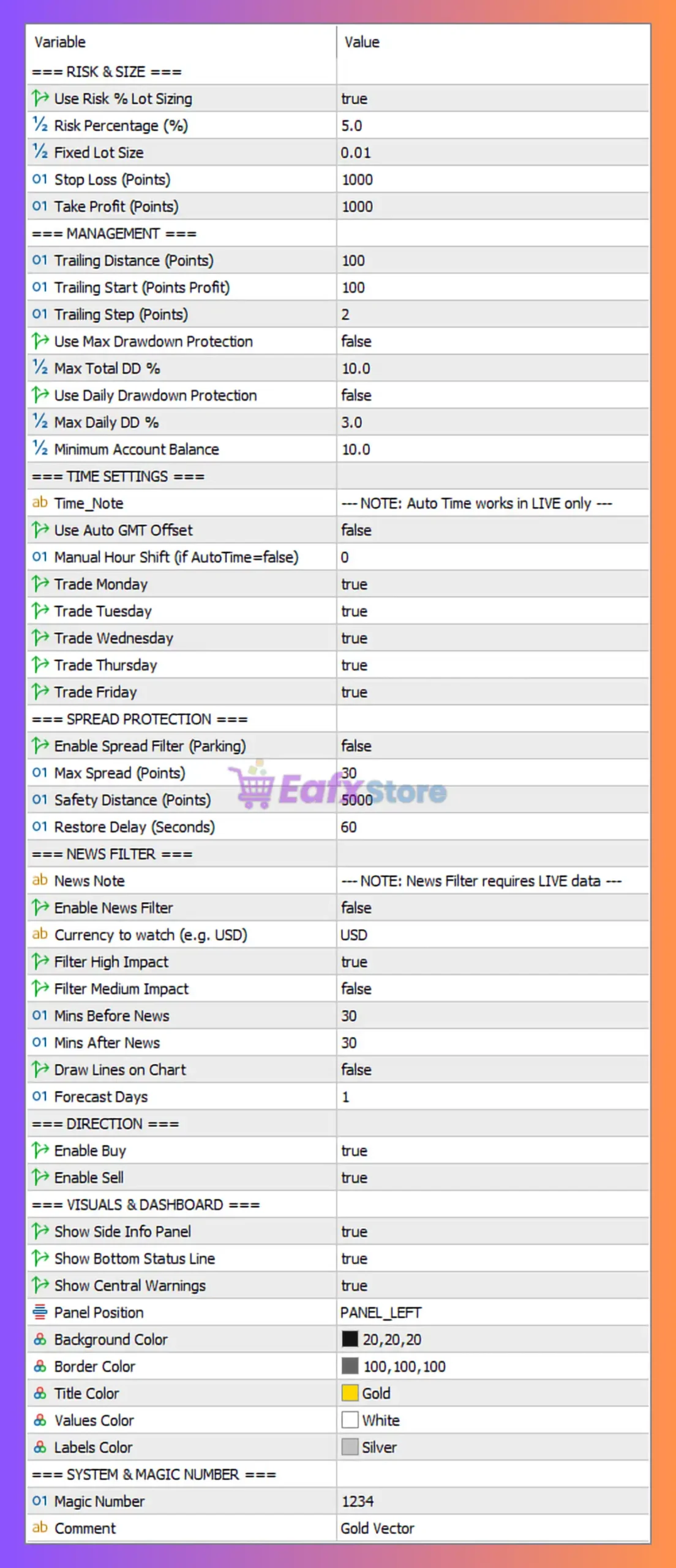
🔶 Risk & Position Size Settings
These parameters control capital management and trade risk, which are crucial for long-term account stability.
| Parameter | Value | Description |
|---|---|---|
| Use Risk % Lot Sizing | true | Enables dynamic lot sizing based on account balance and risk percentage. |
| Risk Percentage (%) | 5.0 | The EA risks 5% of the account balance per trade. Higher values increase profit potential but also increase drawdown risk. |
| Fixed Lot Size | 0.01 | Used only if risk-based lot sizing is disabled. |
| Stop Loss (Points) | 1000 | Defines the maximum loss per trade in points. |
| Take Profit (Points) | 1000 | Target profit level set at the same distance as the stop loss. |
Analysis
The configuration indicates a 1:1 risk-reward ratio, where stop loss and take profit are equal. Using 5% risk per trade suggests an aggressive trading approach, suitable for high-growth strategies but potentially volatile during losing streaks.
🔶 Trade Management Settings
These parameters control how the EA manages trades after entry.
| Parameter | Value | Description |
|---|---|---|
| Trailing Distance (Points) | 100 | Distance from current price where trailing stop activates. |
| Trailing Start (Points Profit) | 100 | Profit required before trailing stop begins. |
| Trailing Step (Points) | 2 | Increment at which the trailing stop moves. |
| Use Max Drawdown Protection | false | Disables automatic protection against total drawdown. |
| Max Total DD % | 10 | Maximum allowed drawdown if protection is enabled. |
| Use Daily Drawdown Protection | false | Daily loss protection is disabled. |
| Max Daily DD % | 3 | Daily drawdown threshold (inactive). |
| Minimum Account Balance | 10 | Minimum account equity required for trading. |
Analysis
Trailing stop management allows the EA to lock in profits as price moves favorably. However, drawdown protection is disabled, meaning the EA will continue trading even during significant losses. Activating these protections could improve capital preservation.
🔶 Time Settings
These parameters define when the EA is allowed to trade.
| Parameter | Value | Description |
|---|---|---|
| Use Auto GMT Offset | false | EA will not automatically detect broker time zone. |
| Manual Hour Shift | 0 | No manual adjustment to trading hours. |
| Trade Monday | true | Trading allowed on Monday. |
| Trade Tuesday | true | Trading allowed on Tuesday. |
| Trade Wednesday | true | Trading allowed on Wednesday. |
| Trade Thursday | true | Trading allowed on Thursday. |
| Trade Friday | true | Trading allowed on Friday. |
Analysis
The EA is configured to trade throughout the entire trading week, which maximizes opportunities but also exposes the strategy to volatile market sessions such as news events.
🔶 Spread Protection Settings
Spread protection helps prevent trades during high transaction costs or unstable market conditions.
| Parameter | Value | Description |
|---|---|---|
| Enable Spread Filter | false | Spread protection is disabled. |
| Max Spread (Points) | 30 | Maximum allowed spread if filter is enabled. |
| Safety Distance (Points) | 5000 | Distance to prevent trades near dangerous price zones. |
| Restore Delay (Seconds) | 60 | Time delay before EA resumes trading after spread normalization. |
Analysis
Since the spread filter is disabled, the EA may open trades during high spread periods, such as market rollover or news events. Enabling this feature could improve trade execution quality.
🔶 News Filter Settings
Economic news events can significantly impact gold prices.
| Parameter | Value | Description |
|---|---|---|
| Enable News Filter | false | News filtering is disabled. |
| Currency to Watch | USD | Monitors USD-related economic events. |
| Filter High Impact | true | Would block trading during high-impact news. |
| Filter Medium Impact | false | Medium impact news ignored. |
| Minutes Before News | 30 | Stop trading 30 minutes before news release. |
| Minutes After News | 30 | Resume trading 30 minutes after. |
| Draw Lines on Chart | false | News markers disabled. |
| Forecast Days | 1 | EA checks economic calendar for the next day. |
Analysis
With the news filter disabled, the EA may trade during major economic announcements such as FOMC, NFP, or CPI, which could lead to unpredictable price spikes.
🔶 Trade Direction Settings
These settings define whether the EA can open buy or sell trades.
| Parameter | Value | Description |
|---|---|---|
| Enable Buy | true | EA can open long positions. |
| Enable Sell | true | EA can open short positions. |
Analysis
Allowing both buy and sell positions enables the EA to capture market opportunities in both bullish and bearish trends.
🔶 Visual Dashboard Settings
These parameters control the display interface on the chart.
| Parameter | Value | Description |
|---|---|---|
| Show Side Info Panel | true | Displays trading statistics panel. |
| Show Bottom Status Line | true | Shows EA status at bottom of chart. |
| Show Central Warnings | true | Displays warnings in center of chart. |
| Panel Position | PANEL_LEFT | Dashboard displayed on the left side. |
| Background Color | 20,20,20 | Dark background theme. |
| Border Color | 100,100,100 | Panel border color. |
| Title Color | Gold | Title text color. |
| Values Color | White | Parameter value color. |
| Labels Color | Silver | Label text color. |
Analysis
These settings improve visual monitoring of the EA, making it easier for traders to track system activity in real time.
🔶 System & Magic Number
This section defines trade identification and order labeling.
| Parameter | Value | Description |
|---|---|---|
| Magic Number | 1234 | Unique ID used to distinguish EA trades from other strategies. |
| Comment | Gold Vector | Label attached to each order. |
Analysis
The magic number ensures that the EA only manages its own trades, which is especially useful when multiple EAs run on the same trading account.
🔶 Conclusion
The Gold Vector Strategy MT5 settings show a configuration designed for active trading with moderate-to-high risk exposure. Key characteristics of the setup include:
- Dynamic risk management using 5% risk per trade
- Equal stop loss and take profit levels (1:1 risk-reward ratio)
- Trailing stop enabled to secure profits
- Both buy and sell trading allowed
- Spread filter and news filter currently disabled
While this configuration can generate high trading frequency and profit potential, it may also increase exposure to market volatility, news events, and spread spikes.
For improved stability, traders may consider:
- Enabling spread protection
- Activating drawdown protection
- Using the news filter for high-impact events
Overall, understanding and optimizing these parameters is essential to maximize the effectiveness of the Gold Vector Strategy EA on MT5 while maintaining proper risk control.