🔶 What is Alpha Tactical Machine MT5?
Alpha Tactical Machine EA is a powerful automated trading system designed for the MetaTrader 5 (MT5) platform. This Expert Advisor (EA) combines grid trading, hedging strategies, MACD-based entry signals and advanced risk control mechanisms to create a flexible and adaptive trading environment.
📌📌📌 Buy this Alpha Tactical Machine MT5 product here 📌📌📌
With features such as AlphaRex entry mode, dynamic lot scaling, daily profit targets, drawdown protection, and trailing stop management, this EA is built for traders seeking a balance between automation, risk management and profitability.
🔶 Entry Settings
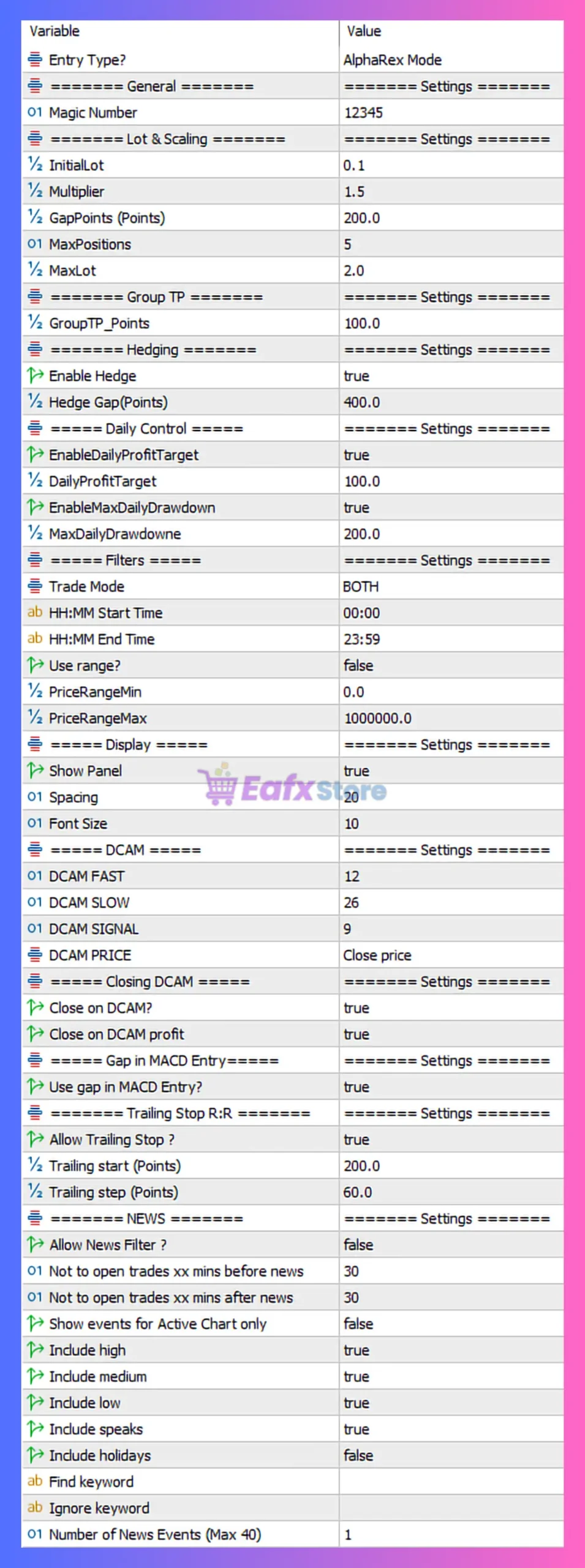
These parameters define how the EA identifies trading opportunities.
| Parameter | Value | Description |
|---|---|---|
| Entry Type | AlphaRex Mode | Proprietary entry logic for signal generation. |
➡️ Analysis
The AlphaRex Mode likely uses internal algorithms combining trend, momentum, and volatility for precise entries.
🔶 General Settings
| Parameter | Value | Description |
|---|---|---|
| Magic Number | 12345 | Unique identifier for EA trades. |
➡️ Analysis
Ensures the EA manages only its own trades when running multiple systems.
🔶 Lot & Scaling Settings
Controls position sizing and scaling strategy.
| Parameter | Value | Description |
|---|---|---|
| Initial Lot | 0.1 | Starting trade size. |
| Multiplier | 1.5 | Lot increase for subsequent trades. |
| Gap Points | 200 | Distance between trades. |
| Max Positions | 5 | Maximum number of open trades. |
| Max Lot | 2.0 | Maximum allowed lot size. |
➡️ Analysis
This configuration represents a moderate grid/martingale hybrid strategy:
- Multiplier 1.5 = controlled scaling
- Max 5 positions = limited exposure
- Max lot cap reduces extreme risk
🔶 Group Take Profit Settings
| Parameter | Value | Description |
|---|---|---|
| Group TP (Points) | 100 | Closes all positions when total profit reaches 100 points. |
➡️ Analysis
Group TP allows the EA to close all trades collectively, improving recovery efficiency.
🔶 Hedging Settings
| Parameter | Value | Description |
|---|---|---|
| Enable Hedge | true | Allows opposite trades to reduce risk. |
| Hedge Gap | 400 | Distance before hedge positions open. |
➡️ Analysis
Hedging helps:
- Reduce drawdown
- Balance exposure during trends
- Improve recovery performance
🔶 Daily Control Settings
| Parameter | Value | Description |
|---|---|---|
| Enable Daily Profit Target | true | Stops trading after reaching profit target. |
| Daily Profit Target | 100 | Daily profit goal. |
| Enable Max Daily Drawdown | true | Activates loss protection. |
| Max Daily Drawdown | 200 | Maximum daily loss allowed. |
➡️ Analysis
This is a strong risk control system, ensuring:
- Profit locking
- Loss limitation
- Consistent account growth
🔶 Filters & Trading Conditions
| Parameter | Value | Description |
|---|---|---|
| Trade Mode | BOTH | Allows buy and sell trades. |
| Trading Time | 00:00 – 23:59 | Trades all day. |
| Use Range Filter | false | No price range restriction. |
➡️ Analysis
The EA is configured for continuous trading, maximizing opportunities.
🔶 DCAM Indicator Settings
Used for signal generation.
| Parameter | Value | Description |
|---|---|---|
| DCAM Fast | 12 | Fast period. |
| DCAM Slow | 26 | Slow period. |
| DCAM Signal | 9 | Signal line period. |
| DCAM Price | Close | Applied price. |
➡️ Analysis
These settings mirror MACD (12,26,9), indicating momentum-based signal confirmation.
🔶 Trade Exit & Signal Logic
| Parameter | Value | Description |
|---|---|---|
| Close on DCAM | true | Closes trades based on indicator signal. |
| Close on Profit | true | Ensures profit-taking behavior. |
| Use Gap in MACD Entry | true | Uses gap conditions for entry filtering. |
🔶 Trailing Stop Settings
| Parameter | Value | Description |
|---|---|---|
| Enable Trailing Stop | true | Activates trailing stop. |
| Trailing Start | 200 | Profit level to start trailing. |
| Trailing Step | 60 | Step size for trailing movement. |
➡️ Analysis
Trailing helps secure profits and extend winning trades.
🔶 News Filter Settings
| Parameter | Value | Description |
|---|---|---|
| Allow News Filter | false | News filter disabled. |
| Minutes Before News | 30 | Pre-news filter window. |
| Minutes After News | 30 | Post-news filter window. |
➡️ Analysis
Even though configured, the filter is currently disabled, meaning trades may occur during high-impact news.
🔶 Panel & Visualization Settings
Controls EA interface.
| Feature | Description |
|---|---|
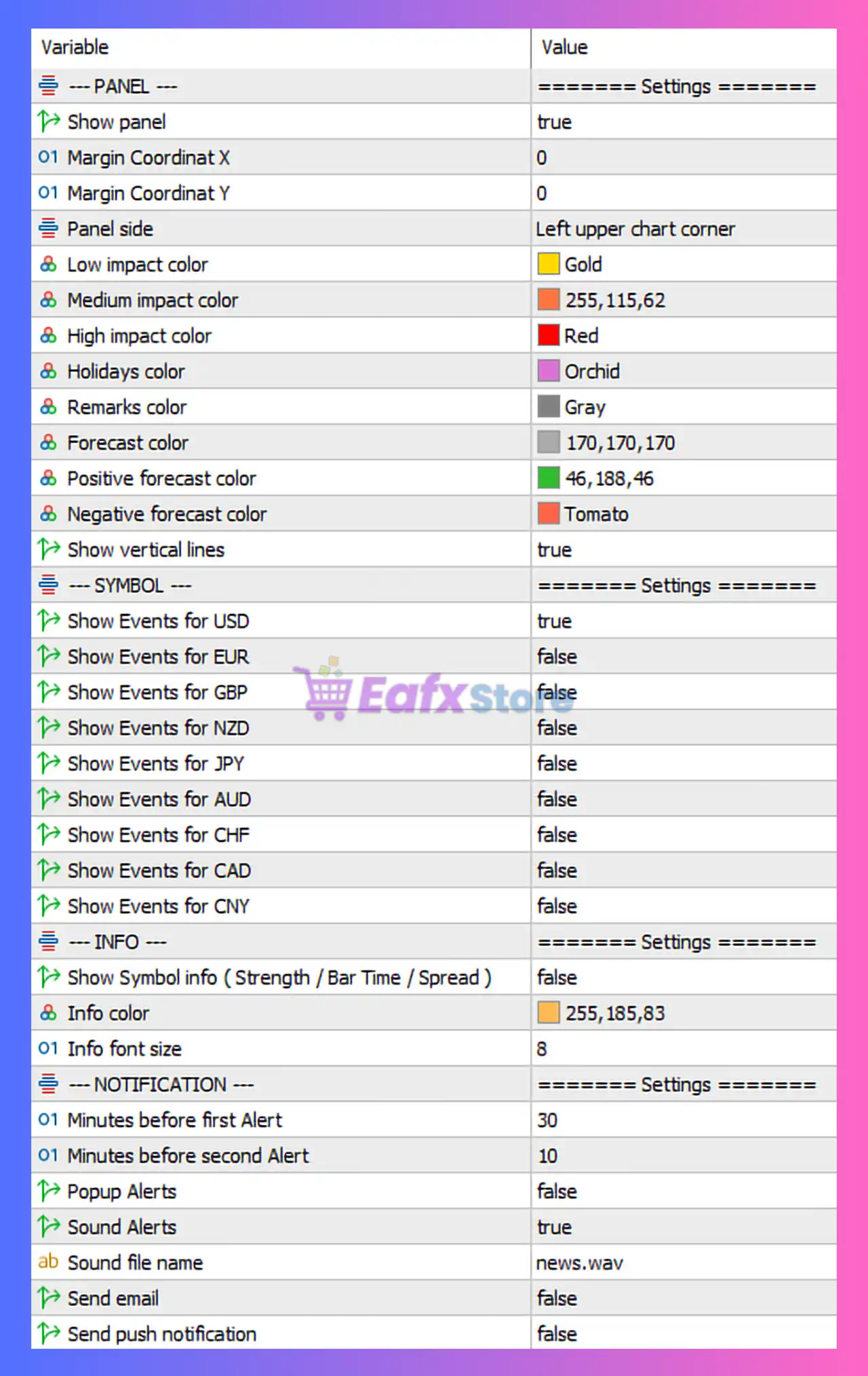
| Show Panel | Displays trading information |
| Panel Position | Left upper chart corner |
| Color Coding | Gold (low), Red (high impact), etc. |
| Vertical Lines | Shows news events |
🔶 Notification Settings
| Parameter | Value | Description |
|---|---|---|
| Sound Alerts | true | Enables sound notifications. |
| Email Alerts | false | Email disabled. |
| Push Notifications | false | Mobile alerts disabled. |
🔶 Key Characteristics of This Configuration
The Alpha Tactical Machine EA is configured as:
- Grid + hedging hybrid strategy
- MACD-based signal system
- Group TP for basket trading
- Daily profit & drawdown control
- Trailing stop enabled
- Full-day trading operation
🔶 Advantages of the Current Setup
➡️ Balanced Risk Management
Daily limits and max positions reduce exposure.
➡️ Flexible Strategy Design
Combines grid, hedging, and indicator signals.
➡️ Profit Optimization
Group TP and trailing stop maximize returns.
➡️ Strong Adaptability
Works in both trending and ranging markets.
🔶 Risks to Consider
- Grid + multiplier can increase drawdown
- News filter disabled → exposure to volatility
- Continuous trading may include low-liquidity periods
🔶 Conclusion
The Alpha Tactical Machine EA MT5 settings represent a well-balanced automated trading system that integrates grid trading, hedging, MACD-based signals, and strict daily risk controls.
Key highlights include:
- Initial lot 0.1 with multiplier 1.5
- Maximum 5 positions with 2.0 lot cap
- Group TP of 100 points
- Hedging enabled with 400-point gap
- Daily profit target and drawdown protection
- Trailing stop starting at 200 points
Overall, this EA is suitable for traders looking for a structured, semi-aggressive automated strategy with built-in risk management. By fine-tuning parameters such as multiplier, gap distance, and news filters, traders can further enhance the performance and stability of the Alpha Tactical Machine EA in live trading environments.