What is Lizard EA MT5?
Lizard EA is a multi-strategy automated trading Expert Advisor (EA) developed for the MetaTrader 5 platform. The EA combines daily swing trading, H1 breakout systems, advanced drawdown management, NFP protection and intelligent trade frequency controls.
With built-in smart time filters, weighted lot sizing, and multiple strategy activation options, Lizard EA is designed for traders seeking diversified and risk-controlled forex automation.
Full Parameters
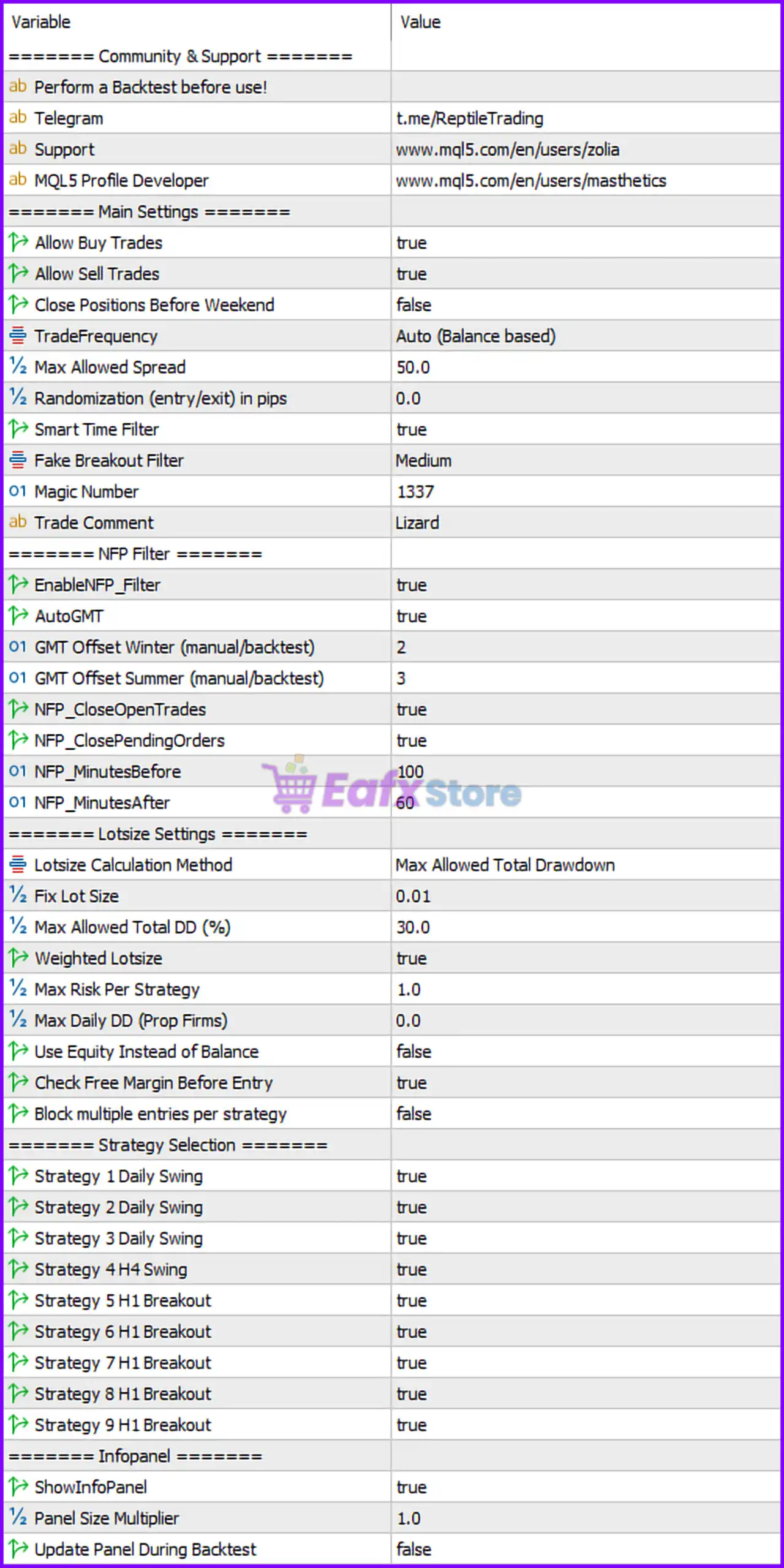
Main Settings
- Allow Buy Trades = true: Enables BUY trading positions.
- Allow Sell Trades = true: Enables SELL trading positions.
- Close Positions Before Weekend = false: Keeps trades open over the weekend.
- TradeFrequency = Auto (Balance based): Automatically adjusts trading frequency based on account balance.
- Max Allowed Spread = 50.0: Maximum allowed spread set to 50.0 points/pips.
- Randomization (entry/exit) in pips = 0.0: Trade entry/exit randomization disabled because value is 0.0.
- Smart Time Filter = true: Enables intelligent time-based trading filtering.
- Fake Breakout Filter = Medium: Uses medium-level filtering for fake breakout detection.
- Magic Number = 1337: Unique identifier (1337) used for managing EA trades.
- Trade Comment = Lizard: Adds “Lizard” as the trade comment for executed orders.
NFP Filter
- EnableNFP_Filter = true: Activates Non-Farm Payroll (NFP) news protection filter.
- AutoGMT = true: Enables automatic GMT offset detection.
- GMT Offset Winter (manual/backtest) = 2: Winter GMT offset manually set to GMT+2 for backtesting/manual mode.
- GMT Offset Summer (manual/backtest) = 3: Summer GMT offset manually set to GMT+3 for backtesting/manual mode.
- NFP_CloseOpenTrades = true: Closes open trades before NFP events.
- NFP_ClosePendingOrders = true: Deletes pending orders before NFP events.
- NFP_MinutesBefore = 100: Applies NFP protection 100 minutes before the news event.
- NFP_MinutesAfter = 60: Resumes trading 60 minutes after the NFP release.
Lotsize Settings
- Lotsize Calculation Method = Max Allowed Total Drawdown: Lot sizing based on maximum total drawdown calculations.
- Fix Lot Size = 0.01: Sets the fixed trading lot size to 0.01 lots.
- Max Allowed Total DD (%) = 30.0: Maximum total account drawdown limited to 30.0%.
- Weighted Lotsize = true: Enables weighted lot size calculations.
- Max Risk Per Strategy = 1.0: Maximum risk per strategy limited to 1.0%.
- Max Daily DD (Prop Firms) = 0.0: Daily drawdown limit disabled because value is 0.0.
- Use Equity Instead of Balance = false: Uses account balance instead of equity for calculations.
- Check Free Margin Before Entry = true: Verifies sufficient free margin before opening trades.
- Block multiple entries per strategy = false: Allows multiple entries for the same strategy.
Strategy Selection
- Strategy 1 Daily Swing = true: Enables Daily Swing Strategy 1.
- Strategy 2 Daily Swing = true: Enables Daily Swing Strategy 2.
- Strategy 3 Daily Swing = true: Enables Daily Swing Strategy 3.
- Strategy 4 H4 Swing = true: Enables H4 Swing Strategy 4.
- Strategy 5 H1 Breakout = true: Enables H1 Breakout Strategy 5.
- Strategy 6 H1 Breakout = true: Enables H1 Breakout Strategy 6.
- Strategy 7 H1 Breakout = true: Enables H1 Breakout Strategy 7.
- Strategy 8 H1 Breakout = true: Enables H1 Breakout Strategy 8.
- Strategy 9 H1 Breakout = true: Enables H1 Breakout Strategy 9.
Infopanel
- ShowInfoPanel = true: Displays the EA information panel on the chart.
- Panel Size Multiplier = 1.0: Sets the information panel scaling multiplier to 1.0.
- Update Panel During Backtest = false: Disables panel updates during strategy backtesting.
Conclusion
The Lizard EA MT5 settings provide a diversified automated trading framework with multiple swing and breakout strategies, advanced NFP filtering and structured risk management.
By combining weighted lot sizing, smart time filtering, and strategy-level risk controls, the EA helps traders manage exposure while maintaining flexible market participation. Understanding these parameters can improve optimization, consistency and long-term automated trading performance.
FAQs
❓ What does TradeFrequency = Auto (Balance based) mean?
It automatically adjusts trading frequency according to account balance size.
❓ Why is EnableNFP_Filter = true important?
It protects the account from extreme volatility during Non-Farm Payroll news releases.
❓ What is the purpose of Max Allowed Total DD (%) = 30.0?
It limits total account drawdown to 30.0% for risk management.
❓ Why are all strategies enabled by default?
The EA is configured to diversify trading across multiple swing and breakout systems.
❓ What does Magic Number = 1337 do?
It uniquely identifies trades opened by Lizard EA MT5 for proper management and tracking.