





Super Hybrid Ultimate With 5 AI Engine Version EA MT5 (Latest version) – GroupBuy
Select a variant to see availability.
 Vendor Website:
  Setting (If Any).docx
 Reviewed by
 Super Hybrid Ultimate With 5 AI Engine Version MT5 Settings Explained – Complete Configuration Guide
Super Hybrid Ultimate With 5 AI Engine Version MT5 is an advanced AI-powered Expert Advisor designed for MetaTrader 5, combining five intelligent trading engines with trend-following analysis, adaptive grid recovery, hedging, martingale control, AI market intelligence, structured decision making, multi-session management, news filtering, and dynamic risk protection. Every module can be customized, allowing traders to optimize performance while maintaining strict control over drawdown, volatility, and market exposure.
Super Hybrid Ultimate With 5 AI Engine Version MT5 Settings
Smart Protection Shortcuts
🔹 Shadow Edge Memory ON/OFF = true – Enables intelligent memory that records previous basket behavior for improved future decisions.
🔹 Recovery Defense Brain ON/OFF = false – Disables the advanced recovery defense module for late-stage recovery cycles.
🔹 Adaptive Basket TP ON/OFF = true – Automatically adjusts basket take-profit targets according to market strength.
🔹 Market Regime Parameter Switching ON/OFF = true – Dynamically switches grid and multiplier parameters based on changing market conditions.
🔹 Execution Quality Map ON/OFF = true – Uses historical execution quality analysis to avoid poor broker execution environments.
General Settings
🔹 InpMagic = 2026 – Assigns the unique Magic Number 2026 to all EA trades.
🔹 InpComment = Super Hybrid Ultimate-with 5 AI Engine Version 2.0 – Adds this comment to every trade opened by the EA.
Entry Direction & Trend Settings
🔹 Open first trade immediately (on first tick) = true – Opens the first position immediately after the EA is attached.
🔹 Trend signal timeframe for trend-based modes = 5 Minutes – Uses the M5 timeframe for trend confirmation.
🔹 Fast EMA period = 20 – Uses EMA(20) as the fast moving average.
🔹 Slow EMA period = 50 – Uses EMA(50) as the slow moving average.
Trend Follow / Standard Martingale Quality Upgrade
🔹 Use multi-confirmation score for TREND_FOLLOW / STANDARD_MARTIN = true – Requires multiple technical confirmations before entering trades.
🔹 ADX period for trend quality score = 14 – Uses ADX(14) for trend strength calculation.
🔹 Minimum ADX for Trend Follow strength = 22.0 – Trend-follow entries require ADX ≥ 22.0.
🔹 RSI period for trend quality score = 14 – Uses RSI(14).
🔹 Trend Follow BUY requires RSI ≥ 52.0 – BUY entries require RSI above 52.0.
🔹 Trend Follow SELL requires RSI ≤ 48.0 – SELL entries require RSI below 48.0.
🔹 ATR period for trend volatility safety = 14 – Uses ATR(14) for volatility measurement.
🔹 Minimum ATR points to avoid dead/flat entries = 80.0 – Blocks entries during very low volatility.
🔹 Bars used to calculate ATR baseline = 20 – Uses the previous 20 bars for ATR baseline calculation.
🔹 Block seed entries when ATR > baseline × factor = 2.5 – Blocks entries when volatility becomes abnormally high.
🔹 Minimum score required for Trend Follow seed entry = 75.0 – Trend entries require at least 75/100 quality.
🔹 If price moves against Trend Follow entry, add using standard martingale = true – Enables controlled martingale recovery.
🔹 Minimum score required for STANDARD_MARTINGALE seed entry = 60.0 – Standard Martingale requires 60/100 quality.
🔹 Hold-timeframe for FULL_HEDGING / CUSTOM_HEDGING add-ons = 2 Minutes – Waits 2 minutes before additional hedge positions.
Grid Step Mode
🔹 Grid step unit selector = Price distance in USD (e.g., XAUUSD: 5.0 means $5 move) – Measures grid spacing using Gold price movement.
Grid Stage 1
🔹 Stage 1 ON/OFF = true – Enables Grid Stage 1.
🔹 Stage 1 start trade number = 0 – Begins from trade 0.
🔹 Stage 1 end trade number = 5 – Ends at trade 5.
🔹 Stage 1 grid step in USD = 5.0 – Grid spacing equals $5.0.
🔹 Stage 1 grid step in pips = 500 – Equivalent to 500 pips.
🔹 Stage 1 multiplier = 1.2 – Applies a 1.2 lot multiplier.
🔹 Stage 1 entry timeframe = 1 Minute – Uses M1 for entries.
🔹 Stage 1 trading mode = Trend Follower with quality-score seed entry – Uses AI trend-following before recovery.
🔹 Stage 1 indicator filter ON/OFF = false – Indicator filter disabled.
🔹 Stage 1 selected indicator group = XAUUSD-focused filter set – Uses Gold-optimized indicators.
Grid Stage 2
🔹 Stage 2 ON/OFF = true – Enables Stage 2.
🔹 Stage 2 start trade number = 6 – Starts at trade 6.
🔹 Stage 2 end trade number = 10 – Ends at trade 10.
🔹 Stage 2 grid step in USD = 5.0 – Uses $5.0 spacing.
🔹 Stage 2 grid step in pips = 500 – Uses 500 pips.
🔹 Stage 2 multiplier = 1.2 – Multiplier set to 1.2.
🔹 Stage 2 entry timeframe = 1 Minute – Entry timeframe is M1.
🔹 Stage 2 trading mode = Hedging First Step then Martingale – Hedge-first recovery logic.
🔹 Stage 2 lot carry = Continue from last lot of previous stage (default) – Continues previous lot progression.
🔹 Stage 2 indicator filter ON/OFF = false – Indicator filter disabled.
🔹 Stage 2 selected indicator group = XAUUSD-focused filter set – Uses Gold indicators.
Grid Stage 3
🔹 Stage 3 ON/OFF = true – Enables Stage 3.
🔹 Stage 3 start trade number = 11 – Starts at trade 11.
🔹 Stage 3 end trade number = 15 – Ends at trade 15.
🔹 Stage 3 grid step in USD = 5.0 – Grid spacing is $5.0.
🔹 Stage 3 grid step in pips = 500 – Uses 500 pips.
🔹 Stage 3 multiplier = 1.2 – Applies 1.2 multiplier.
🔹 Stage 3 entry timeframe = 1 Minute – Uses M1 timeframe.
🔹 Stage 3 trading mode = Hedging First Step then Martingale – Hedge-first recovery logic.
🔹 Stage 3 lot carry = Continue from last lot of previous stage (default) – Maintains lot continuity.
🔹 Stage 3 indicator filter ON/OFF = false – Indicator filter disabled.
🔹 Stage 3 selected indicator group = XAUUSD-focused filter set – Gold indicator profile.
Grid Stage 4
🔹 Stage 4 ON/OFF = true – Enables Stage 4.
🔹 Stage 4 start trade number = 16 – Starts at trade 16.
🔹 Stage 4 end trade number = 25 – Ends at trade 25.
🔹 Stage 4 grid step in USD = 5.0 – Grid distance is $5.0.
🔹 Stage 4 grid step in pips = 500 – Uses 500 pips.
🔹 Stage 4 multiplier = 1.2 – Lot multiplier equals 1.2.
🔹 Stage 4 entry timeframe = 1 Minute – Uses M1 entries.
🔹 Stage 4 trading mode = Hedging First Step then Martingale – Maintains hedge-first recovery.
🔹 Stage 4 lot carry = Continue from last lot of previous stage (default) – Continues previous lot progression.
🔹 Stage 4 indicator filter ON/OFF = false – Indicator filter disabled.
🔹 Stage 4 selected indicator group = XAUUSD-focused filter set – Gold-specific indicators.
AI Stage 2–4 Defensive Adjustments
🔹 Reduce add-on lot size during elevated/high AI risk = false – Lot reduction during high AI risk is disabled.
🔹 Stage 2 additive multiplier offset = 0.05 – Adjusts Stage 2 multiplier by 0.05.
🔹 Stage 3 additive multiplier offset = 0.10 – Adjusts Stage 3 multiplier by 0.10.
🔹 Stage 4 additive multiplier offset = 0.15 – Adjusts Stage 4 multiplier by 0.15.
🔹 Increase grid distance during high-risk conditions = true – Widens grid spacing during elevated AI risk.
🔹 Stage 2 grid-distance multiplier = 1.2 – Expands Stage 2 spacing by 20%.
🔹 Stage 3 grid-distance multiplier = 1.4 – Expands Stage 3 spacing by 40%.
🔹 Stage 4 grid-distance multiplier = 1.6 – Expands Stage 4 spacing by 60%.
XAUUSD Indicator Filters
🔹 Signal timeframe = 5 Minutes – Indicator calculations use M5.
🔹 Fast EMA = 20 – Fast EMA period.
🔹 Slow EMA = 50 – Slow EMA period.
🔹 ADX period = 14 – Uses ADX(14).
🔹 Minimum ADX strength = 20.0 – Trend requires ADX ≥ 20.0.
🔹 RSI period = 14 – RSI lookback period.
🔹 Minimum RSI for BUY = 52.0 – BUY confirmation threshold.
🔹 Maximum RSI for SELL = 48.0 – SELL confirmation threshold.
🔹 ATR period = 14 – ATR lookback.
🔹 Minimum ATR = 80.0 – Avoids flat Gold markets.
Basket Profit Settings
🔹 Basket close profit = 3.0 USD – Closes the basket at $3.0 profit.
🔹 Show basket TP line = true – Displays the basket TP line.
🔹 Enable trailing basket TP = false – Basket trailing TP disabled.
🔹 Trailing TP pullback = 1.0 USD – Uses $1.0 pullback if trailing is enabled.
🔹 Enable partial close above 50% target = false – Partial close disabled.
🔹 Partial close percentage = 50.0% – Would close 50% when enabled.
Lot & Position Sizing
🔹 Starting lot size = 0.01 – Initial lot size is 0.01.
AI Market Intelligence & Risk Defense
🔹 Enable AI Market Intelligence & Risk Defense = true – Activates AI-based volatility and market condition analysis.
🔹 ATR analysis timeframe = 1 Minute – AI evaluates volatility on M1.
🔹 ATR period = 14 – Uses ATR(14).
🔹 Rolling average bars = 30 – Uses 30 candles for baseline calculations.
🔹 ATR acceleration factor = 1.8 – Detects abnormal volatility acceleration.
🔹 Candle expansion factor = 1.8 – Measures unusually large candles.
🔹 Spread spike factor = 2.0 – Detects abnormal spread widening.
🔹 One-sided candle streak = 5 – Five consecutive candles increase risk.
🔹 Fast momentum threshold = 20.0 pips/minute – High-speed price movement increases AI caution.
🔹 Erratic jump factor = 3.0 – Detects unstable market behavior.
🔹 AI News/Fed amplification window = 30 minutes – AI strengthens protection around major events.
🔹 Level 3+: Block new cycle starts = true – Stops new trading cycles.
🔹 Level 4+: Block same-direction add-ons = true – Prevents aggressive averaging.
🔹 Level 2+: Delay add-ons = true – Delays additional trades.
🔹 Cooldown between add-ons = 60 seconds – Waits 60 seconds.
🔹 Require stronger confirmations = true – Tightens entry rules.
🔹 Dynamic entry tightening = true – Automatically adapts entry quality.
🔹 Effective max spread multiplier = 0.75 – Narrows spread tolerance.
🔹 Elevated Risk DD = 2.0% – Elevated protection begins at 2%.
🔹 High Risk DD = 4.0% – High-risk mode begins at 4%.
🔹 Critical Defense DD = 6.0% – Critical protection begins at 6%.
🔹 Dangerous DD speed = 0.75%/minute – Detects rapid drawdowns.
🔹 Margin warning = 300.0% – AI increases caution below 300%.
🔹 Critical margin = 150.0% – Critical defense below 150%.
🔹 Elevated caution after 10 trades – Higher protection after 10 positions.
🔹 High Risk after 20 trades – Highest protection beyond 20 trades.
🔹 High Risk basket lots = 2.0 – Exposure threshold.
🔹 AI refresh interval = 5 seconds – AI recalculates every 5 seconds.
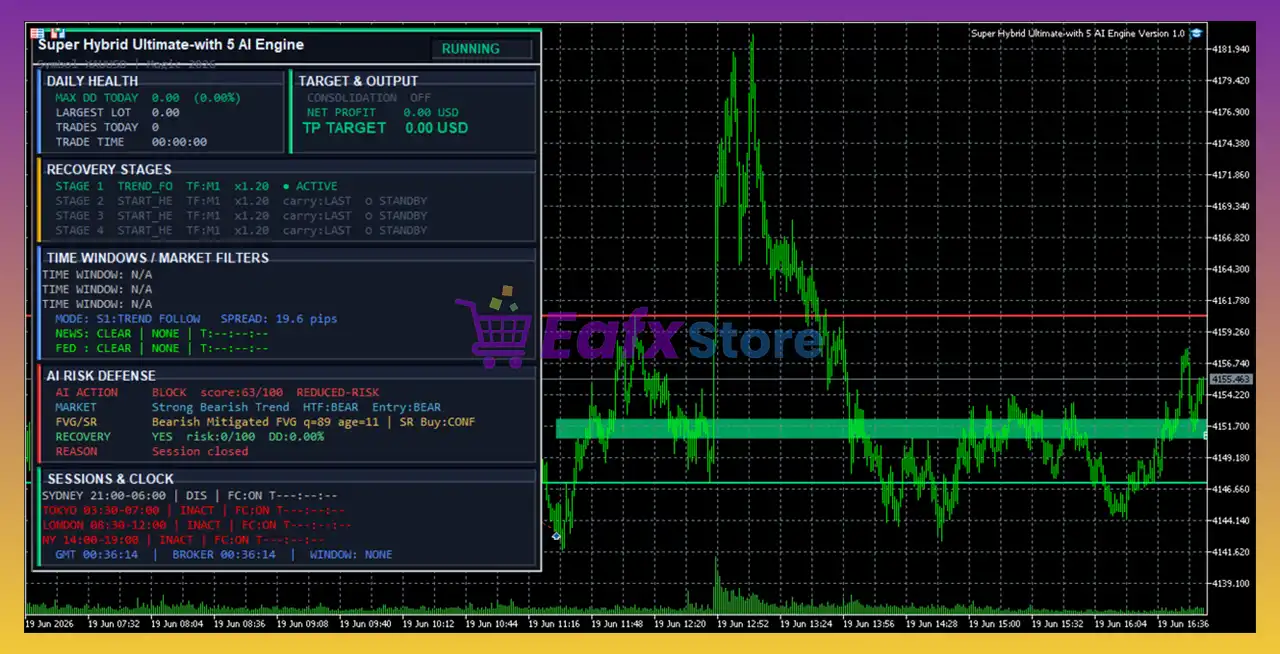
🔹 Show AI status = true – Displays AI status panel.
🔹 Print AI diagnostics = true – Logs AI decisions.
Structured AI Decision Engine
🔹 Replace blind first entries with BUY/SELL/WAIT/BLOCK = true – AI evaluates whether to buy, sell, wait, or block new entries.
🔹 Higher timeframe bias = 1 Hour – Uses the H1 trend for directional confirmation.
🔹 Entry structure/FVG timeframe = 15 Minutes – Fair Value Gap analysis runs on M15.
🔹 Structure lookback bars = 140 – Uses 140 bars for market structure.
🔹 FVG scan lookback = 80 bars – Scans 80 bars for Fair Value Gaps.
🔹 Ignore FVG after 45 bars – Older zones are discarded.
🔹 Minimum FVG gap = 0.1 ATR – Minimum Fair Value Gap size.
🔹 Smart fast EMA = 20 – Fast EMA.
🔹 Smart slow EMA = 50 – Slow EMA.
🔹 Higher timeframe EMA = 200 – Uses EMA(200).
🔹 Smart ADX period = 14 – Uses ADX(14).
🔹 Strong trend ADX = 24.0 – Strong trend threshold.
🔹 Choppy market ADX = 16.0 – Choppy market threshold.
🔹 Normal first-entry score = 70.0 – Required AI score.
🔹 Reduced-risk first-entry score = 60.0 – Lower-risk entry threshold.
🔹 Reduced-risk lot factor = 0.5 – Uses half-size positions.
🔹 Minimum Support/Resistance room = 0.75 ATR – Minimum space before entry.
🔹 S/R conflict buffer = 0.25 ATR – Buffer around support and resistance.
🔹 Spread spike blocking factor = 2.0 – Blocks entries during spread spikes.
🔹 Require FVG retest/rejection = true – Waits for confirmation.
🔹 Block/Wait during choppy regime = true – Avoids ranging markets.
🔹 Block during News/FED/abnormal spikes = true – AI blocks high-risk entries.
🔹 Draw detected S/R and active FVG = true – Displays detected structures.
🔹 Print BUY/SELL/WAIT/BLOCK reasons = true – Logs AI decisions.
Federal Reserve News Filter
🔹 Enable dedicated USA Federal Reserve News Filter = true – Activates dedicated Fed protection.
🔹 Block same-day/before/after Fed = false – Same-day and adjacent-day blocking disabled.
🔹 Additional blackout before Fed = 2 hours – Stops entries 2 hours before.
🔹 Additional blackout after Fed = 4 hours – Stops entries 4 hours after.
🔹 Block martingale add-ons during Fed = true – Prevents recovery trades during Fed events.
🔹 Fed cache refresh = 30 seconds – Updates Fed calendar every 30 seconds.
Session, Time, News & Dashboard Controls
🔹 Auto chart timeframe = 1 Minute – Automatically switches charts to M1.
🔹 Tokyo Session = 03:30–07:00 GMT – Active Tokyo trading window.
🔹 London Session = 08:30–12:00 GMT – Active London trading window.
🔹 New York Session = 14:00–19:00 GMT – Active New York trading window.
🔹 Custom Trading Windows = Disabled – Uses predefined sessions.
🔹 Trading Window 1 = 03:30–07:00 – First custom window.
🔹 Trading Window 2 = 08:30–16:00 – Second custom window.
🔹 Trading Window 3 = 17:00–20:00 – Third custom window.
🔹 Enable News Filter = true – Economic news protection enabled.
🔹 News Source = MT5 Calendar – Uses the MetaTrader 5 economic calendar.
🔹 Block High Impact News = true – Avoids high-impact events.
🔹 Block Moderate News = false – Medium news allowed.
🔹 Block Low News = false – Low-impact news allowed.
🔹 Block Before News = 60 minutes – Stops entries 60 minutes before.
🔹 Block After News = 120 minutes – Resumes 120 minutes afterward.
🔹 Show On-Chart Daily Metrics Panel = true – Displays the performance dashboard.
Drawdown, Spread & Day Control
🔹 Enable Drawdown Control = false – Basket drawdown protection disabled.
🔹 Maximum Basket Lots = 5.0 – Maximum total basket exposure.
🔹 Maximum Single Trade Lot = 1.0 – Caps individual trade size.
🔹 Risk per First Trade = 0.5% – Uses 0.5% account balance for the first trade.
🔹 Enable Spread Control = true – Monitors spread before entries.
🔹 Maximum Allowed Spread = 40.0 pips – Blocks trades above 40.0 pips.
🔹 Enable Slippage Control = true – Controls execution quality.
🔹 Maximum Slippage = 20 points – Maximum allowed order deviation.
🔹 Trading Days = Monday–Friday – Weekend trading disabled.
🔹 Daily Close Time = 19:05 GMT – Automatic daily basket management.
🔹 Friday Weekly Close = 19:05 GMT – Weekly close management.
Conclusion
Super Hybrid Ultimate With 5 AI Engine Version MT5 is one of the most advanced AI-driven Expert Advisors available for MetaTrader 5. It combines five intelligent trading engines, structured AI decision-making, adaptive grid recovery, trend-following confirmation, dynamic market regime detection, institutional-grade news protection, session management, and sophisticated risk control. Its extensive customization options allow traders to tailor every aspect of automated Gold trading while maintaining strong protection against volatility, drawdowns, and changing market conditions.
FAQs
❓ What is the main advantage of Super Hybrid Ultimate With 5 AI Engine Version MT5?
It combines five AI trading engines with trend-following, adaptive grid management, structured market analysis, and advanced risk protection.
❓ Does the EA support hedging and martingale strategies?
Yes. It supports multi-stage hedging and controlled martingale recovery with configurable grid stages and adaptive multipliers.
❓ How does the AI Decision Engine improve trading?
The AI evaluates higher-timeframe trends, Fair Value Gaps (FVG), ADX, EMA, RSI, ATR, support and resistance, spread, and news conditions before deciding to BUY, SELL, WAIT, or BLOCK a trade.
❓ Can I customize trading sessions and news filters?
Yes. You can configure Tokyo, London, and New York sessions, custom trading windows, economic news filters, and dedicated Federal Reserve event protection.
❓ Is Super Hybrid Ultimate With 5 AI Engine Version MT5 suitable for professional risk management?
Yes. It includes AI-based drawdown monitoring, adaptive spread control, session management, volatility analysis, execution quality checks, structured trade filtering, and multiple layers of defensive protection for automated trading.
User Reviews
Only logged in customers who have purchased this product may leave a review.
❓ What is Super Hybrid Ultimate With 5 AI Engine Version EA designed for?
Super Hybrid Ultimate With 5 AI Engine Version EA is built for automated XAUUSD trading with AI-style market analysis, basket control, and advanced recovery logic.
❓ Does Super Hybrid Ultimate With 5 AI Engine Version EA use Grid and Martingale?
Yes. Super Hybrid Ultimate With 5 AI Engine Version EA combines configurable grid, martingale, and hedging features with multiple protection layers to manage risk.
❓ How do the 5 AI protection engines improve trading?
Super Hybrid Ultimate With 5 AI Engine Version EA uses five AI engines to monitor market stress, execution quality, basket recovery, and adaptive risk control.
❓ Can Super Hybrid Ultimate With 5 AI Engine Version EA adapt to changing markets?
Yes. Super Hybrid Ultimate With 5 AI Engine Version EA adjusts grid spacing, recovery logic, and basket targets according to market volatility and AI risk levels.
❓ Does Super Hybrid Ultimate With 5 AI Engine Version EA include news protection?
Yes. Super Hybrid Ultimate With 5 AI Engine Version EA features economic news filters, Federal Reserve event protection, and session controls for safer trading.
❓ What risk management features are included?
Super Hybrid Ultimate With 5 AI Engine Version EA includes drawdown limits, daily loss protection, margin checks, lot caps, spread filters, and basket controls.
❓ Can I customize the recovery strategy in Super Hybrid Ultimate With 5 AI Engine Version EA?
Yes. Super Hybrid Ultimate With 5 AI Engine Version EA supports four recovery stages with separate grid distance, multipliers, filters, and entry rules.
❓ Is Super Hybrid Ultimate With 5 AI Engine Version EA suitable for beginners?
Super Hybrid Ultimate With 5 AI Engine Version EA offers flexible settings and visual dashboards, but users should demo test and understand grid trading risks first.
❓ Should I use a VPS with Super Hybrid Ultimate With 5 AI Engine Version EA?
Yes. Super Hybrid Ultimate With 5 AI Engine Version EA performs best on a low-latency VPS with a stable broker to improve execution quality and reliability.
-
 Original price was: $500.00.$89.00Current price is: $89.00.
 -
 Original price was: $1,499.00.$199.00Current price is: $199.00.
 -
 Original price was: $3,999.00.$299.00Current price is: $299.00.
 -
 Price range: $60.00 through $599.00
-
 3
3 -
 2
2 -
 3Price range: $89.00 through $599.00
 -
 5Price range: $89.00 through $599.00
There are no reviews yet.