




Yukon EA MT5 (Latest version) – GroupBuy
Select a variant to see availability.
 Vendor Website:
  Setting (If Any).docx
 Reviewed by
 🔢 Yukon EA MT5 Settings Guide
Yukon EA is a professional multi-engine Expert Advisor that combines Grid Classic execution, Pattern Long entries, and Pattern Short hedging strategies into one automated trading system. Featuring dynamic position sizing, advanced risk controls, volatility filtering, weekend protection, and a customizable trading panel, Yukon EA MT5 provides traders with flexible portfolio management while maintaining disciplined risk exposure.
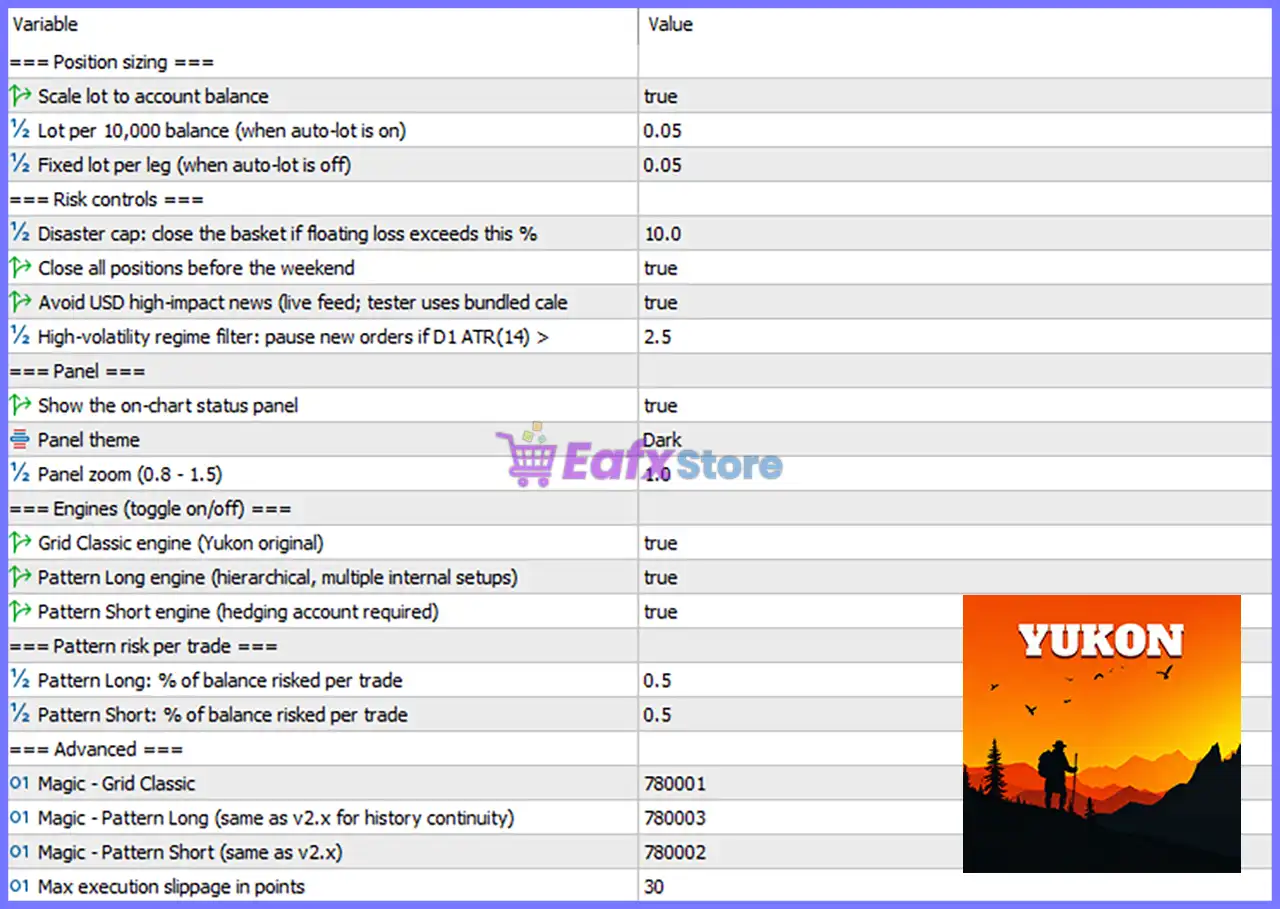
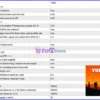
Yukon EA MT5 Settings Panel
🔢 Position Sizing
🔹 Scale lot to account balance = true – Automatically adjusts the trading volume according to the current account balance.
🔹 Lot per 10,000 balance (when auto-lot is on) = 0.05 – Uses 0.05 lots for every 10,000 units of account balance when Auto Lot is enabled.
🔹 Fixed lot per leg (when auto-lot is off) = 0.05 – Uses a fixed trading volume of 0.05 lots per position when automatic lot sizing is disabled.
🔢 Risk Controls
🔹 Disaster cap: close the basket if floating loss exceeds this % = 10.0 – Closes all open positions when the floating basket loss reaches 10.0% of the account.
🔹 Close all positions before the weekend = true – Automatically closes all open trades before the weekend to avoid gap risk.
🔹 Avoid USD high-impact news (live feed; tester uses bundled calendar) = true – Prevents new trading activity during major USD economic news events.
🔹 High-volatility regime filter: pause new orders if D1 ATR(14) > 2.5 – Suspends opening new trades whenever the Daily ATR(14) exceeds 2.5, indicating unusually high market volatility.
🔢 Panel Settings
🔹 Show the on-chart status panel = true – Displays the EA’s real-time status panel directly on the trading chart.
🔹 Panel theme = Dark – Uses the Dark interface theme for the information panel.
🔹 Panel zoom (0.8 – 1.5) = 1.0 – Displays the dashboard at the default zoom level of 1.0.
🔢 Trading Engines (Toggle On/Off)
🔹 Grid Classic engine (Yukon original) = true – Enables the original Grid Classic trading engine.
🔹 Pattern Long engine (hierarchical, multiple internal setups) = true – Activates the Pattern Long engine, which uses multiple internal pattern-recognition setups for Buy opportunities.
🔹 Pattern Short engine (hedging account required) = true – Enables the Pattern Short engine for Sell opportunities. A hedging-enabled trading account is required.
🔢 Pattern Risk Per Trade
🔹 Pattern Long: % of balance risked per trade = 0.5 – Risks 0.5% of the account balance on each Pattern Long trade.
🔹 Pattern Short: % of balance risked per trade = 0.5 – Risks 0.5% of the account balance on each Pattern Short trade.
🔢 Advanced Settings
🔹 Magic – Grid Classic = 780001 – Assigns the Magic Number 780001 to all Grid Classic trades.
🔹 Magic – Pattern Long (same as v2.x for history continuity) = 780003 – Uses the Magic Number 780003 for Pattern Long trades while maintaining historical trade compatibility.
🔹 Magic – Pattern Short (same as v2.x) = 780002 – Uses the Magic Number 780002 for Pattern Short trades.
🔹 Max execution slippage in points = 30 – Limits maximum execution slippage to 30 points during order placement.
🔢 Risk Level
🔹 Fix Lot – Trades with a constant lot size regardless of account balance, providing predictable position sizing.
🔹 Safe – Uses conservative risk exposure with smaller trading volume to prioritize long-term capital preservation.
🔹 Balanced – Provides an optimal balance between profitability and drawdown, making it suitable for most traders.
🔹 Aggressive – Increases position sizing and market exposure to maximize potential returns while accepting higher trading risk.
🔢 Conclusion
Yukon EA MT5 offers a sophisticated combination of Grid Classic execution, Pattern Long, and Pattern Short trading engines with intelligent money management and robust risk controls. Features such as automatic lot scaling, volatility filtering, weekend protection, USD news avoidance, and customizable dashboard settings allow traders to adapt the EA to various market conditions while maintaining disciplined portfolio management.
🔢 FAQs
❓ How does the Auto Lot feature work in Yukon EA MT5?
When Scale lot to account balance = true, the EA automatically calculates the lot size using 0.05 lots per 10,000 units of account balance.
❓ What is the purpose of the Disaster Cap?
The Disaster Cap automatically closes the entire basket of trades if the floating loss reaches 10.0%, helping protect the trading account from excessive drawdown.
❓ Why does the Pattern Short engine require a hedging account?
The Pattern Short strategy may open positions that require simultaneous long and short trades, which are only supported by hedging-enabled MT5 accounts.
❓ Does Yukon EA MT5 avoid trading during important news events?
Yes. The EA can automatically avoid opening new positions during high-impact USD news releases, reducing exposure to extreme market volatility.
❓ Which Risk Level is recommended for beginners?
The Safe or Balanced risk level is recommended for new users because it offers improved capital protection while maintaining stable long-term trading performance.
User Reviews
Only logged in customers who have purchased this product may leave a review.
❓ What market is Yukon MT5 designed to trade?
Yukon MT5 is built exclusively for XAUUSD, combining Grid and Pattern strategies with intelligent market-state analysis for disciplined Gold trading.
❓ Can I choose different trading strategies in Yukon MT5?
Yes. Yukon MT5 lets you run Grid Classic, Pattern Long, Pattern Short, or combine all three engines to match your preferred trading style.
❓ How does Yukon MT5 protect my trading account?
Yukon MT5 includes a configurable equity cap, daily volatility filter, weekend protection, and live USD news filter to help control trading risk.
❓ Does Yukon MT5 use Martingale or aggressive lot multiplication?
No. Yukon MT5 uses linear exposure with flat lot progression instead of Martingale, providing more predictable and disciplined basket management.
❓ How does Yukon MT5 decide when to open Pattern trades?
Yukon MT5 analyzes market trend, transition, range, and volatility before allowing Pattern entries, helping improve trade quality and reduce drawdowns.
❓ Can I customize the risk settings in Yukon MT5?
Yes. Yukon MT5 allows you to configure Grid sizing, Pattern risk percentage, and the maximum equity cap to suit your personal risk tolerance.
❓ Does Yukon MT5 automatically avoid high-impact news events?
Yes. Yukon MT5 features live USD news protection that pauses trading around major economic announcements to reduce exposure to sudden volatility.
❓ What account type is recommended for Yukon MT5?
Yukon MT5 is designed for MT5 hedging accounts and works with brokers offering XAUUSD, including support for cent and cross-currency accounts.
-
 Price range: $89.00 through $599.00
 -
 Price range: $89.00 through $599.00
 -
 Original price was: $799.99.$89.00Current price is: $89.00.
 -
 Price range: $80.00 through $599.00
-
 3
3 -
 0
0 -
 2
2 -
 3Price range: $89.00 through $599.00
There are no reviews yet.