




GOLD Pulsar EA MT5 (Latest version) - Unlimited

Subscriptions for Special Plan
- 30 EA package is more economical!
- Special package with 99%
- Download 1 EA/Day

Subscriptions for Premium Membership
- Download Unlimited in 1 Year
- Get 100% Discount
- Get free access to all

Subscriptions for Gold Membership
- 1 Year Membership
- Get 100% Discount
- Access EA+Indicator+Course
Frequently bought together 🎁
Add these products to enhance your purchase




 Vendor Website:
  Experts: GOLD Pulsar EA.ex5
 Reviewed by
 🔢 GOLD Pulsar EA MT5 Settings Guide
GOLD Pulsar EA is a fully automated Gold trading Expert Advisor designed with intelligent money management, customizable risk controls, advanced spread and news filters, trading session scheduling, and an intuitive information panel.
The EA supports both fixed and automatic lot sizing while allowing traders to optimize execution quality and minimize exposure during volatile market events.
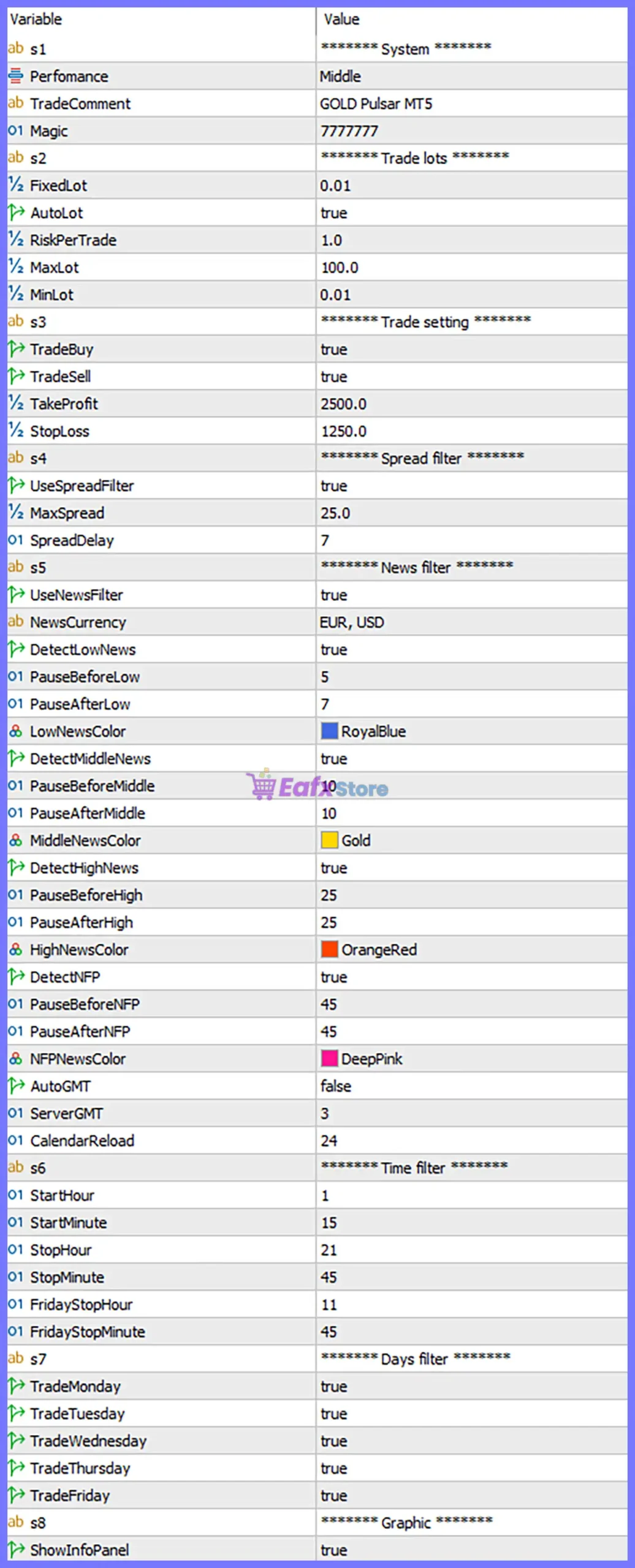
GOLD Pulsar EA MT5 Settings Panel
🔢 System Settings
🔹 Performance = Middle – Sets the EA to the Middle performance profile, providing a balanced trading frequency and risk level.
🔹 TradeComment = GOLD Pulsar MT5 – Adds the trade comment “GOLD Pulsar MT5” to every position opened by the EA.
🔹 Magic = 7777777 – Assigns the unique Magic Number 7777777 to identify all trades generated by the EA.
🔢 Trade Lots
🔹 FixedLot = 0.01 – Uses a fixed trading volume of 0.01 lots whenever AutoLot is disabled.
🔹 AutoLot = true – Enables automatic lot size calculation based on account risk settings.
🔹 RiskPerTrade = 1.0 – Risks approximately 1.0% of the trading account on each position.
🔹 MaxLot = 100.0 – Limits the maximum automatically calculated trading volume to 100.0 lots.
🔹 MinLot = 0.01 – Sets the minimum allowable trading volume to 0.01 lots.
🔢 Trade Settings
🔹 TradeBuy = true – Enables the EA to automatically open Buy positions.
🔹 TradeSell = true – Enables the EA to automatically open Sell positions.
🔹 TakeProfit = 2500.0 – Sets the Take Profit target to 2500.0 points.
🔹 StopLoss = 1250.0 – Sets the Stop Loss distance to 1250.0 points.
🔢 Spread Filter
🔹 UseSpreadFilter = true – Activates spread protection to avoid opening trades during unfavorable spread conditions.
🔹 MaxSpread = 25.0 – Allows trading only when the market spread is 25.0 points or lower.
🔹 SpreadDelay = 7 – Waits 7 seconds after spread conditions become acceptable before opening a new trade.
🔢 News Filter
🔹 UseNewsFilter = true – Enables the built-in economic news filter.
🔹 NewsCurrency = EUR, USD – Monitors important economic news related to EUR and USD currencies.
🔹 DetectLowNews = true – Enables detection of Low Impact economic news.
🔹 PauseBeforeLow = 5 – Stops opening new trades 5 minutes before Low Impact news.
🔹 PauseAfterLow = 7 – Resumes trading 7 minutes after Low Impact news.
🔹 LowNewsColor = RoyalBlue – Displays Low Impact news using the RoyalBlue color.
🔹 DetectMiddleNews = true – Enables detection of Medium Impact economic news.
🔹 PauseBeforeMiddle = 10 – Stops trading 10 minutes before Medium Impact news.
🔹 PauseAfterMiddle = 10 – Resumes trading 10 minutes after Medium Impact news.
🔹 MiddleNewsColor = Gold – Displays Medium Impact news using the Gold color.
🔹 DetectHighNews = true – Enables detection of High Impact economic events.
🔹 PauseBeforeHigh = 25 – Stops trading 25 minutes before High Impact news.
🔹 PauseAfterHigh = 25 – Resumes trading 25 minutes after High Impact news.
🔹 HighNewsColor = OrangeRed – Displays High Impact news using the OrangeRed color.
🔹 DetectNFP = true – Enables dedicated monitoring for Non-Farm Payroll (NFP) releases.
🔹 PauseBeforeNFP = 45 – Stops trading 45 minutes before NFP announcements.
🔹 PauseAfterNFP = 45 – Resumes trading 45 minutes after NFP announcements.
🔹 NFPNewsColor = DeepPink – Displays NFP events using the DeepPink color.
🔹 AutoGMT = false – Disables automatic GMT detection.
🔹 ServerGMT = 3 – Uses a manual server GMT offset of GMT +3.
🔹 CalendarReload = 24 – Refreshes the economic calendar every 24 hours.
🔢 Time Filter
🔹 StartHour = 1 – Allows trading to begin at 01:00.
🔹 StartMinute = 15 – Begins trading at 01:15.
🔹 StopHour = 21 – Stops opening new trades at 21:00.
🔹 StopMinute = 45 – Ends the daily trading session at 21:45.
🔹 FridayStopHour = 11 – Stops trading on Friday beginning at 11:00.
🔹 FridayStopMinute = 45 – Ends Friday trading at 11:45.
🔢 Days Filter
🔹 TradeMonday = true – Enables trading on Monday.
🔹 TradeTuesday = true – Enables trading on Tuesday.
🔹 TradeWednesday = true – Enables trading on Wednesday.
🔹 TradeThursday = true – Enables trading on Thursday.
🔹 TradeFriday = true – Enables trading on Friday.
🔢 Graphic Settings
🔹 ShowInfoPanel = true – Displays the EA’s real-time information panel directly on the trading chart.
🔢 Risk Level
🔹 Fix Lot – Uses a constant lot size for every position regardless of account balance, providing consistent exposure.
🔹 Safe – Applies conservative position sizing with lower market exposure to prioritize capital preservation.
🔹 Balanced – Delivers a balanced combination of growth potential and drawdown control for most traders.
🔹 Aggressive – Uses larger position sizes to maximize potential returns while accepting significantly higher trading risk.
🔢 Conclusion
GOLD Pulsar EA MT5 combines intelligent automated trading with comprehensive money management, advanced spread protection, detailed news filtering, flexible trading schedules, and an easy-to-read chart interface. Its configurable risk controls and execution filters allow traders to customize the EA according to different broker environments and personal trading objectives while maintaining disciplined risk management.
🔢 FAQs
❓ What does the Performance setting control?
The Performance option selects the EA’s overall trading behavior. The Middle profile offers a balanced approach between trade frequency and risk.
❓ How does AutoLot work?
When AutoLot = true, the EA automatically calculates the appropriate lot size based on the specified RiskPerTrade percentage.
❓ Why does the EA include separate filters for NFP and High Impact news?
NFP announcements often create exceptional market volatility, so the EA allows independent pause periods for additional protection.
❓ Can I change the trading session?
Yes. You can customize the StartHour, StartMinute, StopHour, StopMinute, and Friday trading hours to match your preferred trading schedule.
❓ Which Risk Level is recommended for new users?
The Safe or Balanced risk level is generally recommended because it offers better capital protection while maintaining stable long-term trading performance.
User Reviews
Only logged in customers who have purchased this product may leave a review.
❓ What market and timeframe is GOLD Pulsar EA MT5 designed for?
GOLD Pulsar EA MT5 is optimized exclusively for XAUUSD on the M1 timeframe, delivering precise automated Gold trading with disciplined risk management.
❓ Does GOLD Pulsar EA MT5 use Martingale or Grid strategies?
No. GOLD Pulsar EA MT5 never uses Martingale, Grid, arbitrage, or similar recovery systems, focusing on safe and transparent automated trading.
❓ How does GOLD Pulsar EA MT5 manage trading risk?
GOLD Pulsar EA MT5 uses intelligent money management, configurable risk per trade, protective Stop Loss, Take Profit, and automatic lot calculation.
❓ Can GOLD Pulsar EA MT5 calculate lot sizes automatically?
Yes. GOLD Pulsar EA MT5 supports AutoLot, automatically adjusting trade volume according to the selected RiskPerTrade percentage and account balance.
❓ Does GOLD Pulsar EA MT5 include an economic News Filter?
Yes. GOLD Pulsar EA MT5 monitors Low, Medium, High Impact, and NFP events, pausing trading before and after scheduled economic announcements.
❓ How does GOLD Pulsar EA MT5 protect against high spreads?
GOLD Pulsar EA MT5 uses a configurable spread filter and execution delay, opening trades only after market spreads return to acceptable levels.
❓ Can I customize the trading schedule in GOLD Pulsar EA MT5?
Yes. GOLD Pulsar EA MT5 allows you to define daily trading hours, Friday closing times, and active trading days to match your preferred schedule.
❓ How many positions can GOLD Pulsar EA MT5 open simultaneously?
GOLD Pulsar EA MT5 maintains only one open trade at a time, reducing market exposure while emphasizing stable and disciplined position management.
❓ What is the recommended account setup for GOLD Pulsar EA MT5?
GOLD Pulsar EA MT5 is recommended for XAUUSD M1 with a minimum $500 balance, leverage from 1:20, and a VPS for uninterrupted operation.
❓ Is GOLD Pulsar EA MT5 suitable for long-term automated trading?
Yes. GOLD Pulsar EA MT5 is designed for long-term consistency through intelligent entries, strict money management, advanced filters, and controlled execution.
-
 Original price was: $2,000.00.$199.00Current price is: $199.00.
 -
 Original price was: $30,000.00.$599.00Current price is: $599.00.
 -
 Original price was: $3,750.00.$599.00Current price is: $599.00.
 -
 Original price was: $30,000.00.$599.00Current price is: $599.00.
-
 4Original price was: $499.00.$249.00Current price is: $249.00.
 -
 0Original price was: $2,288.00.$249.00Current price is: $249.00.
 -
 1Original price was: $500.00.$249.00Current price is: $249.00.
 -
 0Original price was: $199.00.$179.00Current price is: $179.00.
There are no reviews yet.