



Nexus HFT Pro EA MT5 (Latest version) – GroupBuy
Select a variant to see availability.
Quick Verdict
Nexus HFT Pro EA is a sophisticated high-frequency trading Expert Advisor (EA) that combines Order Flow Imbalance (OFI), volatility modeling, momentum analysis, spread monitoring, and adaptive signal fusion to capture short-term market opportunities. With intelligent risk management, multi-symbol support, and institutional-grade execution controls, it is an excellent solution for traders seeking fast, disciplined and precision-driven automated trading.
Best For
✅ High-frequency trading (HFT)
✅ XAUUSD (Recommended)
✅ MT5 algorithmic traders
✅ ECN & Raw Spread accounts
✅ VPS-based automated trading
✅ Professional risk management
Overall Rating
9.6/10 ⭐⭐⭐⭐⭐
| Category | Score |
|---|---|
| Trading Strategy | 9.7/10 |
| Risk Management | 9.7/10 |
| Execution Quality | 9.8/10 |
| Customization | 9.6/10 |
| Value for Money | 9.5/10 |
What is Nexus HFT Pro EA MT5?
Nexus HFT Pro EA is a professional high-frequency Expert Advisor developed for MetaTrader 5. It is designed to identify and execute short-term trading opportunities by combining Order Flow Imbalance (OFI) analysis, GARCH volatility estimation, momentum detection, spread filtering, and multi-factor signal fusion.
Unlike traditional scalping robots that rely on a handful of technical indicators, Nexus HFT Pro continuously evaluates multiple market variables before authorizing a trade. The system is optimized for fast execution, making it particularly suitable for ECN brokers, low-latency VPS environments, and Raw Spread accounts.
 Vendor Website: View here
This is GroupBuy ==> How to Join
How Does Nexus HFT Pro EA MT5 Work?
Order Flow Imbalance Analysis
The EA continuously monitors Order Flow Imbalance (OFI) by evaluating multiple market-depth observations to determine buying and selling pressure before initiating a trade.
Volatility Modeling
Instead of relying on fixed volatility assumptions, Nexus HFT Pro uses a GARCH-based volatility model to estimate changing market conditions and avoid entering trades during unfavorable volatility environments.
Intelligent Signal Fusion
One of the EA’s strongest features is its proprietary signal fusion engine.
Rather than making decisions from a single indicator, Nexus HFT Pro combines:
🔹 Order Flow Imbalance
🔹 Momentum
🔹 VWAP analysis
🔹 Volatility conditions
🔹 Spread quality
🔹 Mean Reversion
Each component contributes a weighted score, and trades are executed only when the combined confidence exceeds the configured threshold.
Adaptive Execution Engine
The execution module minimizes trading errors through:
🔹 Spread filtering
🔹 Slippage protection
🔹 Cooldown intervals
🔹 Partial profit taking
🔹 Fast order processing
This helps maintain execution quality during volatile market conditions.
Key Features of Nexus HFT Pro
Advanced Order Flow Analysis
Utilizes Order Flow Imbalance (OFI) to identify institutional buying and selling pressure.
Multi-Factor Signal Fusion
Combines six independent analytical models into one intelligent trading decision.
Adaptive Risk Engine
Automatically adjusts position size based on account risk and current exposure.
Partial Position Closing
Locks in profits by closing portions of winning trades while allowing remaining positions to continue.
Professional Volatility Filters
Uses GARCH volatility estimation together with spread monitoring before allowing entries.
Multi-Symbol Compatibility
Supports numerous Forex pairs, indices, metals, and custom instruments.
Fast Execution Controls
Includes:
🔹 Maximum slippage protection
🔹 Cooldown timer
🔹 Adaptive Stop Loss
🔹 Dynamic Take Profit
🔹 Trailing management
Professional Dashboard
Displays:
🔹 Market bias
🔹 Signal strength
🔹 Trade status
🔹 Risk information
🔹 Trading activity
Directly on the chart.
Comprehensive CSV Logging
Maintains detailed trading logs for performance analysis and optimization.
Historical Trading Results Performance
Backtest Summary
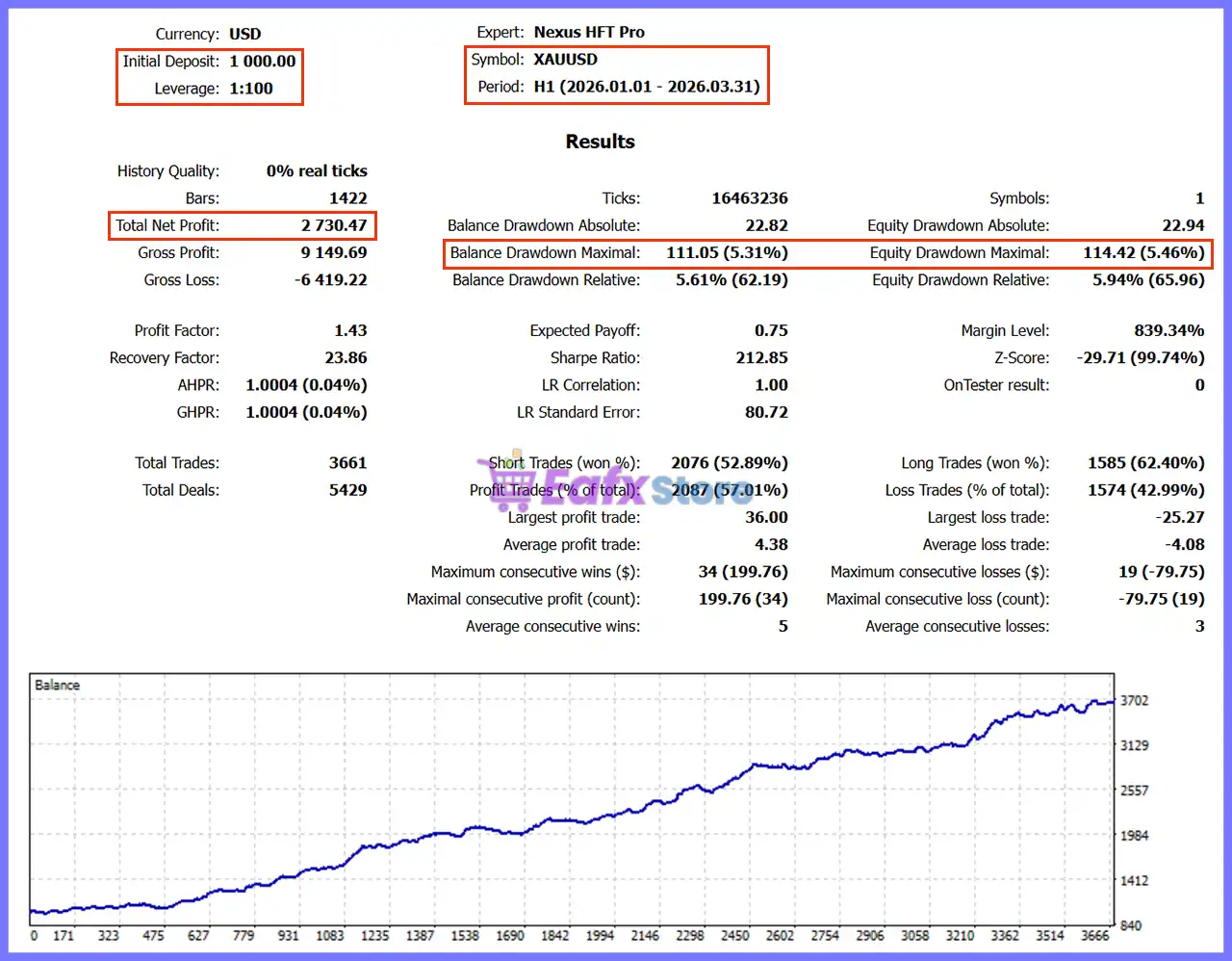
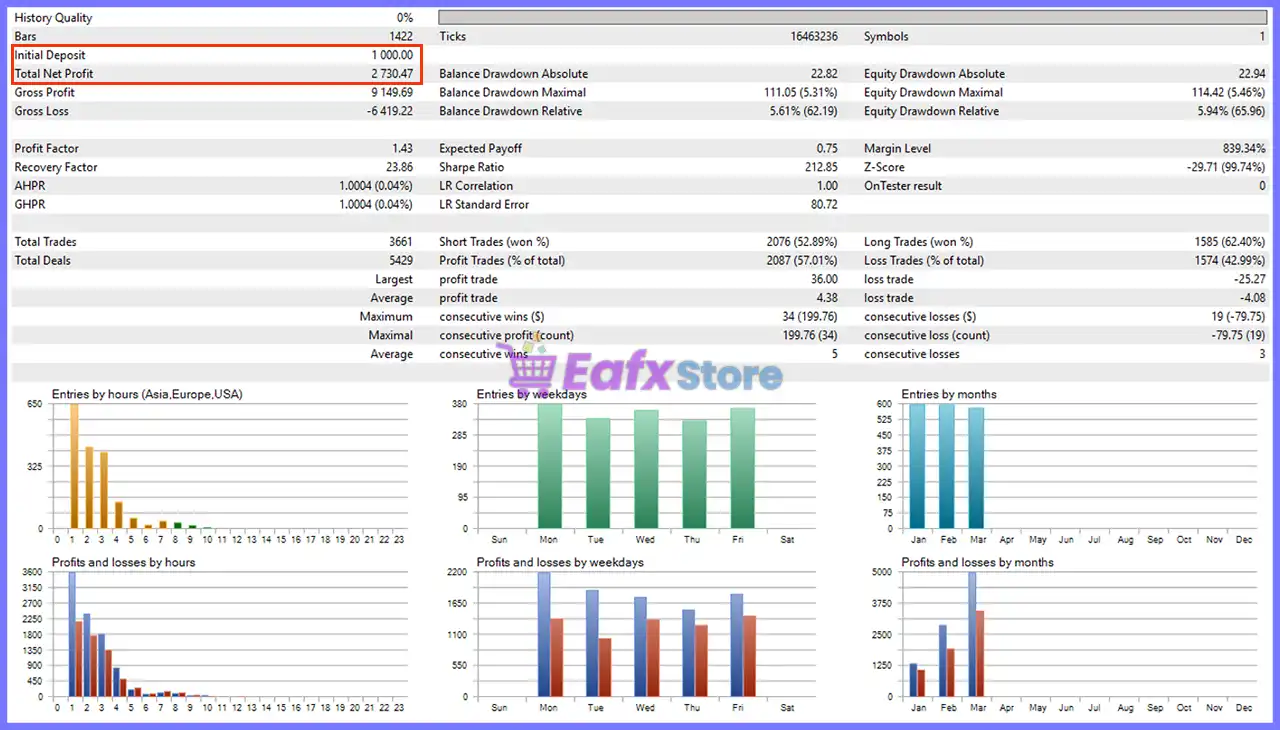
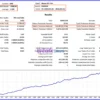
Nexus HFT Pro EA MT5 Backtest
| Metric | Result |
|---|---|
| Initial Deposit | $1,000 |
| Net Profit | $2,730.47 |
| Total Trades | 3,661 |
| Winning Trades | 57.01% |
| Profit Factor | 1.43 |
| Recovery Factor | 23.86 |
| Maximum Equity Drawdown | 5.94% |
| Maximum Daily Trades | 30 |
Performance Analysis
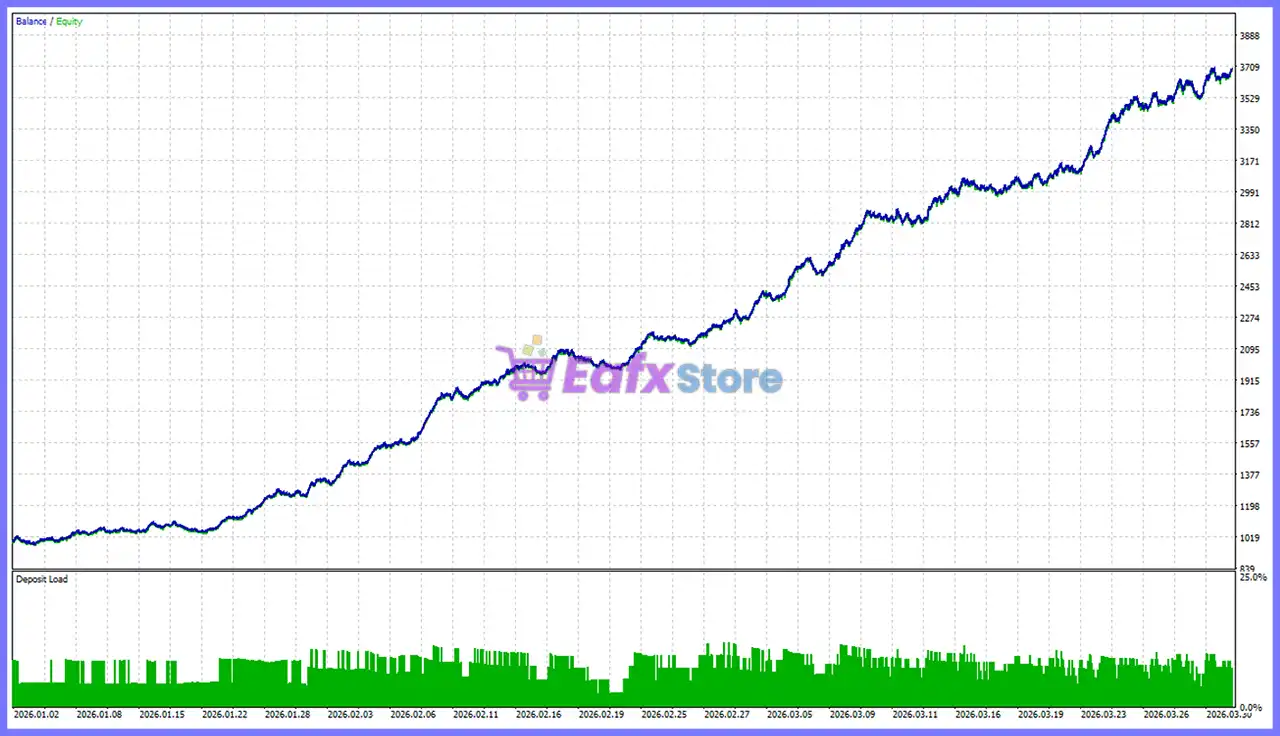
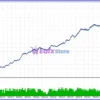
Nexus HFT Pro EA Backtest
The provided backtest shows a strong emphasis on consistency rather than exceptionally high win rates. Starting with an initial balance of $1,000, the strategy generated $2,730.47 in net profit across 3,661 trades, reflecting the EA’s high-frequency trading design.
Despite a modest 57.01% win rate, the system maintained a Profit Factor of 1.43 and an excellent maximum equity drawdown of only 5.94%, suggesting disciplined risk control.
The steadily rising equity curve indicates stable long-term growth with relatively controlled fluctuations, making the strategy suitable for traders who prioritize consistent execution and capital preservation over aggressive returns.
Why Nexus HFT Pro EA MT5 Stands Out
Institutional Order Flow Logic
Unlike conventional scalpers, Nexus HFT Pro analyzes market microstructure through Order Flow Imbalance rather than relying solely on indicators.
Intelligent Market Filtering
The EA evaluates:
🔹 Volatility
🔹 Momentum
🔹 Spread quality
🔹 VWAP positioning
🔹 Mean Reversion
🔹 Order Flow
Before every trade.
Professional Execution Quality
The integrated execution engine helps reduce poor fills through slippage control, spread monitoring, and execution cooldowns.
Flexible Portfolio Management
Users can trade a single instrument or multiple symbols while maintaining centralized portfolio risk management.
Recommended Trading Conditions
For the best performance, the following setup is recommended:
| Parameter | Recommendation |
|---|---|
| Platform | MetaTrader 5 |
| Recommended Symbol | XAUUSD |
| Other Symbols | Multi-pair supported |
| Account Type | ECN / Raw Spread |
| Minimum Deposit | $1,000+ recommended |
| Leverage | 1:100 or higher |
| VPS | Strongly Recommended |
| Execution | Low latency |
| Spread | Low spread broker |
| Trading Style | High-Frequency Trading |
Product Download Package?
The download package of the product suite includes:
 Setting (If Any).docx
Installation Guide.docx
 Reviewed by David Easton
Risk Management Features
Nexus HFT Pro EA MT5 includes a comprehensive collection of capital protection tools:
🔹 Adaptive automatic lot sizing.
🔹 Fixed risk percentage per trade.
🔹 Daily drawdown protection.
🔹 Maximum account drawdown limits.
🔹 Portfolio exposure control.
🔹 Maximum daily trade limitation.
🔹 Partial profit taking.
🔹 Slippage protection.
🔹 Spread filtering.
🔹 Volatility filtering.
🔹 Session management.
🔹 Dynamic Stop Loss (SL) / Take Profit (TP) support.
🔹 Trailing stop functionality.
🔹 Execution cooldown timer.
🔹 Multi-symbol risk monitoring.
These features help maintain disciplined exposure while allowing the EA to adapt to changing market conditions.
Weaknesses and Risk Warnings
Although Nexus HFT Pro EA MT5 incorporates advanced analytical models and strong risk controls, traders should be aware of several considerations:
🔹 High-frequency trading performance depends heavily on execution speed, spread quality, and broker latency.
🔹 The strategy should be thoroughly tested on a demo account before transitioning to live trading.
🔹 The historical report shown was generated with 0% real ticks, meaning results should be validated using Every Tick Based on Real Ticks before live deployment.
🔹 Profitability may vary significantly between brokers due to differences in liquidity, commission structure, slippage, and server infrastructure.
🔹 Frequent trading can lead to higher transaction costs, making low-spread ECN accounts particularly important.
Who Should Use Nexus HFT Pro EA?
Nexus HFT Pro EA is best suited for:
🔹 Professional MT5 traders.
🔹 High-Frequency Trading enthusiasts.
🔹 XAUUSD traders.
🔹 Multi-asset algorithmic traders.
🔹 ECN broker users.
🔹 VPS users.
🔹 Traders seeking disciplined automated execution.
🔹 Investors focused on controlled risk and systematic trading.
Final Verdict
Nexus HFT Pro EA is a professional-grade automated trading solution built for traders who demand speed, precision, and disciplined risk management. Its combination of Order Flow Imbalance analysis, GARCH volatility modeling, intelligent signal fusion, adaptive risk controls, and institutional-style execution sets it apart from many conventional scalping robots.
While achieving optimal performance requires a quality ECN broker, low-latency VPS, and favorable execution conditions, the EA’s structured approach and robust capital protection make it an attractive choice for traders seeking a sophisticated high-frequency trading system on MetaTrader 5.
🔢 Nexus HFT Pro EA MT5 Settings Guide
Nexus HFT Pro EA is a high-frequency trading Expert Advisor designed to capture short-term market opportunities using advanced Order Flow Imbalance (OFI) analysis, volatility filters, spread monitoring, momentum detection and intelligent signal fusion.
The EA includes adaptive risk management, partial position closing, session filters, comprehensive logging, and a customizable dashboard, making it suitable for professional traders seeking precision and fast execution across multiple financial instruments.
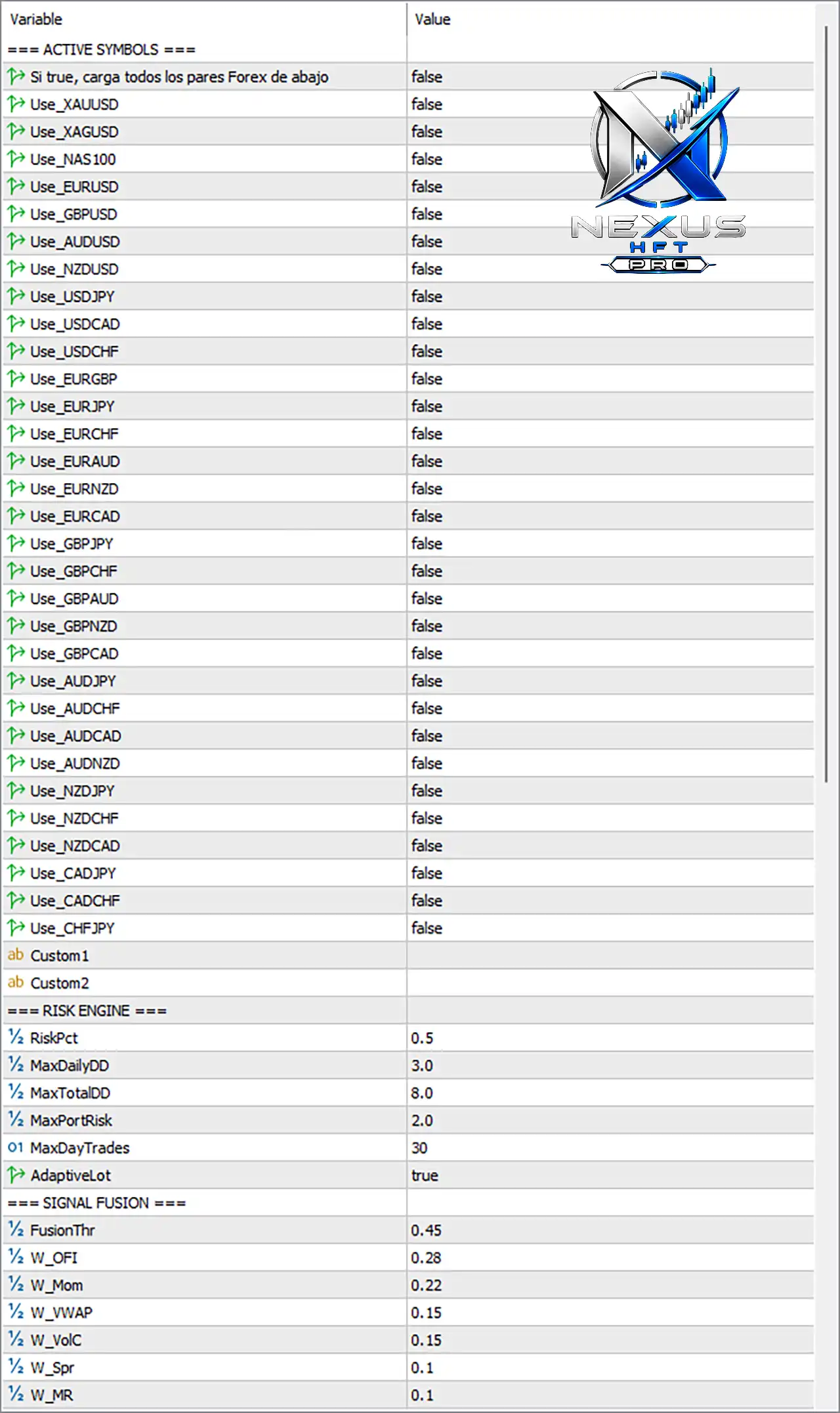
Nexus HFT Pro EA MT5 Settings Panel
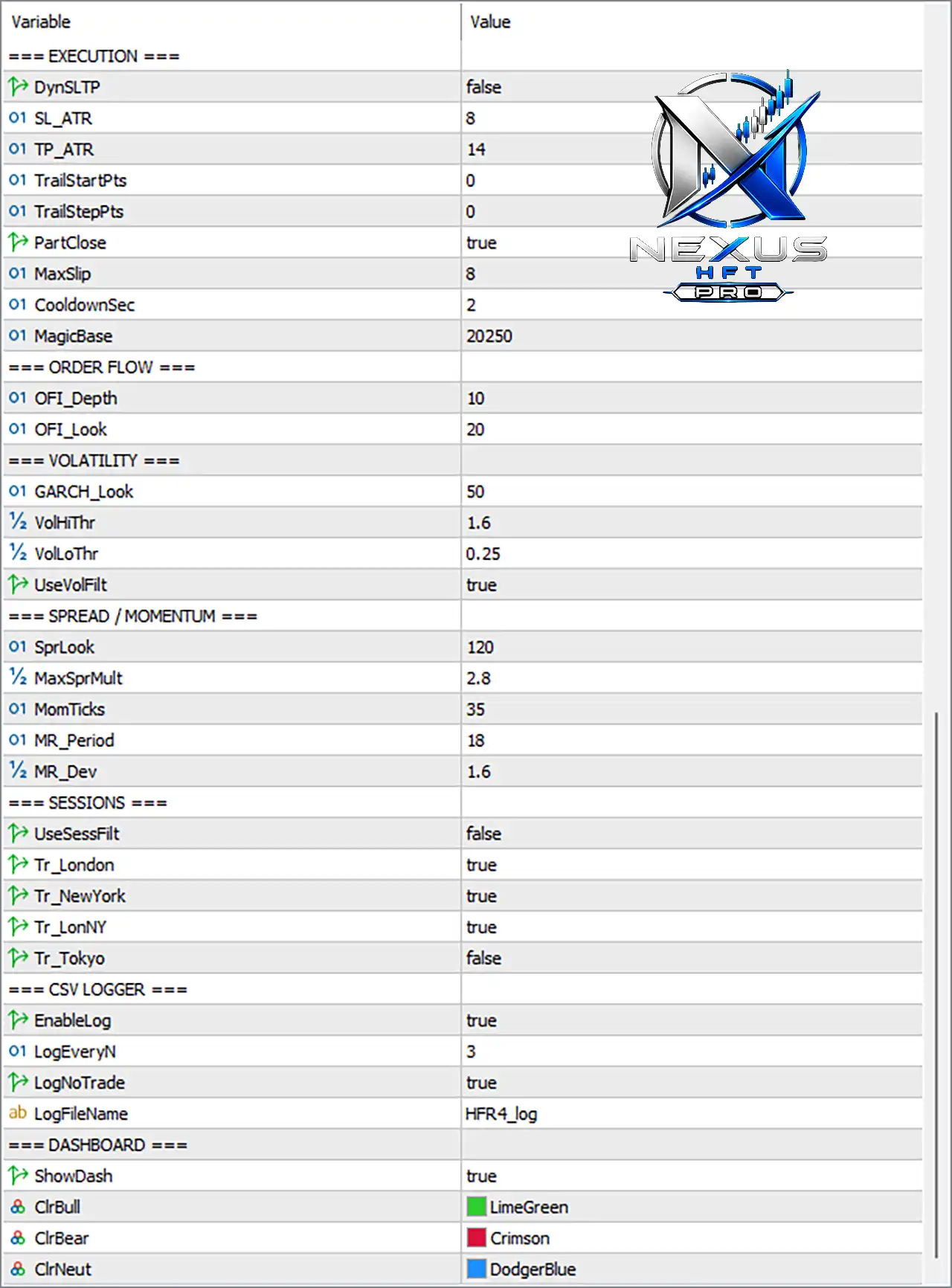
Nexus HFT Pro MT5 Settings Panel
🔢 Nexus HFT Pro EA MT5 Settings Explained
🔶 Execution Settings
🔹 DynSLTP = false – Disables dynamic Stop Loss and Take Profit calculation, using fixed execution parameters instead.
🔹 SL_ATR = 8 – Uses an ATR multiplier of 8 when dynamic Stop Loss is enabled.
🔹 TP_ATR = 14 – Uses an ATR multiplier of 14 for dynamic Take Profit calculation.
🔹 TrailStartPts = 0 – Trailing Stop starts immediately since the activation threshold is 0 points.
🔹 TrailStepPts = 0 – No incremental trailing step is applied.
🔹 PartClose = true – Enables partial position closing to secure profits during active trades.
🔹 MaxSlip = 8 – Maximum acceptable execution slippage is 8 points.
🔹 CooldownSec = 2 – Waits 2 seconds before allowing another trade after execution.
🔹 MagicBase = 20250 – Base Magic Number used to uniquely identify trades opened by the EA.
🔶 Order Flow Settings
🔹 OFI_Depth = 10 – Analyzes Order Flow Imbalance using a depth of 10 market levels.
🔹 OFI_Look = 20 – Uses 20 observations for Order Flow calculations.
🔶 Volatility Settings
🔹 GARCH_Look = 50 – Uses 50 periods for GARCH-based volatility estimation.
🔹 VolHiThr = 1.6 – High volatility threshold is 1.6.
🔹 VolLoThr = 0.25 – Low volatility threshold is 0.25.
🔹 UseVolFilt = true – Enables the volatility filter before entering trades.
🔶 Spread & Momentum Settings
🔹 SprLook = 120 – Evaluates spread conditions over 120 observations.
🔹 MaxSprMult = 2.8 – Maximum spread multiplier allowed before filtering trades.
🔹 MomTicks = 35 – Momentum calculations use 35 ticks.
🔹 MR_Period = 18 – Mean Reversion indicator period is 18.
🔹 MR_Dev = 1.6 – Mean Reversion deviation threshold is 1.6.
🔶 Trading Sessions
🔹 UseSessFilt = false – Session filter is disabled, allowing trading throughout the day.
🔹 Tr_London = true – Trading is permitted during the London session.
🔹 Tr_NewYork = true – Trading is permitted during the New York session.
🔹 Tr_LonNY = true – Trading is permitted during the London–New York overlap.
🔹 Tr_Tokyo = false – Trading during the Tokyo session is disabled.
🔶 CSV Logger
🔹 EnableLog = true – Enables CSV logging for trading activity.
🔹 LogEveryN = 3 – Records trading information every 3 events.
🔹 LogNoTrade = true – Logs periods when no trades are executed.
🔹 LogFileName = HFR4_log – CSV log file is saved using the filename HFR4_log.
🔶 Dashboard
🔹 ShowDash = true – Displays the Nexus HFT Pro dashboard on the chart.
🔹 ClrBull = LimeGreen – Bullish signals are displayed using the LimeGreen color.
🔹 ClrBear = Crimson – Bearish signals are displayed using the Crimson color.
🔹 ClrNeut = DodgerBlue – Neutral market conditions are displayed using the DodgerBlue color.
🔶 Active Symbols
🔹 Si true, carga todos los pares Forex de abajo = false – Does not automatically load every predefined Forex pair.
🔹 Use_XAUUSD = false – XAUUSD trading is disabled.
🔹 Use_XAGUSD = false – XAGUSD trading is disabled.
🔹 Use_NAS100 = false – NAS100 trading is disabled.
🔹 Use_EURUSD = false – EURUSD trading is disabled.
🔹 Use_GBPUSD = false – GBPUSD trading is disabled.
🔹 Use_AUDUSD = false – AUDUSD trading is disabled.
🔹 Use_NZDUSD = false – NZDUSD trading is disabled.
🔹 Use_USDJPY = false – USDJPY trading is disabled.
🔹 Use_USDCAD = false – USDCAD trading is disabled.
🔹 Use_USDCHF = false – USDCHF trading is disabled.
🔹 Use_EURGBP = false – EURGBP trading is disabled.
🔹 Use_EURJPY = false – EURJPY trading is disabled.
🔹 Use_EURCHF = false – EURCHF trading is disabled.
🔹 Use_EURAUD = false – EURAUD trading is disabled.
🔹 Use_EURNZD = false – EURNZD trading is disabled.
🔹 Use_EURCAD = false – EURCAD trading is disabled.
🔹 Use_GBPJPY = false – GBPJPY trading is disabled.
🔹 Use_GBPCHF = false – GBPCHF trading is disabled.
🔹 Use_GBPAUD = false – GBPAUD trading is disabled.
🔹 Use_GBPNZD = false – GBPNZD trading is disabled.
🔹 Use_GBPCAD = false – GBPCAD trading is disabled.
🔹 Use_AUDJPY = false – AUDJPY trading is disabled.
🔹 Use_AUDCHF = false – AUDCHF trading is disabled.
🔹 Use_AUDCAD = false – AUDCAD trading is disabled.
🔹 Use_AUDNZD = false – AUDNZD trading is disabled.
🔹 Use_NZDJPY = false – NZDJPY trading is disabled.
🔹 Use_NZDCHF = false – NZDCHF trading is disabled.
🔹 Use_NZDCAD = false – NZDCAD trading is disabled.
🔹 Use_CADJPY = false – CADJPY trading is disabled.
🔹 Use_CADCHF = false – CADCHF trading is disabled.
🔹 Use_CHFJPY = false – CHFJPY trading is disabled.
🔹 Custom1 – Custom trading symbol slot available for user-defined instruments.
🔹 Custom2 – Second custom trading symbol slot available for user-defined instruments.
🔶 Risk Engine
🔹 RiskPct = 0.5 – Risks 0.5% of account equity per trade.
🔹 MaxDailyDD = 3.0 – Maximum daily drawdown is limited to 3.0%.
🔹 MaxTotalDD = 8.0 – Overall account drawdown limit is 8.0%.
🔹 MaxPortRisk = 2.0 – Maximum total portfolio exposure is 2.0%.
🔹 MaxDayTrades = 30 – Allows a maximum of 30 trades per day.
🔹 AdaptiveLot = true – Automatically adjusts lot size according to risk conditions.
🔶 Signal Fusion
🔹 FusionThr = 0.45 – Minimum combined confidence score required to trigger a trade is 0.45.
🔹 W_OFI = 0.28 – Order Flow Imbalance contributes 0.28 to the final signal score.
🔹 W_Mom = 0.22 – Momentum contributes 0.22 to the signal weighting.
🔹 W_VWAP = 0.15 – VWAP contributes 0.15 to the signal calculation.
🔹 W_VolC = 0.15 – Volatility component contributes 0.15.
🔹 W_Spr = 0.10 – Spread analysis contributes 0.10 to signal generation.
🔹 W_MR = 0.10 – Mean Reversion contributes 0.10 to the final trading signal.
🔢 Conclusion
Nexus HFT Pro EA MT5 is a sophisticated high-frequency trading system that integrates Order Flow Imbalance analysis, GARCH volatility modeling, adaptive risk management, signal fusion, and professional execution controls. Its flexible configuration allows traders to optimize trading sessions, portfolio exposure, execution quality, and market filters while maintaining disciplined risk management. Whether used for a single instrument or a diversified portfolio, the EA provides advanced tools for precision-driven automated trading.
🔢 FAQs
❓ What markets can Nexus HFT Pro EA MT5 trade?
The EA supports Forex pairs, Gold (XAUUSD), Silver (XAGUSD), NAS100, and custom symbols, although each instrument must be enabled individually.
❓ Does the EA include automatic risk management?
Yes. The built-in Risk Engine supports adaptive lot sizing, percentage-based risk, daily drawdown protection, and portfolio exposure limits.
❓ What is Signal Fusion in Nexus HFT Pro EA MT5?
Signal Fusion combines Order Flow, Momentum, VWAP, Volatility, Spread, and Mean Reversion into a weighted confidence score before opening trades.
❓ Can I restrict trading to specific market sessions?
Yes. The EA supports London, New York, London–New York overlap, and Tokyo session controls, which can be enabled or disabled individually.
❓ Does Nexus HFT Pro EA MT5 keep detailed trading logs?
Yes. The integrated CSV Logger records trading activity, execution events, and even periods without trades, making strategy analysis and optimization easier.
User Reviews
Only logged in customers who have purchased this product may leave a review.
❓ What markets can Nexus HFT Pro EA MT5 trade?
Nexus HFT Pro EA MT5 supports multi-pair trading and is optimized for XAUUSD, while allowing users to enable additional symbols or custom instruments.
❓ How does Nexus HFT Pro EA MT5 generate trading signals?
Nexus HFT Pro EA MT5 combines Order Flow Imbalance, momentum, VWAP, volatility, spread analysis, and signal fusion to identify high-quality entries.
❓ Does Nexus HFT Pro EA MT5 include advanced risk management?
Yes. Nexus HFT Pro EA MT5 offers adaptive lot sizing, daily drawdown limits, portfolio risk control, and automatic position sizing for disciplined trading.
❓ Can I customize the trading parameters in Nexus HFT Pro EA MT5?
Yes. Nexus HFT Pro EA MT5 lets users configure lot size, Stop Loss, Take Profit, trailing stop, trading hours, spread filters, and Magic Number.
❓ Does Nexus HFT Pro EA MT5 support partial profit taking?
Yes. Nexus HFT Pro EA MT5 includes partial position closing, allowing traders to secure profits while keeping the remaining position active when trends continue.
❓ What execution features are included in Nexus HFT Pro EA MT5?
Nexus HFT Pro EA MT5 uses slippage control, spread monitoring, cooldown timing, volatility filters, and fast execution logic for efficient trade management.
❓ Is Nexus HFT Pro EA MT5 suitable for ECN brokers?
Yes. Nexus HFT Pro EA MT5 is designed for ECN and Raw Spread accounts, where low latency and tight spreads help maximize execution quality.
❓ Does Nexus HFT Pro EA MT5 include an on-chart dashboard?
Yes. Nexus HFT Pro EA MT5 provides a live dashboard displaying bullish, bearish, and neutral signals together with important trading information.
❓ Can Nexus HFT Pro EA MT5 trade throughout the day?
Yes. Nexus HFT Pro EA MT5 can trade continuously when session filtering is disabled, while still allowing traders to configure preferred trading sessions.
-
 Price range: $89.00 through $599.00
 -
 Price range: $89.00 through $599.00
 -
 Price range: $89.00 through $599.00
 -
 Price range: $89.00 through $599.00
-
 2
2 -
 7Original price was: $1,199.00.$229.00Current price is: $229.00.
 -
 1
1 -
 1Price range: $89.00 through $599.00
There are no reviews yet.