





Capital Guard EA MT5 with SetFiles (Unlimited)

Subscriptions for Special Plan
- 30 EA package is more economical!
- Special package with 99%
- Download 1 EA/Day

Subscriptions for Premium Membership
- Download Unlimited in 1 Year
- Get 100% Discount
- Get free access to all

Subscriptions for Gold Membership
- 1 Year Membership
- Get 100% Discount
- Access EA+Indicator+Course
Frequently bought together 🎁
Add these products to enhance your purchase




Quick Verdict
Capital Guard EA MT5 is a disciplined breakout trading robot built for traders who value controlled risk and systematic execution. Featuring flexible money management, trailing stop protection, configurable breakout entries, and trading session filters, it delivers a balanced solution for automated Gold trading while maintaining strong emphasis on capital preservation.
Best For
Capital Guard EA MT5 is ideal for:
✅ Gold (XAUUSD) traders.
✅ Breakout strategy enthusiasts.
✅ MT5 automated trading.
✅ Conservative to moderate risk traders.
✅ Traders using fixed lot or risk-based sizing.
✅ Users seeking configurable session filters.
Overall Rating
9.3/10 ⭐⭐⭐⭐⭐
| Category | Rating |
|---|---|
| Breakout Strategy | 9.5/10 |
| Automation | 9.4/10 |
| Risk Management | 9.5/10 |
| Trade Execution | 9.3/10 |
| Customization | 9.2/10 |
| Ease of Use | 9.2/10 |
| Historical Performance | 9.4/10 |
| Overall Rating | 9.3/10 |
What is Capital Guard EA MT5?
Capital Guard EA MT5 is a fully automated breakout trading Expert Advisor (EA) designed to identify and execute trades when price breaks above or below predefined market levels.
Rather than relying on multiple lagging indicators, the EA focuses on clean breakout opportunities while incorporating intelligent money management, configurable lot sizing, trailing stop protection and trading session filters.
The system is highly customizable, allowing traders to select between fixed lot sizing and advanced risk calculation while applying optional martingale logic with strict safety limits.

How Does Capital Guard EA MT5 Work?
Automated Breakout Detection
Capital Guard EA MT5 continuously monitors market highs and lows and automatically opens positions when predefined breakout conditions are satisfied.
An optional breakout offset can also be configured to avoid premature entries.
Flexible Position Sizing
The EA supports two primary position sizing methods:
🔹 Fixed Lot Trading
🔹 Advanced Risk-Based Lot Calculation
This enables traders to match their trading volume with their account size and personal risk tolerance.
Intelligent Trade Management
Every trade can be protected using:
🔹 Initial Stop Loss (SL)
🔹 Profit Activation Level
🔹 Dynamic Trailing Distance
The built-in trailing stop locks in profits automatically as the market moves in the trade’s favor.
Session-Based Trading
Capital Guard EA MT5 includes a built-in IST Time Filter that restricts trading to predefined market hours.
Default schedule:
🔹 Start: 09:00 IST
🔹 End: 17:00 IST
This helps reduce exposure during low-liquidity periods.
Optional Martingale Control
For traders who prefer recovery-based position sizing, the EA supports martingale lot progression while limiting maximum lot growth using configurable safety parameters.
The martingale feature can also be disabled by selecting Fixed Lot mode.
Key Features of Capital Guard EA
Automated Breakout Trading
Capital Guard EA automatically identifies breakout opportunities and opens trades when price breaks above or below key market levels, ensuring fast and disciplined execution.
Flexible Money Management
The EA supports both Fixed Lot and Risk-Based Lot Sizing, allowing traders to adjust position sizes according to their account balance and preferred risk level.
Built-In Trailing Stop Protection
Every trade can be managed automatically using an adjustable Trailing Stop, helping secure profits while allowing winning trades to continue running.
Smart Trading Session Filter
A configurable IST Time Filter restricts trading to selected market hours, helping avoid low-liquidity periods and improving trade quality.
Advanced Risk Control
The EA includes customizable Stop Loss, optional Martingale settings, maximum lot size protection, and slippage control to maintain disciplined risk management.
Easy-to-Customize Settings
With configurable Magic Number, breakout offset, execution parameters, and trading filters, Capital Guard EA can be tailored to suit different trading styles and account sizes.
Historical Trading Results Performance
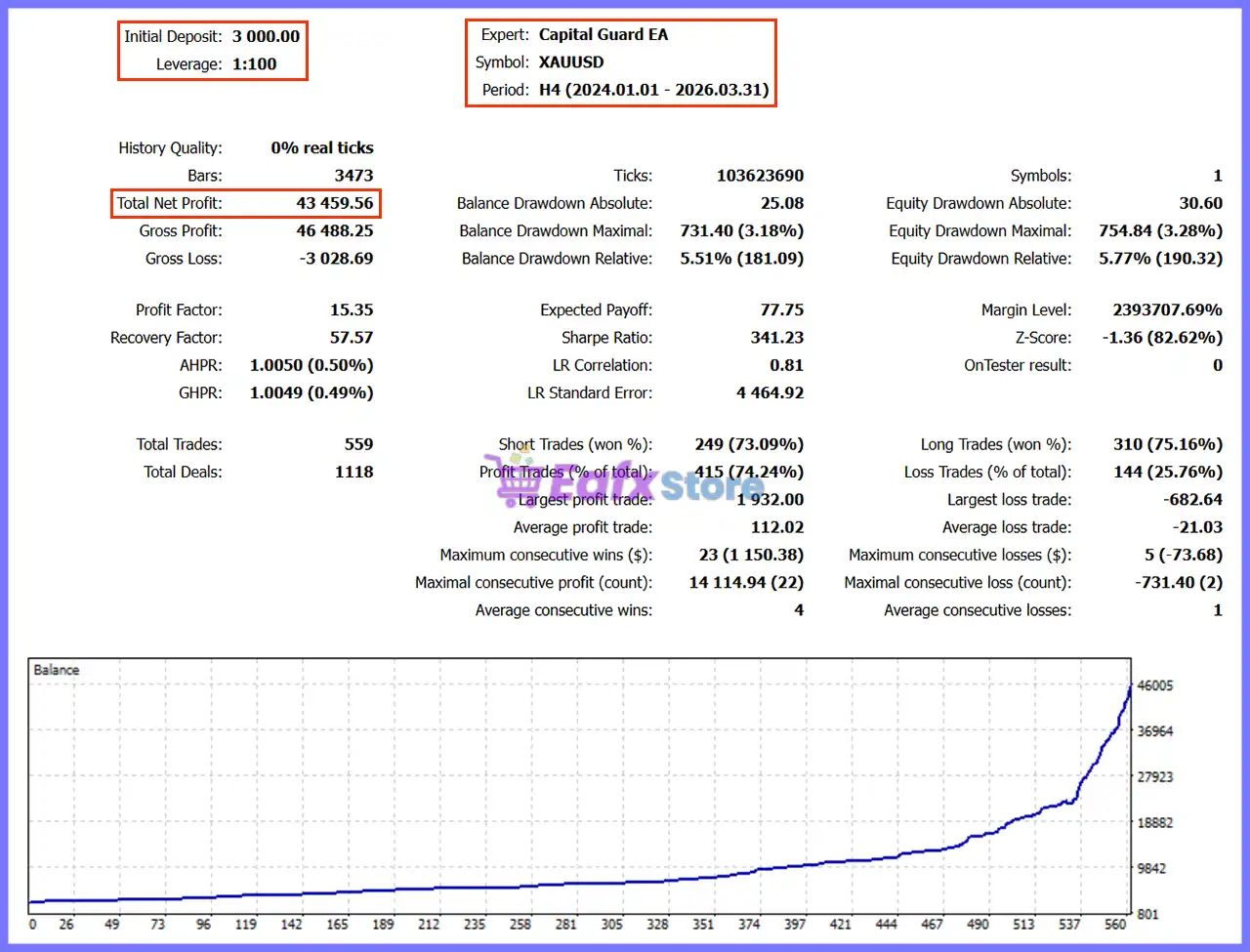
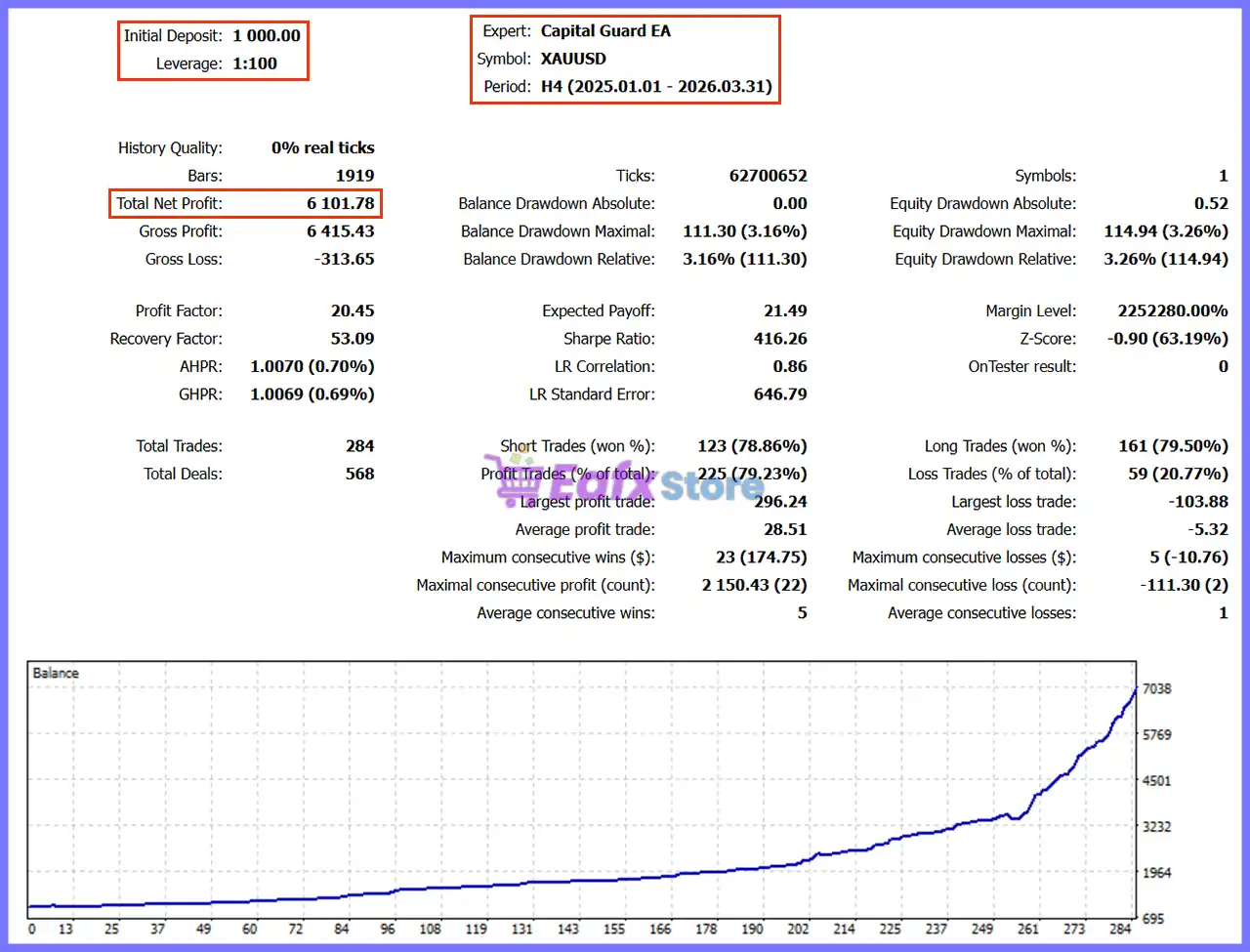
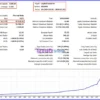
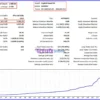
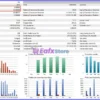
The supplied backtests demonstrate strong profitability with relatively low balance drawdown across two testing periods on XAUUSD H4.
Backtest 1 (2025.01.01 – 2026.03.31)
Capital Guard EA MT5 Backtest
| Metric | Result |
|---|---|
| Symbol | XAUUSD |
| Timeframe | H4 |
| Initial Deposit | $1,000 |
| Total Net Profit | $6,101.78 |
| Profit Factor | 20.45 |
| Recovery Factor | 53.09 |
| Total Trades | 284 |
| Win Rate | 79.23% |
| Max Balance Drawdown | 3.16% |
✅ Analysis: This test highlights excellent consistency, with a very high Profit Factor and low drawdown. A win rate close to 80% combined with disciplined risk management indicates a stable breakout strategy under the tested conditions.
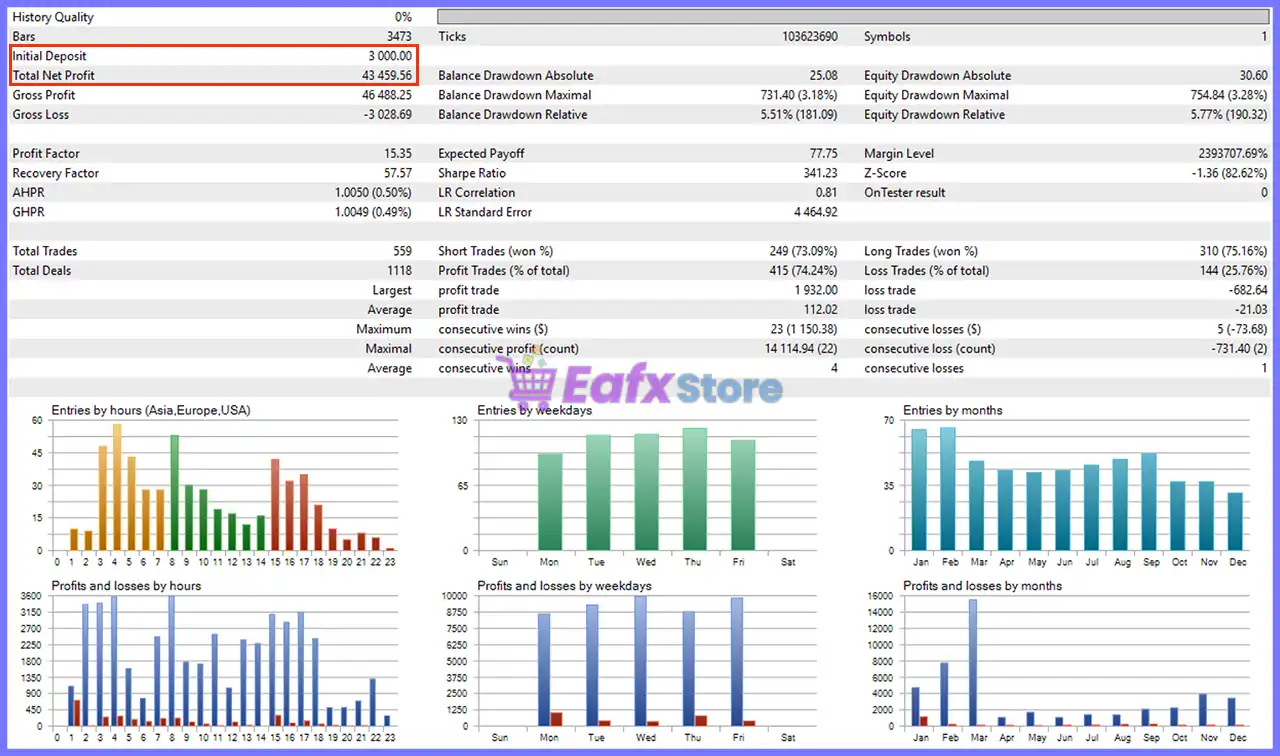
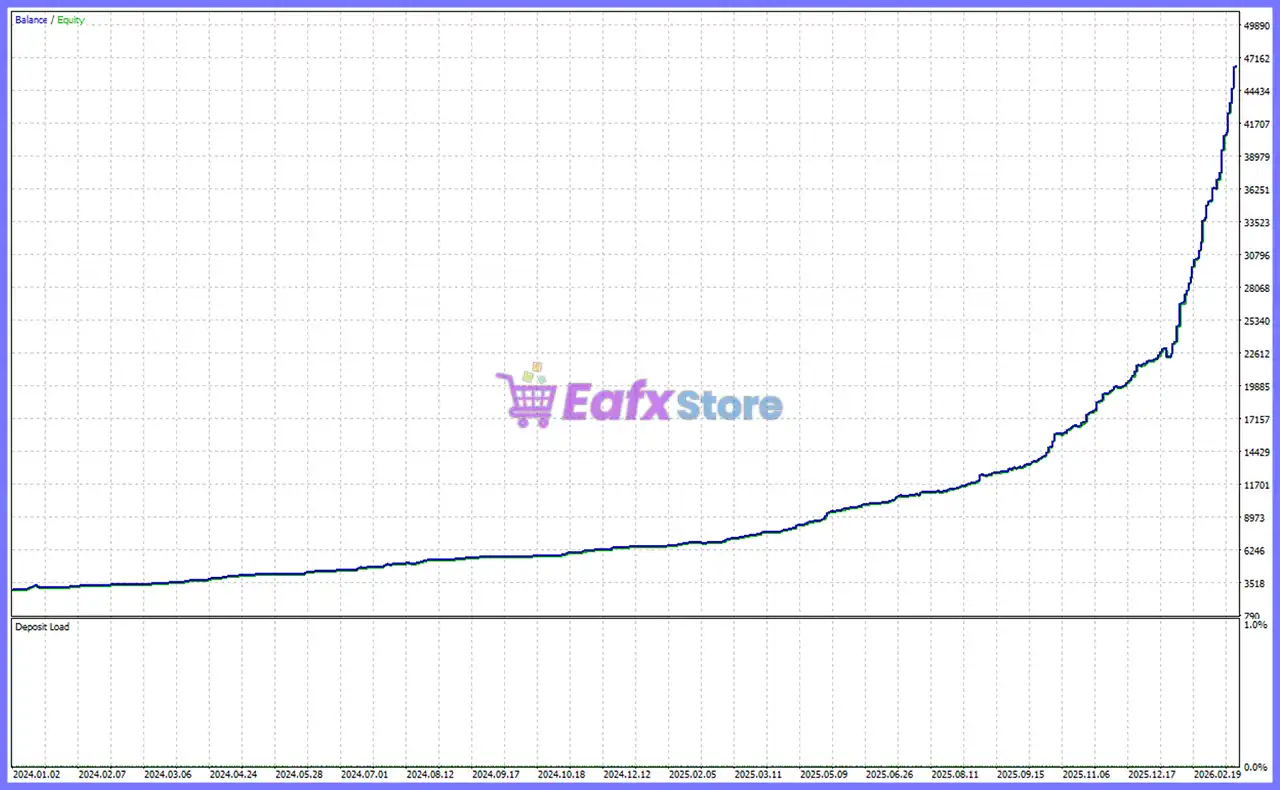
Backtest 2 (2024.01.01 – 2026.03.31)
Capital Guard MT5 Backtest
| Metric | Result |
|---|---|
| Symbol | XAUUSD |
| Timeframe | H4 |
| Initial Deposit | $3,000 |
| Total Net Profit | $43,459.56 |
| Profit Factor | 15.35 |
| Recovery Factor | 57.57 |
| Total Trades | 559 |
| Win Rate | 74.24% |
| Max Balance Drawdown | 5.51% |
✅ Analysis: The longer historical test shows the EA maintaining profitability over an extended period. Although the win rate is slightly lower than the shorter test, drawdown remains modest while delivering substantial net profit, suggesting strong long-term robustness.
Why Capital Guard EA MT5 Stands Out
Professional Breakout Trading
Instead of depending on indicator crossovers, Capital Guard EA MT5 focuses on clean breakout opportunities with configurable entry precision.
Excellent Risk-to-Reward Balance
The EA combines:
🔹 Controlled Stop Loss
🔹 Trailing Stop
🔹 Fixed or Dynamic Lot Sizing
🔹 Maximum Lot Protection
To create a disciplined trading environment.
Highly Configurable
Nearly every important trading parameter can be adjusted, including:
🔹 Breakout offsets
🔹 Trading hours
🔹 Lot sizing
🔹 Risk
🔹 Martingale behavior
🔹 Slippage
Low Historical Drawdown
The supplied backtests indicate relatively low balance drawdowns while maintaining strong profitability, making the strategy attractive for traders prioritizing capital preservation.
Risk Management Features
Capital Guard EA MT5 includes several professional risk-control mechanisms.
Fixed or Dynamic Position Sizing
Choose between:
🔹 Fixed Lot
🔹 Advanced Risk Calculation
Depending on account size and trading objectives.
Trailing Stop Protection
The EA automatically protects profitable trades by activating the trailing stop once a predefined profit level is reached.
Maximum Lot Limitation
Even when martingale mode is enabled, the maximum lot size is capped to prevent excessive position growth.
Trading Session Restriction
The IST session filter reduces exposure during unfavorable trading hours, helping improve execution quality.
Slippage Control
Orders exceeding the configured maximum slippage are rejected to help avoid poor fills during volatile market conditions.
Recommended Trading Conditions
For optimal performance, consider the following setup:
| Parameter | Recommendation |
|---|---|
| Platform | MetaTrader 5 |
| Symbol | XAUUSD & BTCUSD |
| Timeframe | H4 (H4 Chart) |
| Minimum Deposit | $1,000+ |
| Leverage | 1:100+ |
| Account Type | ECN / Raw Spread |
| VPS | Recommended |
| Lot Mode | Fixed Lot or Risk-Based |
Product Download Package?
The download package of the product suite includes:
Experts
 Capital Guard EA.ex5
SetFiles
CapitalGuard_XAUUSD.set
CapitalGuard_XAUUSD_Low Risk.set
CapitalGuard_XAUUSD_Martingale1.3.set
 Reviewed by David Easton
Weaknesses and Risk Warnings
Although Capital Guard EA MT5 demonstrates promising historical results, traders should consider the following factors.
Breakout Strategies Can Experience False Signals
Periods of ranging or low-volatility markets may generate false breakouts, which can temporarily reduce performance.
Martingale Requires Caution
While optional, martingale position sizing increases risk if enabled. Conservative traders may prefer using Fixed Lot mode.
Backtests Used Non-Real Tick Data
The provided reports indicate 0% real ticks, meaning historical results should be interpreted with caution and validated through forward testing on a broker with high-quality tick data.
Market Conditions Change
Future performance will depend on broker execution, spreads, slippage, liquidity, and changing market dynamics. Historical results do not guarantee future profitability.
Who Should Use Capital Guard EA MT5?
Capital Guard EA MT5 is best suited for traders who:
🔹 Trade XAUUSD (Gold) and BTCUSD (Bitcoin).
🔹 Prefer breakout strategies.
🔹 Want automated MT5 trading.
🔹 Value disciplined money management.
🔹 Prefer configurable trading sessions.
🔹 Need flexible lot sizing.
🔹 Want optional recovery logic with safety controls.
It is particularly appealing to traders seeking a structured breakout system that emphasizes controlled risk rather than excessive trade frequency.
Final Verdict
Capital Guard EA MT5 is a well-designed automated breakout Expert Advisor that combines precise breakout execution with flexible money management and comprehensive risk controls. Its support for fixed or dynamic lot sizing, optional martingale recovery, built-in trailing stop, and configurable trading sessions makes it adaptable to a wide range of trading preferences.
The historical backtests show strong profitability with relatively low drawdown, suggesting a robust breakout methodology under the tested conditions. While traders should independently validate performance using high-quality real-tick data and forward testing, the EA offers a compelling balance of automation, customization and disciplined execution.
For traders seeking a professional MT5 breakout solution focused on XAUUSD with strong risk management and flexible configuration, Capital Guard EA is a highly competitive choice.
🔢 Capital Guard EA MT5 Settings Guide
Capital Guard EA MT5 is an automated breakout trading Expert Advisor for MetaTrader 5 designed to execute trades based on predefined breakout levels while incorporating flexible money management, trailing stop protection and time-based trading filters.
With configurable lot sizing, martingale controls, risk management, and execution settings, the EA allows traders to customize their strategy according to different account sizes and trading preferences.
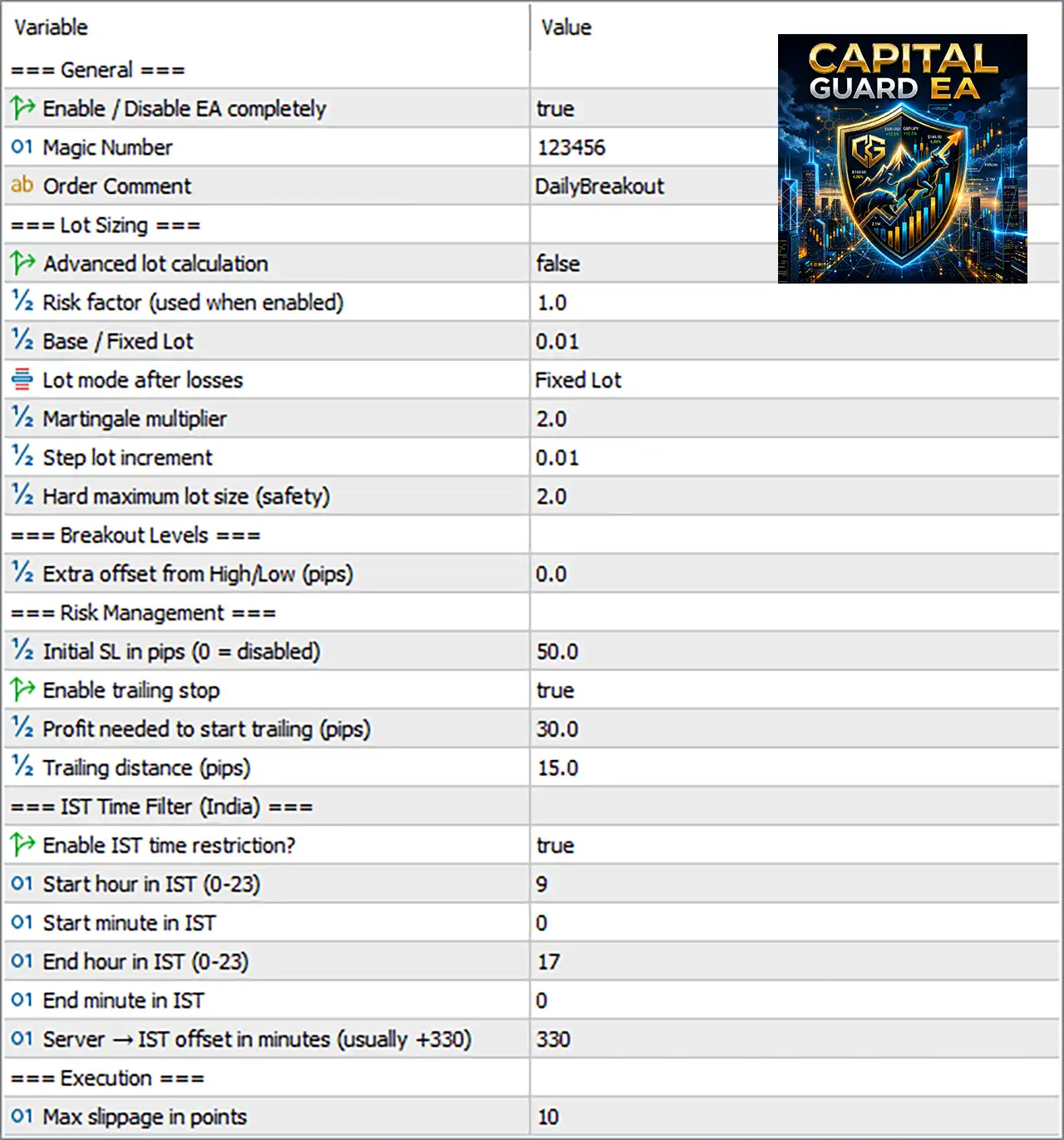
Capital Guard EA MT5 Settings Panel
🔢 Capital Guard EA MT5 Settings Explained
🔶 General Settings
🔹 Enable / Disable EA completely = true – Enables the Expert Advisor and allows it to trade automatically; set to false to disable all trading activity.
🔹 Magic Number = 123456 – Assigns the unique Magic Number 123456 to identify and manage trades opened by Capital Guard EA MT5.
🔹 Order Comment = DailyBreakout – Adds the trade comment “DailyBreakout” to every order for easier identification in the trading history.
🔶 Lot Sizing
🔹 Advanced lot calculation = false – Disables advanced automatic lot sizing and uses the selected fixed lot settings.
🔹 Risk factor (used when enabled) = 1.0 – Sets the automatic risk factor to 1.0 when advanced lot calculation is enabled.
🔹 Base / Fixed Lot = 0.01 – Defines the default fixed trading volume as 0.01 lots.
🔹 Lot mode after losses = Fixed Lot – Keeps the trading volume fixed after losing trades instead of increasing it automatically.
🔹 Martingale multiplier = 2.0 – Multiplies the lot size by 2.0 after a loss when a martingale-based lot mode is used.
🔹 Step lot increment = 0.01 – Increases the lot size by 0.01 lots for each configured lot adjustment step.
🔹 Hard maximum lot size (safety) = 2.0 – Limits the maximum trading volume to 2.0 lots for account protection.
🔶 Breakout Levels
🔹 Extra offset from High/Low (pips) = 0.0 – Adds 0.0 pips to the breakout entry level, meaning trades are executed directly at the detected High or Low breakout.
🔶 Risk Management
🔹 Initial SL in pips (0 = disabled) = 50.0 – Sets the initial Stop Loss to 50.0 pips; entering 0 disables the initial Stop Loss.
🔹 Enable trailing stop = true – Activates the Trailing Stop feature to lock in profits as the trade moves favorably.
🔹 Profit needed to start trailing (pips) = 30.0 – Starts the trailing stop once the position reaches 30.0 pips in profit.
🔹 Trailing distance (pips) = 15.0 – Maintains a trailing stop distance of 15.0 pips behind the current market price.
🔶 IST Time Filter (India)
🔹 Enable IST time restriction? = true – Restricts trading to the configured Indian Standard Time (IST) trading session.
🔹 Start hour in IST (0-23) = 9 – Trading begins at 09:00 IST.
🔹 Start minute in IST = 0 – Trading starts at 00 minutes past the configured start hour.
🔹 End hour in IST (0-23) = 17 – Trading ends at 17:00 IST.
🔹 End minute in IST = 0 – Trading stops at 00 minutes past the configured end hour.
🔹 Server → IST offset in minutes (usually +330) = 330 – Uses a 330-minute offset to synchronize broker server time with IST.
🔶 Execution
🔹 Max Slippage in points = 10 – Limits the maximum acceptable execution slippage to 10 points before rejecting an order.
🔢 Conclusion
Capital Guard EA provides a well-balanced combination of breakout trading logic, flexible lot management, trailing stop protection, and time-based execution filters. Its configurable risk controls, fixed or advanced lot sizing options, martingale support, and precise IST trading schedule make it suitable for traders seeking disciplined automated breakout trading while maintaining strict money management and execution quality.
🔢 FAQs
❓ What is the Magic Number used for in Capital Guard EA MT5?
The Magic Number (123456) uniquely identifies trades opened by the EA, allowing it to manage its own positions independently from other Expert Advisors.
❓ Can I use fixed lot sizing instead of automatic risk calculation?
Yes. By keeping Advanced lot calculation = false, the EA trades using the configured Base / Fixed Lot value.
❓ Does Capital Guard EA MT5 include a Trailing Stop?
Yes. The EA supports a built-in Trailing Stop that activates after 30.0 pips of profit and trails the price by 15.0 pips.
❓ Can I restrict trading to specific hours?
Yes. The built-in IST Time Filter allows trading only between 09:00 IST and 17:00 IST, using a configurable server time offset.
❓ How does the Martingale Multiplier work?
When a martingale-based lot mode is selected, the Martingale multiplier = 2.0 doubles the lot size after a losing trade, while the Hard maximum lot size (2.0 lots) prevents excessive position growth.
User Reviews
Only logged in customers who have purchased this product may leave a review.
❓ What trading strategy does Capital Guard EA MT5 use?
Capital Guard EA MT5 is an automated breakout trading system that opens trades at predefined breakout levels while applying flexible money management and risk controls.
❓ Can I use fixed lot sizing with Capital Guard EA MT5?
Yes. Capital Guard EA MT5 supports fixed lot trading by disabling advanced lot calculation, allowing it to trade with your selected Base Lot size.
❓ Does Capital Guard EA MT5 include a Trailing Stop feature?
Yes. Capital Guard EA MT5 activates its Trailing Stop after 30 pips of profit and follows price with a 15-pip distance to help secure gains.
❓ How does Capital Guard EA MT5 manage trading risk?
Capital Guard EA MT5 provides configurable Stop Loss, maximum lot limits, fixed or advanced lot sizing, and optional martingale settings for flexible risk control.
❓ Can I limit trading hours in Capital Guard EA MT5?
Yes. Capital Guard EA MT5 includes an IST Time Filter that restricts trading to user-defined hours, helping avoid unwanted trading outside selected sessions.
❓ What is the Magic Number used for in Capital Guard EA MT5?
Capital Guard EA MT5 uses a unique Magic Number to identify and manage its own trades, preventing conflicts when multiple Expert Advisors run together.
❓ Does Capital Guard EA MT5 support Martingale trading?
Yes. Capital Guard EA MT5 includes an optional Martingale multiplier that can increase lot size after losses, while a maximum lot limit adds safety control.
❓ Can Capital Guard EA MT5 control execution quality?
Yes. Capital Guard EA MT5 includes a configurable maximum slippage setting to reject orders when execution conditions exceed the specified tolerance.
❓ Is Capital Guard EA MT5 suitable for different account sizes?
Yes. Capital Guard EA MT5 supports fixed lots, advanced risk calculation, and adjustable money management, making it adaptable to various account sizes.
❓ Can I customize breakout entry settings in Capital Guard EA MT5?
Yes. Capital Guard EA MT5 allows you to adjust breakout offsets, Stop Loss, lot sizing, trading hours, and execution parameters to match your trading preferences.
🔥 Get This EA for FREE with Our Membership! 🚀🚀
Unlock access to this EA, premium Indicators, and exclusive trading tools completely FREE with any of our Membership Plans! Thousands of traders already benefit from our VIP library—join them and level up your trading instantly. Choose Your Membership:
- SPECIAL – 1 Month Membership
- GOLD – 1 Year Membership
- PREMIUM – 1 Year Membership
-
 Original price was: $2,000.00.$89.00Current price is: $89.00.
 -
 Original price was: $2,000.00.$89.00Current price is: $89.00.
 -
 Original price was: $499.00.$89.00Current price is: $89.00.
 -
 Original price was: $200.00.$69.00Current price is: $69.00.
-
 1Original price was: $11,000.00.$89.00Current price is: $89.00.
 -
 0Original price was: $500.00.$69.00Current price is: $69.00.
 -
 3Original price was: $999.00.$69.00Current price is: $69.00.
 -
 3Original price was: $999.00.$69.00Current price is: $69.00.
There are no reviews yet.