

Introduction
Delta IA EA is an automated trading Expert Advisor (EA) designed for the MetaTrader 4 platform. Its configuration includes adjustable initial lot sizing, flexible Take Profit targets, partial profit-taking, daily and monthly profit limits, and maximum drawdown protection.

The EA also features a structured partial-closing system with multiple lot-size levels, allowing traders to configure how positions are managed as trading activity progresses. Its money management settings provide additional controls for defining trading volume, profit objectives, and account protection thresholds.
Understanding the Delta IA EA settings helps traders configure position management, customize profit targets, and establish trading limits according to their account size and risk preferences.
Initial Trading Settings
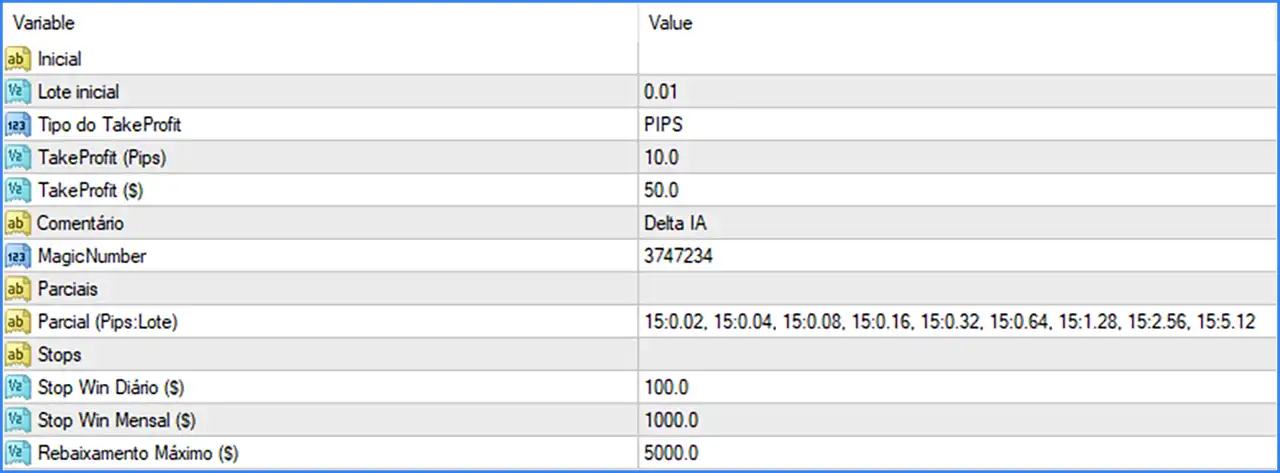
🔹 Inicial = Initial Settings: Section heading for the EA's initial trading configuration, containing the starting lot size and Take Profit parameters.
🔹 Lote inicial = 0.01: Sets the initial trading volume to 0.01 lots, determining the starting position size when Delta IA EA MT4 opens a new trade.
🔹 Tipo do TakeProfit = PIPS: Selects PIPS as the Take Profit calculation mode, indicating that the EA uses a pip-based profit target rather than relying exclusively on a monetary target.
🔹 TakeProfit (Pips) = 10.0: Sets the Take Profit target to 10.0 pips, defining the configured price movement required to reach the pip-based profit objective.
🔹 TakeProfit ($) = 50.0: Sets the monetary Take Profit target to $50.0, providing a dollar-denominated profit target for the EA's Take Profit management functionality.
🔹 Comentário = Delta IA: Sets the trade comment to "Delta IA", allowing traders to identify positions opened by Delta IA EA MT4 in the MetaTrader 4 trade terminal.
🔹 MagicNumber = 3747234: Assigns Magic Number 3747234 to trades opened by Delta IA EA MT4, allowing the Expert Advisor to identify and manage its own trading positions separately from manual trades or other automated systems.
Partial Profit-Taking Settings
🔹 Parciais = Partial Settings: Section heading for configuring the EA's partial position management and profit-taking functionality.
🔹 Parcial (Pips:Lote) = 15:0.02, 15:0.04, 15:0.08, 15:0.16, 15:0.32, 15:0.64, 15:1.28, 15:2.56, 15:5.12: Defines nine partial profit-taking levels, each associated with a 15-pip target and a corresponding lot-size value. The configured sequence is 15:0.02, 15:0.04, 15:0.08, 15:0.16, 15:0.32, 15:0.64, 15:1.28, 15:2.56, and 15:5.12. Each successive lot value doubles, creating a progressive position-management structure. The exact execution and interpretation of these levels depend on the EA's internal partial-closing logic.
Stop and Account Protection Settings
🔹 Stops = Stop Settings: Section heading for configuring the EA's profit protection and maximum drawdown limits.
🔹 Stop Win Diário ($) = 100.0: Sets the daily profit target to $100.0. This parameter establishes the configured daily profit threshold for the EA's stop-win mechanism.
🔹 Stop Win Mensal ($) = 1000.0: Sets the monthly profit target to $1,000.0, allowing traders to define a monthly profit threshold for the EA's account management system.
🔹 Rebaixamento Máximo ($) = 5000.0: Sets the maximum drawdown threshold to $5,000.0, defining the configured monetary loss limit for the EA's drawdown protection mechanism.
Conclusion
Delta IA EA MT4 provides a configurable automated trading system with initial lot management, pip-based Take Profit, monetary profit targets, progressive partial position management, and account-level protection settings.
The default configuration includes several important parameters:
Initial Lot: 0.01 lots.
Take Profit Mode: PIPS.
Take Profit Distance: 10.0 pips.
Monetary Take Profit: $50.0.
Partial Profit Levels: 9 configured levels, each using a 15-pip target.
Partial Lot Sequence: 0.02, 0.04, 0.08, 0.16, 0.32, 0.64, 1.28, 2.56, and 5.12 lots.
Daily Profit Target: $100.0.
Monthly Profit Target: $1,000.0.
Maximum Drawdown: $5,000.0.
Magic Number: 3747234.
Traders should pay particular attention to the progressive partial lot sequence because the configured volume doubles at every successive level, potentially increasing trading exposure significantly. The daily and monthly Stop Win settings and maximum drawdown threshold should also be evaluated in relation to the account's available capital.
Before deploying Delta IA EA MT4 on a live account, it is recommended to test its partial-closing behavior, verify how its Take Profit modes interact, and evaluate its drawdown protection under different market conditions.