

Introduction
Gorilla EA is an automated trading Expert Advisor (EA) featuring configurable lot management, grid trading parameters, Take Profit, Trailing Stop, and equity-based risk controls. Its input settings allow traders to customize position sizing, control the maximum number of trades across different trading strategies, and manage profit-taking conditions.
The EA also provides separate Magic Numbers for different trading modules, including Hilo and two additional strategy configurations. With adjustable grid spacing, trailing protection, and a customizable control panel, Gorilla EA offers several options for managing automated trading operations on MetaTrader.

Gorilla EA Settings Explained
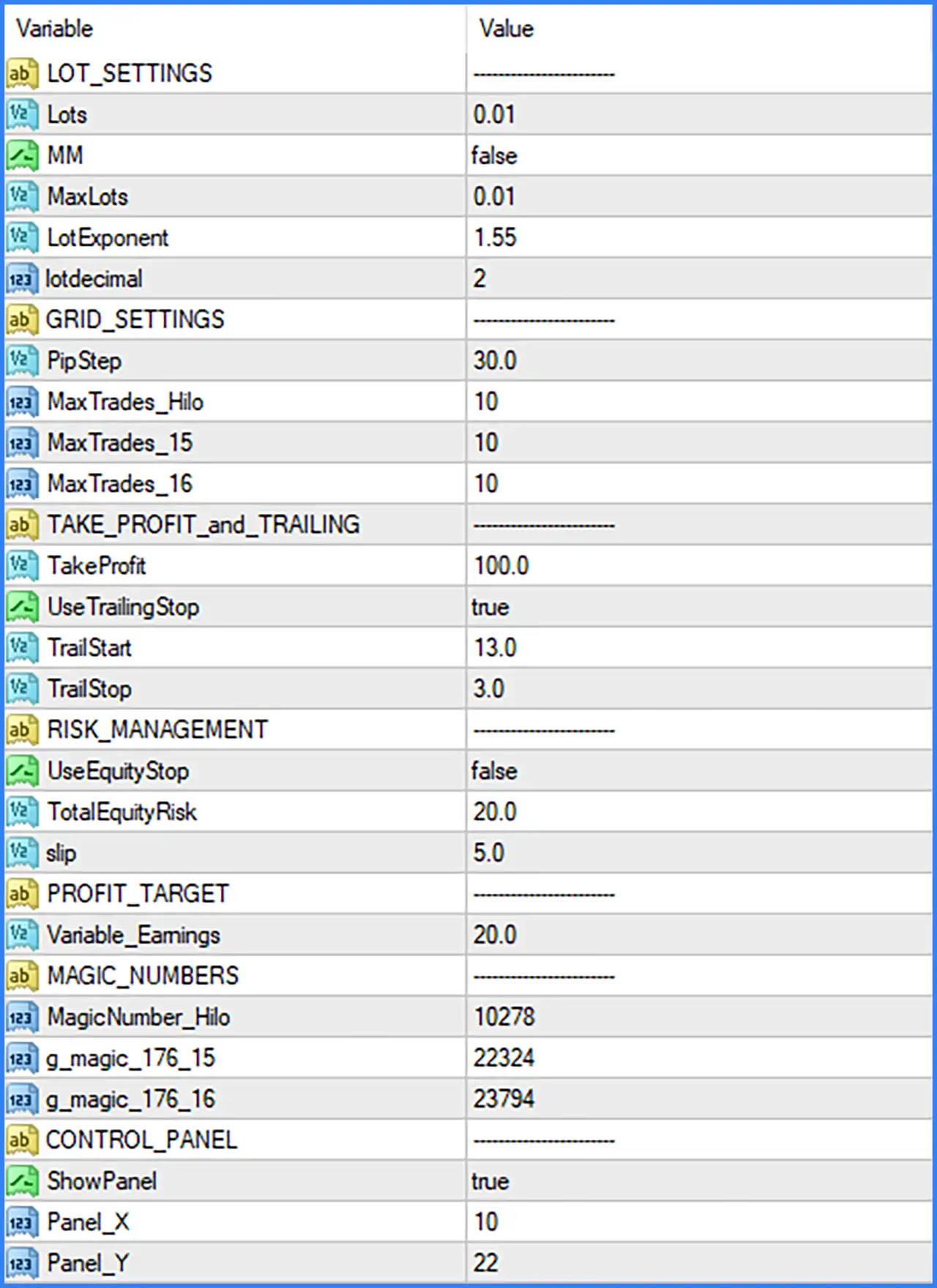
Lot Settings
🔹 LOT_SETTINGS – Main configuration section containing the lot sizing and money management parameters of Gorilla EA.
🔹 Lots = 0.01 – Defines the initial trading lot size used by the EA. The default value of 0.01 represents a micro lot and establishes the starting trading volume.
🔹 MM = false – Enables or disables the EA's Money Management function. The default value of false means this option is disabled, so the EA uses its configured lot-sizing parameters rather than activating this money management mode.
🔹 MaxLots = 0.01 – Sets the maximum permitted lot size to 0.01. This parameter establishes the configured upper limit for trading volume.
🔹 LotExponent = 1.55 – Defines the lot multiplication factor used by the EA's position management logic. A value of 1.55 can increase subsequent trading volumes according to the EA's lot progression rules.
🔹 lotdecimal = 2 – Sets the number of decimal places used when calculating or normalizing trading lot sizes. The default value of 2 allows lot values to be represented with two decimal places.
Grid Settings
🔹 GRID_SETTINGS – Section containing the grid trading configuration, including order spacing and maximum trade limits.
🔹 PipStep = 30.0 – Defines the distance between grid trading entries as 30.0 in the EA's configured distance units. This parameter determines the spacing used when placing additional grid positions.
🔹 MaxTrades_Hilo = 10 – Sets the maximum number of trades allowed for the Hilo trading module to 10. This parameter helps control the number of positions managed by this strategy.
🔹 MaxTrades_15 = 10 – Defines the maximum number of trades for the strategy identified by the suffix 15. The default value of 10 establishes its configured trade limit.
🔹 MaxTrades_16 = 10 – Sets the maximum number of trades for the strategy identified by the suffix 16. The EA is configured with a limit of 10 trades for this module.
Take Profit and Trailing Stop Settings
🔹 TAKE_PROFIT_and_TRAILING – Section containing the profit-target and trailing protection configuration.
🔹 TakeProfit = 100.0 – Sets the Take Profit target to 100.0 in the EA's configured distance units. This parameter defines the profit-taking level used by the trading system.
🔹 UseTrailingStop = true – Enables the Trailing Stop function. When set to true, the EA can dynamically adjust the Stop Loss according to its trailing management rules as positions move into profit.
🔹 TrailStart = 13.0 – Defines the profit threshold required to activate the Trailing Stop. When a trade reaches the configured level of 13.0, the EA can begin applying its trailing protection.
🔹 TrailStop = 3.0 – Sets the trailing distance to 3.0. This parameter determines how far the Stop Loss follows the market price after the Trailing Stop becomes active.
Risk Management Settings
🔹 RISK_MANAGEMENT – Section containing the account equity protection and trading risk parameters.
🔹 UseEquityStop = false – Enables or disables equity-based protection. The default value of false means the EA's equity stop function is disabled in the supplied configuration.
🔹 TotalEquityRisk = 20.0 – Defines the total equity risk threshold at 20.0. This parameter provides the configured risk reference for the EA's equity protection mechanism when enabled.
🔹 slip = 5.0 – Sets the permitted slippage parameter to 5.0. This setting controls the price deviation tolerance used when executing trading orders, subject to the EA's internal execution logic.
Profit Target Settings
🔹 PROFIT_TARGET – Section containing the EA's profit-target configuration.
🔹 Variable_Earnings = 20.0 – Defines the variable earnings parameter with a default value of 20.0. This setting is associated with the EA's profit management logic and may influence how variable profit targets are calculated.
Magic Number Settings
🔹 MAGIC_NUMBERS – Section containing the unique trade identification numbers assigned to the EA's different trading modules.
🔹 MagicNumber_Hilo = 10278 – Assigns Magic Number 10278 to the Hilo trading module. This identifier allows Gorilla EA to distinguish Hilo-related positions from other trades.
🔹 g_magic_176_15 = 22324 – Assigns Magic Number 22324 to the trading module identified by the suffix 176_15. This unique identifier helps separate its trading positions from other EA operations.
🔹 g_magic_176_16 = 23794 – Assigns Magic Number 23794 to the trading module identified by the suffix 176_16. This value provides a separate trade identification reference for the corresponding strategy.
Control Panel Settings
🔹 CONTROL_PANEL – Section containing the display and positioning parameters for the EA's on-chart control panel.
🔹 ShowPanel = true – Enables the display of the Gorilla EA control panel on the MetaTrader chart. When set to true, the panel is visible during the EA's operation.
🔹 Panel_X = 10 – Defines the horizontal position of the control panel on the chart. The default value of 10 determines its placement along the X-axis.
🔹 Panel_Y = 22 – Defines the vertical position of the control panel on the chart. The default value of 22 determines its placement along the Y-axis.
Conclusion
Gorilla EA provides a configurable automated trading system with grid management, adjustable lot sizing, Take Profit, Trailing Stop, and equity protection features.
Its default settings include a starting lot size of 0.01, LotExponent of 1.55, PipStep of 30.0, and three separate maximum trade limits of 10 each. The EA also uses TakeProfit = 100.0, with Trailing Stop enabled at TrailStart = 13.0 and TrailStop = 3.0.
For trade identification, Gorilla EA uses Magic Numbers 10278, 22324, and 23794 across its different trading modules. Its control panel is enabled by default, while equity-based protection is disabled.
Before using Gorilla EA on a live account, traders should carefully review the lot-size configuration, grid spacing, maximum trade limits, and equity risk settings. Grid-based trading and lot multiplication can increase account exposure when markets move against open positions. Demo testing and appropriate risk management are recommended.