

Introduction
Marvin EA is an automated trading Expert Advisor (EA) for the MetaTrader 4 platform, featuring grid-based position management, ATR-based entry spacing, configurable trading direction, and dynamic Take Profit calculations. Its input parameters include global drawdown protection, initial lot sizing, Martingale-style lot progression, and spread filtering.
The EA uses Average True Range (ATR) calculations to determine the distance between trading orders and adjust profit targets according to market volatility. Traders can also configure Buy and Sell permissions, maximum drawdown limits, and general trading conditions to customize the EA's trading behavior.

Marvin EA MT4 Settings Explained
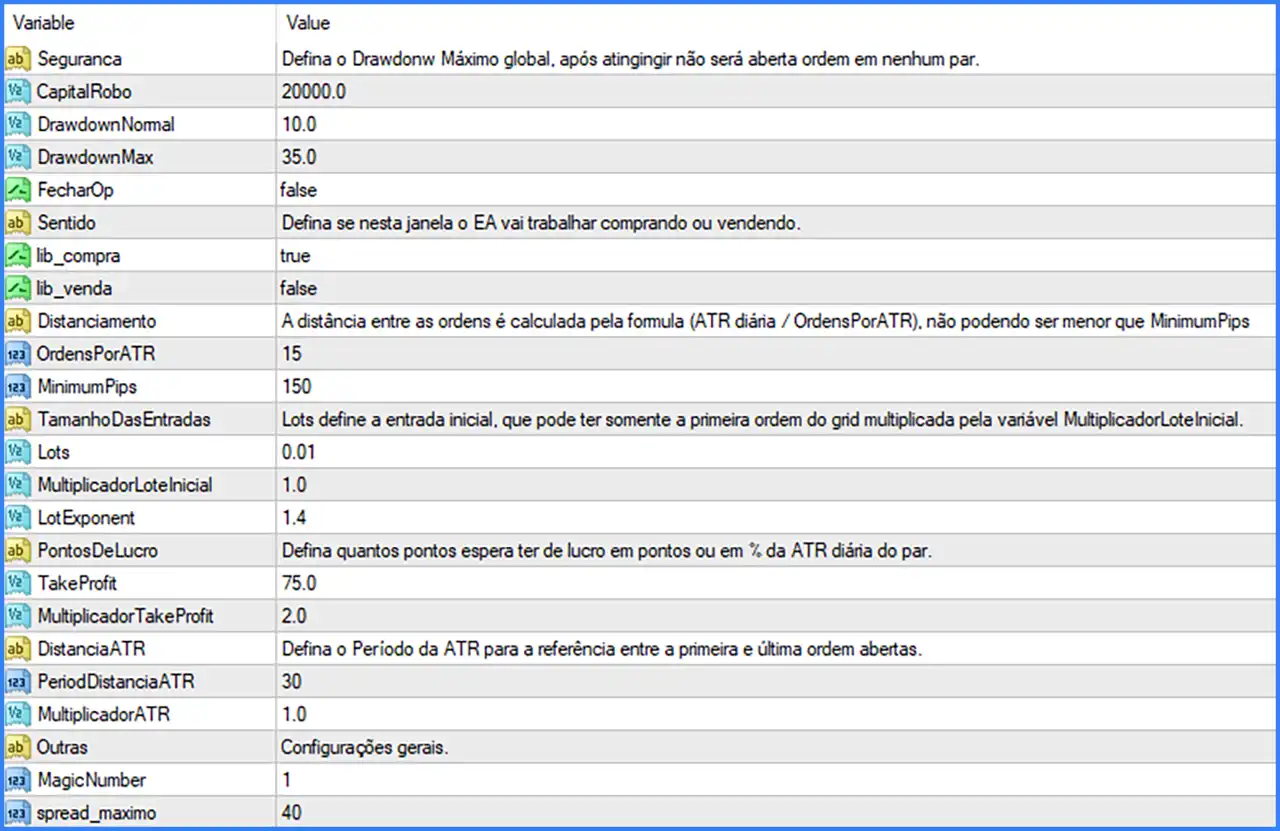
1. Security and Drawdown Protection
🔹 Seguranca – Security and risk management section describing the global maximum drawdown protection. Once the specified maximum drawdown is reached, the EA will stop opening new orders on all currency pairs.
🔹 CapitalRobo = 20000.0 – Defines the reference capital allocated to the trading robot. The default value of 20000.0 is used as the capital reference for the EA's risk and drawdown management calculations.
🔹 DrawdownNormal = 10.0 – Sets the normal drawdown threshold to 10.0. This parameter defines the configured normal drawdown level used by the EA's risk management system.
🔹 DrawdownMax = 35.0 – Sets the global maximum drawdown threshold to 35.0. Once this maximum level is reached, the EA will prevent new orders from being opened on any trading pair, according to its global protection rules.
🔹 FecharOp = false – Controls the option to close existing trading operations. The default value of false disables this option. Its exact relationship with the drawdown protection mechanism should be confirmed in the EA documentation.
2. Trading Direction Settings
🔹 Sentido – Trading direction configuration section that determines whether Marvin EA MT4 is allowed to execute Buy or Sell operations.
🔹 lib_compra = true – Enables Buy trading operations. When set to true, the EA is allowed to open Buy positions when its trading conditions and entry signals are satisfied.
🔹 lib_venda = false – Enables or disables Sell trading operations. The default value of false disables Sell entries, meaning the supplied configuration allows Buy trading but not Sell trading.
3. Order Distance Settings – ATR-Based Grid Management
🔹 Distanciamento – Defines the distance between trading orders using the formula (Daily ATR / OrdersPorATR), with the calculated distance not being allowed to fall below MinimumPips. This allows the EA to adjust grid spacing according to daily market volatility.
🔹 OrdensPorATR = 15 – Defines the number of divisions used in the ATR-based order spacing calculation. With a value of 15, the EA calculates the reference distance by dividing the daily ATR by 15.
🔹 MinimumPips = 150 – Sets the minimum permitted distance between trading orders to 150 pips. Even when the ATR-based calculation produces a smaller distance, the EA will not use a spacing below this configured minimum, according to the supplied description.
4. Entry Size and Lot Management Settings
🔹 TamanhoDasEntradas – Defines the initial entry lot configuration. The description specifies that Lots determines the initial entry size, which can be applied only to the first order of the grid and multiplied by MultiplicadorLoteInicial.
🔹 Lots = 0.01 – Sets the initial trading lot size to 0.01. This parameter establishes the starting volume for the first grid order.
🔹 MultiplicadorLoteInicial = 1.0 – Defines the initial lot multiplication factor. The default value of 1.0 means the initial lot size is not increased by this multiplier.
🔹 LotExponent = 1.4 – Sets the lot progression exponent to 1.4. This parameter controls the lot-size multiplication factor used by the EA's subsequent grid entries, potentially increasing position volume as additional orders are opened.
5. Profit Target Settings
🔹 PontosDeLucro – Defines the desired profit target, which can be configured in points or as a percentage of the pair's daily ATR. This parameter allows the EA to determine its profit objective using the configured target calculation method.
🔹 TakeProfit = 75.0 – Sets the default Take Profit reference to 75.0. This parameter defines the configured profit distance or target used by the EA's trade management system.
🔹 MultiplicadorTakeProfit = 2.0 – Sets the Take Profit multiplication factor to 2.0. This parameter allows the EA to multiply its base profit target by 2.0 according to its internal Take Profit calculation logic.
6. ATR Distance Settings
🔹 DistanciaATR – Defines the ATR period used as a reference for calculating the distance between the first and last open orders. This parameter supports volatility-based grid management.
🔹 PeriodDistanciaATR = 30 – Sets the ATR calculation period to 30. The EA uses this period to evaluate market volatility when determining the reference distance between the first and last open orders.
🔹 MultiplicadorATR = 1.0 – Sets the ATR distance multiplier to 1.0. This factor adjusts the ATR-based distance calculation without applying an additional increase or reduction to the reference ATR value.
7. General Trading Settings
🔹 Outras – General configuration section containing additional trading parameters that control the EA's order identification and market execution conditions.
🔹 MagicNumber = 1 – Assigns Magic Number 1 to trades managed by Marvin EA MT4. This unique identifier helps the EA distinguish its positions from manually opened trades and orders belonging to other Expert Advisors.
🔹 spread_maximo = 40 – Sets the maximum permitted spread to 40. This parameter acts as a spread filter, allowing the EA to restrict trading when the broker's spread exceeds the configured threshold.
Conclusion
Marvin EA MT4 offers a configurable automated trading system combining ATR-based grid spacing, dynamic lot management, global drawdown protection, and adjustable profit targets.
The default configuration uses an initial lot size of 0.01, a LotExponent of 1.4, and an initial lot multiplier of 1.0. Its ATR-based order spacing uses OrdersPorATR = 15 and MinimumPips = 150, while the profit management configuration includes TakeProfit = 75.0 and MultiplicadorTakeProfit = 2.0.
The supplied settings also enable Buy trading while disabling Sell trading, with a global maximum drawdown threshold of 35.0 and a maximum spread of 40.
Traders should pay particular attention to the LotExponent of 1.4 and the global drawdown protection settings because grid-based strategies can accumulate multiple positions and increase exposure during prolonged adverse market movements.