

Introduction
The Wolf EA MT4 is an automated trading Expert Advisor (EA) for the MetaTrader 4 platform, featuring configurable entry management, Stop Loss, Take Profit, and Martingale-based lot multiplication. Its input parameters also include average price management, monetary loss protection, initial trading volume, and trade-count restrictions across different Magic Numbers. These settings allow traders to customize position sizing, manage trading exposure, and configure the EA's automated trading behavior.

The Wolf EA MT4 Settings Explained
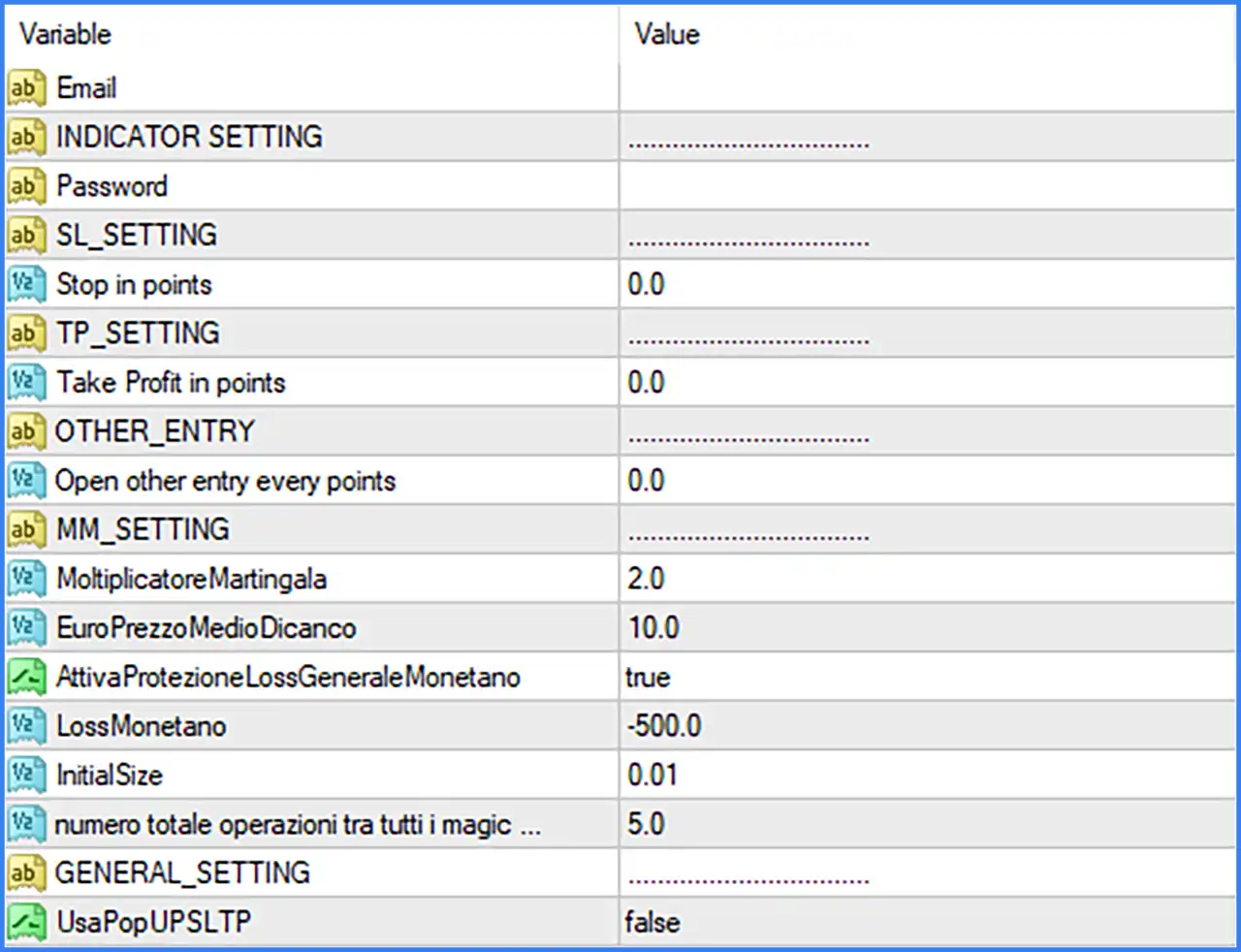
Indicator Settings
🔹 INDICATOR SETTING – A section heading that separates the indicator-related configuration from the other EA inputs. No adjustable indicator parameters are displayed directly under this heading in the supplied screenshot.
Stop Loss Settings
🔹 SL_SETTING – A section heading identifying the Stop Loss configuration area of The Wolf EA MT4.
🔹 Stop in points = 0.0 – Defines the Stop Loss distance in points. The current value is 0.0, indicating that no positive fixed Stop Loss distance is specified in this input. The EA's handling of a zero value should be verified before live trading.
Take Profit Settings
🔹 TP_SETTING – A section heading identifying the Take Profit configuration area.
🔹 Take Profit in points = 0.0 – Sets the Take Profit distance in points. The default value is 0.0, meaning no positive fixed Take Profit distance is specified through this parameter. Traders should check the EA's internal exit logic to understand how this value is handled.
Other Entry Settings
🔹 OTHER_ENTRY – A section heading for additional entry configuration parameters.
🔹 Open other entry every points = 0.0 – Defines the point interval associated with opening additional trading entries. The default value of 0.0 does not specify a positive entry interval. The exact behavior when this parameter is zero depends on the EA's internal entry logic.
Martingale Settings
🔹 MM_SETTING – A section heading for the Martingale management configuration of The Wolf EA MT4.
🔹 MoltiplicatoreMartingala = 2.0 – Italian for Martingale Multiplier. This parameter determines the lot-size multiplication factor used by the EA after successive trading losses or additional entries. A value of 2.0 means the configured lot size can be multiplied by 2.0 according to its Martingale logic, potentially increasing trading exposure significantly.
🔹 EuroPrezzoMedioDicanko = 10.0 – This is the parameter name displayed in the screenshot. Its exact intended meaning is not clearly identifiable from the label alone. The value is 10.0 and appears under the Martingale settings section, suggesting a parameter related to average-price or monetary management. Its precise function should be confirmed with the developer.
Monetary Risk Protection Settings
🔹 AttivaProtezioneLossGeneraleMonetano = true – Italian for Enable General Monetary Loss Protection. When set to true, this option enables the EA's general monetary loss protection mechanism, according to its internal risk management rules.
🔹 LossMonetano = -500.0 – Defines the monetary loss threshold at -500.0. This value is associated with the general monetary loss protection setting and establishes the configured loss limit. The account currency and exact triggering conditions depend on the EA's implementation.
Lot Size and Trade Management
🔹 InitialSize = 0.01 – Sets the initial trading position size to 0.01 lots. This is the starting volume used by the EA when initiating its trading sequence, subject to its internal lot management rules.
🔹 numero totale operazioni tra tutti i magic ... = 5.0 – Italian for Total number of operations across all Magic Numbers. This parameter is set to 5.0 and appears to define a maximum trade-count restriction across the EA's Magic Numbers. The original parameter label is truncated in the screenshot, so its exact counting conditions should be verified.
General Settings
🔹 GENERAL_SETTING – A section heading containing general configuration options for The Wolf EA MT4.
🔹 UsaPopUPSLTP = false – Italian for Use SL/TP Popup. This parameter controls the use of the EA's SL/TP popup functionality. The default value of false means this option is disabled in the supplied configuration.
Conclusion
The Wolf EA MT4 provides configurable trading parameters covering entry management, Martingale multiplication, Stop Loss, Take Profit, monetary loss protection, and trade-count restrictions.
The default configuration includes an InitialSize of 0.01 lots, a Martingale Multiplier of 2.0, a monetary loss threshold of -500.0, and a maximum trade-count parameter of 5.0 across all Magic Numbers. General monetary loss protection is enabled, while the SL/TP popup option is disabled.
Traders should pay particular attention to the Martingale Multiplier of 2.0 because increasing lot sizes after losses can significantly amplify drawdown and account exposure. It is also important to verify the zero-value Stop Loss and Take Profit settings and understand how the EA handles additional entries before using it on a live account. Demo testing and appropriate risk management are strongly recommended.