

Introduction to KingSpreadFX Multi EA
KingSpreadFX Multi EA is a multi-currency automated trading Expert Advisor (EA) designed for MetaTrader, offering flexible trading configurations across multiple currency pairs. Its input settings provide control over currency pair selection, lot allocation, Bollinger Bands parameters, overlay chart analysis, trading schedules, position averaging, pyramiding, and account-level risk management.

KingSpreadFX Multi EA also includes configurable profit targets, stop-loss management, trailing stop functionality, daily profit and loss limits, and floating drawdown monitoring. In addition, its integrated notification system supports alerts, push notifications, and email messages for trading errors, order execution, and order modifications.
General Settings
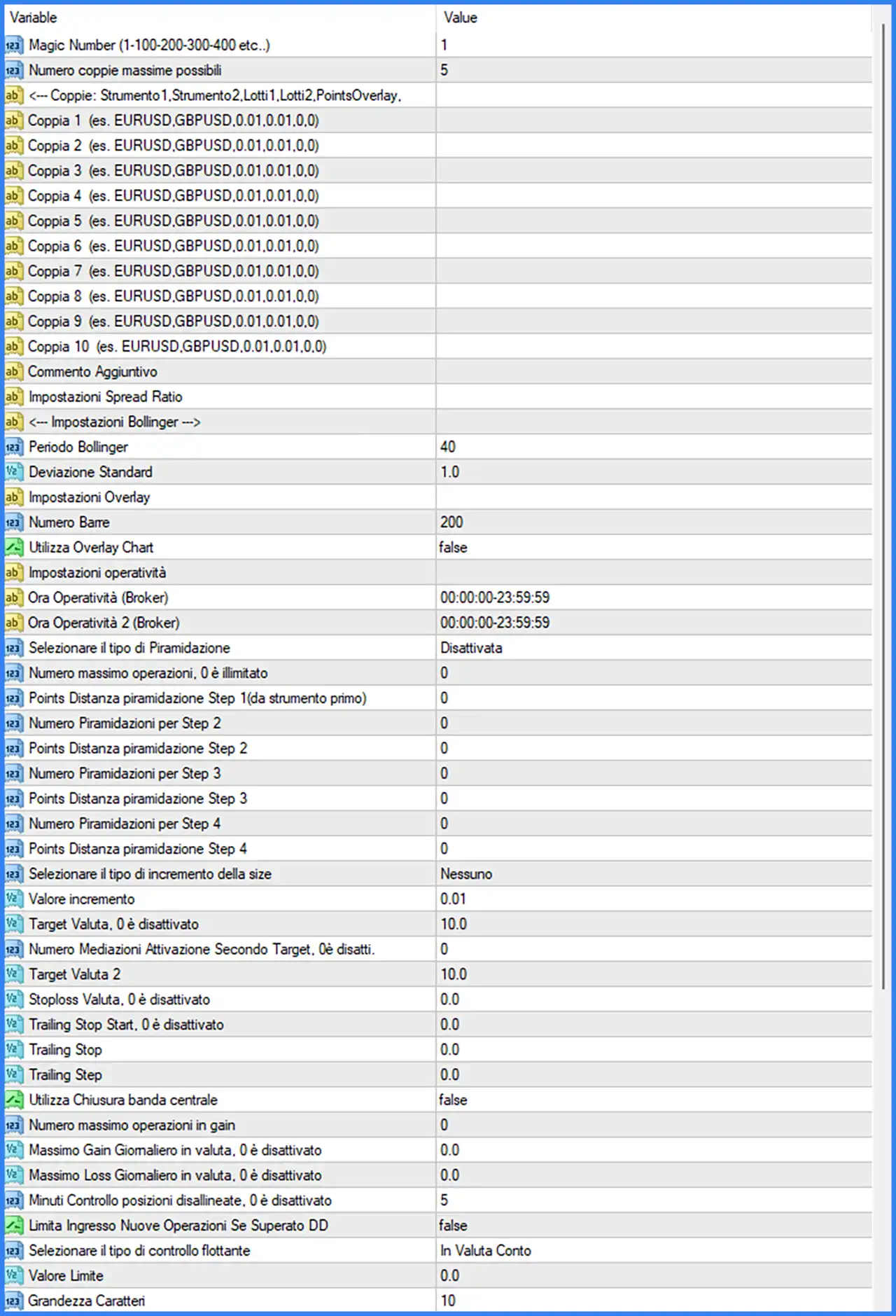
🔹 Magic Number (1-100-200-300-400 etc.) = 1 – Sets the EA's Magic Number to 1, allowing MetaTrader to identify and distinguish its trading positions from trades opened by other Expert Advisors.
🔹 Numero coppie massime possibili = 5 – Sets the maximum number of currency pairs that can be configured for simultaneous trading to 5.
Currency Pair Configuration
The following settings allow users to configure individual currency pairs, including their trading instruments, lot sizes, and overlay point parameters.
🔹 Coppia 1 (Instrument1, Instrument2, Lot1, Lot2, PointsOverlay) = Empty – Defines the first currency pair configuration, including the first instrument, second instrument, corresponding lot sizes, and overlay points; no default value is specified.
🔹 Coppia 2 (Instrument1, Instrument2, Lot1, Lot2, PointsOverlay) = Empty – Defines the second currency pair configuration, allowing users to specify two trading instruments, their respective lot sizes, and overlay points.
🔹 Coppia 3 (Instrument1, Instrument2, Lot1, Lot2, PointsOverlay) = Empty – Defines the third currency pair configuration, including the two instruments, Lot1, Lot2, and the overlay point distance.
🔹 Coppia 4 (Instrument1, Instrument2, Lot1, Lot2, PointsOverlay) = Empty – Defines the fourth currency pair configuration, allowing traders to enter the required instrument names, trading volumes, and overlay points.
🔹 Coppia 5 (Instrument1, Instrument2, Lot1, Lot2, PointsOverlay) = Empty – Defines the fifth currency pair configuration with customizable instruments, individual lot sizes, and overlay point values.
🔹 Coppia 6 (Instrument1, Instrument2, Lot1, Lot2, PointsOverlay) = Empty – Provides an additional currency pair configuration with fields for two instruments, two lot sizes, and overlay points.
🔹 Coppia 7 (Instrument1, Instrument2, Lot1, Lot2, PointsOverlay) = Empty – Allows users to configure a seventh pair combination using the Instrument1, Instrument2, Lot1, Lot2, and PointsOverlay fields.
🔹 Coppia 8 (Instrument1, Instrument2, Lot1, Lot2, PointsOverlay) = Empty – Provides the eighth currency pair configuration, supporting customized instrument selection and trading volume settings.
🔹 Coppia 9 (Instrument1, Instrument2, Lot1, Lot2, PointsOverlay) = Empty – Defines the ninth pair configuration, including the two instruments, their corresponding lot sizes, and overlay point settings.
🔹 Coppia 10 (Instrument1, Instrument2, Lot1, Lot2, PointsOverlay) = Empty – Provides the tenth pair configuration, allowing users to specify the instruments, lot allocation, and overlay point distance.
🔹 Commento Aggiuntivo = Empty – Provides an optional additional comment field that can be used to customize trading-related information or order comments.
🔹 Impostazioni Spread Ratio = Section Header – Introduces the Spread Ratio configuration section; no separate numerical parameter or default value is visible in the supplied screenshot.
Bollinger Bands Settings
🔹 Periodo Bollinger = 40 – Sets the Bollinger Bands indicator period to 40, determining the number of price bars used to calculate the moving average and volatility bands.
🔹 Deviazione Standard = 1.0 – Sets the Bollinger Bands standard deviation to 1.0, controlling the distance between the middle band and the upper and lower bands.
Overlay Chart Settings
🔹 Numero Barre = 200 – Sets the number of historical price bars to 200, determining how many bars are considered for the overlay chart configuration.
🔹 Utilizza Overlay Chart = false – Disables the Overlay Chart feature by default; enabling this option activates the EA's configured overlay chart functionality.
Trading Operation Settings
🔹 Ora Operatività (Broker) = 00:00:00-23:59:59 – Defines the first broker-time trading session, allowing operations throughout the entire day from 00:00:00 to 23:59:59.
🔹 Ora Operatività 2 (Broker) = 00:00:00-23:59:59 – Defines the second broker-time trading session, also covering the full daily period from 00:00:00 to 23:59:59.
Pyramiding Settings
🔹 Selezionare il tipo di Piramidazione = Disattivata – Selects the pyramiding mode, with the default configuration set to Disabled, meaning the pyramiding functionality is turned off.
🔹 Numero massimo operazioni, 0 è illimitato = 0 – Sets the maximum number of trading operations allowed during pyramiding; a value of 0 represents an unlimited number of operations according to the parameter description.
🔹 Points Distanza piramidazione Step 1 (da strumento primo) = 0 – Sets the first pyramiding step distance to 0 points, defining the distance from the first trading instrument required for this level.
🔹 Numero Piramidazioni per Step 2 = 0 – Sets the permitted number of pyramiding operations for Step 2 to 0.
🔹 Points Distanza piramidazione Step 2 = 0 – Sets the price distance for the second pyramiding level to 0 points.
🔹 Numero Piramidazioni per Step 3 = 0 – Sets the permitted number of pyramiding operations for Step 3 to 0.
🔹 Points Distanza piramidazione Step 3 = 0 – Sets the price distance for the third pyramiding level to 0 points.
🔹 Numero Piramidazioni per Step 4 = 0 – Sets the permitted number of pyramiding operations for Step 4 to 0.
🔹 Points Distanza piramidazione Step 4 = 0 – Sets the price distance for the fourth pyramiding level to 0 points.
Lot Size Progression and Profit Targets
🔹 Selezionare il tipo di incremento della size = Nessuno – Selects the lot size increment method, with Nessuno (None) indicating that no additional lot size progression method is selected by default.
🔹 Valore incremento = 0.01 – Sets the lot size increment value to 0.01, defining the configured volume adjustment when an increment method is used.
🔹 Target Valuta, 0 è disattivato = 10.0 – Sets the primary profit target to 10.0 in the account currency; according to the parameter description, setting this value to 0 disables the target.
🔹 Numero Mediazioni Attivazione Secondo Target, 0 è disatti. = 0 – Sets the number of averaging operations required to activate the second profit target; a value of 0 disables this activation condition.
🔹 Target Valuta 2 = 10.0 – Sets the second profit target to 10.0 in the account currency, defining the configured monetary target for the second target mechanism.
Stop Loss and Trailing Stop Settings
🔹 Stoploss Valuta, 0 è disattivato = 0.0 – Sets the monetary stop-loss threshold to 0.0; the parameter description specifies that 0 disables this stop-loss setting.
🔹 Trailing Stop Start, 0 è disattivato = 0.0 – Sets the floating profit level required to activate trailing stop management; a value of 0.0 disables the trailing stop activation threshold.
🔹 Trailing Stop = 0.0 – Sets the trailing stop distance to 0.0, defining the distance used to protect open positions when trailing stop functionality is configured.
🔹 Trailing Step = 0.0 – Sets the trailing stop adjustment step to 0.0, defining the incremental movement used when updating the trailing stop level.
🔹 Utilizza Chiusura banda centrale = false – Disables the middle Bollinger Band closing feature by default; enabling it allows the EA to use the central Bollinger Band as a configured position-closing condition.
Profit and Loss Management
🔹 Numero massimo operazioni in gain = 0 – Sets the maximum number of profitable trading operations to 0, with no positive operation limit specified by the default value.
🔹 Massimo Gain Giornaliero in valuta, 0 è disattivato = 0.0 – Sets the maximum daily profit target to 0.0 in the account currency; a value of 0 disables this daily profit limit.
🔹 Massimo Loss Giornaliero in valuta, 0 è disattivato = 0.0 – Sets the maximum daily monetary loss threshold to 0.0; a value of 0 disables this daily loss restriction.
Position Synchronization and Drawdown Control
🔹 Minuti Controllo posizioni disallineate, 0 è disattivato = 5 – Sets the position synchronization checking interval to 5 minutes, allowing the EA to periodically check for misaligned or inconsistent trading positions.
🔹 Limita Ingresso Nuove Operazioni Se Superato DD = false – Disables the restriction on opening new trades after the configured drawdown threshold has been exceeded.
🔹 Selezionare il tipo di controllo flottante = In Valuta Conto – Selects account currency as the measurement method for floating profit and loss monitoring.
🔹 Valore Limite = 0.0 – Sets the floating account control threshold to 0.0, defining the configured limit used by the selected floating monitoring method.
🔹 Grandezza Caratteri = 10 – Sets the character or font size parameter to 10, controlling the text size used in the EA's on-chart interface.
Error Alert Settings
This section controls how KingSpreadFX Multi EA reports trading errors through its built-in alert system, terminal notifications, push notifications, and email messages.
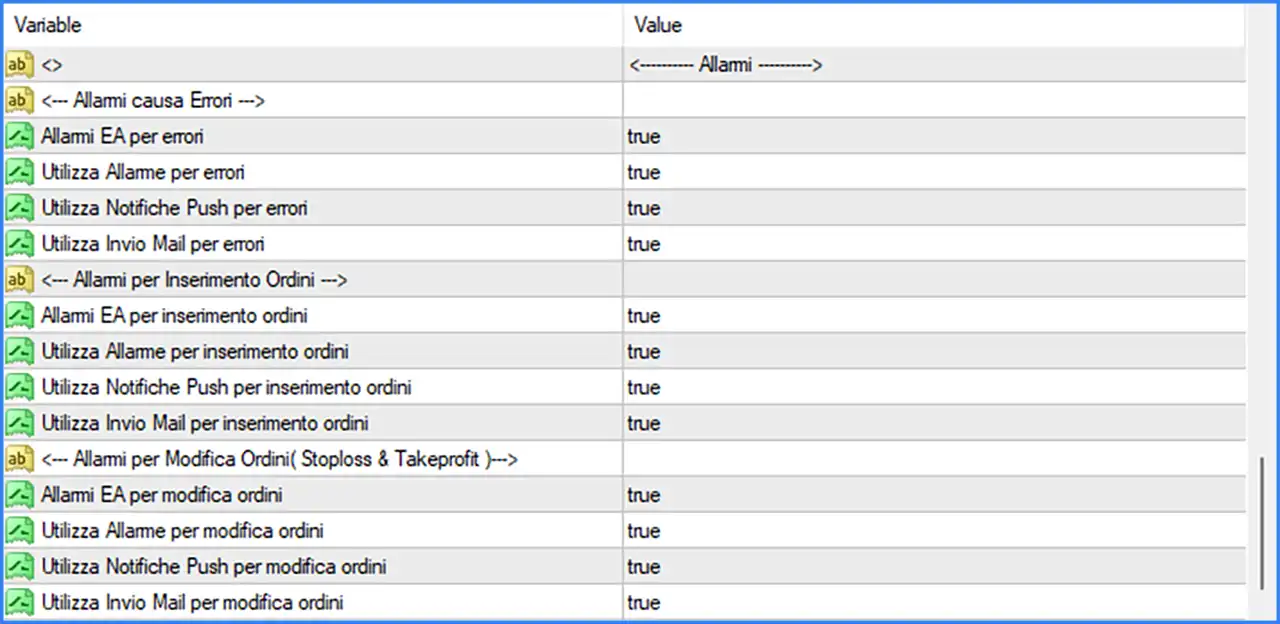
🔹 Allarmi EA per errori = true – Enables the EA's error alert system, allowing it to generate notifications when trading errors occur.
🔹 Utilizza Allarme per errori = true – Enables terminal sound or popup alerts for trading errors.
🔹 Utilizza Notifiche Push per errori = true – Enables push notifications for trading errors, allowing alerts to be delivered through the MetaTrader mobile application when configured.
🔹 Utilizza Invio Mail per errori = true – Enables email notifications for trading errors, provided that MetaTrader email settings have been configured correctly.
Order Execution Alert Settings
🔹 Allarmi EA per inserimento ordini = true – Enables the EA's notification system for newly inserted or opened trading orders.
🔹 Utilizza Allarme per inserimento ordini = true – Enables terminal alerts when the EA inserts new trading orders.
🔹 Utilizza Notifiche Push per inserimento ordini = true – Enables push notifications when new trading orders are inserted by the EA.
🔹 Utilizza Invio Mail per inserimento ordini = true – Enables email notifications whenever the EA inserts new trading orders.
Order Modification Alerts (Stop Loss and Take Profit)
🔹 Allarmi EA per modifica ordini = true – Enables the EA's alert system for modifications to existing trading orders, including Stop Loss and Take Profit changes.
🔹 Utilizza Allarme per modifica ordini = true – Enables terminal alerts when the EA modifies existing trading orders.
🔹 Utilizza Notifiche Push per modifica ordini = true – Enables push notifications when the EA updates order parameters, including Stop Loss and Take Profit levels.
🔹 Utilizza Invio Mail per modifica ordini = true – Enables email notifications whenever the EA modifies existing trading orders.
Conclusion
KingSpreadFX Multi EA provides a comprehensive collection of configuration options for multi-currency trading, Bollinger Bands analysis, overlay chart management, pyramiding, averaging, and automated position management.
Its default configuration allows up to 5 currency pairs, with 10 available pair configuration slots. The Bollinger Bands period is set to 40 with a standard deviation of 1.0, while the overlay chart and pyramiding features are disabled by default.
The EA also offers two trading sessions covering 00:00:00 to 23:59:59, configurable monetary profit targets of 10.0, and multiple account monitoring options. Its integrated notification system has all displayed error, order insertion, and order modification alerts enabled.
Before deploying KingSpreadFX Multi EA on a live account, traders should carefully review the currency pair configurations, lot allocation, pyramiding parameters, stop-loss protection, and floating drawdown limits. The default Stop Loss and Trailing Stop values are 0.0, so users should understand the EA's internal protection mechanisms before relying on them for live trading.