
Introduction to OverPower MT5
OverPower MT5 is an automated trading Expert Advisor (EA) developed for the MetaTrader 5 (MT5) platform, featuring revenge trading logic, neural-network integration support and advanced account protection settings.
The EA combines break-even management, martingale-style recovery controls, and account drawdown protection to automate aggressive trading strategies while maintaining configurable risk limits. OverPower MT5 is designed for traders seeking high-risk, high-reward automated trading systems.
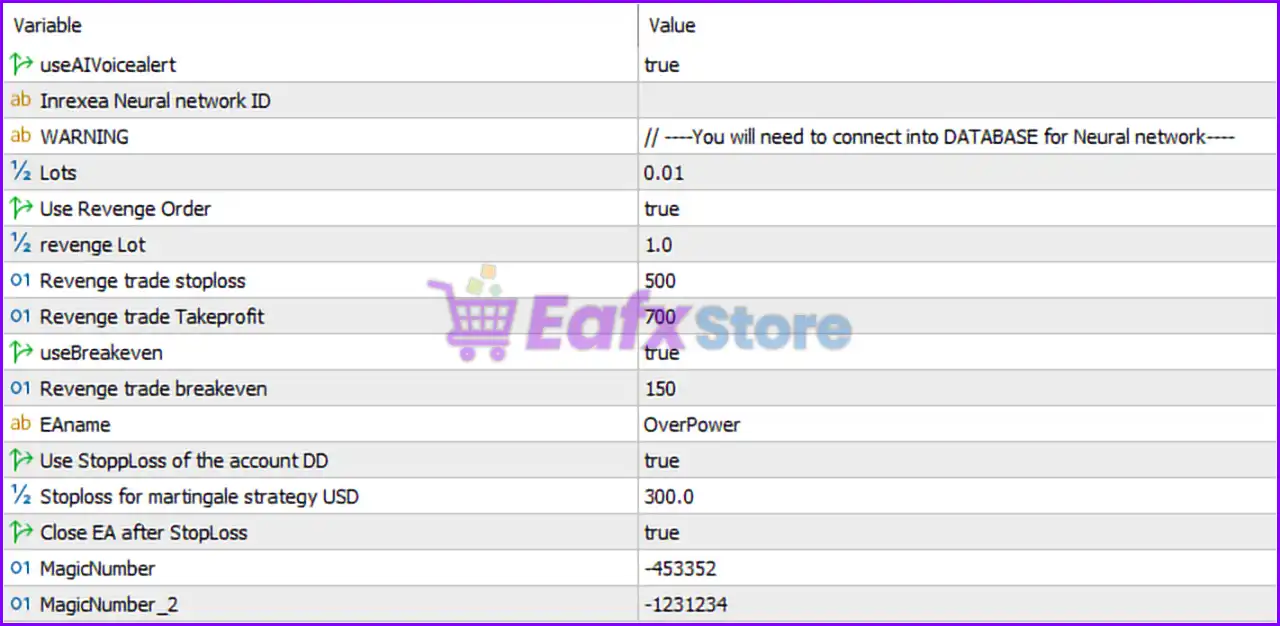
Full Parameters
- useAIVoicealert = true: Enables AI-generated voice alerts for trading activities and EA notifications.
- Inrexea Neural network ID =: Field reserved for entering the neural network identification key required for AI/database connectivity.
- WARNING = // —-You will need to connect into DATABASE for Neural network—-: Indicates that database connection is required for neural-network functionality.
- Lots = 0.01: Sets the default fixed trading lot size to 0.01 lots.
- Use Revenge Order = true: Enables revenge order functionality, allowing recovery-style trades after losses.
- revenge Lot = 1.0: Sets the revenge trade lot size to 1.0 lots.
- Revenge trade stoploss = 500: Defines the Stop Loss level for revenge trades at 500 points.
- Revenge trade Takeprofit = 700: Sets the Take Profit (TP) target for revenge trades at 700 points.
- useBreakeven = true: Activates Break-Even protection for trades.
- Revenge trade breakeven = 150: Moves Stop Loss to break-even after revenge trades gain 150 points in profit.
- EAname = OverPower: Displays the Expert Advisor name as “OverPower”.
- Use StopLoss of the account DD = true: Enables account drawdown-based Stop Loss (SL) protection.
- Stoploss for martingale strategy USD = 300.0: Maximum allowed loss for the martingale/recovery strategy is 300.0 USD.
- Close EA after StopLoss = true: Automatically stops the EA after Stop Loss conditions are triggered.
- MagicNumber = -453352: Primary unique identifier (-453352) used for managing EA trades.
- MagicNumber_2 = -1231234: Secondary Magic Number (-1231234) used for additional trade identification or strategy separation.
Conclusion
The OverPower MT5 settings provide an aggressive automated trading framework with integrated revenge trading, break-even protection and account drawdown controls. By combining AI voice alerts, neural-network integration support, and martingale-style recovery logic, the EA is designed for traders seeking advanced automation with high-risk management flexibility. Understanding these parameters helps optimize execution, control exposure and improve overall strategy discipline.
FAQs
❓ What does Use Revenge Order = true do?
It enables recovery-style revenge trades after losing positions.
❓ Why is revenge Lot = 1.0 significant?
It sets a larger trade size for revenge orders, increasing both recovery potential and risk.
❓ What is the purpose of useBreakeven = true?
It protects profits by moving the Stop Loss to break-even after trades reach a certain gain.
❓ Why is Stoploss for martingale strategy USD = 300.0 important?
It limits the maximum allowable loss for the martingale/recovery strategy to 300.0 USD.
❓ What happens when Close EA after StopLoss = true is triggered?
The EA automatically stops trading after reaching the defined Stop Loss protection threshold.