

🔢 Quantum Athena X EA – Complete Settings & Configuration Guide
Quantum Athena X EA is an automated trading system designed for XAUUSD (Gold), with a configuration framework focused on automated position sizing, trading-direction control, drawdown management, execution parameters, visual chart presentation, trading-day filters, and emergency basket protection.
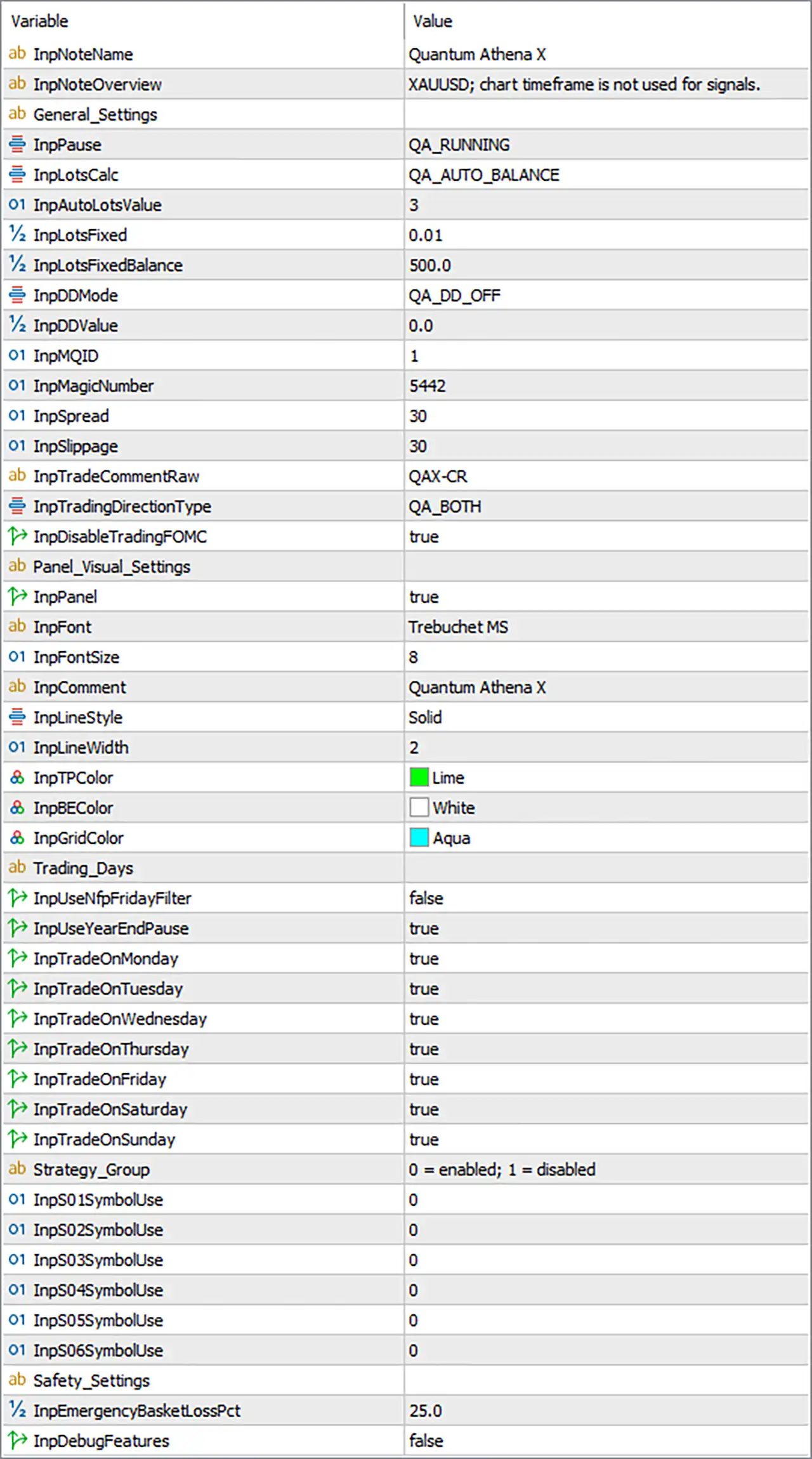
According to the supplied settings panel, the EA uses XAUUSD, supports automated balance-based lot calculation, can trade in both directions, includes an FOMC trading restriction, and provides configurable visual and safety controls. The settings below reproduce all parameters and numerical values visible in the provided image.
🔄 General Settings
🔹 InpNoteName = Quantum Athena X — Defines the EA's displayed identification/name as Quantum Athena X.
🔹 InpNoteOverview = XAUUSD; chart timeframe is not used for signals. — Indicates that the EA is designed for XAUUSD and that the chart timeframe is not used for generating trading signals.
🔹 General_Settings — Section heading for the EA's main operational configuration.
🔹 InpPause = QA_RUNNING — Sets the EA operating state to QA_RUNNING, indicating that the configured state is running.
🔹 InpLotsCalc = QA_AUTO_BALANCE — Selects QA_AUTO_BALANCE as the lot-calculation method, meaning position sizing is based on the EA's automatic balance-based mechanism.
🔹 InpAutoLotsValue = 3 — Sets the automatic lot-sizing parameter to 3; its exact calculation effect depends on the EA's internal implementation.
🔹 InpLotsFixed = 0.01 — Defines a fixed lot size of 0.01 for configurations or modes that use fixed-lot sizing.
🔹 InpLotsFixedBalance = 500.0 — Sets the balance reference to 500.0 for the fixed-lot configuration.
🔹 InpDDMode = QA_DD_OFF — Selects QA_DD_OFF, disabling the EA's drawdown-control mode.
🔹 InpDDValue = 0.0 — Sets the drawdown-control value to 0.0, consistent with the drawdown function being disabled.
🔹 InpMQID = 1 — Sets the MQ identifier parameter to 1.
🔹 InpMagicNumber = 5442 — Assigns 5442 as the EA's Magic Number for identifying and managing its trades.
🔹 InpSpread = 30 — Sets the configured spread threshold to 30.
🔹 InpSlippage = 30 — Sets the maximum configured slippage tolerance to 30.
🔹 InpTradeCommentRaw = QAX-CR — Sets the raw trade comment to QAX-CR, which can be attached to EA-generated orders.
🔹 InpTradingDirectionType = QA_BOTH — Enables QA_BOTH, allowing the EA to operate in both Buy and Sell directions.
🔹 InpDisableTradingFOMC = true — Enables the FOMC trading restriction, meaning trading is disabled around FOMC events according to the EA's internal event logic.
🔄 Panel & Visual Settings
🔹 Panel_Visual_Settings — Section containing the on-chart display configuration.
🔹 InpPanel = true — Enables the EA information panel on the chart.
🔹 InpFont = Trebuchet MS — Sets Trebuchet MS as the panel font.
🔹 InpFontSize = 8 — Sets the panel font size to 8.
🔹 InpComment = Quantum Athena X — Sets the displayed EA comment/label to Quantum Athena X.
🔹 InpLineStyle = Solid — Uses a Solid line style for the EA's visual elements.
🔹 InpLineWidth = 2 — Sets the visual line width to 2.
🔹 InpTPColor = Lime — Sets the Take Profit visual color to Lime.
🔹 InpBEColor = White — Sets the Break-Even visual color to White.
🔹 InpGridColor = Aqua — Sets the grid visual color to Aqua.
🔄 Trading Days
🔹 Trading_Days — Section controlling which days of the week the EA is permitted to trade.
🔹 InpUseNfpFridayFilter = false — Disables the dedicated NFP Friday filter.
🔹 InpUseYearEndPause = true — Enables the year-end trading pause.
🔹 InpTradeOnMonday = true — Trading is enabled on Monday.
🔹 InpTradeOnTuesday = true — Trading is enabled on Tuesday.
🔹 InpTradeOnWednesday = true — Trading is enabled on Wednesday.
🔹 InpTradeOnThursday = true — Trading is enabled on Thursday.
🔹 InpTradeOnFriday = true — Trading is enabled on Friday.
🔹 InpTradeOnSaturday = true — Trading is enabled on Saturday.
🔹 InpTradeOnSunday = true — Trading is enabled on Sunday.
Note: Although all seven day switches are set to true, actual trading availability may still depend on the broker's market hours, symbol availability, and other EA restrictions.
🔄 Strategy Group
🔹 Strategy_Group = 0 = enabled; 1 = disabled — Defines the interpretation of the strategy-group controls: 0 = enabled and 1 = disabled.
🔹 InpS01SymbolUse = 0 — Strategy/Symbol group 01 is set to 0, corresponding to enabled under the displayed rule.
🔹 InpS02SymbolUse = 0 — Strategy/Symbol group 02 is set to 0, corresponding to enabled.
🔹 InpS03SymbolUse = 0 — Strategy/Symbol group 03 is set to 0, corresponding to enabled.
🔹 InpS04SymbolUse = 0 — Strategy/Symbol group 04 is set to 0, corresponding to enabled.
🔹 InpS05SymbolUse = 0 — Strategy/Symbol group 05 is set to 0, corresponding to enabled.
🔹 InpS06SymbolUse = 0 — Strategy/Symbol group 06 is set to 0, corresponding to enabled.
🔄 Safety Settings
🔹 Safety_Settings — Section dedicated to emergency risk protection.
🔹 InpEmergencyBasketLossPct = 25.0 — Sets the emergency basket-loss threshold to 25.0%; this parameter is intended to provide an account-level/basket-level emergency protection mechanism according to the EA's internal logic.
🔹 InpDebugFeatures = false — Disables debug features, keeping diagnostic functionality turned off during normal operation.
🔄 Quantum Athena X EA – Full Settings Summary
General Configuration
🔹 InpNoteName = Quantum Athena X — EA identification name.
🔹 InpNoteOverview = XAUUSD; chart timeframe is not used for signals. — XAUUSD-focused system with chart timeframe-independent signals.
🔹 InpPause = QA_RUNNING — EA running state.
🔹 InpLotsCalc = QA_AUTO_BALANCE — Automatic balance-based lot calculation.
🔹 InpAutoLotsValue = 3 — Automatic lot-sizing parameter.
🔹 InpLotsFixed = 0.01 — Fixed lot size.
🔹 InpLotsFixedBalance = 500.0 — Fixed-lot balance reference.
🔹 InpDDMode = QA_DD_OFF — Drawdown protection disabled.
🔹 InpDDValue = 0.0 — Drawdown value set to 0.0.
🔹 InpMQID = 1 — MQ identifier.
🔹 InpMagicNumber = 5442 — EA trade identifier.
🔹 InpSpread = 30 — Spread setting.
🔹 InpSlippage = 30 — Slippage setting.
🔹 InpTradeCommentRaw = QAX-CR — Trade comment.
🔹 InpTradingDirectionType = QA_BOTH — Buy and Sell trading enabled.
🔹 InpDisableTradingFOMC = true — FOMC trading restriction enabled.
Visual Configuration
🔹 InpPanel = true — Information panel enabled.
🔹 InpFont = Trebuchet MS — Panel font.
🔹 InpFontSize = 8 — Font size.
🔹 InpComment = Quantum Athena X — Panel comment/name.
🔹 InpLineStyle = Solid — Solid visual lines.
🔹 InpLineWidth = 2 — Line width.
🔹 InpTPColor = Lime — Take Profit color.
🔹 InpBEColor = White — Break-Even color.
🔹 InpGridColor = Aqua — Grid color.
Trading Schedule
🔹 InpUseNfpFridayFilter = false — NFP Friday filter disabled.
🔹 InpUseYearEndPause = true — Year-end pause enabled.
🔹 InpTradeOnMonday = true — Monday trading enabled.
🔹 InpTradeOnTuesday = true — Tuesday trading enabled.
🔹 InpTradeOnWednesday = true — Wednesday trading enabled.
🔹 InpTradeOnThursday = true — Thursday trading enabled.
🔹 InpTradeOnFriday = true — Friday trading enabled.
🔹 InpTradeOnSaturday = true — Saturday trading enabled.
🔹 InpTradeOnSunday = true — Sunday trading enabled.
Strategy Controls
🔹 InpS01SymbolUse = 0 — Strategy group 01 enabled.
🔹 InpS02SymbolUse = 0 — Strategy group 02 enabled.
🔹 InpS03SymbolUse = 0 — Strategy group 03 enabled.
🔹 InpS04SymbolUse = 0 — Strategy group 04 enabled.
🔹 InpS05SymbolUse = 0 — Strategy group 05 enabled.
🔹 InpS06SymbolUse = 0 — Strategy group 06 enabled.
Safety
🔹 InpEmergencyBasketLossPct = 25.0 — Emergency basket-loss threshold.
🔹 InpDebugFeatures = false — Debug features disabled.
🔢 Overview
Quantum Athena X EA MT5 settings are designed for automated XAUUSD trading, with configurable automatic lot sizing, fixed lot sizing, spread control, slippage control, Buy/Sell direction management, FOMC protection, trading-day filters, strategy-group activation, chart visualization, and emergency basket-loss protection.
The supplied configuration uses QA_AUTO_BALANCE for lot calculation, with InpAutoLotsValue = 3, while the alternative fixed-lot parameters are InpLotsFixed = 0.01 and InpLotsFixedBalance = 500.0. Drawdown protection is currently set to QA_DD_OFF with InpDDValue = 0.0.
For execution, the EA uses InpSpread = 30, InpSlippage = 30, InpMagicNumber = 5442, and InpTradeCommentRaw = QAX-CR. Trading direction is set to QA_BOTH, allowing both Buy and Sell operations.
The visual system is enabled with InpPanel = true, Trebuchet MS, font size 8, line width 2, and Lime, White, and Aqua visual colors. The configuration also enables all seven displayed trading-day switches while activating the year-end pause and disabling the dedicated NFP Friday filter.
🔢 Conclusion
Quantum Athena X EA provides a broad configuration structure covering the key components of an automated XAUUSD trading system. Its settings allow users to control position sizing, execution limits, trading direction, event restrictions, visual presentation, trading days, strategy groups, and emergency protection.
The current configuration is particularly notable for QA_AUTO_BALANCE lot calculation, QA_BOTH trading direction, Magic Number 5442, Spread 30, Slippage 30, and a 25.0% emergency basket-loss setting. The six strategy-symbol controls are all set to 0, which the panel explicitly defines as enabled.
These values describe the configuration shown in the supplied settings image. They should not automatically be considered optimal for every account or broker. Backtesting, forward testing, and careful risk evaluation are recommended before using an automated trading system with real funds.