🔢 Smart Gold Hunter EA – Complete MT5 Settings & Parameters Guide
Smart Gold Hunter EA is a highly configurable MetaTrader 5 Expert Advisor designed with a dedicated Striker mode, customizable scalping controls, flexible money management, account protection, news filtering, and scheduled daily/Friday position management.
The settings shown provide extensive control over risk, lot sizing, Take Profit, Stop Loss, trailing behavior, news protection, daily drawdown protection, trading-session closures, and EA identification. This makes the configuration suitable for traders who want precise control over how the EA operates on their MT5 account.
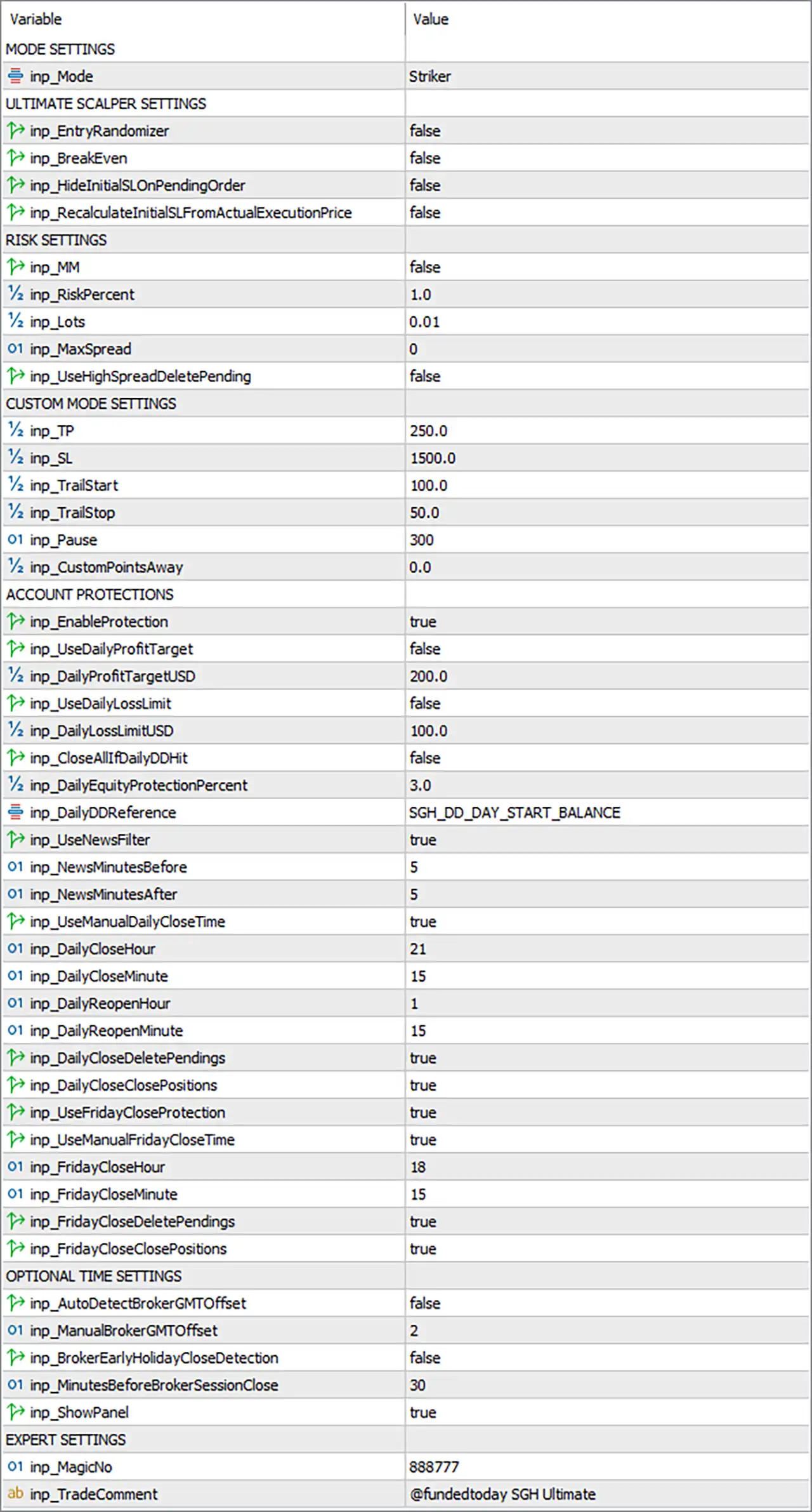
Important: The explanations below describe what each parameter is intended to control based on its name and displayed value. They do not guarantee trading performance or profitability.
🔄 Mode Settings
🔹 inp_Mode = Striker — Selects the EA's operating mode as Striker, determining the primary trading behavior used by the EA.
🔄 Ultimate Scalper Settings
🔹 inp_EntryRandomizer = false — Disables entry randomization, so the EA does not intentionally randomize its entry execution.
🔹 inp_BreakEven = false — Disables the dedicated break-even feature.
🔹 inp_HideInitialSLonPendingOrder = false — Keeps the initial Stop Loss visible on pending orders rather than hiding it.
🔹 inp_RecalculateInitialSLFromActualExecutionPrice = false — Disables recalculation of the initial Stop Loss based on the actual execution price.
🔄 Risk Settings
🔹 inp_MM = false — Disables the EA's money-management mode.
🔹 inp_RiskPercent = 1.0 — Sets the configured risk percentage to 1.0% when percentage-based risk management is applicable.
🔹 inp_Lots = 0.01 — Sets the lot size to 0.01 when fixed-lot sizing is used.
🔹 inp_MaxSpread = 0 — Sets the maximum spread filter to 0, which commonly indicates that the spread restriction is disabled, subject to the EA's internal implementation.
🔹 inp_UseHighSpreadDeletePending = false — Prevents the EA from automatically deleting pending orders when spread becomes excessively high.
🔄 Custom Mode Settings
🔹 inp_TP = 250.0 — Sets the custom Take Profit distance to 250.0 points.
🔹 inp_SL = 1500.0 — Sets the custom Stop Loss distance to 1500.0 points.
🔹 inp_TrailStart = 100.0 — Configures trailing management to begin after 100.0 points of favorable movement.
🔹 inp_TrailStop = 50.0 — Sets the trailing Stop Loss distance to 50.0 points.
🔹 inp_Pause = 300 — Sets the configured pause interval to 300 units, typically interpreted by the EA according to its internal pause-time implementation.
🔹 inp_CustomPointsAway = 0.0 — Sets the custom pending-entry/price offset to 0.0 points.
🔄 Account Protections
🔹 inp_EnableProtection = true — Enables the EA's account-protection system.
🔹 inp_UseDailyProfitTarget = false — Disables the fixed daily profit target.
🔹 inp_DailyProfitTargetUSD = 200.0 — Sets the daily profit target reference to 200.0 USD, although the feature is currently disabled.
🔹 inp_UseDailyLossLimit = false — Disables the fixed daily loss-limit function.
🔹 inp_DailyLossLimitUSD = 100.0 — Sets the daily loss limit reference to 100.0 USD, although the feature is currently disabled.
🔹 inp_CloseAllIfDailyDDHit = false — Prevents the EA from closing all positions automatically when the configured daily drawdown condition is reached.
🔹 inp_DailyEquityProtectionPercent = 3.0 — Sets daily equity protection at 3.0%.
🔹 inp_DailyDDReference = SGH_DD_DAY_START_BALANCE — Uses SGH_DD_DAY_START_BALANCE as the reference for calculating daily drawdown.
🔄 News Protection
🔹 inp_UseNewsFilter = true — Enables the EA's news-filter functionality.
🔹 inp_NewsMinutesBefore = 5 — Configures a 5-minute protection period before a relevant news event.
🔹 inp_NewsMinutesAfter = 5 — Configures a 5-minute protection period after a relevant news event.
🔄 Daily Trading Schedule
🔹 inp_UseManualDailyCloseTime = true — Enables the manually specified daily closing time.
🔹 inp_DailyCloseHour = 21 — Sets the daily closing hour to 21.
🔹 inp_DailyCloseMinute = 15 — Sets the daily closing minute to 15, producing a configured daily close time of 21:15.
🔹 inp_DailyReopenHour = 1 — Sets the daily reopening hour to 1.
🔹 inp_DailyReopenMinute = 15 — Sets the daily reopening minute to 15, producing a configured reopening time of 01:15.
🔹 inp_DailyCloseDeletePendings = true — Enables deletion of pending orders during the daily close procedure.
🔹 inp_DailyCloseClosePositions = true — Enables closing of open positions during the daily close procedure.
🔄 Friday Close Protection
🔹 inp_UseFridayCloseProtection = true — Enables the dedicated Friday closing protection.
🔹 inp_UseManualFridayCloseTime = true — Enables the manually specified Friday closing time.
🔹 inp_FridayCloseHour = 18 — Sets the Friday close hour to 18.
🔹 inp_FridayCloseMinute = 15 — Sets the Friday close minute to 15, giving a configured Friday close time of 18:15.
🔹 inp_FridayCloseDeletePendings = true — Enables deletion of pending orders during the Friday close procedure.
🔹 inp_FridayCloseClosePositions = true — Enables closing of open positions during the Friday close procedure.
🔄 Optional Time Settings
🔹 inp_AutoDetectBrokerGMTOffset = false — Disables automatic detection of the broker's GMT offset.
🔹 inp_ManualBrokerGMTOffset = 2 — Manually sets the broker GMT offset to 2, corresponding to GMT+2.
🔹 inp_BrokerEarlyHolidayCloseDetection = false — Disables automatic detection of an early broker holiday-session close.
🔹 inp_MinutesBeforeBrokerSessionClose = 30 — Sets the protection period to 30 minutes before the broker session closes.
🔹 inp_ShowPanel = true — Enables the EA's on-chart information panel.
🔄 Expert Settings
🔹 inp_MagicNo = 888777 — Sets the EA Magic Number to 888777, allowing the EA to identify and manage its own trades.
🔹 inp_TradeComment = @fundedtoday SGH Ultimate — Sets @fundedtoday SGH Ultimate as the trade comment attached to the EA's orders.
🔢 Conclusion
Smart Gold Hunter EA offers a broad set of configurable controls covering Striker trading mode, scalping behavior, risk settings, custom SL/TP, trailing management, account protection, news filtering, daily rollover, Friday protection, and broker-time synchronization.
The displayed setup places particular emphasis on account protection, with protection enabled and a 3.0% daily equity protection level, while the configured trading parameters include 250.0-point TP, 1500.0-point SL, 100.0-point trailing start, and 50.0-point trailing distance.
For users testing this configuration, the most important parameters to evaluate first are the 1.0% risk setting, 0.01 lot size, 1500.0-point Stop Loss, 250.0-point Take Profit, 3.0% daily equity protection, 5-minute news windows, and 21:15/01:15 daily schedule. Actual point values and risk behavior can vary according to the traded symbol, broker contract specifications, and account configuration.