🔢 One Shoot AI EA MT5 Settings: Complete Parameter Guide & Optimization Overview
One Shoot AI EA is a highly configurable MetaTrader 5 Expert Advisor designed around breakout detection, trend bias, intrabar price action, fast trade management, execution normalization, and automated position sizing. Its settings show a modular architecture that combines a Clean-Room Breakout Model, an Enhanced Intrabar Hunt Engine, an Ultra-Fast Exit Engine, cross-broker execution controls, and a matching on-chart dashboard.
The following guide explains every parameter visible in the provided One Shoot AI EA setting panels, including the exact numerical values, Boolean states, timeframes, and symbol-specific configurations.
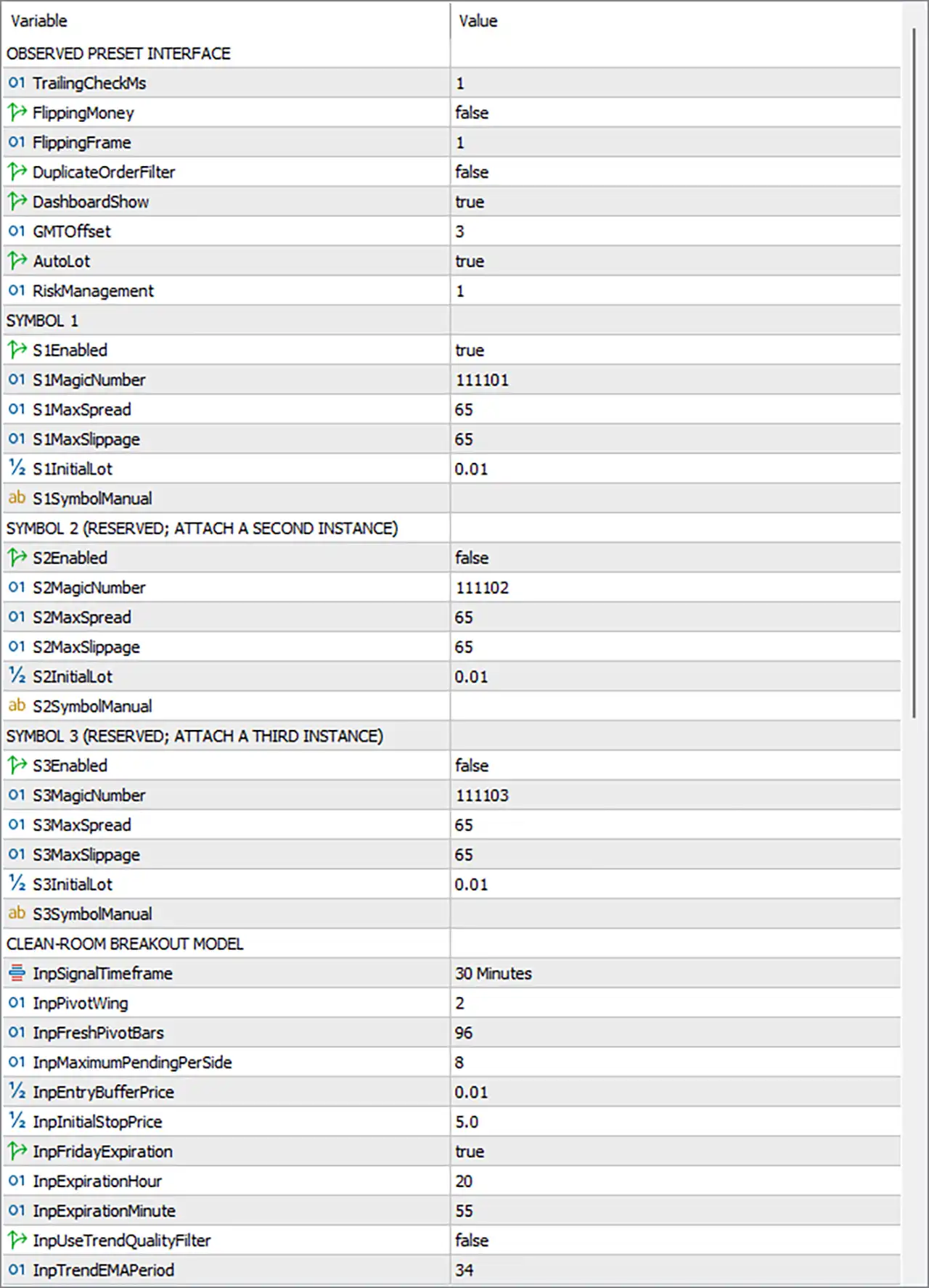
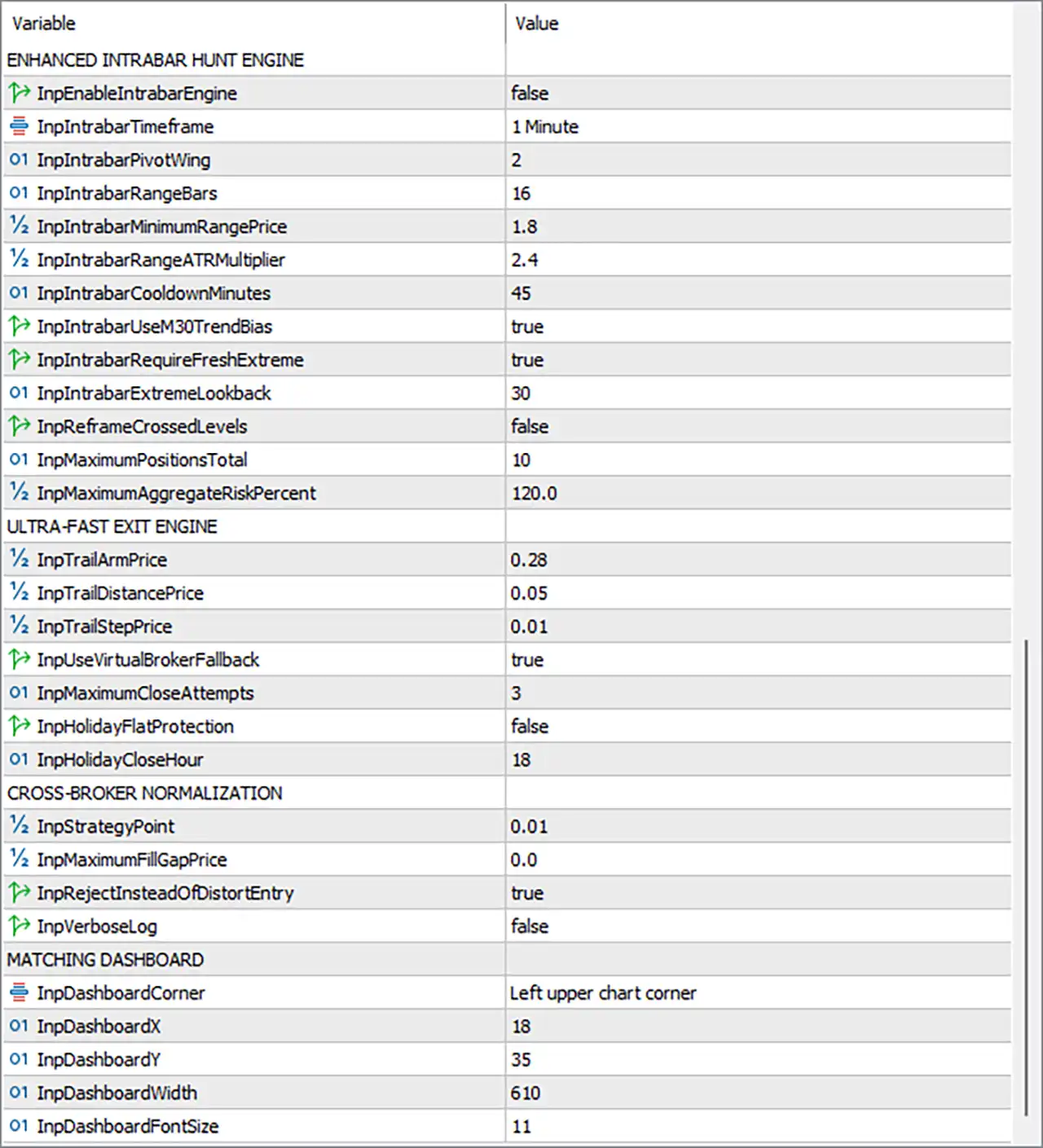
🔄 Enhanced Intrabar Hunt Engine
🔹 InpEnableIntrabarEngine = false — Enables or disables the Enhanced Intrabar Hunt Engine; false means this intrabar engine is currently disabled.
🔹 InpIntrabarTimeframe = 1 Minute — Sets the timeframe used by the intrabar engine to 1 Minute (M1) for detecting short-term price movements and potential entry conditions.
🔹 InpIntrabarPivotWing = 2 — Defines the pivot-wing size as 2, controlling how many surrounding bars are considered when identifying an intrabar pivot structure.
🔹 InpIntrabarRangeBars = 16 — Uses 16 bars for evaluating the intrabar price range.
🔹 InpIntrabarMinimumRangePrice = 1.8 — Requires a minimum price range of 1.8 for the intrabar range condition.
🔹 InpIntrabarRangeATRMultiplier = 2.4 — Sets the ATR-based range multiplier to 2.4, making the range requirement adaptive to market volatility.
🔹 InpIntrabarCooldownMinutes = 45 — Establishes a 45-minute cooldown period between qualifying intrabar operations/signals to help prevent excessive repeated activity.
🔹 InpIntrabarUseM30TrendBias = true — Enables the M30 trend bias, allowing the intrabar engine to take the 30-minute directional context into consideration.
🔹 InpIntrabarRequireFreshExtreme = true — Requires a fresh price extreme before an intrabar setup can qualify.
🔹 InpIntrabarExtremeLookback = 30 — Uses a lookback period of 30 bars when evaluating fresh highs/lows or extreme-price conditions.
🔹 InpReframeCrossedLevels = false — Disables reframing or recalculating crossed levels after price crosses an established reference level.
🔹 InpMaximumPositionsTotal = 10 — Allows a maximum of 10 total positions under the configured EA framework.
🔹 InpMaximumAggregateRiskPercent = 120.0 — Sets the maximum aggregate risk parameter to 120.0%; this is a very high ceiling and should not be interpreted as a recommended account-level daily risk limit.
🔄 Ultra-Fast Exit Engine
🔹 InpTrailArmPrice = 0.28 — Activates the trailing mechanism after price reaches a favorable movement of 0.28 price units.
🔹 InpTrailDistancePrice = 0.05 — Sets the trailing distance to 0.05 price units, determining how far the protective trailing level remains from the relevant price.
🔹 InpTrailStepPrice = 0.01 — Sets the trailing adjustment step to 0.01 price units, allowing the stop to update in small increments.
🔹 InpUseVirtualBrokerFallback = true — Enables the virtual-broker fallback mechanism, providing an alternative execution/protection method when the normal broker-side process cannot be used as intended.
🔹 InpMaximumCloseAttempts = 3 — Allows up to 3 close attempts when the EA attempts to exit a position.
🔹 InpHolidayFlatProtection = false — Disables holiday flat protection; therefore, the special holiday-related forced-flat mechanism is currently turned off.
🔹 InpHolidayCloseHour = 18 — Sets the holiday-related closing hour to 18:00 when holiday flat protection is enabled.
🔄 Cross-Broker Normalization
🔹 InpStrategyPoint = 0.01 — Defines the strategy's normalized price-point unit as 0.01, helping standardize price calculations across different broker specifications.
🔹 InpMaximumFillGapPrice = 0.0 — Sets the maximum tolerated execution/fill gap to 0.0 price units, meaning no additional fill-gap allowance is configured.
🔹 InpRejectInsteadOfDistortEntry = true — Instructs the EA to reject an entry rather than distort/modify the intended entry price when execution normalization requirements cannot be satisfied.
🔹 InpVerboseLog = false — Disables verbose logging, reducing detailed diagnostic messages in the platform log.
🔄 Matching Dashboard
🔹 InpDashboardCorner = Left upper chart corner — Positions the EA dashboard in the left upper corner of the chart.
🔹 InpDashboardX = 18 — Sets the dashboard horizontal offset to 18 pixels/points of chart-object positioning, depending on the EA's implementation.
🔹 InpDashboardY = 35 — Sets the dashboard vertical offset to 35.
🔹 InpDashboardWidth = 610 — Sets the dashboard width to 610.
🔹 InpDashboardFontSize = 11 — Sets the dashboard font size to 11, controlling the readability and visual density of dashboard information.
🔄 Observed Preset Interface
🔹 TrailingCheckMs = 1 — Sets the trailing-management checking interval to 1 millisecond according to the configured preset value, indicating an extremely aggressive checking frequency.
🔹 FlippingMoney = false — Disables the money-based flipping function.
🔹 FlippingFrame = 1 — Sets the flipping framework/frame parameter to 1.
🔹 DuplicateOrderFilter = false — Disables the duplicate-order filtering mechanism.
🔹 DashboardsShow = true — Enables the display of the EA dashboard.
🔹 GMTOffset = 3 — Sets the configured GMT offset to GMT+3.
🔹 AutoLot = true — Enables automatic lot calculation rather than relying exclusively on a fixed manually selected trading lot.
🔹 RiskManagement = 1 — Sets the Risk Management mode/value to 1.
🔄 Symbol 1 Configuration
🔹 S1Enabled = true — Enables Symbol 1, making the first symbol slot active.
🔹 S1MagicNumber = 111101 — Assigns the unique Magic Number 111101 to Symbol 1 trades, allowing the EA to identify and manage its positions.
🔹 S1MaxSpread = 65 — Sets the maximum permitted spread parameter for Symbol 1 to 65.
🔹 S1MaxSlippage = 65 — Sets the maximum permitted slippage parameter for Symbol 1 to 65.
🔹 S1InitialLot = 0.01 — Sets the initial lot size for Symbol 1 to 0.01 lots.
🔹 S1SymbolManual = blank — No manually specified symbol name is entered for Symbol 1, so the EA can rely on its internal/default symbol handling.
🔄 Symbol 2 Configuration
🔹 S2Enabled = false — Disables Symbol 2, meaning the second symbol slot is currently inactive.
🔹 S2MagicNumber = 111102 — Assigns Magic Number 111102 to Symbol 2.
🔹 S2MaxSpread = 65 — Sets the maximum permitted spread parameter for Symbol 2 to 65.
🔹 S2MaxSlippage = 65 — Sets the maximum permitted slippage parameter for Symbol 2 to 65.
🔹 S2InitialLot = 0.01 — Sets the initial lot size for Symbol 2 to 0.01 lots.
🔹 S2SymbolManual = blank — No manually specified symbol is entered for Symbol 2.
🔄 Symbol 3 Configuration
🔹 S3Enabled = false — Disables Symbol 3, making the third symbol slot inactive.
🔹 S3MagicNumber = 111103 — Assigns Magic Number 111103 to Symbol 3.
🔹 S3MaxSpread = 65 — Sets the maximum permitted spread parameter for Symbol 3 to 65.
🔹 S3MaxSlippage = 65 — Sets the maximum permitted slippage parameter for Symbol 3 to 65.
🔹 S3InitialLot = 0.01 — Sets the initial lot size for Symbol 3 to 0.01 lots.
🔹 S3SymbolManual = blank — No manually specified symbol is entered for Symbol 3.
🔄 Clean-Room Breakout Model
🔹 InpSignalTimeframe = 30 Minutes — Sets the primary breakout signal timeframe to 30 Minutes (M30).
🔹 InpPivotWing = 2 — Uses a pivot-wing value of 2 when identifying significant swing/pivot structures.
🔹 InpFreshPivotBars = 96 — Requires/uses 96 bars as the fresh-pivot evaluation window, controlling how recently a pivot structure must have formed to remain relevant.
🔹 InpMaximumPendingPerSide = 8 — Allows a maximum of 8 pending orders per side, controlling the number of buy-side or sell-side pending orders.
🔹 InpEntryBufferPrice = 0.01 — Adds an entry buffer of 0.01 price units around the calculated breakout/entry level.
🔹 InpInitialStopPrice = 5.0 — Sets the initial stop-distance parameter to 5.0 price units, providing the initial protective-stop framework.
🔹 InpFridayExpiration = true — Enables Friday expiration for relevant pending breakout orders.
🔹 InpExpirationHour = 20 — Sets the expiration hour to 20.
🔹 InpExpirationMinute = 55 — Sets the expiration minute to 55, producing an expiration time of 20:55 according to the EA's configured time basis.
🔹 InpUseTrendQualityFilter = false — Disables the additional trend-quality filter.
🔹 InpTrendEMAPeriod = 34 — Sets the trend EMA period to 34, which becomes relevant when the trend-quality filtering functionality is enabled.
🔢 Key Configuration Characteristics
🔹 Primary Signal Timeframe: 30 Minutes (M30) — The Clean-Room Breakout Model is configured around M30, while the Intrabar Hunt Engine is configured for M1.
🔹 Intrabar Engine Status: Disabled — InpEnableIntrabarEngine = false, so the M1 intrabar module is not currently active despite its parameters being configured.
🔹 M30 Trend Bias: Enabled — InpIntrabarUseM30TrendBias = true, meaning the configured intrabar framework is designed to use M30 directional context if the intrabar engine is activated.
🔹 Automatic Lot Sizing: Enabled — AutoLot = true, indicating that automated position-size calculation is enabled.
🔹 Symbol Activation: Symbol 1 Only — S1Enabled = true, while S2Enabled = false and S3Enabled = false, so only the first symbol slot is active in the displayed configuration.
🔹 Initial Lot: 0.01 — Symbol 1, Symbol 2, and Symbol 3 all have SxInitialLot = 0.01, although Symbols 2 and 3 are disabled.
🔹 Maximum Positions: 10 — The configuration permits up to 10 total positions through InpMaximumPositionsTotal = 10.
🔹 Aggregate Risk Ceiling: 120.0% — InpMaximumAggregateRiskPercent = 120.0, which is notably aggressive and should be carefully reviewed before live deployment.
🔹 Fast Trailing Configuration: 0.28 / 0.05 / 0.01 — The exit engine uses InpTrailArmPrice = 0.28, InpTrailDistancePrice = 0.05, and InpTrailStepPrice = 0.01.
🔹 Breakout Stop Parameter: 5.0 — InpInitialStopPrice = 5.0 provides the configured initial stop-distance value.
🔹 Friday Expiration: 20:55 — Friday expiration is enabled with InpFridayExpiration = true, InpExpirationHour = 20, and InpExpirationMinute = 55.
🔢 Conclusion
🔹 One Shoot AI EA is configured as a multi-layer MT5 trading system combining M30 breakout analysis, optional M1 intrabar hunting, trend-bias logic, automated lot sizing, fast trailing exits, execution normalization, pending-order management, and multi-symbol architecture.
🔹 The current preset is particularly notable for its M30 signal timeframe, M1 intrabar configuration, 0.01 initial lot, 10-position maximum, 120.0% aggregate-risk ceiling, 5.0 initial stop parameter, and 20:55 Friday expiration.
🔹 The most important point when evaluating this configuration is that a parameter's numerical value does not automatically represent its risk in percentage terms. For example, InpMaximumAggregateRiskPercent = 120.0 is a configuration ceiling, not necessarily the same thing as risking 120.0% of the account on every trade.
🔹 Before using the EA on a live XAUUSD or Forex account, the settings should be validated through MT5 Strategy Tester, broker-specific symbol specifications, spread/slippage conditions, and forward testing. Particular attention should be given to the 120.0% aggregate risk parameter, 10-position maximum, 65 spread/slippage limits, and 5.0 initial stop parameter.
🔢 Frequently Asked Questions
❓ What timeframe does One Shoot AI EA use for its main trading signals?
The Clean-Room Breakout Model is configured to use 30 Minutes (M30) through InpSignalTimeframe = 30 Minutes.
❓ Does One Shoot AI EA use M1 intrabar analysis?
Yes, the EA has an Enhanced Intrabar Hunt Engine configured for 1 Minute (M1) through InpIntrabarTimeframe = 1 Minute, but the current setting InpEnableIntrabarEngine = false means that module is disabled.
❓ Is automatic lot sizing enabled?
Yes. AutoLot = true, so automatic lot calculation is enabled. The displayed initial lot for each symbol slot is 0.01.
❓ How many positions can One Shoot AI EA open according to these settings?
The configuration shows InpMaximumPositionsTotal = 10, meaning the total-position limit is set to 10.
❓ What is the Friday expiration time?
Friday expiration is enabled with InpFridayExpiration = true, and the configured expiration is 20:55, using InpExpirationHour = 20 and InpExpirationMinute = 55.