


🔢 AGI FX V2 EA MT5 – Complete Inputs & Settings Guide
AGI FX V2 EA is a multi-parameter automated trading Expert Advisor designed around EURUSD and GBPUSD, with dedicated controls for averaging, lot compounding, position sizing, profit management, execution conditions and RTH/range-related settings.
Its Inputs provide traders with detailed control over how the EA identifies its trades, manages averaging levels, scales lot sizes, calculates profit targets, and limits the number of active trades.
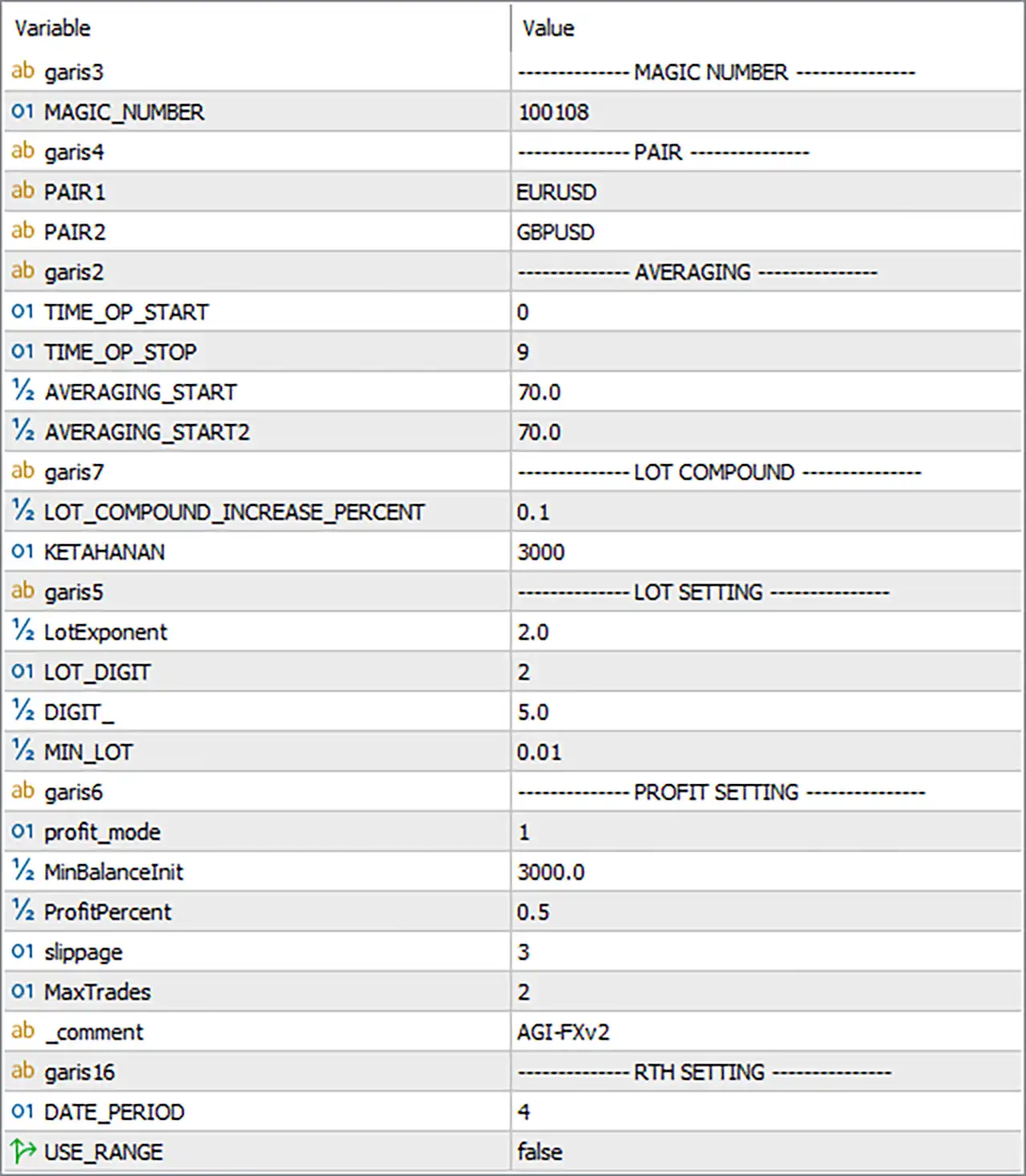
The following guide is based directly on the AGI FX V2 EA Inputs panel provided. All parameter names and numerical values have been preserved.
🔶 Magic Number
🔹 MAGIC_NUMBER — 100108 — The unique Magic Number used by AGI FX V2 EA MT5 to identify and manage its own trades. This helps separate the EA's positions from trades opened by other EAs or manually.
🔶 Pair Settings
🔹 PAIR1 — EURUSD — Defines the first currency pair used by the EA. The configured primary pair is EURUSD.
🔹 PAIR2 — GBPUSD — Defines the second currency pair used by the EA. The configured secondary pair is GBPUSD.
🔶 Averaging Settings
🔹 TIME_OP_START — 0 — Defines the starting time parameter for the EA's operating/averaging schedule. The configured value is 0.
🔹 TIME_OP_STOP — 9 — Defines the stopping time parameter for the EA's operating/averaging schedule. The configured value is 9.
🔹 AVERAGING_START — 70.0 — Defines the initial averaging threshold or distance used by the EA for its averaging mechanism. The configured value is 70.0.
🔹 AVERAGING_START2 — 70.0 — Defines the second averaging threshold or distance used by the EA. The configured value is also 70.0, meaning both averaging parameters are currently set to the same numerical level.
🔶 Lot Compound Settings
🔹 LOT_COMPOUND_INCREASE_PERCENT — 0.1 — Defines the percentage used by the EA to increase/compound the lot size as the account or trading conditions change. The configured compounding increase is 0.1.
🔹 KETAHANAN — 3000 — Defines a protection/tolerance parameter used by the EA's internal trading logic. The exact unit or calculation cannot be determined solely from the exposed Input name, but the configured value is 3000.
🔶 Lot Settings
🔹 LotExponent — 2.0 — Controls the exponent/multiplier behavior used in the EA's lot-size calculation. A value of 2.0 indicates that the EA's lot calculation uses an exponent of 2.0 according to its internal formula.
🔹 LOT_DIGIT — 2 — Defines the number of decimal digits used when normalizing or rounding the calculated lot size. The configured value is 2.
🔹 DIGIT_ — 5.0 — Defines a digit/scaling parameter used by the EA's internal lot or price calculation. The configured value is 5.0.
🔹 MIN_LOT — 0.01 — Defines the minimum lot size allowed by the EA. The configured minimum is 0.01 lots.
🔶 Profit Settings
🔹 profit_mode — 1 — Selects the EA's profit-management mode. The current configuration uses mode 1; the exact behavior of each numerical mode depends on the EA's internal implementation.
🔹 MinBalanceInit — 3000.0 — Defines the minimum or initial balance reference used by the EA's profit-management/target calculation. The configured value is 3000.0.
🔹 ProfitPercent — 0.5 — Defines the profit percentage used by the selected profit-management mode. The current target/reference value is 0.5%.
🔹 slippage — 3 — Defines the maximum permitted slippage parameter for trade execution. The configured value is 3.
🔹 MaxTrades — 2 — Defines the maximum number of trades allowed by the relevant EA trading logic. The current setting is 2 trades.
🔹 _comment — AGI-FXv2 — Defines the order comment used to identify trades generated by AGI FX V2 EA MT5. The configured comment is AGI-FXv2.
🔶 RTH Settings
🔹 DATE_PERIOD — 4 — Defines the date/period parameter used by the EA's RTH-related logic. The configured value is 4.
🔹 USE_RANGE — false — Determines whether the EA uses the configured range-based logic. False means the range feature is currently disabled.
🔢 AGI FX V2 EA MT5 – Current Configuration Summary
🔹 Magic Number — 100108
🔹 Pair 1 — EURUSD
🔹 Pair 2 — GBPUSD
🔹 Operation Start — 0
🔹 Operation Stop — 9
🔹 Averaging Start — 70.0
🔹 Averaging Start 2 — 70.0
🔹 Lot Compound Increase — 0.1
🔹 KETAHANAN — 3000
🔹 Lot Exponent — 2.0
🔹 Lot Digit — 2
🔹 Digit Parameter — 5.0
🔹 Minimum Lot — 0.01
🔹 Profit Mode — 1
🔹 Minimum/Initial Balance Reference — 3000.0
🔹 Profit Percent — 0.5
🔹 Slippage — 3
🔹 Maximum Trades — 2
🔹 Order Comment — AGI-FXv2
🔹 Date Period — 4
🔹 Use Range — false
🔢 How the Main AGI FX V2 EA MT5 Parameters Work Together
🔹 EURUSD + GBPUSD — The EA is configured to work with two major currency pairs, EURUSD and GBPUSD.
🔹 Averaging 70.0 / 70.0 — Both averaging thresholds are set to 70.0, indicating that the EA's two averaging parameters currently use the same configured level.
🔹 Lot Compounding = 0.1 — The EA has a 0.1 lot-compounding increase parameter, allowing its internal position-sizing logic to adjust lot exposure according to its compounding rules.
🔹 LotExponent = 2.0 — The 2.0 exponent is an important component of the EA's lot-sizing calculation and can significantly affect how position size changes through its internal trading sequence.
🔹 MIN_LOT = 0.01 — The EA will not intentionally calculate a lot size below the configured minimum of 0.01 lots, subject to broker constraints and the EA's internal normalization.
🔹 ProfitPercent = 0.5 — The selected profit-management logic uses a 0.5% profit parameter.
🔹 MaxTrades = 2 — The configuration limits the relevant trading logic to 2 trades, helping constrain the number of simultaneous positions managed under this parameter.
🔹 USE_RANGE = false — Range-based functionality is currently disabled, meaning the EA is not configured to use its range mechanism under this setting.
🔢 Conclusion
AGI FX V2 EA MT5 provides a relatively compact but highly configurable Input structure focused on pair selection, averaging, lot compounding, position sizing, profit management, and trade limitations.
The configuration shown is centered around EURUSD and GBPUSD, with Magic Number 100108, Averaging Start = 70.0, Averaging Start 2 = 70.0, LotExponent = 2.0, and MIN_LOT = 0.01.
The profit-management section is configured with profit_mode = 1, MinBalanceInit = 3000.0, ProfitPercent = 0.5, slippage = 3, and MaxTrades = 2. Meanwhile, the RTH section has DATE_PERIOD = 4 and USE_RANGE = false.
Overall, these settings give AGI FX V2 EA MT5 control over the key components of its automated trading behavior, particularly averaging and lot-size progression. Because several parameters such as KETAHANAN, DIGIT_, profit_mode, and DATE_PERIOD are implementation-specific, their exact mathematical behavior cannot be established from the Input names alone; they should be interpreted together with the EA's documentation or source code when available.
🔢 FAQs
❓ What currency pairs does AGI FX V2 EA MT5 use in this configuration?
The EA is configured with PAIR1 = EURUSD and PAIR2 = GBPUSD.
❓ What is the Magic Number of AGI FX V2 EA MT5?
The Magic Number is 100108, which is used to identify the EA's trades.
❓ What is the minimum lot size configured for AGI FX V2 EA MT5?
The MIN_LOT parameter is set to 0.01, meaning the configured minimum lot size is 0.01 lots.
❓ What are the averaging settings of AGI FX V2 EA MT5?
AVERAGING_START = 70.0 and AVERAGING_START2 = 70.0. Both averaging parameters are currently configured at 70.0.
❓ What is the maximum number of trades configured?
MaxTrades = 2, so the relevant EA trading logic is configured to allow a maximum of 2 trades.


