


🔢 AGI FX EA MT4 Settings & Inputs – Complete Configuration Guide
AGI FX EA MT4 is a configurable automated trading system built around flexible money management, averaging controls, lot compounding, trading-session restrictions, and position-management parameters. Its Inputs panel provides granular control over how trade volume is calculated, how averaging positions are handled, when trading can occur, and how many positions the EA may maintain.
The configuration shown uses a CUSTOM risk profile, Magic Number 100108, an operating window from 0 to 11, 15.0% lot-compounding increase, an averaging engine, Lot Exponent 2.1, 0.23 lots, and a maximum of 10 trades. The EA also uses the AGI-FX trade comment and displays its information panel.
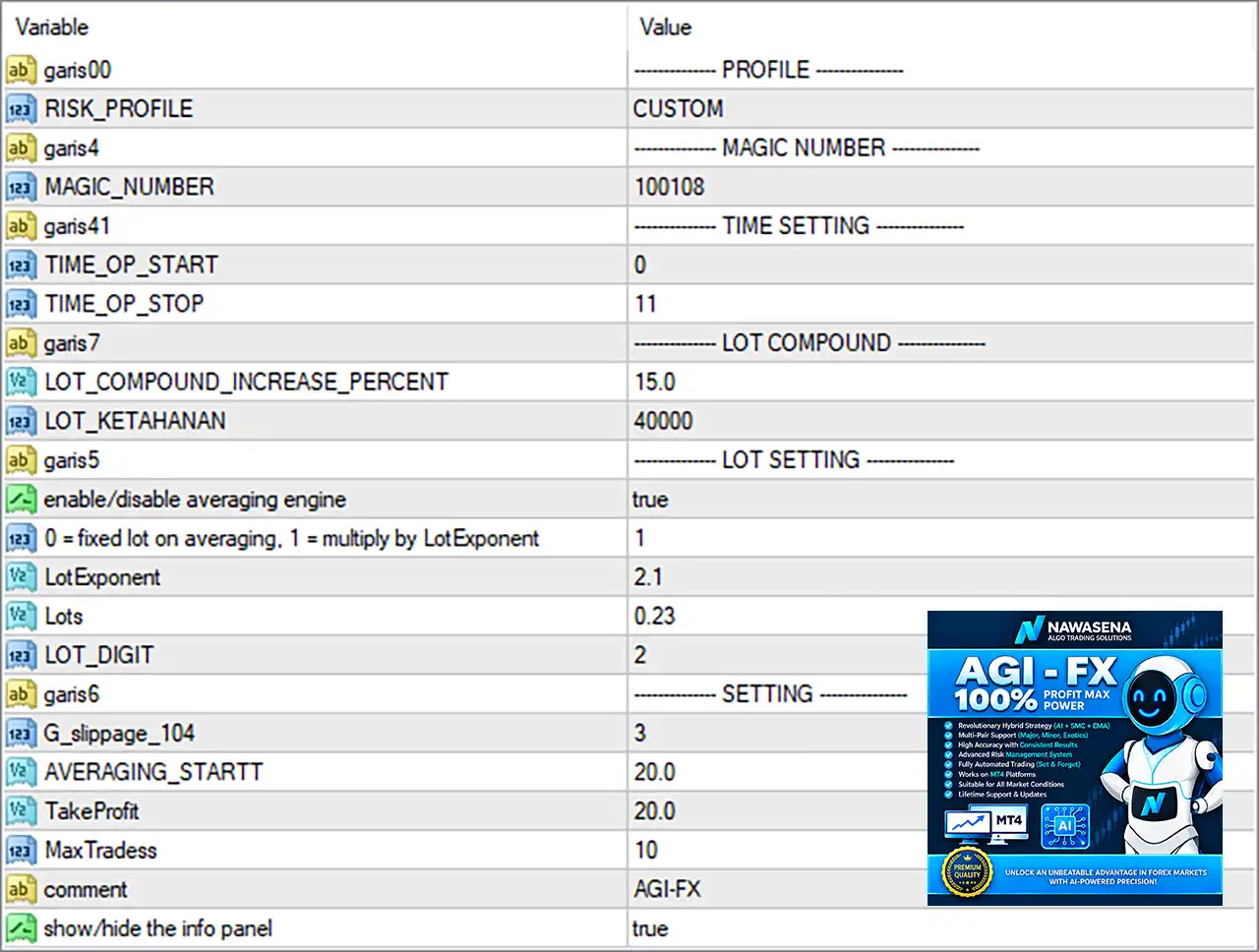
⚙️ Profile & Identification Settings
🔹 RISK_PROFILE = CUSTOM — Selects the CUSTOM risk profile, allowing the parameters below to determine the EA's trading and position-sizing behavior rather than relying on a predefined profile.
🔹 MAGIC_NUMBER = 100108 — Sets the EA's unique Magic Number to 100108, allowing MT4 to distinguish AGI FX EA trades from trades generated by other EAs or manual trading.
⚙️ Time Settings
🔹 TIME_OP_START = 0 — Sets the configured trading-operation start hour to 0.
🔹 TIME_OP_STOP = 11 — Sets the configured trading-operation stop hour to 11.
🔹 Trading Window = 0–11 — Based on the two parameters above, the EA's configured operating period runs from hour 0 to hour 11, subject to the EA's internal time interpretation and broker/server time.
⚙️ Lot Compound Settings
🔹 LOT_COMPOUND_INCREASE_PERCENT = 15.0 — Sets the lot-compounding increase parameter to 15.0%, allowing position sizing to increase according to the EA's programmed compounding logic.
🔹 LOT_KETAHANAN = 40000 — Sets the LOT_KETAHANAN parameter to 40000; this is an EA-specific internal lot/compounding control, so its exact calculation depends on the EA's source-code implementation.
⚙️ Averaging & Lot Settings
🔹 enable/disable averaging engine = true — Enables the averaging engine, allowing the EA to use its programmed averaging-position mechanism.
🔹 0 = fixed lot on averaging. 1 = multiply by Lot Exponent = 1 — Selects option 1, meaning averaging positions use the Lot Exponent multiplier rather than maintaining the same fixed lot size.
🔹 Lot Exponent = 2.1 — Sets the averaging lot multiplier/exponent to 2.1, meaning subsequent averaging positions can increase according to the EA's exponent-based calculation.
🔹 Lots = 0.23 — Sets the configured base lot value to 0.23 lots.
🔹 LOT_DIGIT = 2 — Sets the lot-size precision/digit parameter to 2, indicating a two-decimal lot precision setting within the EA's calculation logic.
⚙️ General Trading Settings
🔹 G_slippage_104 = 3 — Sets the EA's slippage parameter to 3, controlling the permitted execution deviation according to the EA's internal implementation.
🔹 AVERAGING_STARTT = 20.0 — Sets the averaging-start threshold to 20.0; this determines when the EA's averaging mechanism can begin according to its programmed distance/trigger logic.
🔹 TakeProfit = 20.0 — Sets the Take Profit parameter to 20.0, defining the configured profit target according to the EA's internal point/pip calculation.
🔹 MaxTradess = 10 — Limits the EA to a maximum of 10 trades/positions within the relevant averaging or trading cycle.
🔹 comment = AGI-FX — Sets the trade comment to AGI-FX, making EA-generated orders easier to identify in the MT4 terminal.
🔹 show/hide the info panel = true — Enables the EA's information panel on the chart.
🔢 Complete AGI FX EA MT4 Settings Summary
🔹 RISK_PROFILE: CUSTOM
🔹 MAGIC_NUMBER: 100108
🔹 TIME_OP_START: 0
🔹 TIME_OP_STOP: 11
🔹 LOT_COMPOUND_INCREASE_PERCENT: 15.0
🔹 LOT_KETAHANAN: 40000
🔹 enable/disable averaging engine: true
🔹 0 = fixed lot on averaging. 1 = multiply by Lot Exponent: 1
🔹 Lot Exponent: 2.1
🔹 Lots: 0.23
🔹 LOT_DIGIT: 2
🔹 G_slippage_104: 3
🔹 AVERAGING_STARTT: 20.0
🔹 TakeProfit: 20.0
🔹 MaxTradess: 10
🔹 comment: AGI-FX
🔹 show/hide the info panel: true
🔢 How the Current Configuration Works
🔹 Custom risk profile is active: The EA is set to CUSTOM, so the displayed custom parameters are important for its behavior.
🔹 Averaging is enabled: The averaging engine is set to true, making averaging a core part of the current configuration.
🔹 Exponent-based averaging is selected: The parameter is set to 1, corresponding to “multiply by Lot Exponent”, with Lot Exponent = 2.1.
🔹 Base lot is 0.23: The configured Lots = 0.23, while the averaging mechanism may calculate subsequent volumes according to the 2.1 exponent.
🔹 Compounding is configured: The EA uses LOT_COMPOUND_INCREASE_PERCENT = 15.0, providing a 15.0% compounding parameter.
🔹 Maximum trade count is 10: MaxTradess = 10 limits the configured number of trades/positions.
🔹 The operating hours are restricted: TIME_OP_START = 0 and TIME_OP_STOP = 11 define the configured trading window.
🔹 Take Profit is 20.0: TakeProfit = 20.0 establishes the EA's configured profit-target value.
🔹 Slippage is 3: G_slippage_104 = 3 sets the configured execution-deviation parameter.
🔹 The chart information panel is visible: show/hide the info panel = true means the EA's information display is enabled.
🔢 Important Risk & Configuration Notes
🔹 Averaging requires careful risk control: Because enable/disable averaging engine = true and the averaging mode is set to 1, subsequent positions may increase according to Lot Exponent = 2.1.
🔹 The 2.1 exponent can increase exposure rapidly: An exponent-based averaging model can cause position volume to grow significantly as additional trades are opened, so the 0.23 base lot and MaxTradess = 10 should be evaluated carefully.
🔹 LOT_KETAHANAN = 40000 is EA-specific: The parameter name does not provide enough information to determine its exact mathematical function. Its precise meaning should be verified from the EA documentation or source code rather than assumed.
🔹 TIME_OP_START = 0 and TIME_OP_STOP = 11 require time-zone verification: The screenshot does not explicitly state whether these hours refer to broker server time, local time, or another time reference.
🔹 TakeProfit = 20.0 requires unit verification: The screenshot does not explicitly specify whether 20.0 represents points, pips, price units, or another internal unit.
🔹 Slippage = 3 should be interpreted according to MT4's implementation: The screenshot provides the value 3, but does not explicitly state the unit convention used by this particular EA.
🔢 Conclusion
AGI FX EA MT4 provides a highly configurable framework with particular emphasis on averaging, dynamic lot sizing, compounding, and trade-cycle control.
The displayed configuration activates the averaging engine, uses mode 1 to multiply averaging lots by a 2.1 Lot Exponent, starts from 0.23 lots, allows up to 10 trades, and applies a 15.0% lot-compounding parameter. Trading is configured for the 0–11 operating window, with TakeProfit = 20.0, slippage = 3, and Magic Number = 100108.
Because averaging and exponent-based position sizing can substantially increase exposure, traders should thoroughly backtest the configuration and evaluate maximum drawdown, margin requirements, and worst-case consecutive positions before deploying it on a live account. Automated trading involves significant risk, and historical or backtest performance does not guarantee future results.
🔢 FAQs
❓ What is the Magic Number of AGI FX EA MT4?
The configured MAGIC_NUMBER is 100108, which identifies trades generated by this EA.
❓ Is the averaging engine enabled?
Yes. enable/disable averaging engine = true, so the averaging mechanism is active.
❓ What is the averaging Lot Exponent?
The configured Lot Exponent is 2.1, and averaging mode 1 selects multiplication by this exponent.
❓ What is the maximum number of trades?
The configured MaxTradess value is 10, limiting the EA to 10 trades/positions according to its internal trade-cycle logic.
❓ What are the configured trading hours?
The EA has TIME_OP_START = 0 and TIME_OP_STOP = 11, giving a configured operating window of 0–11. The exact time-zone convention should be confirmed from the EA's documentation.


