


🔢 Aikon MT5 – Complete Settings & Parameters Guide
Aikon MT5 is a highly configurable MetaTrader 5 Expert Advisor built around adaptive execution, multi-timeframe analysis, native risk controls, economic-calendar protection, portfolio management and optional AI-assisted position management.
The configuration shown gives traders detailed control over supported currency pairs, entry behavior, analysis frequency, Take Profit and Stop Loss, ATR-based exits, trailing, AI modifications, news protection, portfolio objectives, lot sizing and trade identification.
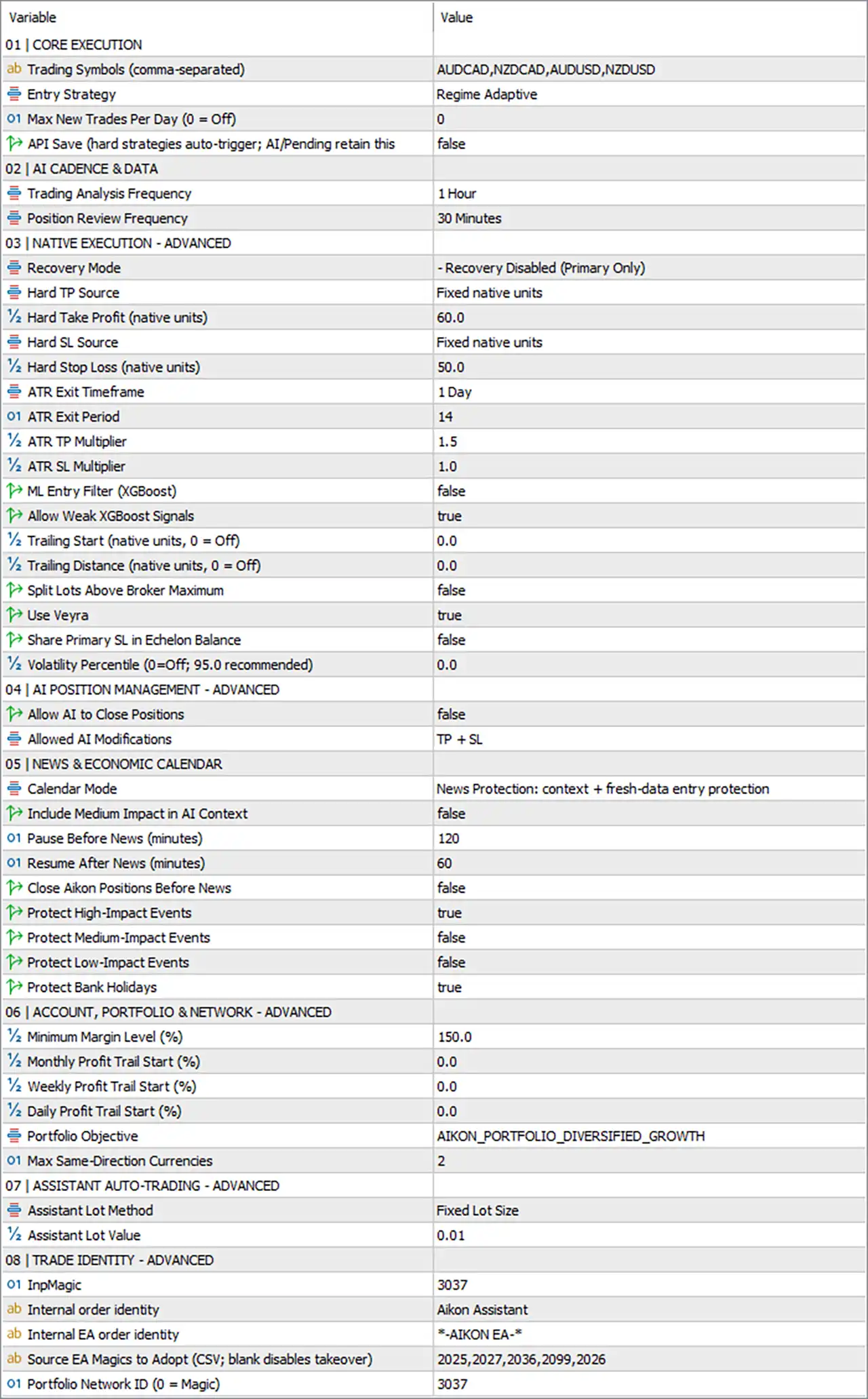
Important: The explanations below are based strictly on the parameter names and values visible in the provided settings panel. They describe the apparent purpose of each setting and do not guarantee profitability or trading performance.
🔄 Core Execution
🔹 Trading Symbols (comma-separated) = AUDCAD, NZDCAD, AUDUSD, NZDUSD — Defines the four symbols the EA is configured to trade: AUDCAD, NZDCAD, AUDUSD and NZDUSD.
🔹 Entry Strategy = Regime Adaptive — Uses a Regime Adaptive entry strategy, allowing the EA's entry logic to adapt to the detected market regime.
🔹 Max New Trades Per Day (0 = Off) = 0 — Sets the maximum number of new trades per day to 0; according to the parameter description, 0 = Off, meaning no daily new-trade cap is imposed by this setting.
🔹 API Save (hard strategies auto-trigger; AI/Pending retain this) = false — Disables the API Save option; hard strategies therefore do not use the API auto-trigger behavior described by this parameter.
🔄 AI Cadence & Data
🔹 Trading Analysis Frequency = 1 Hour — Configures the EA to perform its trading analysis on a 1-hour frequency.
🔹 Position Review Frequency = 30 Minutes — Configures existing positions to be reviewed every 30 minutes.
🔄 Native Execution – Advanced
🔹 Recovery Mode = - Recovery Disabled (Primary Only) — Disables recovery trading and operates in Primary Only mode.
🔹 Hard TP Source = Fixed native units — Uses fixed native units as the source for the hard Take Profit calculation.
🔹 Hard Take Profit (native units) = 60.0 — Sets the hard Take Profit value to 60.0 native units.
🔹 Hard SL Source = Fixed native units — Uses fixed native units as the source for the hard Stop Loss calculation.
🔹 Hard Stop Loss (native units) = 50.0 — Sets the hard Stop Loss value to 50.0 native units.
🔹 ATR Exit Timeframe = 1 Day — Uses the 1 Day timeframe for ATR-based exit calculations.
🔹 ATR Exit Period = 14 — Sets the ATR calculation period to 14.
🔹 ATR TP Multiplier = 1.5 — Sets the ATR-based Take Profit multiplier to 1.5×.
🔹 ATR SL Multiplier = 1.0 — Sets the ATR-based Stop Loss multiplier to 1.0×.
🔹 ML Entry Filter (XGBoost) = false — Disables the XGBoost machine-learning entry filter.
🔹 Allow Weak XGBoost Signals = true — Allows weak XGBoost signals to be accepted when the XGBoost-related functionality is applicable.
🔹 Trailing Start (native units, 0 = Off) = 0.0 — Sets trailing activation to 0.0 native units; according to the parameter description, 0 = Off, so trailing is currently disabled through this setting.
🔹 Trailing Distance (native units, 0 = Off) = 0.0 — Sets the trailing distance to 0.0 native units, which indicates the trailing-distance function is disabled.
🔹 Split Lots Above Broker Maximum = false — Disables automatic splitting of oversized lots when the calculated volume exceeds the broker's maximum permitted lot size.
🔹 Use Veyra = true — Enables the Veyra functionality.
🔹 Share Primary SL in Echelon Balance = false — Disables sharing the primary Stop Loss within the Echelon balance mechanism.
🔹 Volatility Percentile (0=Off, 95.0 recommended) = 0.0 — Sets the volatility percentile filter to 0.0; because 0 = Off, volatility-percentile filtering is disabled.
🔄 AI Position Management – Advanced
🔹 Allow AI to Close Positions = false — Prevents AI logic from directly closing existing positions.
🔹 Allowed AI Modifications = TP + SL — Restricts permitted AI modifications to Take Profit and Stop Loss parameters.
🔄 News & Economic Calendar
🔹 Calendar Mode = News Protection: context + fresh-data entry protection — Uses the News Protection: context + fresh-data entry protection calendar mode.
🔹 Include Medium Impact in AI Context = false — Excludes medium-impact economic events from the AI context.
🔹 Pause Before News (minutes) = 120 — Configures a 120-minute trading pause before relevant news events.
🔹 Resume After News (minutes) = 60 — Configures trading to resume 60 minutes after relevant news events.
🔹 Close Aikon Positions Before News = false — Prevents the EA from automatically closing Aikon positions before news events.
🔹 Protect High-Impact Events = true — Enables protection around high-impact economic events.
🔹 Protect Medium-Impact Events = false — Disables protection around medium-impact economic events.
🔹 Protect Low-Impact Events = false — Disables protection around low-impact economic events.
🔹 Protect Bank Holidays = true — Enables protection for bank holidays.
🔄 Account, Portfolio & Network – Advanced
🔹 Minimum Margin Level (%) = 150.0 — Sets the minimum permitted margin level to 150.0%, providing a margin-safety threshold.
🔹 Monthly Profit Trail Start (%) = 0.0 — Sets the monthly profit-trailing activation threshold to 0.0%, which generally means the feature is not activated at a positive-profit threshold.
🔹 Weekly Profit Trail Start (%) = 0.0 — Sets the weekly profit-trailing activation threshold to 0.0%.
🔹 Daily Profit Trail Start (%) = 0.0 — Sets the daily profit-trailing activation threshold to 0.0%.
🔹 Portfolio Objective = AIKON_PORTFOLIO_DIVERSIFIED_GROWTH — Selects AIKON_PORTFOLIO_DIVERSIFIED_GROWTH as the portfolio-management objective.
🔹 Max Same-Direction Currencies = 2 — Limits the number of currencies that can simultaneously have exposure in the same trading direction to 2.
🔄 Assistant Auto-Trading – Advanced
🔹 Assistant Lot Method = Fixed Lot Size — Configures the assistant's position sizing method to Fixed Lot Size.
🔹 Assistant Lot Value = 0.01 — Sets the assistant's fixed trading volume to 0.01 lots.
🔄 Trade Identity – Advanced
🔹 InpMagic = 3037 — Sets the EA Magic Number to 3037, allowing the EA to identify its own trades.
🔹 Internal order identity = Aikon Assistant — Assigns Aikon Assistant as the internal order identity.
🔹 Internal EA order identity = -AIKON EA- — Uses *-AIKON EA-* as the internal EA order identifier.
🔹 Source EA Magics to Adopt (CSV; blank disables takeover) = 2025,2027,2036,2099,2026 — Configures the EA to recognize and potentially adopt trades associated with Magic Numbers 2025, 2027, 2036, 2099, and 2026; the parameter specifically notes that leaving the field blank disables takeover.
🔹 Portfolio Network ID (0 = Magic) = 3037 — Sets the Portfolio Network ID to 3037; the parameter description indicates that 0 = Magic, so the current configuration explicitly uses 3037.
🔢 Conclusion
The displayed Aikon MT5 configuration provides a sophisticated combination of adaptive entry logic, native execution controls, ATR-based exits, AI position management, economic-calendar protection, portfolio objectives, and trade-identity management.
Several protective features are active, including high-impact news protection, bank-holiday protection, a 150.0% minimum margin level, and a 2-currency same-direction limit. At the same time, some functions are deliberately disabled, including recovery mode, XGBoost entry filtering, trailing through the 0.0 settings, AI position closing, and medium/low-impact news protection.
Before using these settings in a live environment, traders should verify the meaning of native units, broker contract specifications, margin requirements, and the EA's internal behavior through backtesting and forward testing. In particular, the 60.0 TP / 50.0 SL, 1.5 / 1.0 ATR multipliers, 120/60-minute news protection, and 150.0% minimum margin level are important parameters to understand before deployment.


