


Liquid Pours Xtreme EA Settings Guide
Liquid Pours Xtreme EA is an automated trading Expert Advisor built around liquidity-pattern analysis, configurable risk management, adaptive SL/TP logic, trading-day controls, visual signal tools, and a high-impact economic news filter. The displayed configuration provides detailed control over risk per trade, liquidity detection times, ATR-based or fixed Tick-based Stop Loss and Take Profit, safe testing mode, visual chart elements, and ForexFactory calendar filtering.
This setup uses a 1.0% risk per operation, trades across Sunday through Saturday, monitors liquidity patterns between 12:00 and 16:50, and enables a high-impact news filter with a 10-minute protection window before and after news events.
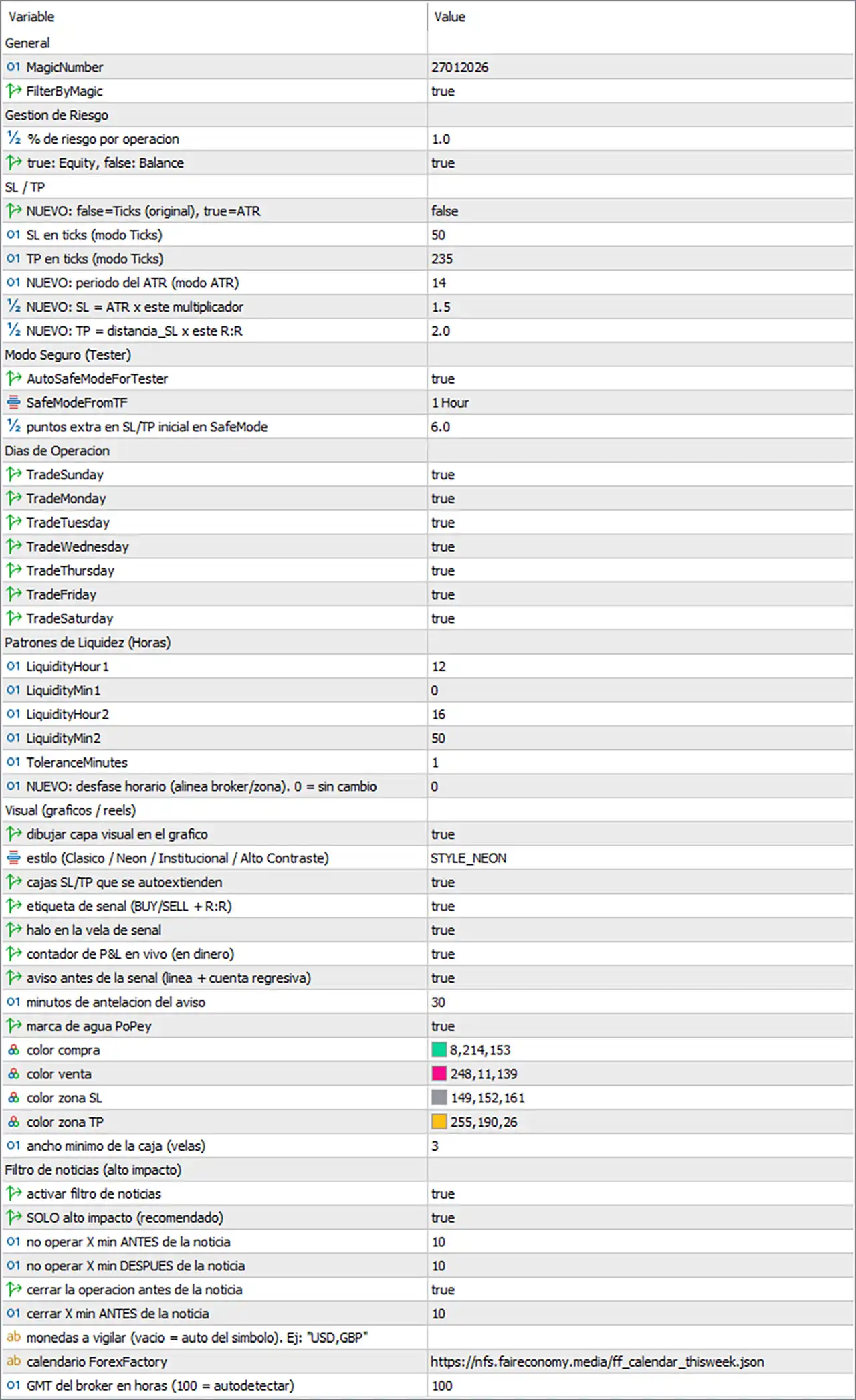
General Settings
🔹 MagicNumber = 27012026 — Sets the EA's unique Magic Number to 27012026, allowing its trades to be identified separately from other trading systems.
🔹 FilterByMagic = true — Enables Magic Number filtering so the EA can distinguish and manage positions associated with 27012026.
Risk Management
🔹 % de riesgo por operación = 1.0 — Sets the configured risk per operation to 1.0%, determining the percentage-based risk used by the EA's money-management system.
🔹 true: Equity, false: Balance = true — Selects Equity as the account-value reference for calculating the 1.0% risk per operation instead of Balance.
Stop Loss / Take Profit Settings
🔹 NUEVO: false=Ticks (original), true=ATR = false — Keeps the ATR-based SL/TP mode disabled, meaning the EA uses the original Ticks mode for the displayed SL/TP values.
🔹 SL en ticks (modo Ticks) = 50 — Sets the Stop Loss distance to 50 ticks when the original Ticks mode is active.
🔹 TP en ticks (modo Ticks) = 235 — Sets the Take Profit distance to 235 ticks when the original Ticks mode is active.
🔹 NUEVO: periodo del ATR = 14 — Sets the ATR calculation period to 14 for the alternative ATR-based SL/TP mode.
🔹 NUEVO: SL = ATR x este multiplicador = 1.5 — Sets the ATR Stop Loss multiplier to 1.5, meaning the ATR-based SL calculation uses ATR multiplied by 1.5 when ATR mode is enabled.
🔹 NUEVO: TP = distancia_SL x este R = 2.0 — Sets the Risk-to-Reward multiplier to 2.0, allowing the ATR-based Take Profit distance to be calculated as the SL distance multiplied by 2.0.
Safe Mode for Testing
🔹 AutoSafeModeForTester = true — Enables the automatic Safe Mode feature when the EA is running in the strategy tester.
🔹 SafeModeFromTF = 1 Hour — Sets the Safe Mode reference timeframe to 1 Hour.
🔹 puntos extra en SL/TP inicial en SafeMode = 6.0 — Adds 6.0 points to the initial SL/TP configuration when Safe Mode is active.
Trading Days
🔹 TradeSunday = true — Allows the EA to operate on Sunday.
🔹 TradeMonday = true — Allows the EA to operate on Monday.
🔹 TradeTuesday = true — Allows the EA to operate on Tuesday.
🔹 TradeWednesday = true — Allows the EA to operate on Wednesday.
🔹 TradeThursday = true — Allows the EA to operate on Thursday.
🔹 TradeFriday = true — Allows the EA to operate on Friday.
🔹 TradeSaturday = true — Allows the EA to operate on Saturday.
🔹 Trading Days Configuration = Sunday–Saturday enabled — All seven displayed trading-day switches are set to true, so no day is excluded by these settings.
Liquidity Pattern Settings
🔹 LiquidityHour1 = 12 — Sets the first liquidity-pattern monitoring hour to 12.
🔹 LiquidityMin1 = 0 — Sets the first liquidity-pattern monitoring minute to 0, creating the first configured time of 12:00.
🔹 LiquidityHour2 = 16 — Sets the second liquidity-pattern monitoring hour to 16.
🔹 LiquidityMin2 = 50 — Sets the second liquidity-pattern monitoring minute to 50, creating the second configured time of 16:50.
🔹 ToleranceMinutes = 1 — Sets the liquidity-pattern timing tolerance to 1 minute, allowing the EA to work within the configured tolerance around the specified liquidity times.
🔹 NUEVO: desfase horario (alinea broker/zona). 0 = sin cambio = 0 — Sets the broker/time-zone offset adjustment to 0, meaning no additional time shift is applied.
Visual Chart Settings
🔹 dibujar capa visual en el grafico = true — Enables the visual layer on the trading chart, allowing the EA to display its graphical trading information.
🔹 estilo (Clasico / Neon / Institucional / Alto Contraste) = STYLE_NEON — Selects STYLE_NEON as the visual chart style.
🔹 cajas SL/TP que se autoextienden = true — Enables automatically extending SL/TP boxes on the chart.
🔹 etiqueta de señal (BUY/SELL + R) = true — Displays signal labels containing the BUY/SELL direction and the corresponding R information.
🔹 halo en la vela de señal = true — Enables a visual halo around the candle associated with the trading signal.
🔹 contador de P&L en vivo (en dinero) = true — Displays a live P&L counter in monetary terms on the chart.
🔹 aviso antes de la señal (linea + cuenta regresiva) = true — Enables a pre-signal notification using a visual line and countdown.
🔹 minutos de antelación del aviso = 30 — Sets the pre-signal warning time to 30 minutes before the expected signal.
🔹 marca de agua PoPeY = true — Enables the PoPeY watermark on the chart.
🔹 color compra = 8,214,153 — Sets the Buy/signal color using RGB values 8,214,153.
🔹 color venta = 248,11,139 — Sets the Sell/signal color using RGB values 248,11,139.
🔹 color zona SL = 149,152,161 — Sets the Stop Loss zone color using RGB values 149,152,161.
🔹 color zona TP = 255,190,26 — Sets the Take Profit zone color using RGB values 255,190,26.
🔹 ancho minimo de la caja (velas) = 3 — Sets the minimum width of the visual SL/TP box to 3 candles.
High-Impact News Filter
🔹 activar filtro de noticias = true — Enables the economic news filter.
🔹 SOLO alto impacto (recomendado) = true — Restricts the news filter to high-impact events, according to the displayed setting.
🔹 no operar X min ANTES de la noticia = 10 — Prevents new trading activity 10 minutes before a qualifying news event.
🔹 no operar X min DESPUES de la noticia = 10 — Prevents new trading activity for 10 minutes after a qualifying news event.
🔹 cerrar la operacion antes de la noticia = true — Enables closing an existing operation before a qualifying news event.
🔹 cerrar X min ANTES de la noticia = 10 — Sets the position-closing protection window to 10 minutes before the qualifying news event.
🔹 monedas a vigilar (vacio = auto del simbolo). Ej: "USD,GBP" = [Blank] — Leaves the monitored-currency field empty, meaning the EA uses the symbol automatically according to the displayed setting description.
🔹 calendario ForexFactory = https://nfs.faireconomy.media/ff_calendar_thisweek.json — Specifies the displayed ForexFactory economic-calendar JSON feed used by the news-filter system.
🔹 GMT del broker en horas (100 = autodetectar) = 100 — Sets the broker GMT offset parameter to 100, which according to the displayed description represents the auto-detection setting.
Key Features of This Liquid Pours Xtreme EA Configuration
🔹 Controlled Risk Management — The EA is configured with 1.0% risk per operation, using Equity as the calculation reference.
🔹 Flexible SL/TP System — The configuration supports both fixed Ticks and alternative ATR-based SL/TP calculations.
🔹 Fixed Tick Protection — The active Ticks mode uses SL = 50 and TP = 235.
🔹 ATR-Based Alternative — The alternative configuration uses ATR period = 14, SL multiplier = 1.5, and R = 2.0.
🔹 Liquidity Timing — The displayed liquidity pattern schedule uses 12:00 and 16:50, with 1 minute of tolerance.
🔹 Full Weekly Availability — Sunday, Monday, Tuesday, Wednesday, Thursday, Friday, and Saturday are all enabled.
🔹 Advanced Visual Interface — The EA uses STYLE_NEON with signal labels, SL/TP boxes, P&L display, countdown alerts, and signal-candle highlighting.
🔹 High-Impact News Protection — The news filter is active and blocks new trades 10 minutes before and 10 minutes after qualifying events.
🔹 Pre-News Position Protection — Existing positions can be closed 10 minutes before a qualifying news event.
Conclusion
The displayed Liquid Pours Xtreme EA configuration combines liquidity-pattern timing with structured risk management, flexible SL/TP calculation, visual trade analysis, and economic-news protection.
The current setup uses 1.0% risk per operation, with Equity selected as the account-value reference. The active SL/TP method is the original Ticks mode, using SL = 50 ticks and TP = 235 ticks. An alternative ATR configuration is also prepared with ATR period = 14, SL multiplier = 1.5, and R = 2.0.
The liquidity schedule is configured around 12:00 and 16:50, with a 1-minute tolerance and no additional time-zone offset. The visual system is fully enabled with STYLE_NEON, automatic SL/TP boxes, BUY/SELL + R labels, signal-candle halos, live monetary P&L, and a 30-minute pre-signal warning.
The economic-calendar filter is also enabled, focusing only on high-impact news, with 10 minutes of protection before and after qualifying events. The EA is additionally configured to close positions 10 minutes before the relevant news event.
These settings should be tested under the intended symbol, broker time zone, spread, execution conditions, and account size before being used in live trading.


